Ds4windows: [Bug] Hide DS4 Controller doesn't work consistently.
What I mean is that this option just wants to work whenever it feels like it.
I'll boot windows with steam loading after DS4 Windows, and I'll have the hide controller option checked, yet some games still detect both a DS4 and an Xbox controller. Restarting Steam/DS4 Windows doesn't fix anything, and restarting the pc seems to be the only option that works(albeit MOST of the time.)
Edit: Unplugging then replugging the DS4 controller while steam and DS4 Windows running seems to fix this issue sometimes as well.
 brothan323
All 21 comments
The most reliable way to obtain exclusive access to the DS4 is to use HidGuardian. The old exclusive mode hack has a fair share of problems and there are situation when it will not work; Broforce is a game that refuses to allow exclusive mode to work on my system using the old method. I have experienced problems like you mentioned when disconnecting the controller and reconnecting it helped with getting exclusive mode working at times. Luckily, the old method still works a majority of the time on my system. At some point, the old exclusive mode method might get removed from DS4Windows.
 Ryochan7
on 19 Feb 2018
Ryochan7
on 19 Feb 2018
How do I install hidguardian?>
brothan323
on 19 Feb 2018
The easiest way is probably to use the test driver installer that I have been working on. Another easy method is to use the InputMapper HidGuardian Installer although it installs an old version of HidGuardian, the AffectedDevice list does not include identifiers for the DS4 v2 controller and it installs an additional service that is only useful if you are running InputMapper.
http://ryochan7.xyz/ds4windows/test/DriverInstaller_Test_20180218.zip
https://inputmapper.com/downloads/download/5-tools/76-inputmapper-hidguardian
Ryochan7
on 19 Feb 2018
k.I installed the test one. Now what do I do?
On Mon, Feb 19, 2018 at 1:15 AM, Travis Nickles notifications@github.com
wrote:
The easiest way is probably to use the test driver installer that I have
been working on. Another easy method is to use the InputMapper HidGuardian
Installer although it installs an old version of HidGuardian, the
AffectedDevice list does not include identifiers for the DS4 v2 controller
and it installs an additional service that is only useful if you are
running InputMapper.http://ryochan7.xyz/ds4windows/test/DriverInstaller_Test_20180218.zip
https://inputmapper.com/downloads/download/5-tools/76-
inputmapper-hidguardian—
You are receiving this because you modified the open/close state.
Reply to this email directly, view it on GitHub
https://github.com/Ryochan7/DS4Windows/issues/220#issuecomment-366597766,
or mute the thread
https://github.com/notifications/unsubscribe-auth/AfK7Z3i7KDRdSqlhdebpCgKfUlC69mvZks5tWRGPgaJpZM4SBcuS
.
brothan323
on 22 Feb 2018
Under normal circumstances, almost everything should be taken care of by the installer. A default AffectedDevices list is created after the HidGuardian Virtual Device is installed. DS4Windows has to be run as admin in order to take advantage of HidGuardian and to have access to some extra utilities.
Based on your posts, it looks like HidGuardian is not hiding the DS4 device like it is supposed to. Firstly, make sure that the HidGuardian Virtual Device is found in the Device Manager under System devices; the driver version number should be 1.13.0.0.

Next, I would suggest that you check your AffectedDevices registry value using the link in DS4Windows. If the installer did not make an AffectedDevice list in your system registry, there is a link in DS4Windows to write the template AffectedDevices list so you can use that as well.

I am not using HidGuardian at the moment so I edited my copy of the list to include invalid values (using AVID instead of VID) so HidGuardian will not find any relevant devices.
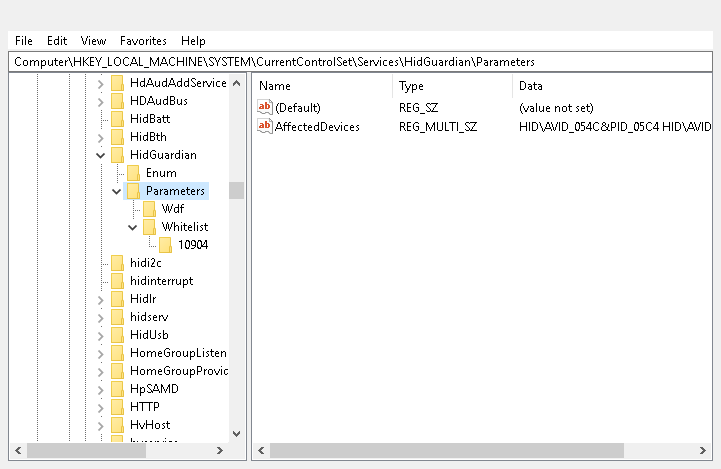
You might also want to check how many whitelist registry keys there are. As you can see in my screenshot, there is only one entry corresponding to the Process ID of the currently running instance of DS4Windows.
Edit: Even though I didn't think I needed to mention it beforehand, please make sure to reboot your computer after installing HidGuardian. If I remember correctly, Windows needs to be rebooted so that the change to filter drivers takes affect and HidGuardian will be usable. Even though there is a section of the intro text that mentions a reboot being necessary, I should change the text in the final screen to mention that a reboot is needed as well.
Ryochan7
on 23 Feb 2018
Jumping Jesus. Everything works flawlessly now. Thanks a ton for the help TristanYoung & Ryochan7.
brothan323
on 24 Feb 2018
Wow thanks for the test driver installer Ryochan7! It fixed the issue I described in: https://github.com/Ryochan7/DS4Windows/issues/118#issuecomment-356141666
Does this test driver still have lag input issues that you are concerned about Ryochan7?
 ceedveed
on 24 Feb 2018
ceedveed
on 24 Feb 2018
thanks for the great software, driver and tutorial. everything works well.
(tldr: how do i completely wipe hidguardian and regain standard ds4 functionality without emulation)
i have a question. how do i completely remove hidguardian or whatever stops the dongle from showing up in windows ? i tried removing the hidguardian driver from device manager, tried moving the dongle to other usb ports, but it's still hidden and i cannot use the ds4 without emulation for when, for example, i want to play injustice 2 with the ps buttons showing, or using the separate triggers for driving games.
i even reinstalled windows because i thought i just clogged up my system with drivers, but now, after installing hidguardian and -tried- removing it, the dongle still doesn't show up in the Game Controllers window and the DS4 doesn't work even wired (the dongle shows up in device manager). also, it connects via the sony dongle, but it isn't detected by windows and games.
am i stuck to starting ds4windows everytime i want to use the ds4 now ?
 AlexC47
on 26 Feb 2018
AlexC47
on 26 Feb 2018
I am not sure why but it seems like some portion of HidGuardian might still be installed even after removing the driver and device. Controllers will still be hidden and devices can be accessible by the system again by editing the AffectedDevices list.
The registry needs to be updated to remove HidGuardian from the HID filters. The following registry value needs to be edited and HidGuardian needs to be removed.
HKEY_LOCAL_MACHINE\SYSTEM\CurrentControlSet\Control\Class\{745a17a0-74d3-11d0-b6fe-00a0c90f57da}\UpperFilters
A reboot is needed after that registry value is changed in order for it to take affect. Also, be careful when editing that value manually as an invalid value can render your keyboard and mouse useless.
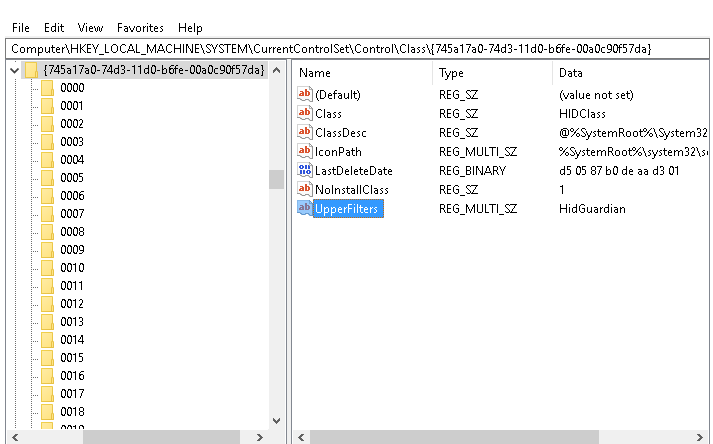
You can also use devcon in order to remove that classfilter from the registry as stated in the older README.
devcon.exe classfilter HIDClass upper !HidGuardian
https://github.com/nefarius/ViGEm/tree/master/Sys/HidGuardian
Ryochan7
on 27 Feb 2018
This should be touted more openly and verbosely! This is an elegant fix to Window's issue with disallowing exclusive mode.
 thetornadotitan
on 17 Mar 2018
thetornadotitan
on 17 Mar 2018
I wouldn't want to advertise this openly just yet as this is still a work in progress. It has gotten better but everything still requires a bit of work to get HidGuardian set up. The README and the Wiki should probably be updated to mention how to configure HidGuardian at some point.
I have made some minor changes to the driver installer utility to look for driver updates and install and also to uninstall the devices.
Ryochan7
on 21 Mar 2018
Hide DS4 Controller worked just fine for me with the old version of DS4Windows (the one this is forked from), but I was having some connection/disconnection problems. This fork seems to connect a lot faster and so far no troubles, but the Hide DS4 Controller problem showed. I installed the Hidguard thing, restarted and it now seems to work just fine, no extra register editing was needed. I installed Hidguard from the InputMapper site, but then checked out the Driver Installer thing and installed ViGEm Bus driver too, which maybe was pointless to do?
Decided it might be worth sharing my experience as well.
By the way I am with a DS4 v2.
 InstallGentoo11
on 24 Mar 2018
InstallGentoo11
on 24 Mar 2018
And then it stopped working. It works in DSWindows when editing the profiles, but nothing else. Tried reinstalled everything, run as admin, restarting several times, nothing. It just stopped working.
I should add that when the gamepad is on and I am in "Devices and Printers" there is only the icon for the DS4 and the icon for the XBOX controller that used to show before is not now.
Edit: So I reinstalled, again, Hidguard from "Programs and Features" and restated. After which Hidguard was not any more in "Programs and Features" but it is still running. And now DS4Windows is actually working and when I turn on the gamepad the XBOX controlller shows too and everything works.
For how long, I have to wonder.
Edit2: And it died again.
InstallGentoo11
on 26 Mar 2018
How many HIDGuardian drivers do you see in your Device Manager?
 Ryusennin
on 28 Mar 2018
Ryusennin
on 28 Mar 2018
Good point. The answer seems to be zero. And didn't work. Like it has just stopped working while nothing much has happened with the PC. So I restarted and it now works. In Device Manager I still don't see the HIDGUardian driver, though. Neither in Human Interface Devices, nor System Devices or anywhere else.
Also mind you it is "uninstalled" right now. When it was installed it didn't seem to work at all, excluding the very first time I installed it, until it just stopped eventually.
HKEY_LOCAL_MACHINE\SYSTEM\CurrentControlSet\services\HidGuardian exists and it is working as inteded currently (after the restart) with listing DS4Windows.
HKEY_LOCAL_MACHINE\SYSTEM\CurrentControlSet\Control\Class{745A17A0-74D3-11D0-B6FE-00A0C90F57DA} exits too, but there is no UpperFilter
InstallGentoo11
on 29 Mar 2018
That doesn't look quite normal. I have one driver in System Devices.
I used to have two drivers displayed there, one of them was from an old InputMapper version which I had forgotten to uninstall and was conflicting with the ViGEm test driver. You too might have a conflict between those two drivers. I suggest removing both of them and reinstalling only the one provided by Ryochan.
Ryusennin
on 29 Mar 2018
UpperFilters needs to be set or HidGuardian will not work. People have mentioned possible Windows Updates purging that value but I have not encountered that problem myself. I am not sure if that is the actual cause for the value getting changed or if it is just speculation. Also, it seems like having the HidGuardian driver in the driver store is enough for HidGuardian to do its job. There does not have to be a device visible in Device Manager as long as the UpperFilters value is set to use HidGuardian as a filter driver.
The problem you are describing might also be similar to issue #147 when ScpVBus does not allow access to a controller slot so the controller goes into DirectInput only mode. Have you checked the DS4Windows Log to see if that is the case? It seems like people using Windows 7 are more prone to running into that problem. The problem can only be circumvented currently by either rebooting or disabling and re-enabling the Scp Virtual Bus Driver device in Device Manager.
As far as I can tell, the most recent changes to DS4Windows have fixed that problem on my Windows 7 VM so hopefully that issue is finally fixed.
Ryochan7
on 29 Mar 2018
Yes, sorry. I did miss to mention it is on Windows 7. Disabling ScpVBus doesn't achieve much, as it requires a restart no matter what. So I tried to install HidGuard again and it did work, even the UpperFilters thing in the register was there. But after like 2-3 hours it stopped working again. HidGuardian is now in Device Manager before it stopped working and after it stopped working. Mind you it didn't stop working while I was playing. I was just trying to reconnect it from time to time. This is what I get as a log
30-Mar-18 02:22:07: Found Controller:70:20:84:67:C2:81 (BT)
30-Mar-18 02:22:07: Plugging in X360 Controller #1
30-Mar-18 02:22:07: X360 Controller # 1 failed. Using DInput only mode
30-Mar-18 02:22:07: Controller 1 is using Profile “Default"
30-Mar-18 02:22:07: Controller 1 was removed or lost connection. Charge the battery
30-Mar-18 02:22:09: Found Controller:70:20:84:67:C2:81 (BT)
30-Mar-18 02:22:09: Plugging in X360 Controller #1
30-Mar-18 02:22:09: X360 Controller # 1 failed. Using DInput only mode
30-Mar-18 02:22:09: Controller 1 is using Profile “Default"
30-Mar-18 02:22:15: Controller 1 was removed or lost connection - I disconnect it here
30-Mar-18 02:22:20: Found Controller:70:20:84:67:C2:81 (USB)
30-Mar-18 02:22:20: Plugging in X360 Controller #1
30-Mar-18 02:22:20: X360 Controller # 1 failed. Using DInput only mode
30-Mar-18 02:22:20: Controller 1 is using Profile “Default"
30-Mar-18 02:22:34: Controller 1 was removed or lost connection - I disconnect it here
Also I should add again that I didn't have this problem with the original DS4WIndows fork, but I did start have to some disconnection issues there, as if out of nowhere, but it would work after reconnecting.
Edit: after another restart (without uninstalling Hidguard) it did stop working and it doesn't start working any more after a restart. It is in the device manager and register. So it is indeed less workable when installed than uninstalled. Logs are identical.
InstallGentoo11
on 30 Mar 2018
Ironically, problems like this have popped up as a side effect of other improvements to DS4Windows. The main focus on this fork has been attempting to reduce input lag so a bigger focus has been spent making the program use more threads and also to reduce the work done on the main UI thread. As a result, the program is a lot faster, input lag has been greatly reduced and overall system resource usage (CPU and RAM usage) has actually been reduced. I launch the old Jays2Kings version on occasion for testing purposes and it feels so slow by comparison.
Also, I am not sure if you have checked out the other issue that I posted a link to but there is a test build that should help fix this problem. You might want to try that build out and see if you have better luck with it. Just make sure to reboot your computer before trying it out just to start on a clean slate.
http://ryochan7.xyz/ds4windows/test/DS4Windows_Test_x64_20180326.zip
Ryochan7
on 31 Mar 2018
I did open the thread, but I guess I didn't read it properly, thanks.
First, though, I uninstalled HidGuardian, used the devcon.exe command and even reinstlalled the Virtual Bus Driver driver. Of course I restarted too. So I was running the last officially released version and now HidGuardian on (though I am not sure if this thing really did uninstall, it is not in the device manager, but DS4Windows is still whitlisting itself in the regedit, is that normal?). It run for over 24 hours like that, during which I could connect at any time. And then it this morning it same thing. I should mention I left the gamepad on a few times and it did disconnect itself after ~25 minutes. Not sure if this is some hidden feature or somewhat just didn't work properly.
So without even restarting I just tried the test version immediately after closing the other version and it connected no problem. And in case you would ask, no, restarting DS4Windows didn't do the trick before. The gamepad has been connected for around and hour and it hasn't disconnected either. I think I will continue without restarting the PC and see if it continues being able to properly go into xbox360 mode when connecting. And again, currently Hidgurad is, supposedly, uninstalled, but I am not sure I believe it.
Edit: It has been over two days, I think, and it is still working just fine. Whatever this is doing, it really would be nice to be implemented in the official version.
InstallGentoo11
on 1 Apr 2018
Did the new version implement the things from the test one? It is not just a bluetooth only issue, by the way. Or maybe that fix was for another problem.
InstallGentoo11
on 12 Apr 2018
Related issues
 Whatsup12345
·
6Comments
Whatsup12345
·
6Comments
 Darthagnon
·
4Comments
Darthagnon
·
4Comments
 CarissaIsWierd
·
7Comments
CarissaIsWierd
·
7Comments
 wergio
·
3Comments
wergio
·
3Comments
 grysor
·
4Comments
grysor
·
4Comments
Most helpful comment
I wouldn't want to advertise this openly just yet as this is still a work in progress. It has gotten better but everything still requires a bit of work to get HidGuardian set up. The README and the Wiki should probably be updated to mention how to configure HidGuardian at some point.
I have made some minor changes to the driver installer utility to look for driver updates and install and also to uninstall the devices.