Draggable: I hope Draggable can run on Chrome directly `feature-request`
Please use this template to help contributors get a detailed description of the issue or feature.
For support questions, please use stackoverflow. This repository's issues are reserved for feature requests and bug reports.
1. Apply either the bug or feature-request label
feature-request
2. Describe the bug or feature
I had try the code below,but it come out of an error.
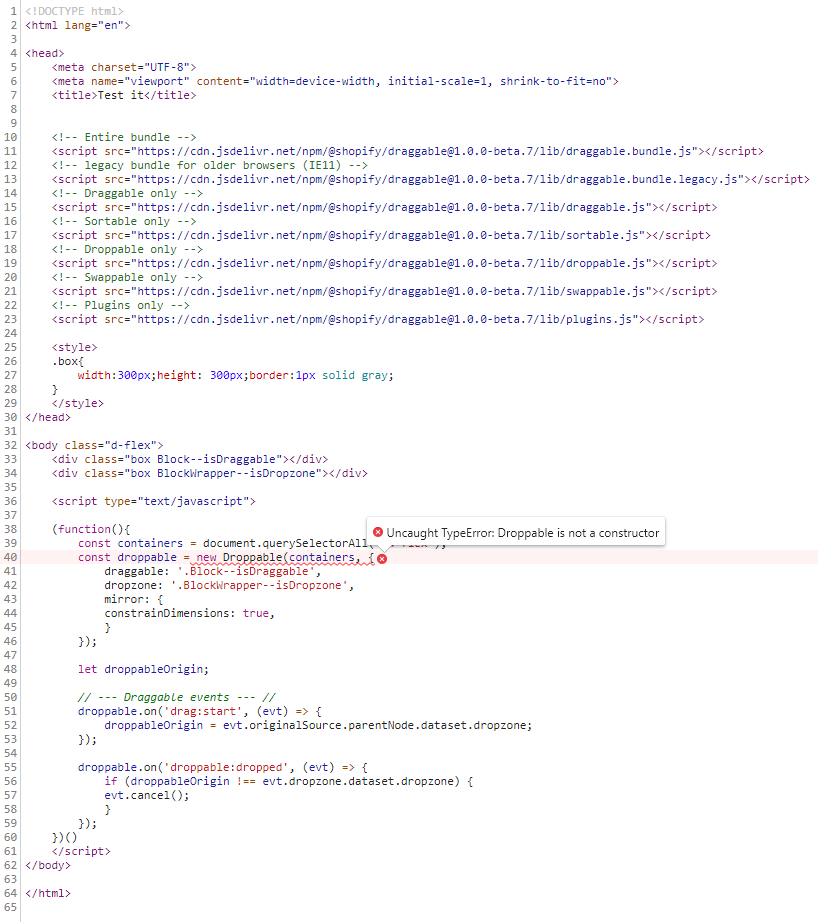
3. If the current behavior is a bug, please provide the steps to reproduce and if possible a minimal demo of the problem
<!DOCTYPE html>
<html lang="en">

<head>
    <meta charset="UTF-8">
    <meta name="viewport" content="width=device-width, initial-scale=1, shrink-to-fit=no">
    <title>Test it</title>


    <!-- Entire bundle -->
    <script src="https://cdn.jsdelivr.net/npm/@shopify/[email protected]/lib/draggable.bundle.js"></script>
    <!-- legacy bundle for older browsers (IE11) -->
    <script src="https://cdn.jsdelivr.net/npm/@shopify/[email protected]/lib/draggable.bundle.legacy.js"></script>
    <!-- Draggable only -->
    <script src="https://cdn.jsdelivr.net/npm/@shopify/[email protected]/lib/draggable.js"></script>
    <!-- Sortable only -->
    <script src="https://cdn.jsdelivr.net/npm/@shopify/[email protected]/lib/sortable.js"></script>
    <!-- Droppable only -->
    <script src="https://cdn.jsdelivr.net/npm/@shopify/[email protected]/lib/droppable.js"></script>
    <!-- Swappable only -->
    <script src="https://cdn.jsdelivr.net/npm/@shopify/[email protected]/lib/swappable.js"></script>
    <!-- Plugins only -->
    <script src="https://cdn.jsdelivr.net/npm/@shopify/[email protected]/lib/plugins.js"></script>

    <style>
    .box{
        width:300px;height: 300px;border:1px solid gray;
    }
    </style>
</head>

<body class="d-flex">
    <div class="box Block--isDraggable"></div>
    <div class="box BlockWrapper--isDropzone"></div>

    <script type="text/javascript">

    (function(){
        const containers = document.querySelectorAll('.d-flex');
        const droppable = new Droppable(containers, {
            draggable: '.Block--isDraggable',
            dropzone: '.BlockWrapper--isDropzone',
            mirror: {
            constrainDimensions: true,
            }
        });

        let droppableOrigin;

        // --- Draggable events --- //
        droppable.on('drag:start', (evt) => {
            droppableOrigin = evt.originalSource.parentNode.dataset.dropzone;
        });

        droppable.on('droppable:dropped', (evt) => {
            if (droppableOrigin !== evt.dropzone.dataset.dropzone) {
            evt.cancel();
            }
        });
    })()
    </script>
</body>

</html>
4. Please tell us about your environment:
- Library version: 1.0.0-beta.7
- Browsers: Chrome 67.0.3396.79
- Tech stack: ES6
- Other information:
 C0618C
>All comments
A couple of quick points:
You are including EVERY CDN option, you don't need to do that. If you want to have draggable + all modules + all plugins, just use that very first bundle:
<script src="https://cdn.jsdelivr.net/npm/@shopify/[email protected]/lib/draggable.bundle.js"></script>
You also are not referencing Droppable correctly. Most of the examples in our README assume proper ES module imports, which is why we have examples like:
import Droppable from 'droppable';

const test = new Droppable();
For you, you need to access Droppable differently. Try:
new window.Draggable.Droppable
Lastly - and this isn't a big deal for your example, because your app logic is at the very bottom of the page - but consider using a "document ready" function:
document.addEventListener('DOMContentLoaded', function() {});
I recommend this just as a way to perhaps avoid some headaches as you continue to build out your page.
Here is a quick revision of your posted example:
<!DOCTYPE html>
<html lang="en">

<head>
    <meta charset="UTF-8">
    <meta name="viewport" content="width=device-width, initial-scale=1, shrink-to-fit=no">
    <title>Test it</title>

    <!-- Entire bundle -->
    <script src="https://cdn.jsdelivr.net/npm/@shopify/[email protected]/lib/draggable.bundle.js"></script>

    <style>
    .box{
        width:300px;height: 300px;border:1px solid gray;
    }
    </style>
</head>

<body>
    <div class="d-flex">
        <div class="box Block--isDraggable draggable-droppable--occupied"></div>
        <div class="box BlockWrapper--isDropzone"></div>
    </div>

    <script type="text/javascript">
    document.addEventListener('DOMContentLoaded', function() {
        const containers = document.querySelectorAll('.d-flex');
        const droppable = new window.Draggable.Droppable(containers, {
            draggable: '.Block--isDraggable',
            dropzone: '.BlockWrapper--isDropzone',
            mirror: {
            constrainDimensions: true,
            }
        });

        let droppableOrigin;

        // --- Draggable events --- //
        droppable.on('drag:start', (evt) => {
            droppableOrigin = evt.originalSource.parentNode.dataset.dropzone;
            console.log(evt);
        });

        droppable.on('droppable:dropped', (evt) => {
            if (droppableOrigin !== evt.dropzone.dataset.dropzone) {
                evt.cancel();
                console.log('cancel');
            }
        });
    });
    </script>
</body>

</html>
 beefchimi
on 12 Jun 2018
beefchimi
on 12 Jun 2018
Related issues
 ncovercash
·
4Comments
ncovercash
·
4Comments
 noloop
·
5Comments
noloop
·
5Comments
 manju-reddys
·
5Comments
manju-reddys
·
5Comments
 mbarakaja
·
3Comments
mbarakaja
·
3Comments
 decademoon
·
4Comments
decademoon
·
4Comments
Most helpful comment
A couple of quick points:
You are including EVERY CDN option, you don't need to do that. If you want to have draggable + all modules + all plugins, just use that very first bundle:
<script src="https://cdn.jsdelivr.net/npm/@shopify/[email protected]/lib/draggable.bundle.js"></script>You also are not referencing
Droppablecorrectly. Most of the examples in our README assume proper ES module imports, which is why we have examples like:For you, you need to access Droppable differently. Try:
new window.Draggable.DroppableLastly - and this isn't a big deal for your example, because your app logic is at the very bottom of the page - but consider using a "document ready" function:
document.addEventListener('DOMContentLoaded', function() {});I recommend this just as a way to perhaps avoid some headaches as you continue to build out your page.
Here is a quick revision of your posted example: