Draggable: Droppable issue and unable to prevent the default insert on "droppable:over"
Please use this template to help contributors get a detailed description of the issue or feature.
For support questions, please use stackoverflow. This repository's issues are reserved for feature requests and bug reports.
Describe the bug or feature
Bug: When the droppable dropped outside the drop-zone we see error in the console ERROR DOMException: Failed to execute 'insertBefore' on 'Node': The new child element contains the parent.
Feature / How to: As you can see the attached GIF the draggable item get auto insert into the drop-zone but I don't want it to auto insert (and remove on out). Because I should have full control on what to insert or whether I should allow to insert or not. How do I prevent the default insert behavior?
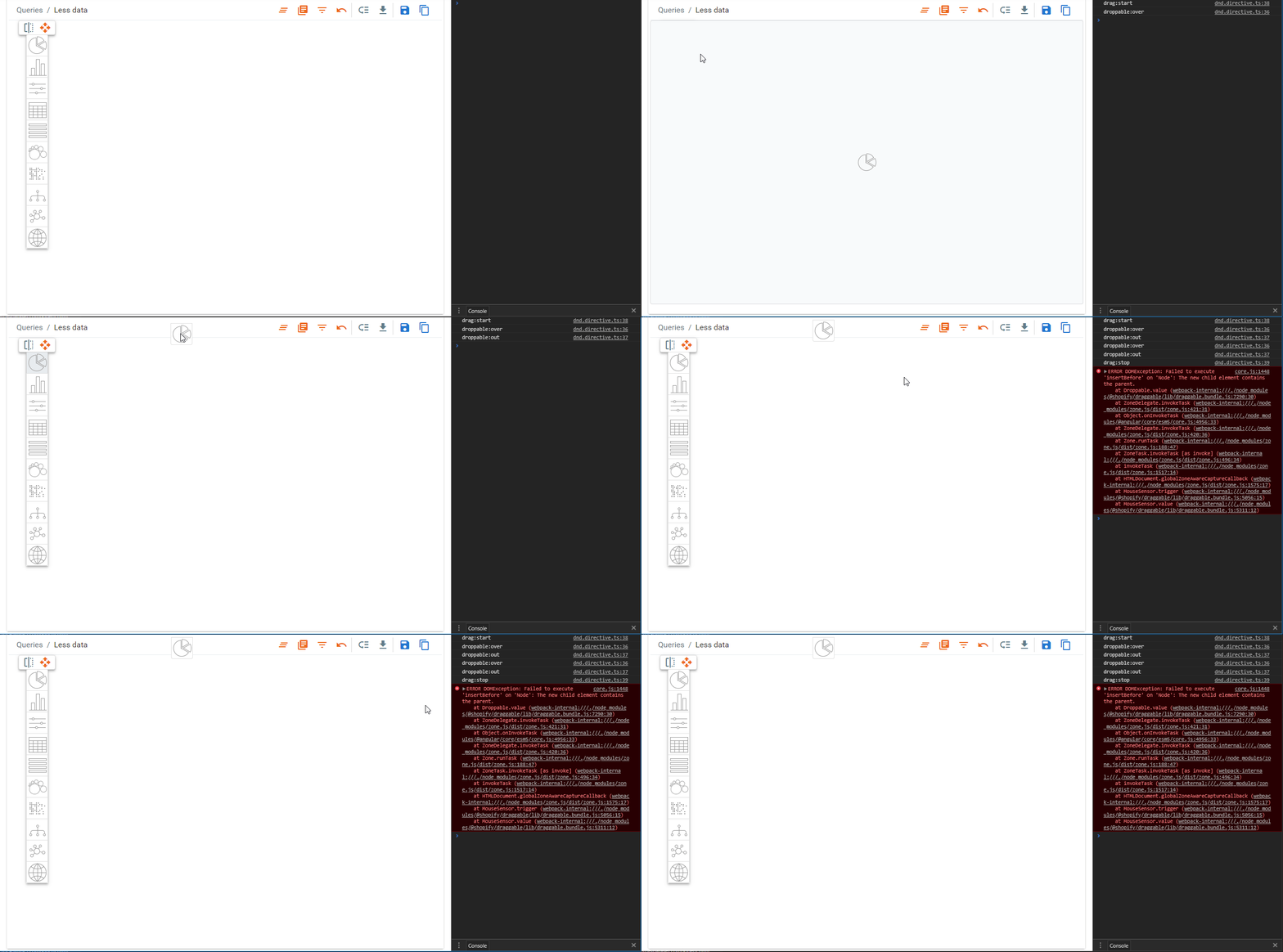
3. If the current behavior is a bug, please provide the steps to reproduce and if possible a minimal demo of the problem
Please see the attached GIF for better understanding and also the code I have written: (Angular 5 directive)
import { Directive, ElementRef, AfterViewInit, Input, OnDestroy, NgZone, ChangeDetectorRef } from '@angular/core';
import { Droppable } from '@shopify/draggable';
import { LayoutManager } from '../charts/layout.manager';

@Directive({
    selector: '[dnd]',
})
export class DndDirective implements AfterViewInit {
    private _droppable: Droppable;

    @Input() dndDraggable: any;
    @Input() dndSelector: string;

    constructor(private elementRef: ElementRef,
        private _zone: NgZone,
        private _cdr: ChangeDetectorRef,
        private _lm: LayoutManager) { }

    ngAfterViewInit() {
        const root: HTMLElement = this.elementRef.nativeElement.querySelector('.portlets-container');
        const droppable = this._droppable = new Droppable(this.elementRef.nativeElement, {
            droppable: () => {
                const ret = root.firstElementChild ? root.querySelectorAll('.drop-zone') : [root]; //We must return array of elements otherwise it will not work.
                return ret;
            },
            appendTo: document.body,
            mirror: {
                constrainDimensions: true
            },
            scrollable: {
                speed: 6,
                sensitivity: 12
            }
        });

        droppable.on('droppable:over', () => console.log('droppable:over'));
        droppable.on('droppable:out', () => console.log('droppable:out'));
        droppable.on('drag:start', () => console.log('drag:start'));
        droppable.on('drag:stop', () => console.log('drag:stop'));
    }

    ngOnDestroy() {
        this._droppable.destroy();
    }
}
4. Please tell us about your environment:
- Library version: 1.0.0-beta.5
- Browsers: [all | Chrome 64
- Tech stack:TypeScript 2.7 | ES6 | Angular 5
 manju-reddys
All 5 comments
@manju-reddys thanks for bringing this up!
This PR: https://github.com/Shopify/draggable/pull/146 may be what you are looking for. We are replacing the droppable:over event with a cancelable droppable:dropped event.
That way you can do
droppable.on('droppable:dropped', (event) => {
  if (/* some logic */) {
    event.cancel(); // prevents drop
  }
})
Let me know if that's the behaviour you are looking for. We are planning to release this feature with beta.6.
I'll check out the bug over the weekend and hopefully provide a fix in the same release 👍
Also: nice example 😄
 tsov
on 8 Mar 2018
tsov
on 8 Mar 2018
I'm looking for this functionality in the project I'm currently working on as well. I am not sure if you are envisioning when
droppable.on('droppable:dropped', (event) => {
  if (/* some logic */) {
    event.cancel(); // prevents drop
  }
})
executes that the dragged object gets reverted to the original container or not.
For example:
Object 1 in container A gets dropped to container B.
Some custom logic is executed
Object 1 gets put back in container A.
Furthermore, would you roll back the animation process in such a scenario? Would ordering be maintained if there were other draggable elements that were in that original source container as well?
 IDontKnowMyUsername
on 8 Mar 2018
IDontKnowMyUsername
on 8 Mar 2018
@tsov Honestly this lib is going in right direction and also I recommended to Angular Material team.
146 solves one use-case _drop cancel_.
2nd use-case: Should provide option to prevent the droppable getting inserted (by default now see in the gif in first the comment) into dropzone while the drag is in progress and the droppable is over the dropzone.
For better understanding the 2nd use-case (see the gif in this comment), when the droppable is over on the dropzone it should get highlight, css classes will be added to all dropzone when the drag start (to indicate where all can the droppable item can be dropped/accepted) and another class will be added when drag is over the dropzone to highlight the active target. If you see the droppable is just tell what kind of chart but it will not insert on over the dropzone but after dropped we should be able to control what to insert and where.

Today I'm using interactjs but I have to deal many major performance issues and unexpected behaviors. I have patched it to make it work for my needs but I don't want to go in that path. To my Luck I found this lib but I have to test and request (or contribute as plugin) if any missing feature
manju-reddys
on 8 Mar 2018
@tsov @manju-reddys +1 for adding option to prevent default or customize the insert behavior for droppable:over event, when you are building some designer or editor applications, user drag and drop a toolbar icon or button, obviously you don't want that icon or button moved into the edit area, instead you just want to know which icon or button is dropped and insert corresponding content for that icon or button.
Another issue about the droppable:over insert is that: it changes the order of the original items. See example here: https://codepen.io/pachecoder/pen/xPKNmg, two list, first one with 5 items in it, second one is empty, drag the first one item from the first list over the second list(but don't drop it yet), the dragged item is still in the first list, but it just become the last one!!! This is really strange! Even drag and move the item within the first list will change the order of items randomly(obviously this is not a sortable list).
 nmhnmh
on 28 Mar 2018
nmhnmh
on 28 Mar 2018
@tsov Any plans to address this soon?
manju-reddys
on 11 May 2018
Related issues
 decademoon
·
4Comments
decademoon
·
4Comments
 xmatusk3
·
5Comments
xmatusk3
·
5Comments
 shuaiyaotian
·
3Comments
shuaiyaotian
·
3Comments
 mbarakaja
·
3Comments
mbarakaja
·
3Comments
 philippkuehn
·
4Comments
philippkuehn
·
4Comments
Most helpful comment
@manju-reddys thanks for bringing this up!
This PR: https://github.com/Shopify/draggable/pull/146 may be what you are looking for. We are replacing the
droppable:overevent with a cancelabledroppable:droppedevent.That way you can do
Let me know if that's the behaviour you are looking for. We are planning to release this feature with
beta.6.I'll check out the bug over the weekend and hopefully provide a fix in the same release 👍
Also: nice example 😄