Downshift: Add a new item if does not exist in items
| Framework | Version |
|----------|:-------------:|
| downshift | 5.4.2 |
| node | 8 |
| npm (or yarn) | any |
Relevant code or config:
function stateReducer(state, changes) {
  // this prevents the menu from being closed when the user
  // selects an item with a keyboard or mouse
  switch (changes.type) {
    case Downshift.stateChangeTypes.keyDownEnter:
    case Downshift.stateChangeTypes.clickItem:
      return {
        ...changes,
        isOpen: state.isOpen,
        highlightedIndex: state.highlightedIndex,
      }
    default:
      return changes
  }
}
What you did:
Try to add an item which does not exist in the suggestion list.
What happened:
Nothing is happening when I press the enter key not even recieving the event Downshift.stateChangeTypes.keyDownEnter it is only if I selected an item from the list with the enter key.
Reproduction repository:
Downshift Gmail example - codesandbox.io
Problem description:
Suggested solution:
To have the possibility to add an item which does not exist in the actual items or we can use onKeyPress just we will have the issue of clearing the input that will makes use a controlled input for that.
Thank you
 Amraneze
All 6 comments
Can you create the codesandbox with only the example you have an issue with? Also what's the point in selecting an item that does not exist in the items list? It does not make sense to me, please explain your use case.
 silviuaavram
on 29 May 2020
silviuaavram
on 29 May 2020
@silviuaavram I want to let the user to add a skill if they can not find in the suggestion that's the only purpose of this evolution. I know is not an issue it is more of a feature not a bug. You can reproduce the issue in any examples if the item does not exist in the suggestion the list would be empty and we can not add that item that the user wrote.
Amraneze
on 29 May 2020
@silviuaavram I _think_ OP is going for this kind of UI/UX.
https://react-select.com/creatable#creatable
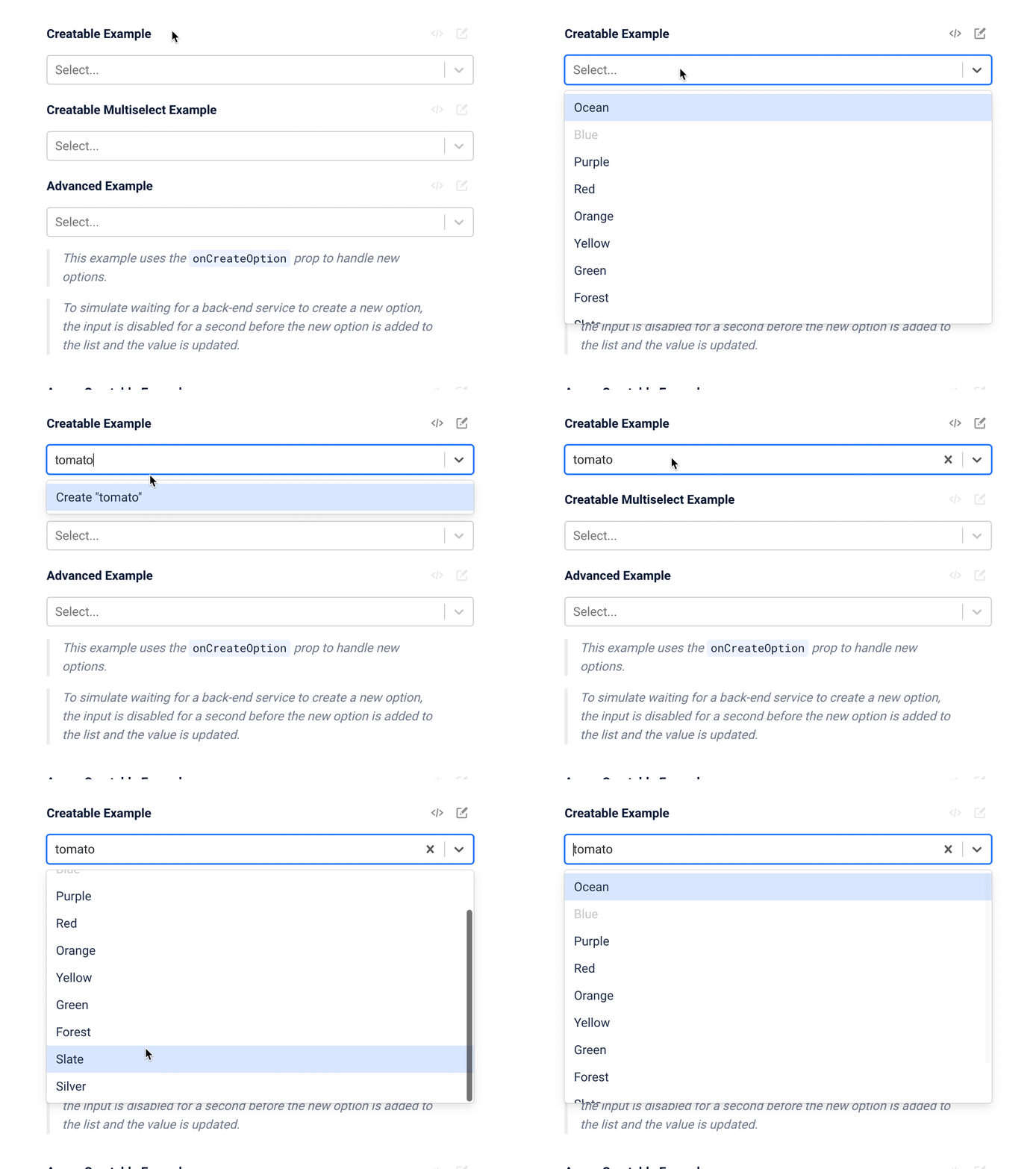
I'm also curious what the official "Downshift" way of handling this would be, since I can think of a few approaches.
- Conditionally render some UI as a function of the length of
items, like in this pseudocode
{filteredItems.length > 0 ? <ListOfOptions /> : <CreateOption inputValue={inputValue} />
- Or, if
filteredItems.length === 0, dynamically append an item to the list which has a value ofinputValueand a label ofCreate item ${inputValue}
I think you'd lose keyboard navigability with approach number 1, despite it being the simpler of the two solutions.
Curious what your thoughts are!
 mattrothenberg
on 7 Jun 2020
mattrothenberg
on 7 Jun 2020
Hi! I don't think Downshift is going to help you, and it should not. The scope is a select/combobox with items already defined.
Since you own both the UI and the items array, you should be able to provide a unified widget that does this item addition on the fly.
It can be super useful to have a codesandbox with this use case so I can add it to the docsite in the future as well. Let me know if you can provide a PoC for the Downshift way of handling this use case .
silviuaavram
on 7 Jun 2020
@silviuaavram Makes sense.
In any event, here's a proof-of-concept: https://codesandbox.io/s/unruffled-elion-1fx0s

mattrothenberg
on 8 Jun 2020
thanks @mattrothenberg for the POC and @silviuaavram for your reply. I will try to cope with the POC.
Amraneze
on 9 Jun 2020
Related issues
 emp823
·
4Comments
emp823
·
4Comments
 srishanbhattarai
·
3Comments
srishanbhattarai
·
3Comments
 oliverjam
·
3Comments
oliverjam
·
3Comments
 slavab89
·
3Comments
slavab89
·
3Comments
 yuripramos
·
4Comments
yuripramos
·
4Comments