Downshift: purpose of a11y-status + possible infinite child elements in this element
So i've noticed that there is a status-message element added to the root of the dom.
I guess its for tracking with what happens with the component..?
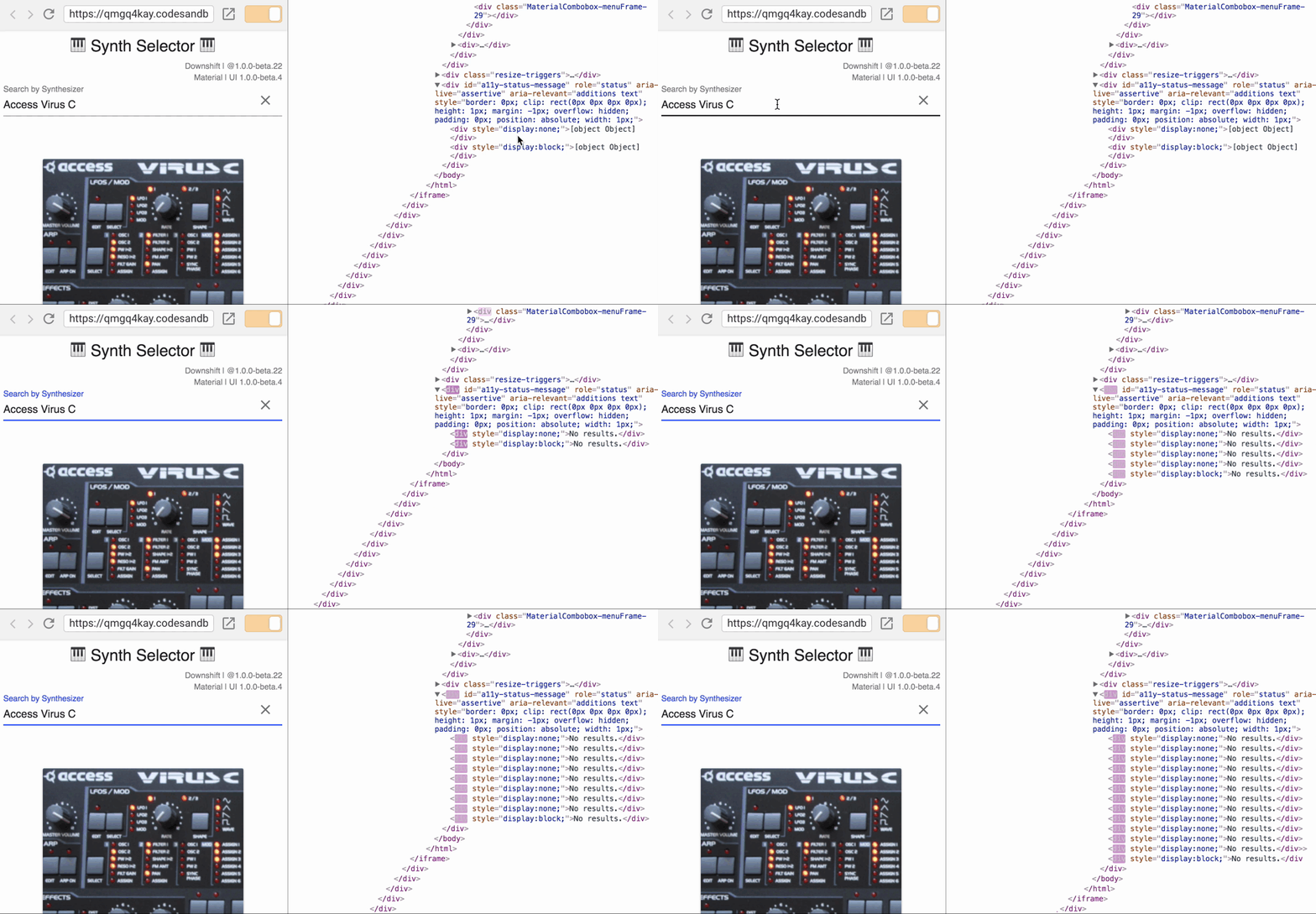
The thing is that i've noticed that its possible to add an infinite amount of child elements to it. They will all be with display:none yet i'm not sure if this is wanted in the first place.
The elements gets cleared once the select box is no longer used / in focus but still, is it necessary at all times?
He's a quick example that shows what i mean. After selecting some element, i'm simply pressing "right arrow key" and it adds more and more elements. Using the following example:
https://codesandbox.io/s/QMGq4kAY
 slavab89
All 3 comments
Hi @slavab89,
Thanks for the issue. First of all, the purpose of this is for screen readers. I got the idea from jQuery-UI's autocomplete and it works great. You should try it with a screen reader :wink:
One thing that we do that jQuery-UI's autocomplete doesn't is we actually clear the contents when we can. So when the status message needs to be different then we can reset the contents to that status message. This works great with screen readers and is really an implementation detail.
Now, as to whether this is really a problem... No, it's not a problem at all. Especially considering jQuery-UI's autocomplete actually _never_ clears the contents of that div and it's been doing that for years without anyone taking the time to optimize it tells me that it's not been a problem for the thousands of websites that use that component. Also, this is literally just a handful of divs that get added to occasionally. Definitely not something to worry about.
Now, with this example in particular it's odd that it's updating the list every time you use the right arrow key. I didn't look into the implementation myself, but I'm thinking it's doing something odd. That doesn't happen with the basic example: http://kcd.im/ds-example
In any case, to answer your general question, no it's not a problem. Don't worry about this implementation detail :smile:
 kentcdodds
on 16 Oct 2017
kentcdodds
on 16 Oct 2017
Awesome! Thanks a lot for the detailed explanation.
slavab89
on 16 Oct 2017
@kentcdodds Nice trick for screen readers... I'll read more about them. Thanks for the details 👍
 morajabi
on 16 Oct 2017
morajabi
on 16 Oct 2017
Related issues
 riax
·
4Comments
riax
·
4Comments
 jlongster
·
4Comments
jlongster
·
4Comments
 alexandernanberg
·
4Comments
alexandernanberg
·
4Comments
 oliverjam
·
3Comments
oliverjam
·
3Comments
 glockjt
·
3Comments
glockjt
·
3Comments
Most helpful comment
Hi @slavab89,
Thanks for the issue. First of all, the purpose of this is for screen readers. I got the idea from jQuery-UI's autocomplete and it works great. You should try it with a screen reader :wink:
One thing that we do that jQuery-UI's autocomplete doesn't is we actually clear the contents when we can. So when the status message needs to be different then we can reset the contents to that status message. This works great with screen readers and is really an implementation detail.
Now, as to whether this is really a problem... No, it's not a problem at all. Especially considering jQuery-UI's autocomplete actually _never_ clears the contents of that div and it's been doing that for years without anyone taking the time to optimize it tells me that it's not been a problem for the thousands of websites that use that component. Also, this is literally just a handful of divs that get added to occasionally. Definitely not something to worry about.
Now, with this example in particular it's odd that it's updating the list every time you use the right arrow key. I didn't look into the implementation myself, but I'm thinking it's doing something odd. That doesn't happen with the basic example: http://kcd.im/ds-example
In any case, to answer your general question, no it's not a problem. Don't worry about this implementation detail :smile: