Dotween: DOTween.Shake() is not consistent, sometimes shakes a lot, sometimes barely moves.
I read the similar issues and unfortunately Complete() and Rewind() aren't helping.
Here's how I set it up:
    static class ShakeAnimProperties {
      static public float Duration { get { return 0.15f; } }
      static public Vector3 Strength { get { return new Vector3(10, 0, 0); } }
      static public int Vibrato { get { return 30; } }
      static public float Randomness { get { return 0f; } }
      static public bool FadeOut { get { return false; } }
     }

    Tweener Textshake(Transform T, string ID)
    {
        Tweener shakey = DOTween.Shake(() => T.position, x => T.position = x, ShakeAnimProperties.Duration, ShakeAnimProperties.Strength, ShakeAnimProperties.Vibrato, ShakeAnimProperties.Randomness, ShakeAnimProperties.FadeOut);
        shakey.SetId<Tweener>(ID);
        shakey.SetAutoKill(false);
        return shakey;
     }

      IEnumerator SlashRoutine(float time) {
        Tweener TS = Textshake(MainText_go.transform, "MainTextID");
        TS.Play();
        yield return new WaitForSeconds(time);
        TS.Complete();
        Debug.Log("Rewinded");
     }
When I press a button, SlashRoutine is fired and a certain label is shaken around.
It however doesn't repeat the same motion. Sometimes it'll shake a lot, sometimes it barely shake at all. I suspect it's not returning to the starting position but everything I've tried failed to help.
I was expecting to fire and forget the shake animation, having it return to its original position without me having to reset it. I was also expecting it to return to its starting position if fired again while it is already animated. What did I do wrong?
 TheJMC17
All 13 comments
Ahoy! :)
Various notes here:
TS.Complete()sends the tween to the end, not to the beginning. You want to callTS.Rewind().- If you want to restart an existing tween from the beginning call
myTween.Restart() - If you want the shake to always be the same don't recreate the tween every time (which I have a feeling that you're doing) but reuse the same one and then call
myTween.Restart()when you want to restart the shake.
 Demigiant
on 12 Mar 2020
Demigiant
on 12 Mar 2020
Thank you. It's working now but it moved the problem to another layer.
If I click the button, it'll repeat the same animation but the animation is different each time the game is fired, so it is still not a consistent animation. Sometimes I'll fire the game up and the animation will barely shake at all. It'll keep barely shaking until I restart the game.
Even if I get it to remember it through a game restart, it's not fixing the underlying issue.
I need the animation to stop barely shaking. I'm not introducing any random numbers and yet it sometimes shakes a lot, sometimes barely moves at all.
Here's how it is setup now:
  static class ShakeAnimProperties
  {
      static public float Duration { get { return 0.15f; } }
      static public Vector3 Strength { get { return new Vector3(10, 0, 0); } }
      static public int Vibrato { get { return 30; } }
      static public float Randomness { get { return 0f; } }
      static public bool FadeOut { get { return false; } }
  }

    Tweener Textshake(Transform T, string ID)
    {
         Tweener shakey = DOTween.Shake(() => T.position, x => T.position = x,
         ShakeAnimProperties.Duration, ShakeAnimProperties.Strength, ShakeAnimProperties.Vibrato,
         ShakeAnimProperties.Randomness, ShakeAnimProperties.FadeOut);
         shakey.SetId<Tweener>(ID);
         shakey.SetAutoKill(false);
         return shakey;
    }

    private Tweener MainLabelShake;
    public GameObject MainText_go;

  void SlashRoutine()
 {
    try { if (MainLabelShake.stringId == "MainTextID") { MainLabelShake.Restart(); } }
    catch { MainLabelShake = Textshake(MainText_go.transform, "MainTextID");  MainLabelShake.Restart(); }
  }
When the button is pressed, SlashRoutine is fired.
It tries to check the stringId but a null reference exception is raised, so the tweener MainLabelShake is assigned and restarted. On consequent presses, the null reference exception is no longer raised and simply restarts the tweener.
TheJMC17
on 12 Mar 2020
Shake is the only "random" tween, but the randomness only involves the chosen axis, not the randomness of the max shake, so you should have consistent shaking regardless of the regeneration at each startup. I see two problems there and the first is my bad.
- Nobody uses
DOTween.Shakedirectly instead of theTransform.DOShakePosition/etcshortcuts so I forgot to add an important information to the intellisense: if you do useDOTween.Shakeyou also have to chain aSetSpecialStartupMode(SpecialStartupMode.SetShake)to it. - The animation has a very short duration but very high vibrato (vibrato is how many times-per-second the shake will happen) which makes me think that it's so fast you're simply not seeing the shake in some cases. I understand you mentioned that happens even if you restart the tween, but could you try to lower the vibrato?
MainLabelShake.stringId == "MainTextID"throws a nullref exception the first time because the tween hasn't yet been created. You should either avoid callingSlashRoutinebefore the tween's generation or check thatMainLabelShakeis not NULL.
Demigiant
on 12 Mar 2020
P.S. You don't need to call MainLabelShake.Restart() when you create the tween because it will play automatically :)
Demigiant
on 12 Mar 2020
I slipped on ice and hurt myself so I'm not going to be able to test much unfortunately.
I fixed the nullref following your advice. I reduced the vibrato but couldn't get the effect I was looking for. I'll be testing different properties and see if I can get the same shake effect with less vibrato. I'll give the DoShake a go when I get better.
Either way, I'm very thankful for the help.
To show my gratitude I've purchased the pro version.
TheJMC17
on 13 Mar 2020
Ouch I'm very sorry to hear that. Get better soon and I wish you all the best.
And thanks for getting the Pro, that was very kind of you. When you'll get better and back to the project throw me an example project with what you're doing and trying to achieve and I promise I'll check it out immediately (unless a superior force delays me).
All the best and hugs! :)
Demigiant
on 13 Mar 2020
Thanks! =D
Took two months to heal but the corona happened so it took awhile longer to get back into it, but here I am!
I tried using your shortcut transform.DoShake() and it worked perfectly.
It's shaking the same way every time and I got it to shake even more violently than my previous attempts!
If anyone else is having trouble like I used to or hesitant to use transform.DoShake(), I found no reason not to use the shortcuts. You can still pass along your properties just as easily.
TheJMC17
on 26 Jul 2020
Ouch, that was some long healing indeed, sorry to hear that but glad you're back o/
(^_-)db(-_^)
Demigiant
on 26 Jul 2020
Hey guys, I have the exact same problem as the thread starter posted, that the shake amount is inconsistent.
See this GIF:

Here's my current code using DOShakePosition(). I have shakeRandomness set to 0, but i still feel like the strength is random each time.
private float effectDuration = 0.3f;
private float shakeStrength = 10f;
private int shakeVibrato = 20;
private float shakeRandomness = 0;

public void DoShake() {
    transform.DOShakePosition(effectDuration, new Vector3(shakeStrength,0,0), shakeVibrato, shakeRandomness).SetLoops(1, LoopType.Restart);
}
I thought I saw somewhere to instead use an animation curve going up and down as many times as I want it to shake, but I'm not sure how to do it. Should I use DOLocalMove and move it in X-direction for the max distance, and then repeat it. How do I combine that with the curve? I'd love a code example for this if possible.
Thanks a lot for an asset that really makes our game feel so much more polished!
 nicmar
on 13 Nov 2020
nicmar
on 13 Nov 2020
Woah, now I did find a bug where the max magnitude wasn't always considered as the starting point when using a single axis (because the shake randomness was still evalued on all axes). Replace the content of DOTween folder with this ZIP and it will be fixed :)
As a secondary note, consider that Shake on a single axis behaves more or less like a Punch. Also consider that if you want to shake a UI element as it looks like you're trying to do, @nicmar, you should use rectTransform.DOShakeAnchorPos. In general, never move/tween anything inside the UI using their transform's position, always use their rectTransform's anchoredPosition (and the relative tween shortcuts).
Demigiant
on 13 Nov 2020
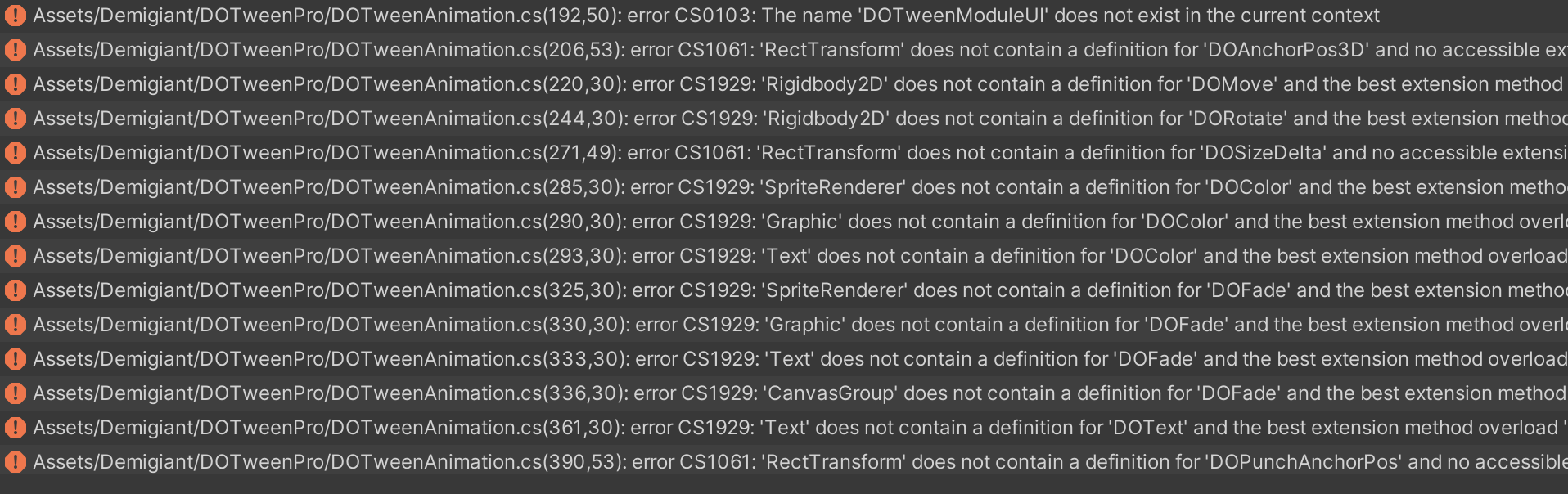
Sorry to open this up, but I have DoTween pro, and when I used the content of the file you sent, i got all these errors. If you need to email me or i need to send some license thing you can find my email on my git profile. Thanks :)
nicmar
on 13 Nov 2020
Ah, this version requires an updated Pro indeed. Write me here so I can send it to you.
Demigiant
on 13 Nov 2020
Why this bug is closed? I am experimenting the same problem in a shake effect when using a single axis:
transform.DOShakePosition(2.0f, strength: new Vector3(0, 2, 0), vibrato: 5, randomness: 1, snapping: false, fadeOut: true);
Sometimes it bounces a lot sometimes almost nothing
 fguillen
on 5 Apr 2021
fguillen
on 5 Apr 2021
Related issues
 Zundrium
·
11Comments
Zundrium
·
11Comments
 Denis535
·
5Comments
Denis535
·
5Comments
 jizc
·
10Comments
jizc
·
10Comments
 eduardbosch
·
3Comments
eduardbosch
·
3Comments
 Dentrax
·
10Comments
Dentrax
·
10Comments
Most helpful comment
Woah, now I did find a bug where the max magnitude wasn't always considered as the starting point when using a single axis (because the shake randomness was still evalued on all axes). Replace the content of DOTween folder with this ZIP and it will be fixed :)
As a secondary note, consider that Shake on a single axis behaves more or less like a Punch. Also consider that if you want to shake a UI element as it looks like you're trying to do, @nicmar, you should use
rectTransform.DOShakeAnchorPos. In general, never move/tween anything inside the UI using their transform's position, always use their rectTransform's anchoredPosition (and the relative tween shortcuts).