Dotween: DoTween Animation script error [UNITY 2018]

I am on unity 2018.3.5f1 I just upgraded from standard dotween to pro dotween. Whenever i add a dotween animation script to a gameobject or a dotween path script i get these errors in playmode and in editor mode.
 RealCosmik
All 9 comments
Hi,
I just installed 2018.3.5 (I was on 2018.3.4) but I can't seem to reproduce this issue. Did you run DOTween's Setup after importing? And if so, can you copy-paste me the very first 2 error/warning logs you received so I can check them out?
 Demigiant
on 11 Feb 2019
Demigiant
on 11 Feb 2019
thats the first error
NullReferenceException: Object reference not set to an instance of an object
UnityEngine.GUILayoutUtility.DoGetRect (UnityEngine.GUIContent content, UnityEngine.GUIStyle style, UnityEngine.GUILayoutOption[] options) (at C:/buildslave/unity/build/Modules/IMGUI/GUILayoutUtility.cs:394)
UnityEngine.GUILayoutUtility.GetRect (UnityEngine.GUIContent content, UnityEngine.GUIStyle style, UnityEngine.GUILayoutOption[] options) (at C:/buildslave/unity/build/Modules/IMGUI/GUILayoutUtility.cs:385)
UnityEngine.GUILayout.DoButton (UnityEngine.GUIContent content, UnityEngine.GUIStyle style, UnityEngine.GUILayoutOption[] options) (at C:/buildslave/unity/build/Modules/IMGUI/GUILayout.cs:36)
UnityEngine.GUILayout.Button (System.String text, UnityEngine.GUIStyle style, UnityEngine.GUILayoutOption[] options) (at C:/buildslave/unity/build/Modules/IMGUI/GUILayout.cs:32)
DG.DOTweenEditor.DOTweenAnimationInspector.OnInspectorGUI () (at Assets/Demigiant/DOTweenPro/Editor/DOTweenAnimationInspector.cs:220)
UnityEditor.InspectorWindow.DoOnInspectorGUI (System.Boolean rebuildOptimizedGUIBlock, UnityEditor.Editor editor, System.Boolean wasVisible, UnityEngine.Rect& contentRect) (at C:/buildslave/unity/build/Editor/Mono/Inspector/InspectorWindow.cs:1625)
UnityEngine.GUIUtility:ProcessEvent(Int32, IntPtr)
thats the first warning
Unexpected top level layout group! Missing GUILayout.EndScrollView/EndVertical/EndHorizontal?
UnityEngine.GUIUtility:ProcessEvent(Int32, IntPtr)
second error
ArgumentException: Getting control 3's position in a group with only 3 controls when doing repaint
Aborting
UnityEngine.GUILayoutGroup.GetNext () (at C:/buildslave/unity/build/Modules/IMGUI/LayoutGroup.cs:117)
UnityEngine.GUILayoutUtility.DoGetRect (UnityEngine.GUIContent content, UnityEngine.GUIStyle style, UnityEngine.GUILayoutOption[] options) (at C:/buildslave/unity/build/Modules/IMGUI/GUILayoutUtility.cs:425)
UnityEngine.GUILayoutUtility.GetRect (UnityEngine.GUIContent content, UnityEngine.GUIStyle style, UnityEngine.GUILayoutOption[] options) (at C:/buildslave/unity/build/Modules/IMGUI/GUILayoutUtility.cs:385)
UnityEngine.GUILayout.DoButton (UnityEngine.GUIContent content, UnityEngine.GUIStyle style, UnityEngine.GUILayoutOption[] options) (at C:/buildslave/unity/build/Modules/IMGUI/GUILayout.cs:36)
UnityEngine.GUILayout.Button (System.String text, UnityEngine.GUIStyle style, UnityEngine.GUILayoutOption[] options) (at C:/buildslave/unity/build/Modules/IMGUI/GUILayout.cs:32)
DG.DOTweenEditor.DOTweenAnimationInspector.OnInspectorGUI () (at Assets/Demigiant/DOTweenPro/Editor/DOTweenAnimationInspector.cs:220)
UnityEditor.InspectorWindow.DoOnInspectorGUI (System.Boolean rebuildOptimizedGUIBlock, UnityEditor.Editor editor, System.Boolean wasVisible, UnityEngine.Rect& contentRect) (at C:/buildslave/unity/build/Editor/Mono/Inspector/InspectorWindow.cs:1625)
UnityEngine.GUIUtility:ProcessEvent(Int32, IntPtr)
the editor will continuously log those errors and that warning
RealCosmik
on 11 Feb 2019
Something very weird is happening there (in the first error, which is causing all the others). It seems as if Unity finds the GUIStyle I pass to it to be NULL, but I verified that I initialize it just a few rows above (and indeed it's not NULL here). It's also a custom GUI initialization system that I use everywhere since ages so I'm very puzzled of how it could fail in your case (I just tried both updating my DOTween test project to 2018.3.5 and to just create a new one and importing DOTween Pro, but everything works as usual here).
Could you post me a picture of your Project folder, with the Demigiant folder expanded? Maybe something's missing there? Also, can you tell me on what operating system are you?
Demigiant
on 11 Feb 2019

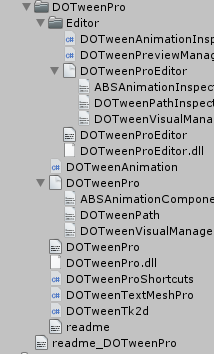
my OS is windows 10
RealCosmik
on 11 Feb 2019
perhaps ill try a fresh install? i'll delete the demigiant folder and re-import from asset store
RealCosmik
on 11 Feb 2019
Ah! Wait, I see what's happening there (though the error log seems related but not really precise if that's the case). You're missing the "DemiLib/Core/Editor/Imgs" folder, which contains Images used by DOTween's Inspector. Maybe it got deselected when you imported DOTween Pro?
Demigiant
on 11 Feb 2019
P.S. In case you deselected it on purpose because you were worried of all those images being added to your build, don't worry. They're very small, and they're not added to the build.
Demigiant
on 11 Feb 2019
ahhhhhhhhh Okay yes that in fact did fix the errors thank you so much
RealCosmik
on 11 Feb 2019
Glad it's fixed :)
Demigiant
on 11 Feb 2019
Related issues
 kruncher
·
7Comments
kruncher
·
7Comments
 jizc
·
10Comments
jizc
·
10Comments
 eduardbosch
·
3Comments
eduardbosch
·
3Comments
 Wolar
·
5Comments
Wolar
·
5Comments
 lucasmontec
·
6Comments
lucasmontec
·
6Comments
Most helpful comment
Ah! Wait, I see what's happening there (though the error log seems related but not really precise if that's the case). You're missing the "DemiLib/Core/Editor/Imgs" folder, which contains Images used by DOTween's Inspector. Maybe it got deselected when you imported DOTween Pro?