Dotween: DOFade not working on CanvasGroup
When I try using
GetComponent<CanvasGroup>().DOFade(1.0, 1.0);
I get the following error:
UnityEngine.CanvasGroup' does not contain a memberDOFade`
Using DOTween 0.9.690
 netlander
All 15 comments
Hi,
It seems you didn't run DOTween's setup, because you're missing the DOTween46.dll. You can find it under "Tools > Demigiant > DOTween Utility Panel".
Cheers,
Daniele
 Demigiant
on 1 Oct 2017
Demigiant
on 1 Oct 2017
Have seen your answer somewhere else and redone the setup multiple times (force setup) without getting rid of the problem.
Now I've tried a brand new project with just DOTween and still the same problem.
The full error message:
Assets/dotweenManager.cs(11,34): error CS1929: Type UnityEngine.CanvasGroup does not contain a member DOFade and the best extension method overload DG.Tweening.ShortcutExtensions43.DOFade(this UnityEngine.SpriteRenderer, float, float) requires an instance of type UnityEngine.SpriteRenderer
First time setup shows this weird message:
DOTween is now setup, two extra files were removed
Unity 5.6.3f1
DOTween 0.9.690
netlander
on 1 Oct 2017
The setup message is correct, if as I assume you're using the Pro and don't have 2D Toolkit and TextMesh Pro installed (in which case the relative files for those are removed).
That said, this is very weird. Can you check your DOTween folder and see if you have 2 files named DOTween46? Also, can you confirm you're using the Pro?
Demigiant
on 2 Oct 2017
Managed to solve the problem suddenly after a Unity restart.
Thanks for your support.
netlander
on 2 Oct 2017
Crazy Unity :O But glad you solved it!
Demigiant
on 2 Oct 2017
It seems you didn't run DOTween's setup, because you're missing the DOTween46.dll. You can find it under "Tools > Demigiant > DOTween Utility Panel".
Regards,
 ismaelash
on 27 Jan 2018
ismaelash
on 27 Jan 2018
I am seeing this issue. Restart didn't help.
 leeprobert
on 1 May 2019
leeprobert
on 1 May 2019
https://issuetracker.unity3d.com/issues/image-color-cannot-be-changed-via-script-when-image-type-is-set-to-simple it might be this issue that unity has right now i recently also ran into an issue like this but im positive not it is not dotween but this unity bug that is causing the issue
 RealCosmik
on 1 May 2019
RealCosmik
on 1 May 2019
@Demigiant
I'm not sure, but the UI-related functionality doesn't work on 2020.1
DoTween.To(Color, Color, float, float), DoTween.ToAlpha(), image.DoFade(float, float), image.DoColor(...), text.DoFade and text.DoColor. There are no errors. The alpha value just doesn't change.
Is this a known problem, or is it just for me?
For now, I use the built-in .CrossFadeAlpha() function. Works as it should.
 fax1ty
on 16 Jan 2020
fax1ty
on 16 Jan 2020
Ahoy,
I just installed 2020.1.0a and DOFade works correctly both on Image and CanvasGroup. Are you sure there's not something else happening?
Demigiant
on 16 Jan 2020
@fax1ty
I just got the same problem on Unity 2020.1. I manage to fix it by adding asmdef files to DoTween and then referencing them in my own asmdef.
 matthewhxq
on 15 Oct 2020
matthewhxq
on 15 Oct 2020
I had the same problem on Unity 2019.4.5f1, I solved by updating Visual Studio Code Editor Package to version 1.2.3
 4bitanimationstudio
on 8 Jan 2021
4bitanimationstudio
on 8 Jan 2021
Got the same error on my side with Unity 2020.2.7f1. Everything else work fine, but just cannot add a DOFade to a canvas group.
 alex-gareau
on 1 Apr 2021
alex-gareau
on 1 Apr 2021
Got the same error with Unity 2021.1.3f1
 szantner
on 15 Apr 2021
szantner
on 15 Apr 2021
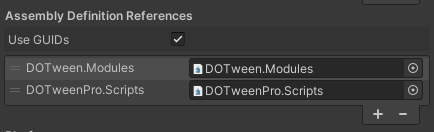
Got the same error, in our case was due to using Assembly Definitions in our project and not referencing DOTween's Assemblies as dependencies. The discussion on this issue gave me the answer: #264
We missed them because they are not generated by default; to generate DOTween's Assembly Definitions, open the DOTween Control Panel (_Tools/Demigiant/DOTween Utility Panel_) and in the _Setup_ tab, press the _Create ASMDEF_ button.

Now you can reference both _DOTweenPro.Scripts.asmdef_ and _DOTween.Modules.asmdef_ to your Assembly Definitions :)
 Algerator
on 21 Apr 2021
Algerator
on 21 Apr 2021
Related issues
leeprobert
·
5Comments
 lucasmontec
·
6Comments
lucasmontec
·
6Comments
 ceyhuntasci
·
5Comments
ceyhuntasci
·
5Comments
 Dentrax
·
10Comments
Dentrax
·
10Comments
 RDeluxe
·
8Comments
RDeluxe
·
8Comments
Most helpful comment
Hi,
It seems you didn't run DOTween's setup, because you're missing the DOTween46.dll. You can find it under "Tools > Demigiant > DOTween Utility Panel".
Cheers,
Daniele