Dotnet: Add release notes for UWP .NET Core 6.2.2
Release notes are missing for 6.2.2 @HollyAM
https://github.com/Microsoft/dotnet/blob/master/releases/UWP/README.md
https://github.com/Microsoft/dotnet/tree/master/releases/UWP/net-native2.2
 dotMorten
All 38 comments
Look slike we do not have any information about even UWP 6.2.0 RTW release. @HollyAM is it known doc gap?
 karelz
on 27 Nov 2018
karelz
on 27 Nov 2018
There was no 6.2.0 or 6.2.1:

dotMorten
on 27 Nov 2018
Interesting, I didn't expect that :).
karelz
on 27 Nov 2018
Lots of "missing" versions in the version list, but generally those were unlisted which doesn't seem to be the case this time.
dotMorten
on 27 Nov 2018
Seems it is unlisted: https://www.nuget.org/packages/Microsoft.NETCore.UniversalWindowsPlatform/
Also Store will not accept submission with 6.2.2 (error 1201).
Btw can developers be notified about this? I spent half a day trying to figure out why the submission was failing
 bezysoftware
on 29 Nov 2018
bezysoftware
on 29 Nov 2018
@bezysoftware It wasn't the other day though
dotMorten
on 29 Nov 2018
There is active work in progress, stay tuned - @tommcdon @zamont can provide update later.
karelz
on 29 Nov 2018
@karelz Hello, is there a test account with a semi legit UWP app that when this important nuget gets update there is an actually store submission? I believe this bug could have been avoided to be released to the public. I have seen other devs complaining on Twitter because the Dev Center was clueless.
 ArchieCoder
on 29 Nov 2018
ArchieCoder
on 29 Nov 2018
Thank you for the feedback. We are working on a UWP 6.2.* RTM build that can be used to publish to the store. Should be available via nuget soon.
Re: 6.2.0 and 6.2.1 and 5.3.6 and 6.1.6: We don't release all .NET UWP builds publicly, so while each new release will be a higher version, they may not be sequential.
 HollyAM
on 29 Nov 2018
HollyAM
on 29 Nov 2018
After a minor update on our UWP-App (Xamarin) we get the following error while submitting the submission to the store:
This submission failed with error code(s) 1201
Two weeks ago submitting the app was not a problem. There were no changes to any packages installed.
Any idea what we can do now? May this be related to a store problem that will be fixed by MS and we just have to wait some days?
 staticvoidlabs
on 6 Dec 2018
staticvoidlabs
on 6 Dec 2018
Downgrade to 6.1.9 and resubmit
dotMorten
on 6 Dec 2018
@dotMorten Thanks for your reply. At the moment we are on 6.0.8
We decided not to upgrade because we had some problem with 6.1.4 some weeks ago regarding app not starting when building in release mode. But I will give 6.1.9 a try now.
staticvoidlabs
on 6 Dec 2018
If you're on 6.0.8 why are you posting in this thread?
dotMorten
on 6 Dec 2018
Because it is hard to find information regarding what to do if „Error 1201“ occurs and we need any help/advice we can get.
staticvoidlabs
on 6 Dec 2018
Info for all others struggeling with "Error 1201": Updating from 6.0.8 to 6.1.9 solved the problem. The submission was certified successful some minutes ago.
staticvoidlabs
on 6 Dec 2018
NetCore.UWP 6.2.3 was just released with VS 15.9.4. Not yet on nuget and without release notes. I did not try store.
 devsko
on 12 Dec 2018
devsko
on 12 Dec 2018
There have been some store updates that may resolve some Error 1201 issues in additon to 6.2.3 that shipped in VS, please try re-submitting. 6.2.2. and 6.2.3 will not be offered on Nuget, because we don't recommend it as an update to 6.1.9 yet. We have some additional work being planned for the next month after which we will publish an updated package to Nuget. If you want to find out what is in 6.2.3 and 6.2.2, please refer to the VS release notes for 15.9 and 15.9.4 respectively at https://docs.microsoft.com/en-us/visualstudio/releasenotes/vs2017-relnotes
HollyAM
on 12 Dec 2018
6.2.2. and 6.2.3 will not be offered on Nuget, because we don't recommend it as an update to 6.1.9 yet
Why are you releasing it without a -beta tag on it then? This is all very confusing to all of us.
dotMorten
on 12 Dec 2018
We are not marking it as Beta, because 6.2.3 can be used for development and store submission. It adds the ability to build and submit apps that can target ARM64 platforms. Beta would imply that these bits are not supported for those scenarios. Due to known issues, we recommend that apps that don't require ARM64 wait until the next release to upgrade.
HollyAM
on 12 Dec 2018
The Microsoft Store does not support submission of apps targeting pre-releases like Betas. It does support submission of 6.2.3 UWP apps.
HollyAM
on 12 Dec 2018
[,,,] we don't recommend it as an update to 6.1.9 yet
Due to known issues […]
We have some additional work being planned […]
Sure sounds like a beta
dotMorten
on 12 Dec 2018
Everyone has a different definition for Beta these days.... I miss when "Beta" actually meant something.
HollyAM
on 13 Dec 2018
But you do understand what I'm saying right? How are we going to navigate among these versions when there's no release notes, no mention why a package was suddenly unlisted on nuget.org etc.
I get mistakes happens, security issues come up etc and you have to "undo" a release but that doesn't sound like that's the case with 6.2.3 as there are apparently known issues with it. And if it wasn't for this thread how were we supposed to know?
I miss when "Beta" actually meant something.
l long for the days where semantic versioning means something
dotMorten
on 13 Dec 2018
Agree. Thank you for that feedback. I am definitely exploring ways to make that clearer. One addition: If we added UWP version numbers to the VS release notes, would that answer most of your questions?
HollyAM
on 13 Dec 2018
If we added UWP version numbers to the VS release notes,
No. These are two different products (the fact you package it with VS is irrelevant). This nuget package can be obtained outside VS. Each nuget package should have release notes in the package
dotMorten
on 13 Dec 2018
One more thing, now when I create a new uwp from VS 15.9 it defaults to 6.2.3, but if I have an old app can't be updated trough nuget to 6.2.3. This is really not a proper behavior, maybe VS should prompt which version to use when starting a new project?
 Panda-Sharp
on 5 Mar 2019
Panda-Sharp
on 5 Mar 2019
@emiliano84 The 6.2.3 package is unlisted, so if you absolutely need to use it in another app you'll have to manually edit the .csproj file and set 6.2.3 as the package version yourself.
 Sergio0694
on 5 Mar 2019
Sergio0694
on 5 Mar 2019
@emiliano84 The 6.2.3 package is unlisted, so if you absolutely need to use it in another app you'll have to manually edit the .csproj file and set 6.2.3 as the package version yourself.
I Understood that, but doesn't make sense this behavior:
- if you create a new UWP it defaults to 6.2.3, that's still not recommended, is like a preview, beta, or call it whatever you prefer
- If you go to NuGet you see 6.1.x as the latest version
in my opinion or when you create a new UWP in VS you ask which version to use, providing the fact that 6.2.3 supports ARM64 but can have still some issues, or you default to 6.1.x but in NuGet you can update to 6.2.3-preview.
I found all of this confusing, also considering that there are no 6.2.3 release notes. Is this only me? Is this for you a proper behavior?
Panda-Sharp
on 6 Mar 2019
@emiliano84
I found all of this confusing, also considering that there are no 6.2.3 release notes. Is this only me? Is this for you a proper behavior?
No, That's why I am here now. :)
 AwsomeCode
on 7 Mar 2019
AwsomeCode
on 7 Mar 2019
@emiliano84 I'm sorry, I thought the issue for you was that you weren't seeing the 6.2.3 package in the search results. And yes, this is definitely not a proper behavior, but if you scroll back in this issue you'll see that the whole deal with the 6.2.x packages is that they're currently messed up, with missing/misleading "preview" labels and known issues not properly reported (eg. missing release notes, or neither the 6.2.2 and 6.2.3 packages having the "preview" label, despite both containing bugs), this was the point of this issue to begin with.
As a side note, it's pointless to suggest to MS to fix the labeling/behavior of the current 6.2.2/6.2.3 packages, as both of those will be unlisted shortly anyway, when 6.2.4 is released.
Just hold on until 6.2.4 finally comes out and ignore the current behavior for now, the updated (and hopefully working and properly documented) package should be almost around the corner by now 👍
Sergio0694
on 7 Mar 2019
@emiliano84 I'm sorry, I thought the issue for you was that you weren't seeing the 6.2.3 package in the search results. And yes, this is definitely not a proper behavior, but if you scroll back in this issue you'll see that the whole deal with the 6.2.x packages is that they're currently messed up, with missing/misleading "preview" labels and known issues not properly reported (eg. missing release notes, or neither the 6.2.2 and 6.2.3 packages having the "preview" label, despite both containing bugs), this was the point of this issue to begin with.
As a side note, it's pointless to suggest to MS to fix the labeling/behavior of the current 6.2.2/6.2.3 packages, as both of those will be unlisted shortly anyway, when 6.2.4 is released.
Just hold on until 6.2.4 finally comes out and ignore the current behavior for now, the updated (and hopefully working and properly documented) package should be almost around the corner by now 👍
ok if everything will back to normal with the next release, at this point I can wait a bit more :)
Panda-Sharp
on 7 Mar 2019
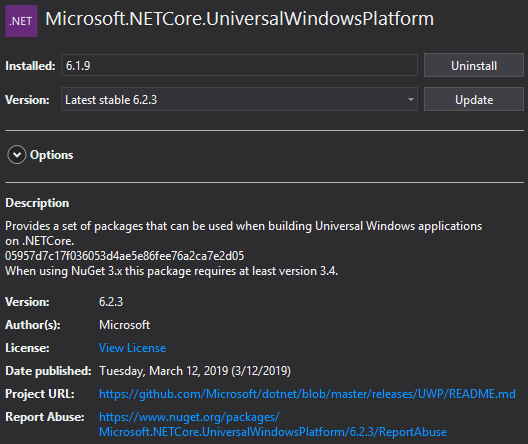
6.2.3 "Latest stable" just went live on NuGet, no release notes though 😕
 jfranki
on 12 Mar 2019
jfranki
on 12 Mar 2019
The package 6.2.3 is still not visible on web or in VS2019 NuGet Package manager. https://www.nuget.org/packages/Microsoft.NETCore.UniversalWindowsPlatform/
 martinsuchan
on 12 Mar 2019
martinsuchan
on 12 Mar 2019
I can't see this mentioned anywhere else, but I've noticed the Span<T> type has completely disappeared after upgrading to 6.2.8. It was there and working correctly in 6.2.3.
Tried downgrading to 6.1.9 just to double check and it isn't there either.
If I try to revert back to 6.2.3 it becomes available again.
Manually referencing System.Memory solves the issue of course (on all packages), but I'm wondering if this is the expected behavior - shouldn't it be included by default?
I don't see anything related to this in the release notes, so was Span<T> (and presumably the other types as well) included just in 6.2.3 and then removed again after that?
@HollyAM Any info on this? Thanks!
Sergio0694
on 28 Mar 2019
@Sergio0694 I guess I'm a bit confused. I get the same results for 6.1.9, 6.2.3 and 6.2.8 for these repro steps:
- New UWP project targeting latest WinSDK
- Add Span into one of the cs files. In my case this:
var arr = new byte[10];
System.Memory.Span<byte> bytes = arr;
In all cases I get errors about Span not being available (which I think is correct out of the box). Can you help me understand what you're seeing a bit better?
 MattWhilden
on 29 Mar 2019
MattWhilden
on 29 Mar 2019
Hey @MattWhilden - I have to say I'm confused too 😄
Here's what I'm doing:
- UWP runtime component (.winmd), targeting 17763 as minimum/target
.NETCore.UWP 6.2.3package, no other NuGet packages- I have the following function:
private static Span<char> Foo(string text) => default;
If I try to build, it... builds just fine.
Switching to either 6.1.9 or 6.2.8 breaks the build again.
I mean, it's fine, it's not a problem to add the System.Memory package, I just found this odd though 🤔
EDIT: I should note though that the Span<T> type I see is in the System namespace, not in System.Memory. Here's the decompiled metadata:
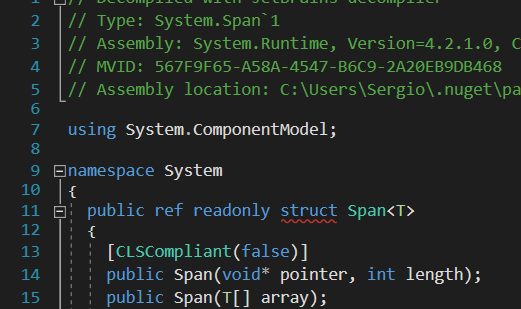
The full path of that assembly is C:\Users\Sergio\.nuget\packages\microsoft.netcore.universalwindowsplatform\6.2.3\ref\uap10.0.15138\System.Runtime.dll, so it does seem to be in the .NETCore.UWP 6.2.3 package somehow.
Sergio0694
on 29 Mar 2019
Span not being available is a NuGet authoring problem somewhere. It should be available by default (it is available if you make a new .NET Core 2.1 console app - UWP 6.2.* corresponds to 2.1 API level).
I filed dotnet/corefx#36476 to track this (it's either a coresetup or corefx issue, but I can never tell).
 MichalStrehovsky
on 29 Mar 2019
MichalStrehovsky
on 29 Mar 2019
@MichalStrehovsky I see, well I'm glad we could figure out what was going on soon and open an issue, hopefully this'll get fixed in the next .NETCore.UWP package.
Thanks for your help! 😄
P.S.: speaking of issues, I'll take the occasion (as you guys both work in the .NET Native team, if I'm not mistaking) to ask you if there are any news on this .NET Native build error (#786375).
The issue is internal so I can't even see the status updates.
Any info on this would be much appreciated, as this bug is 100% breaking my project in Release. You can reply via email as well if you prefer, as this issue isn't strictly related to this.
Thanks again for your time!
Sergio0694
on 29 Mar 2019
Related issues
 Seikilos
·
11Comments
Seikilos
·
11Comments
 scottsauber
·
8Comments
scottsauber
·
8Comments
 keslerm
·
8Comments
keslerm
·
8Comments
 AlleSchonWeg
·
7Comments
AlleSchonWeg
·
7Comments
 favishG
·
7Comments
favishG
·
7Comments
Most helpful comment
No. These are two different products (the fact you package it with VS is irrelevant). This nuget package can be obtained outside VS. Each nuget package should have release notes in the package