Dotnet: Existence of SizeToContent in XAML breaks Loaded Event of window
SizeToContentProblem.zip
We've noticed a very strange behaviour that is reproducible in VS 2017 and with dotnet 4.6.2.
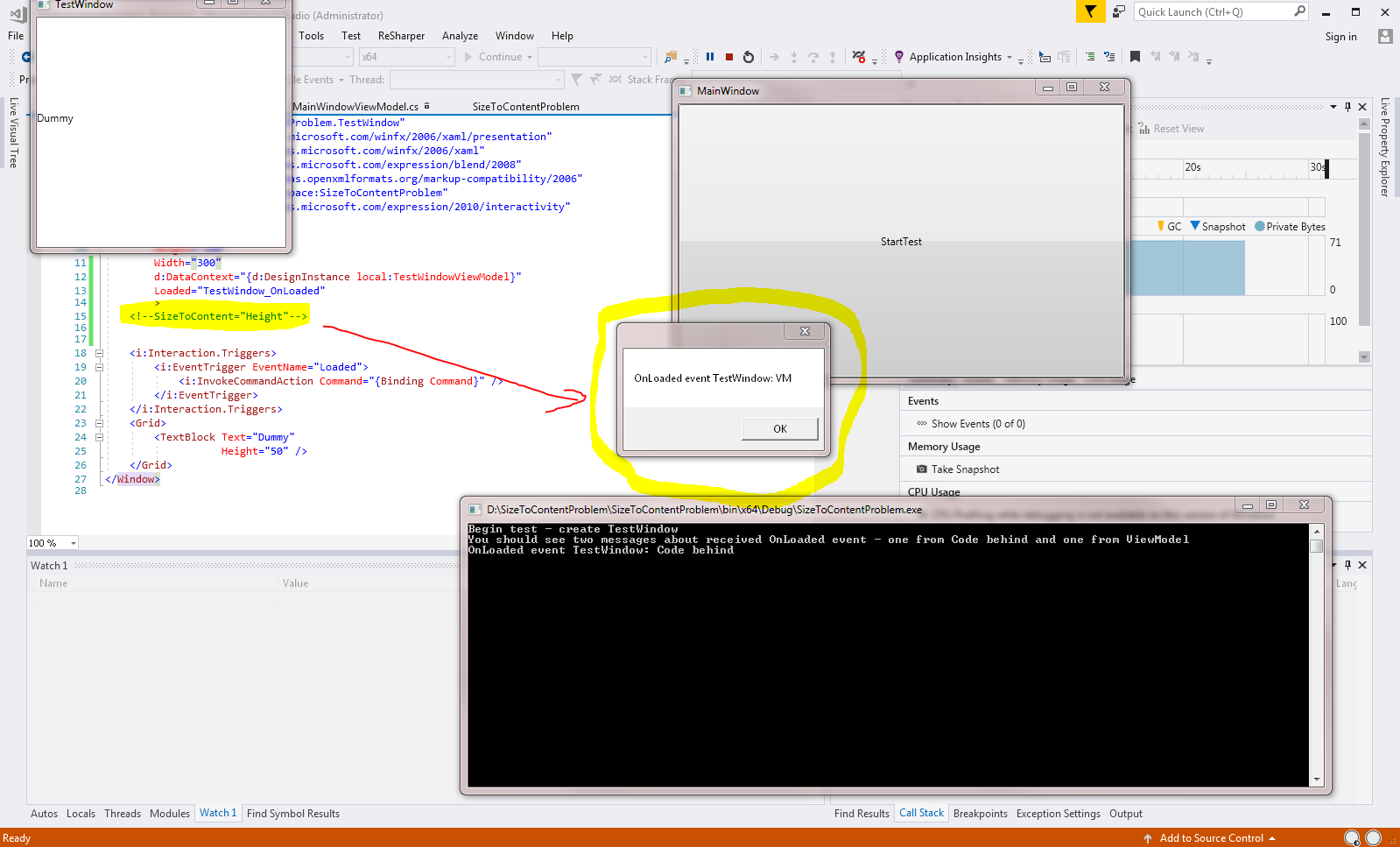
The attached repro case consist of a window with a button that opens another window. In this window there is an interactivity trigger (TestWindow.xaml) that should create a message box and a console entry.
However due to the presence of SizeToContent="Height" in the very same xaml, dotnet does only emit the console write line from the callback set in the code behind (Loaded="TestWindow_OnLoaded") but ignores the callback that should be executed in TestWindowViewModel.
If the SizeToContent attribute is removed in TestWindow.xaml, then the expected message box is displayed and the second console output (after the message box) is generated, see the image below for the correct version when SizeToContent is commented out.
 Seikilos
All 11 comments
I sent this to the WPF team. Thanks for reporting.
 richlander
on 26 Jun 2017
richlander
on 26 Jun 2017
For Microsoft folks: I created Microsoft-internal VSTS bug 460315 to track this.
richlander
on 5 Jul 2017
Als see https://stackoverflow.com/questions/32627331/eventtocommand-for-loaded-event-not-working-as-expected-if-window-sizetocontent for another case and a workaround.
 Bodewes
on 10 Jul 2017
Bodewes
on 10 Jul 2017
I tested with Win10 1709.16299.19, VS2017 v15.5.0 Preview 2.0, .net v4.7.02556 and there is no such issue. It seems to be fixed with the .net 4.7.1 update
 SirRufo
on 31 Oct 2017
SirRufo
on 31 Oct 2017
Great!
richlander
on 29 Nov 2017
We recently upgraded our WPF projects to target .NET 4.7.1 so I tried to remove the workaround mentioned in the StackOverflow post linked by @Bodewes as @SirRufo mentioned he was not able to reproduce the issue on .NET 4.7.1
It still did not execute the command.
Just to confirm that I didn't screw up, I removed the SizeToContent="WidthAndHeight" and tried again. This time the command was executed as you would expect.
Windows 10 1709.16299.248
VS2017 15.5.4
 AridTag
on 21 Feb 2018
AridTag
on 21 Feb 2018
I can confirm that this issue hasn't been fixed. Please find the attached example, targeting .NET 4.7.1, which demonstrates the problem very clearly. The command in the event trigger starts working as soon as the SizeToContent="WidthAndHeight" is removed.
 yariker
on 7 May 2018
yariker
on 7 May 2018
Confirmed, Even if you setSizeToContent="Width", Loaded event does not fired, starts working as soon as SizeToContent="Width" is Removed.
was trying below code.
<telerik:EventToCommandBehavior.EventBindings>
            <telerik:EventBinding Command="{Binding OnLoadCommand}" EventName="Loaded"/>
</telerik:EventToCommandBehavior.EventBindings>
 jjTudu
on 22 Jan 2019
jjTudu
on 22 Jan 2019
is it fixed yet? until june 19th 2019
 sonhai1710
on 19 Jun 2019
sonhai1710
on 19 Jun 2019
Still not fix if SizeToContent="Width" .
VS2019 16.4.4
.NET Framework 4.7.2
 GF-Huang
on 5 Feb 2020
GF-Huang
on 5 Feb 2020
This also happens on VS 2019 and .Net 4.8 - Any workarounds/recommendations?
 NorbertHuethmayr
on 15 Jun 2020
NorbertHuethmayr
on 15 Jun 2020
Related issues
 favishG
·
7Comments
favishG
·
7Comments
 thuannguy
·
5Comments
thuannguy
·
5Comments
 FlsZen
·
4Comments
FlsZen
·
4Comments
 aludin
·
12Comments
aludin
·
12Comments
 keslerm
·
8Comments
keslerm
·
8Comments
Most helpful comment
We recently upgraded our WPF projects to target .NET 4.7.1 so I tried to remove the workaround mentioned in the StackOverflow post linked by @Bodewes as @SirRufo mentioned he was not able to reproduce the issue on .NET 4.7.1
It still did not execute the command.
Just to confirm that I didn't screw up, I removed the SizeToContent="WidthAndHeight" and tried again. This time the command was executed as you would expect.
Windows 10 1709.16299.248
VS2017 15.5.4