Dosbox-x: Add menu options to select a CPU model, e.g. 486DX-33, Pentium 60, 75, etc
Describe the solution you'd like
If possible, please add a menu to select a CPU model (to simulate a specific speed) in DOSBox-X. I'll like this.
Describe alternatives you've considered
This should give DOSBox-X better options.
Additional context
The menu should contain separate CPU types, which should be like this:
8086 - 7/8/9/10/12/16Mhz
8088 - 4/7/8/10/12/16Mhz
80286 - 6/8/10/12/16/20/25Mhz
80386 - SX/DX 16/20/25/33/40Mhz
80486 - SX/DX 16/20/25/33/40/50/66Mhz
Pentium - 60/75/90/100/120/133/150/166/200Mhz
Pentium MMX - 166/200/233Mhz
 DSN9990
All 62 comments
@DSN9990 In the current "CPU" menu, select "CPU type", and you will find a list of CPU options from 8086 to Pentium Pro. Please let me know if it is still missing something.
 Wengier
on 13 Sep 2020
Wengier
on 13 Sep 2020
@Wengier I asked you if you can add options to select a specific CPU speed, like PCem (and 86Box) have.
DSN9990
on 13 Sep 2020
Emulating a specific speed CPU is not straight forward. DOSBox, and
DOSBox-X by extension is NOT cycle accurate.
DOSBox will run one x86 instruction per-cycle, so if you set 1000 cycles,
it will run 1000 instructions per second. But actual legacy CPUs, depending
on the instruction, and the CPU model, may take several cycles to execute a
instruction.
The best you can do, is to try to approximate it. Especially programs using
x87 (floating point unit) are affected by this.
Have a look at the dosbox wiki for more information:
https://www.dosbox.com/wiki/Performance
On Sun, Sep 13, 2020 at 7:06 PM DSN notifications@github.com wrote:
@Wengier https://github.com/Wengier I asked you if you can add options
to select a specific CPU speed, like PCem have.—
You are receiving this because you are subscribed to this thread.
Reply to this email directly, view it on GitHub
https://github.com/joncampbell123/dosbox-x/issues/1854#issuecomment-691697213,
or unsubscribe
https://github.com/notifications/unsubscribe-auth/AEHBR2UJQUXYQ473BCTYKLDSFT3X5ANCNFSM4RKXPI6A
.
 rderooy
on 13 Sep 2020
rderooy
on 13 Sep 2020
FWIW in D-Fend Reloaded:

core/cycles:
- normal/auto
- dynamic/45000
- auto/500
- auto/10000
- auto/3000
IMO it could be nice to have a few presets that approximates families of CPUs.
 aybe
on 13 Sep 2020
aybe
on 13 Sep 2020
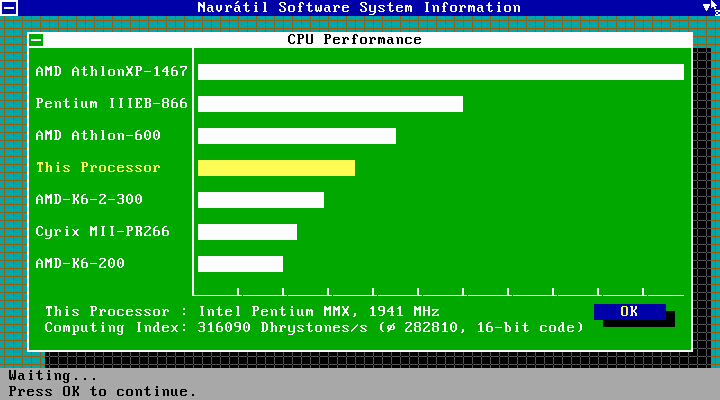
I made approximate cycles values by analogy with the Norton Utilities System Information and NSSI (Navrаtil Software System Information) performance index:
8088 XT 4.77MHz (cycles=240, core=auto, cputype=auto). The value was chosen as accurately as possible, according to the sound of the music in the game Arkanoid on a real machine 8088 XT 4.77MHz: https://youtu.be/_7mouV05qy0
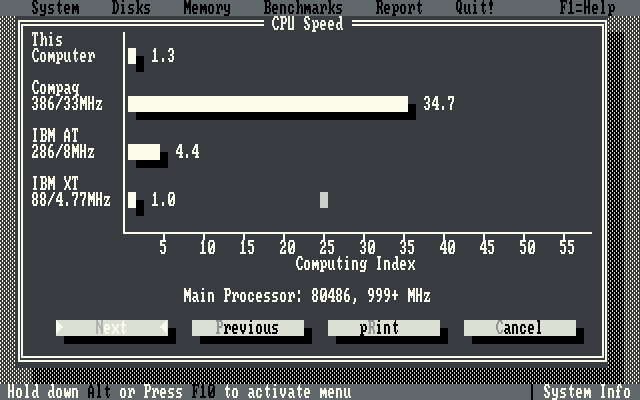
286-8MHz (cycles=750, core=auto, cputype=auto)
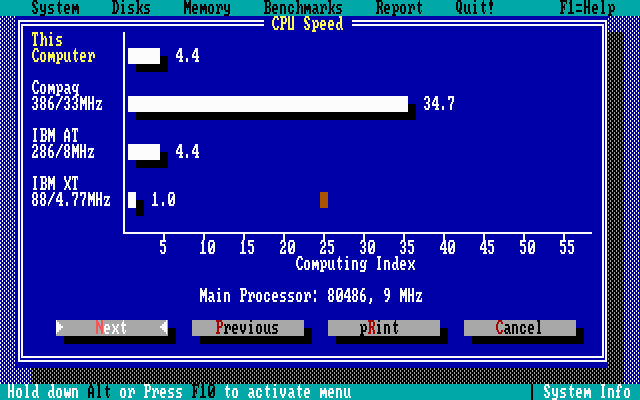
286-12MHz (cycles=1510, core=auto, cputype=auto)
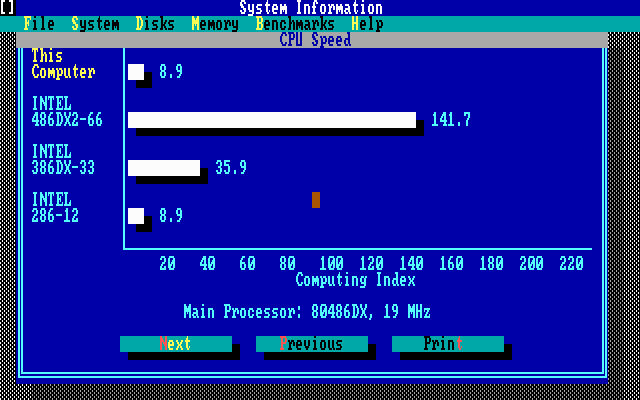
286-25MHz (cycles=3300, core=auto, cputype=auto)
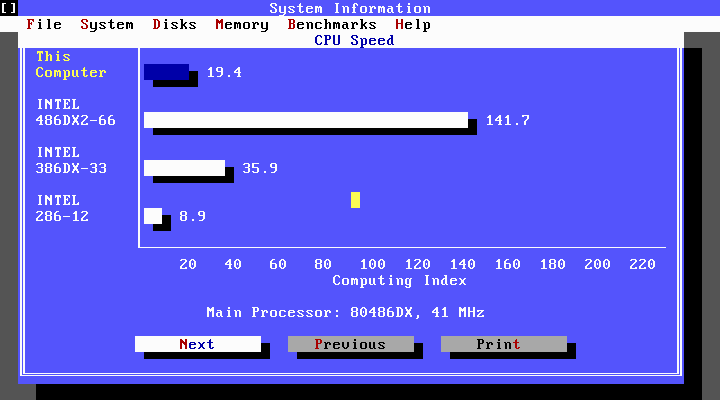
386DX-25MHz (cycles=4595, core=auto, cputype=auto)

386DX-33MHz (cycles=6075, core=auto, cputype=auto)
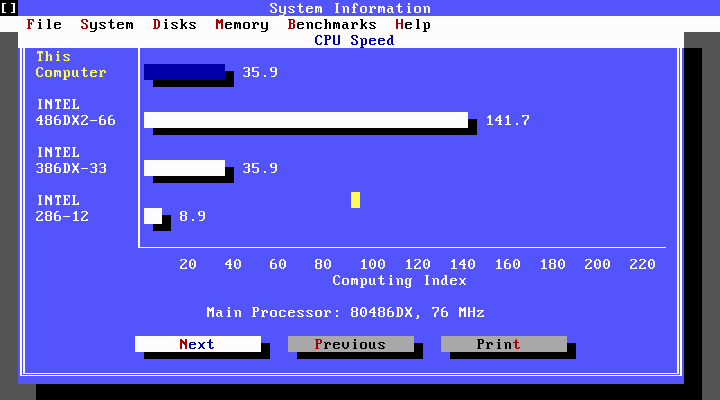
486DX-33MHz (cycles=12010, core=auto, cputype=auto)

486DX2-66MHz (cycles=23880, core=auto, cputype=auto)
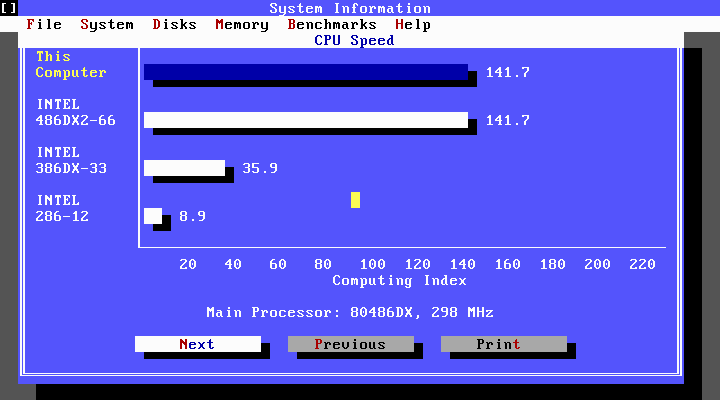
486DX4-100MHz (cycles=33445, core=auto, cputype=auto)
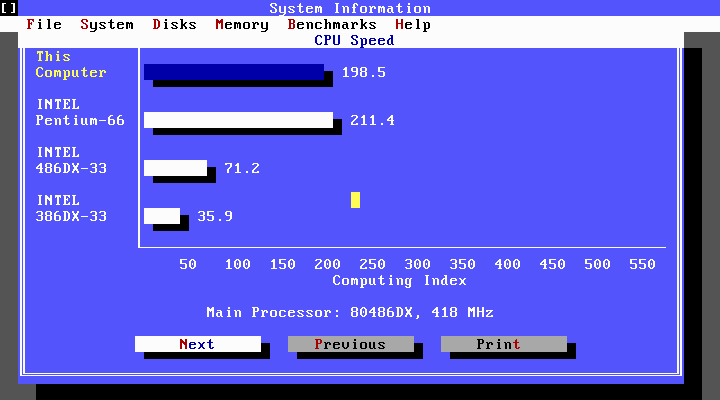
486DX5-133MHz (cycles=47810, core=auto, cputype=auto)
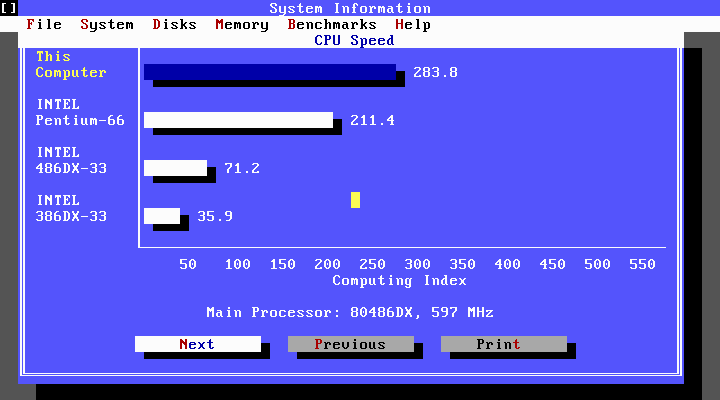

Pentium-60MHz (cycles=31545, core=auto, cputype=pentium_mmx)
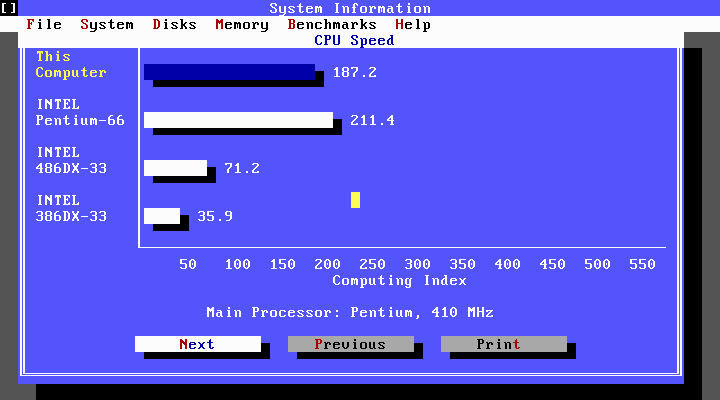
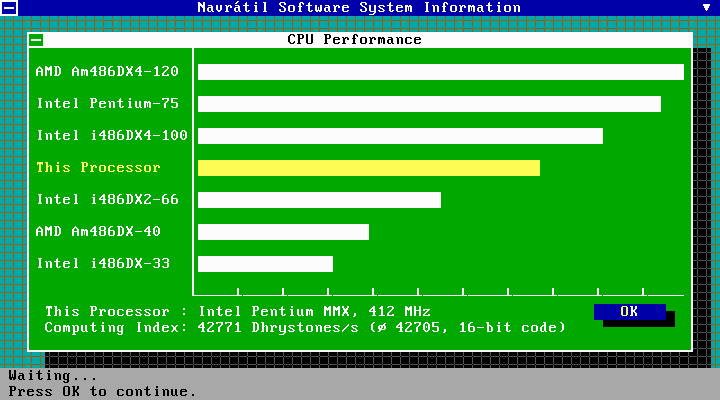
Pentium-66MHz (cycles=35620, core=auto, cputype=pentium_mmx)
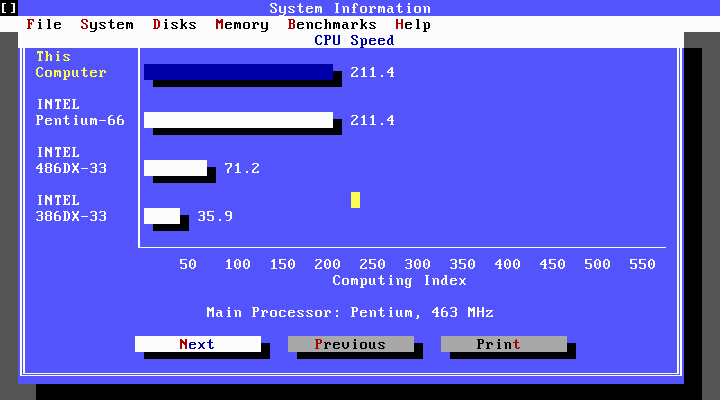
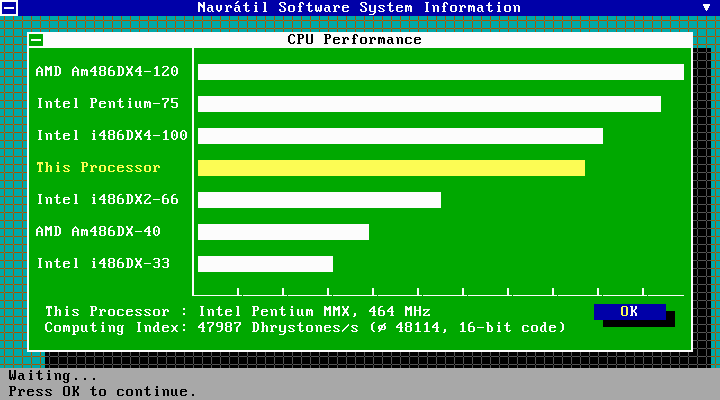
Pentium-75MHz (cycles=43500, core=auto, cputype=pentium_mmx)
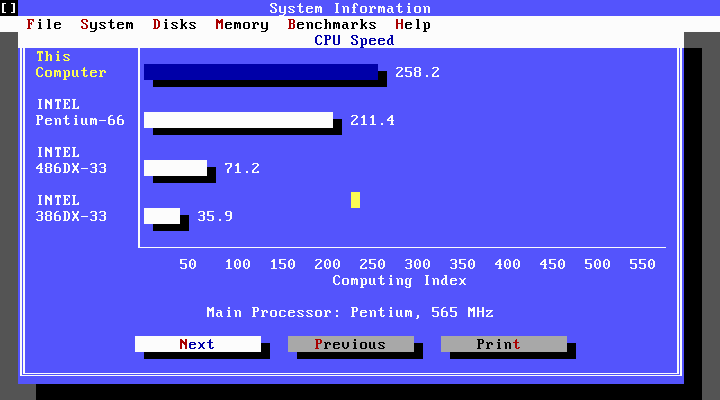

Pentium-90MHz (cycles=52000, core=auto, cputype=pentium_mmx)
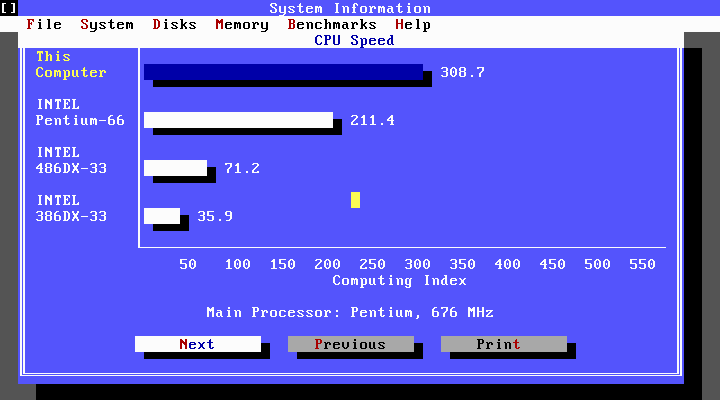
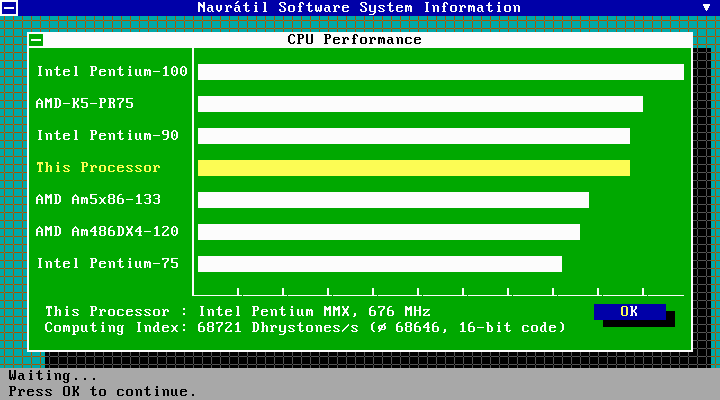
Pentium-100MHz (cycles=60000, core=auto, cputype=pentium_mmx)
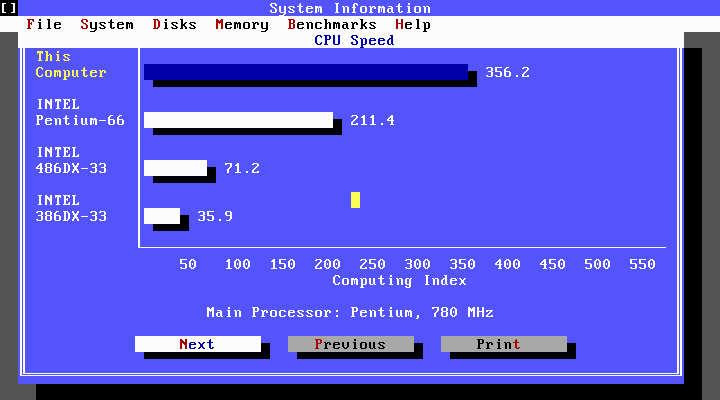
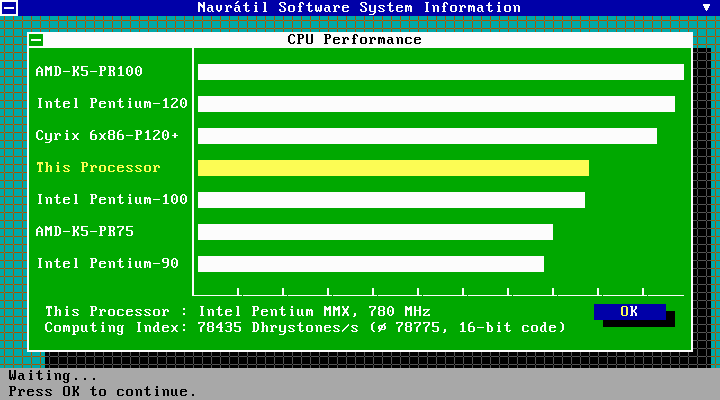
Pentium-120MHz (cycles=74000, core=auto, cputype=pentium_mmx)
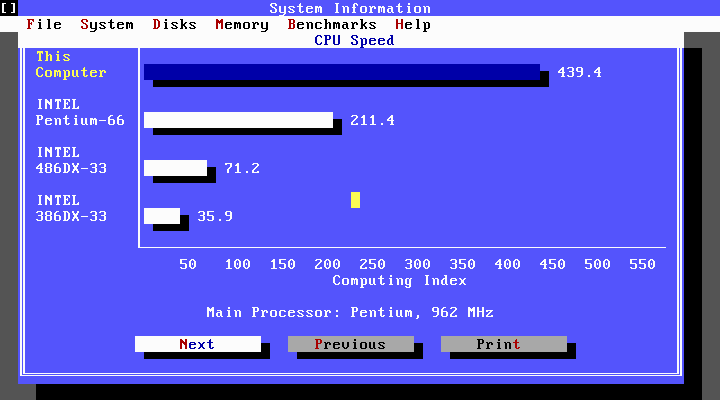

Pentium-133MHz (cycles=80000, core=auto, cputype=pentium_mmx)
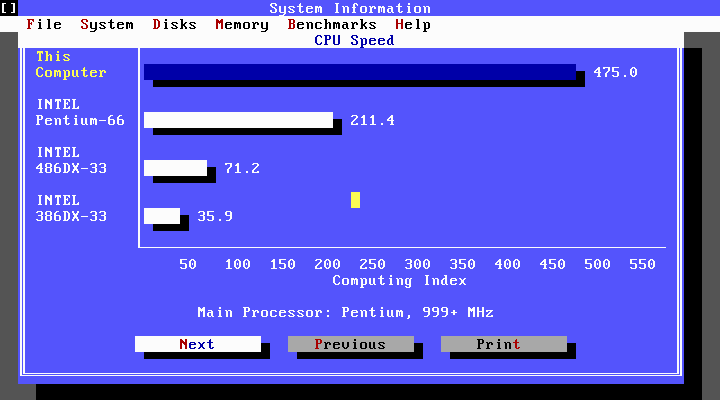
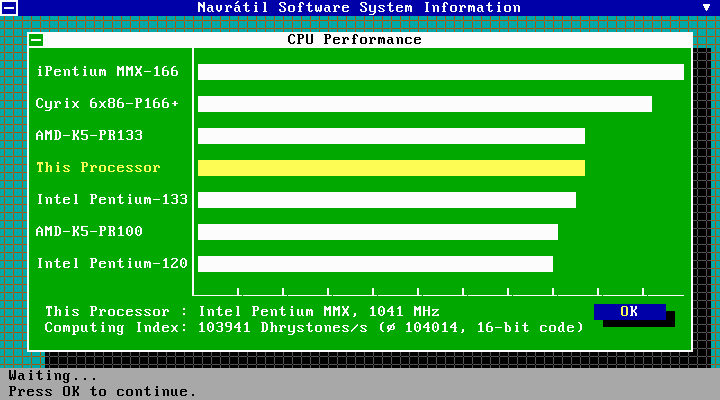
Pentium MMX-166MHz (cycles=97240, core=auto, cputype=pentium_mmx)

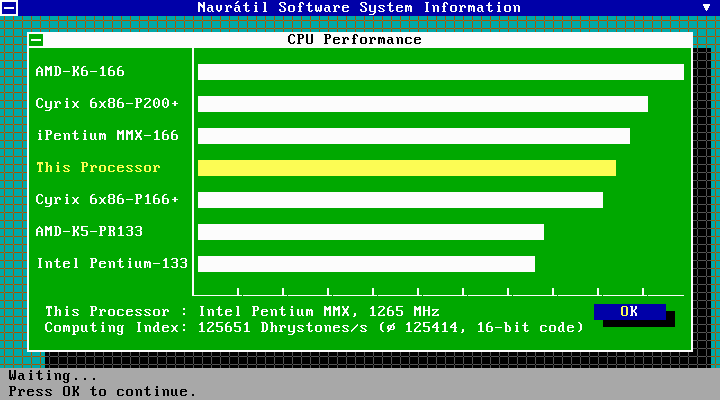
AMD-K6-2-400 (cycles=max, core=dynamic, cputype=pentium_mmx)

 maximus105
on 14 Sep 2020
maximus105
on 14 Sep 2020
@maximus105 amazing, you just need to add the core you've used and it'll be perfect !
aybe
on 14 Sep 2020
I added to the description the core and cputype.
maximus105
on 15 Sep 2020
I added to the description the core and cputype.
Can you explain how you measured the cycles? Trial and error?
 brunocastello
on 17 Sep 2020
brunocastello
on 17 Sep 2020
@brunocastello Yes.
maximus105
on 17 Sep 2020
@maximus105 Great work! I will try to add menu options based on the data you provided. Please check if there are errors in the data before it is added. If you (or anyone else) want to add more to the list it is very welcomed of course.
8088 XT 4.77MHz: cycles=240
286-8MHz: cycles=750
286-12MHz: cycles=1510
386DX-33MHz: cycles=6075
486DX-33MHz: cycles=12010
486DX2-66MHz: cycles=23880
Pentium-66MHz: cycles=35618
Pentium-100MHz: cycles=60000
Wengier
on 17 Sep 2020
Given that MMX apparently doesn't work well (at least for me), how about adding the popular Pentium 133MHz? I'm sure I had that model straight after the 486DX2 decades ago.
brunocastello
on 17 Sep 2020
@Wengier Thanks.
DSN9990
on 18 Sep 2020
I have already added "Emulate CPU speed" menu group (under "CPU") to emulate the speed of these CPU classes in the latest code. Thanks for the data provided by @maximus105. If @maximus105 (or anyone else) wants to add more CPU classes to the list, please free feel to do so.
Wengier
on 18 Sep 2020
I thought that the emulated CPU speed largely depends of how powerful your host computer is?
brunocastello
on 18 Sep 2020
I performed the selection of cycles on the i9-9900K processor. I added cycles for Pentium-120 MHz, Pentium-133 MHz, Pentium MMX-166 MHz to the description. A further increase in cycles (above the value of 97240) does not lead to an increase in performance, but even to a slowdown in programs (Volkov Commander), and hangs of Norton Utilities System Information and NSSI (Navrаtil Software System Information). I also added cycles for the highest possible performance to the description (if you set cycles = max), roughly corresponding to AMD-K6-2-400 (cycles = max, core = dynamic, cputype = pentium_mmx).
maximus105
on 19 Sep 2020
I have already added the emulation options for Pentium-120 MHz, 133 MHz, and 166 MHz in the latest code (thanks to @maximus105). The emulated cycles provided should be considered accurate overall, as I have checked with NSSI on my own computer and found that the speeds largely match here too (maybe around 5% difference sometimes). Since minor adjustments may be desired in some cases, I have added a new config option "cycle emulation percentage adjust" in [cpu] section for users who wish to make relative percentage adjustments (between -25% and 25%) of the emulated CPU cycles.
Wengier
on 20 Sep 2020
Could you give me a updated build?
DSN9990
on 20 Sep 2020
Sure! Here it is the updated Windows binary package:
Note: FluidSynth support is fully enabled in this build. The sound font GeneralUser_GS.sf2 is bundled and enabled by default. Furthermore, the DOSMID program now appears on the Z drive to play MIDI audios.
Wengier
on 20 Sep 2020
Can you give me a link to NSSI?
DSN9990
on 20 Sep 2020
@DSN9990 Here: https://www.navsoft.cz/nssi060.exe
Wengier
on 20 Sep 2020
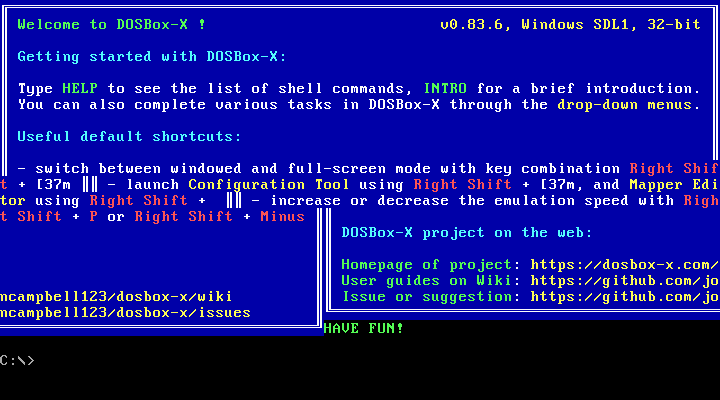
I checked the DOSBox-X 0.83.6 build posted above here. With my mapper configured in cga_mono or svga_s3 mode, when starting DOSBox-X, the image gets corrupted:
Config.zip

In addition, the Volkov Commander file manager is launched in my .conf file, and if I do "Reset Virtual Machine" or "Reboot Guest System", an error window will appear and DOSBox-X will close:
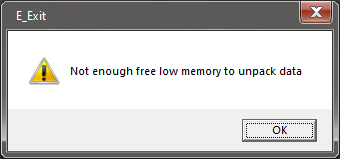
In addition, if you do "Reset Virtual Machine", then an error window appears randomly and DOSBox-X will close:
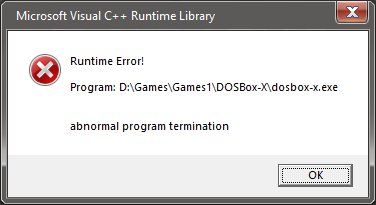
In addition, cycles values over 60000 slow down overall performance. Programs start to slow down noticeably. The previous build DOSBox-X 0.83.5 did not have the above problems.
maximus105
on 20 Sep 2020
@maximus105 Please check out the following Windows binary:
The banner image issue only happened with your modified key setting (not default configuration), which was fixed. Also, the issue with rebooting the system only occurred with the setting "keyb ru" as we discussed in Issue #1732. It seems that the fix mentioned thare did not work when the Volkov Commander file manager is currently running (and with "keyb ru" applied), so I have modified the fix in the updated build.
However, I am not able to notice that cycles values over 60000 slow down overall performance. For example, when I select Pentium 120/133/166 CPUs (all >60000 cycles) to emulate, the benchmarks do increase as expected.
Wengier
on 20 Sep 2020
You may run into issues, if your host system is not able to sustain the number of cycles chosen. Remember that DOSBox is for the most part single-threaded, so CPU clock rating is more important than core count.
rderooy
on 20 Sep 2020
@Wengier In the new build, the above issues are gone, apart from the performance drop over cycles > 60000. This is especially noticeable with cycles = 97240. The performance indices themselves, in the form of numbers or bars, have not changed. A performance has decreased in the form:
- In Volkov Commander, the cursor in the panels began to move up/down noticeably slower.
- In Norton Utilities System Information, windows maximize noticeably more slowly.
- In NSSI, windows unfold noticeably slower and PC Speaker stutters several times at startup.
Maybe this is due to the fact that I tested DOSBox-X 0.83.5 Win x64 SDL1, and the new DOSBox-X build 0.83.6 Win x32 SDL1?
Can you make the new build as Win x64 SDL1 ?
maximus105
on 20 Sep 2020
@maximus105 I think the DOSBox-X 0.83.5 build you tested was MinGW x64 SDL1 build. Why not try the Visual Studio x86 SDL1 build and see how it works (compared to DOSBox-X 0.83.6 Visual Studio x86 SDL1 build). All 0.83.5 Windows builds are included in the Windows installer (available from http://dosbox-x.com).
Wengier
on 20 Sep 2020
@Wengier I tested DOSBox-X 0.83.5 Visual Studio x86 SDL1 and DOSBox-X 0.83.5 Visual Studio x64 SDL1. Yes, they both slow down at cycles = 97240. It turns out that I would rather use MinGW x64 SDL1, since it does not slow down ?
maximus105
on 20 Sep 2020
@Wengier Please correct the cycles value for Pentium 66 MHz to 35620. I have found a more accurate cycle value.
maximus105
on 21 Sep 2020
@maximus105 Done in the latest code.
Wengier
on 21 Sep 2020
@Wengier Yes, and don't forget to correct the description in the menu "(~ 35618 cycles)" to "(~ 35620 cycles)". Can you make the new build as MinGW Win x64 SDL1 ?
maximus105
on 21 Sep 2020
@maximus105 The description has been updated accordingly. A MinGW 64-bit SDL1 Windows binary I built is available from:
Download link: dosbox-x-mingw64.zip
Wengier
on 21 Sep 2020
Can you update the file dosbox-x-update.zip to MinGW 32Bit SDL1?
DSN9990
on 22 Sep 2020
@DSN9990 You want the Visual Studio build or the MinGW build?
Wengier
on 22 Sep 2020
@DSN9990 If you want the Visual Studio build, the dosbox-x-update.zip file is already updated.
Wengier
on 22 Sep 2020
MinGW.
DSN9990
on 22 Sep 2020
@DSN9990 Use the dosbox-x-mingw64.zip file for the MinGW build (and dosbox-x-update.zip for the Visual Studio build). Both files will be maintained from now on and updated sometimes (regularly or on request).
Wengier
on 22 Sep 2020
@Wengier I want the MinGW 32bit build.
DSN9990
on 22 Sep 2020
@DSN9990 I don’t have 32-bit MinGW so I cannot build MinGW 32-bit binary myself. Wait for the next official release if you want that.
Wengier
on 22 Sep 2020
@Wengier The VisualStudio build is 32Bit? I want that.
DSN9990
on 22 Sep 2020
@DSN9990 Visual Studio 2019 can build both 32-bit and 64-bit binaries easily from a single solution, which is not the case for MinGW 64-bit. I think I tried 32-bit MinGW a few months ago but it did not work for some reason, so I uninstalled it and never tried it again.
Wengier
on 22 Sep 2020
@Wengier Can you give me the 64Bit VisualStudio build?
DSN9990
on 22 Sep 2020
@DSN9990 I will do that tomorrow (I had already left my main computer).
Wengier
on 22 Sep 2020
@Wengier Thanks. I'll wait.
DSN9990
on 22 Sep 2020
In the new MinGW x64 SDL1 build, the aspect = true option does not work with fullscreen = true. And there is no direct3d in the output option. Or is it the way it should be? And where can I get the "glshaders" folder?
maximus105
on 22 Sep 2020
@DSN9990 A 64-bit Visual Studio SDL1 build is available from:
Wengier
on 22 Sep 2020
@maximus105 The MinGW build was built by me just for testing, and it does not come with things like Direct3D support. As for glshaders, at this time you can get them from:
Wengier
on 22 Sep 2020
@maximus105 You can now find GLSL shaders in the contrib/glshaders directory of this source tree:
https://github.com/joncampbell123/dosbox-x/tree/master/contrib/glshaders
The Windows installer will copy them to the glshaders subdirectory of the DOSBox-X install directory as well.
Wengier
on 22 Sep 2020
@Wengier Can you add options for Pentium 60, 75 and 90mhz?
DSN9990
on 25 Sep 2020
@DSN9990 Yes if you (or anyone else) can provide the data for them.
Wengier
on 25 Sep 2020
Just a comment. Don't you think that when people select a CPU this way,
that they also expect the emulated CPU to be set to match?
The problem with that obviously is that it will require a reset of the
emulation.
On Fri, Sep 25, 2020 at 10:34 PM Wengier notifications@github.com wrote:
@DSN9990 https://github.com/DSN9990 Yes if you (or anyone else) can
provide the data for them.—
You are receiving this because you commented.
Reply to this email directly, view it on GitHub
https://github.com/joncampbell123/dosbox-x/issues/1854#issuecomment-699142086,
or unsubscribe
https://github.com/notifications/unsubscribe-auth/AEHBR2SC2NGE3PBHPKTEQL3SHT5FTANCNFSM4RKXPI6A
.
rderooy
on 25 Sep 2020
@rderooy Yes, I had thought of that too, but requiring a reset the emulation will be a big impact. So the menu is named "emulate CPU speed" and placed in the cycles subsection to make it clearer that it is just for emulating the speed in terms of CPU cycles, not something like "select CPU subtype" near "CPU type".
Wengier
on 26 Sep 2020
@maximus105 Can you provide data for Pentium 60Mhz (not 66Mhz), Pentium 75Mhz and Pentium 90Mhz?
DSN9990
on 27 Sep 2020
There is certainly a positive response to this feature!

 joncampbell123
on 4 Oct 2020
joncampbell123
on 4 Oct 2020
@joncampbell123 I am certainly very happy to hear that. You have definitely done great work in maintaining the project and I hope more people will like it.
Wengier
on 5 Oct 2020
@maximus105 You had made very helpful efforts to provide the data for the CPUs. Please feel free to add more so that users can benefit more from this feature.
Wengier
on 7 Oct 2020
I added cycles for 486DX4-100, 486DX5-133, Pentium-75, Pentium-90 to the description. Please correct my nickname in the changelog (In the word "maximum", you need to correct the last letter "m" for "s").
maximus105
on 17 Oct 2020
@maximus105 Thanks for adding the cycles for these CPU types to the description. I have already added them to the latest code (https://github.com/joncampbell123/dosbox-x/commit/7b4aa110b071a4523935f36ced56aca2e70eca6a). Also sorry for the typo of your nickname, and I think I have already corrected it in CHANGELOG.
Wengier
on 17 Oct 2020
@maximus105 I have corrected your nickname in the Releases page also. If you have data for other CPU models, please feel free to add them as well. Thanks!
Wengier
on 18 Oct 2020
@Wengier I added cycles for 286-25, 386DX-25, Pentium-60 to the description. Can you add a hotkey to the menu for "Edit cycles"?

maximus105
on 24 Oct 2020
@maximus105 Thanks! I have already added them to the latest code (https://github.com/joncampbell123/dosbox-x/commit/807221bf6efe1e2345d15a31ec5aaeafe8bd2e3b).
Meanwhile, the "Edit cycles" function is already in the mapper editor, named "EditCycles". You can certainly add a hotkey for it yourself.
Wengier
on 24 Oct 2020
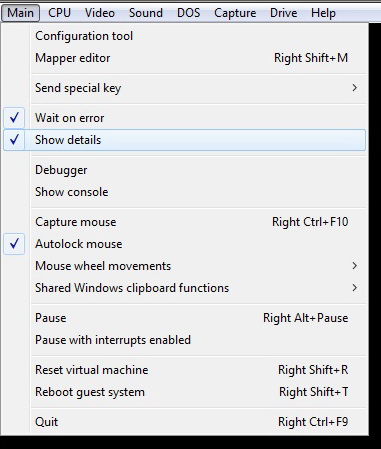
@Wengier Is it possible to make the "Show details" option persist (on or off) after closing and then starting DOSBox-X ?
maximus105
on 24 Oct 2020
@maximus105 The "show details" menu option is equivalent to the -showcycles and -showrt command-line options combined. So you can just run DOSBox-X with these command-line options.
Wengier
on 24 Oct 2020
@Wengier Thanks!
maximus105
on 24 Oct 2020
Related issues
 mikeypdev
·
8Comments
mikeypdev
·
8Comments
 kcgen
·
11Comments
kcgen
·
11Comments
 sduensin
·
7Comments
sduensin
·
7Comments
 almeath
·
18Comments
joncampbell123
·
14Comments
almeath
·
18Comments
joncampbell123
·
14Comments
Most helpful comment
Emulating a specific speed CPU is not straight forward. DOSBox, and
DOSBox-X by extension is NOT cycle accurate.
DOSBox will run one x86 instruction per-cycle, so if you set 1000 cycles,
it will run 1000 instructions per second. But actual legacy CPUs, depending
on the instruction, and the CPU model, may take several cycles to execute a
instruction.
The best you can do, is to try to approximate it. Especially programs using
x87 (floating point unit) are affected by this.
Have a look at the dosbox wiki for more information:
https://www.dosbox.com/wiki/Performance
On Sun, Sep 13, 2020 at 7:06 PM DSN notifications@github.com wrote: