Dosbox-x: Could DOSBox possibly handle EXE file type directly in Windows?
Describe the solution you'd like
Not sure about this but I've always dreamed of directly click MS-DOS EXEs in Explorer and DOSBox would directly start.
This feature could be hinted to user with an overlay on the EXE (#1837).
Haven't really done any research but I suppose that EXE file type could be handled like any other with Computer\HKEY_CLASSES_ROOT\.exe ?
Also, there should be a way to locate dosbox-x.exe quickly such as a registry key : #1840
Considerations
More research should be done to see if this is really feasible and not too intrusive for the user.
If GetBinaryType does not return SCS_DOS_BINARY then launch the Windows-based application, i.e. normal behavior.
Now obviously it's an extreme approach that could be red flagged by some AV software but it'd be so great to just have to double-click a MS-DOS executable to launch it within DOSBox!
 aybe
aybe
All 63 comments
I think I tried with Computer\HKEY_CLASSES_ROOT\.exe before, which can be handled in this way. However, this will result in double-clicking any EXEs being launched in DOSBox-X, which is not expected. So a type check is indeed needed, but the main problem appears that using GetBinaryType requires a 3rd party (.NET) tool (which I will look at to see how it works).
 Wengier
on 10 Sep 2020
Wengier
on 10 Sep 2020
Ah I forgot to mention,
Basically the handler should be a mini command-line app written not in .NET for the fastest execution time,
It should do the following:
- call GetBinaryType to see if it's DOS
- if it is, run DOSBox
- if not, run as Windows program
GetBinaryType is Win32 so no .NET 3rd party:
https://docs.microsoft.com/en-us/windows/win32/api/winbase/nf-winbase-getbinarytypew
Also, that would require something like:
There should be a way to locate dosbox-x.exe quickly #1840
aybe
on 10 Sep 2020
@Wengier also, check this on how it's done, seems to work transparently :)
https://github.com/otya128/winevdm#how-to-install
aybe
on 10 Sep 2020
I looked at Winevdm (otvdm) which apparently uses special registry entries that are used for WOW (Windows on Windows) applications, which do not quite apply to DOS applications. The best solution for DOSBox-X is to find if there are special registry entries that can be used for DOS applications, but if it is not available, the other solution is to use the GetBinaryType method, which I can confirm it works. But one drawback for this solution I think is that if the EXE handler was moved or renamed, then all EXE applications become not runnable from the Windows Explorer, including Windows PE applications. The second drawback is that it will always cause some (maybe very minor) delays. So if possible the first solution is always preferred.
Wengier
on 11 Sep 2020
I've done this little program but it's caught in an infinite loop, since exefile is itself, it ends up calling itself no matter what 😂.
https://github.com/aybe/dosbox-x-launcher
Problem is exefile in registry doesn't seem to be the way to do that.
There is Image File Execution Options, haven't yet tried it but it only supports an exe name, not a path.
For WineVDM yeah, but who knows ? After searching for sometime there are many places to do things in registry so why not some last resort shotgun debugging ? 🤣
Now something I don't get, some Windows stuff doesn't seem to be affected at all, how do they do that ? idk
Any ideas ?
aybe
on 11 Sep 2020
Also, yes, if handler disappears it offers "Open With" .... yet another way to maybe hack into this!
DOS keys ... isn't what these WOW keys supposed to handle at least on x86 ?
For the delay it's irrelevant IMO, program I wrote is extremely small but yeah, who knows :)
aybe
on 11 Sep 2020
Interesting! I will try your program tomorrow (already very late here). Thanks for making it.
Wengier
on 11 Sep 2020
Ok, same here, good night !
🛌
aybe
on 11 Sep 2020
The best solution for DOSBox-X is to find if there are special registry entries that can be used for DOS applications,
Unfortunately this doesn't exist at least in the ntvdm64.dll library which does the win16-win32 installer substitution. As noted in https://github.com/joncampbell123/dosbox-x/issues/1403#issuecomment-584446764 ntvdmx64 has a shim to do this.
 cracyc
on 12 Sep 2020
cracyc
on 12 Sep 2020
The small program i've written https://github.com/aybe/dosbox-x-launcher is supposedly all needed but it's caught in a loop calling itself when i define it in exefile...
But now I wonder how even when i've changed exefile, some MS programs can still be launched and bypass the mechanism !
For instance, I double click a reg file, regedit launches directly, effectively ignoring my wrapper in exefile !
If we can understand how they do this, maybe there's a chance it works. I tried to start process with UseShellExecute be true and false but that did nothing.
aybe
on 12 Sep 2020
@cracyc and yes, I tried winevdm approach but for DOS progs indeed it is ignored :(
aybe
on 12 Sep 2020
@aybe After working with the improvements in the other threads, I finally have some time to look at this one. Having tried your dosbox-x-launcher, and I can see the infinite loop you mentioned. I think there is a possible solution to overcome this issue though, by doing the following in the dosbox-x-launcher:
- dosbox-x-launch starts.
- Restores the default exe handler (the equivalent to
ftype exefile="%1" %*). - Launches EXE (either direct execution or executing via DOSBox-X).
- Reinstalls the exe handler (the equivalent to
ftype exefile="<path>\dosbox-x-launcher.exe" "%1" %2 %3 %4 %5 %6 %7 %8 %9).
You can certainly try this, which may hopefully work.
Wengier
on 15 Sep 2020
That might work but only as admin as it's in HKCR.
I was wondering why, for instance:
- when you change the exefile to custom handler
- open a .reg file
- regedit opens directly, circumventing this
If only we could figure that one out,
I tried PROCMON to see if I'd spot something but nothing at all.
aybe
on 15 Sep 2020
@aybe I just checked that and I think it applies to all handlers in general - the handlers themselves are not subject to the file associations, or else it can be an infinite loop. So when you open a .reg file, the handler (regedit.exe) will be executed directly instead of being possibly handled by another handler.
As for the admin issue, I think there are user-level file associations too - you can check HKEY_CURRENT_USER\Software\Classes.
Wengier
on 15 Sep 2020
OK, i'll check that
aybe
on 15 Sep 2020
@aybe Have you got it working now?
Wengier
on 15 Sep 2020
@aybe I decided to go ahead and modify the code myself. I have uploaded the new dosbox-x-launcher package, which includes the dosbox-x-launcher.exe binary and the C# source code. It will automatically install all necessary user-level registry entries if not yet installed (if DOSBox-X is not already in the registry then it will try to add C:DOSBox-XDOSBox-X.exe to the registry if it is found there), and as an EXE handler it will launch DOSBox-X if the EXE is of DOS type, otherwise it will execute the program directly:
https://github.com/Wengier/dosbox-x-wiki/raw/master/dosbox-x-launcher.zip
Please check it out.
Wengier
on 16 Sep 2020

🤣
I've tried it anyway but it didn't work, the part with Software\Classes\.exe never happened on my system, behavior unchanged.
I need to debug it to understand what's going, will do that ASAP.
aybe
on 16 Sep 2020
@aybe You need to run the launcher once to install the correct handler automatically, and then everything is supposed to be automatic.
In any case, I have made some improvements to the program, such as also installing the handler for .COM programs, using the program icon for .COM/.EXE programs (not the launcher icon), along with some other smaller fixes. The updated version is still available from:
https://github.com/Wengier/dosbox-x-wiki/raw/master/dosbox-x-launcher.zip
Wengier
on 16 Sep 2020
Basically you don't specify true and that's why registry keys never get created here, tonight I will have a complete look at it.
aybe
on 16 Sep 2020
You have an amazing coding style, was very hard to follow you ! 🤣
I rewrote it and gave you access, just commit there directly, it'll be simpler.
https://github.com/aybe/dosbox-x-launcher
We're getting close but few issues:
- impossible to debug in VS, ok I believe this is expected
- now all programs default action are Run with DOSBox...
- even Win32 programs do launch dosbox
- some programs like Chrome won't start anymore
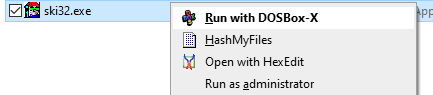
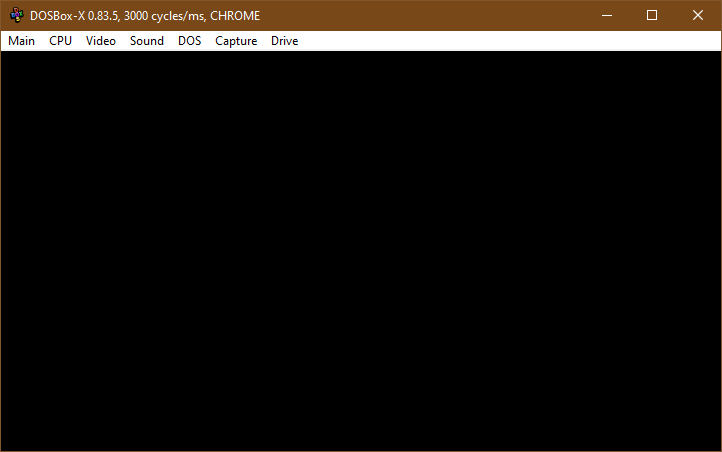
I still believe that we should try understand how some MS programs are effectively protected by such hijacking and try doing the same if possible at all.
aybe
on 16 Sep 2020
Also,
- unless I'm mistaken I think I rewrote your logic properly, please confirm
- I've added two registry files in
.regsas a safe net, you must use install.reg first - i output binary directly in c:dosbox-x for the time being
aybe
on 16 Sep 2020
@aybe I had a look at your rewritten code, which I believe did most of the functions of my code (with minor exceptions such as the icon and the fact it will not keeping existing dosbox-x.exe in the registry even if it exists). However, I am not quite sure what you mean by "now all programs default action are Run with DOSBox...". It is not the case at least on my computer. I have attached a screenshot for this:
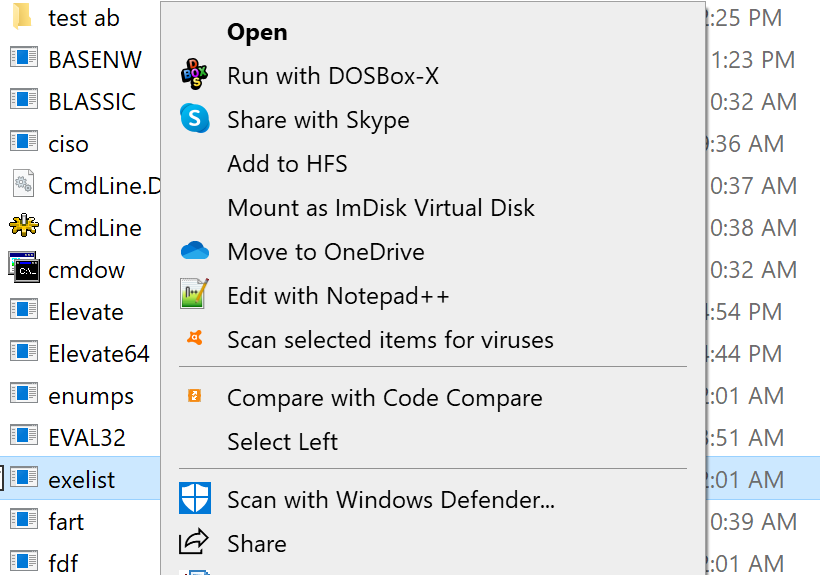
The default action here is still "Open", not "Run with DOSBox-X...". As I result, I have never seen that Win32 programs being launched with DOSBox-X when I double-click the program (or by clicking "Open"). Perhaps you have modified the registry somehow which changed the default behavior?
Wengier
on 17 Sep 2020
Just did the following:
- regscanner for dosbox string
- deleted all relevant ones such as those made by innosetup
- default 'open' is back
- i install the launcher with the reg file
- guess what, something else looks like the default handler but double click does nothing
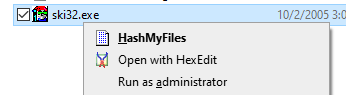
As a precautionary measure:
- never trust a user's registry
- always create a .reg that uninstalls/resets to defaults
So I have my system back to normal but the launcher doesn't work anymore!
aybe
on 17 Sep 2020
@aybe I think what happened is likely the following:
When you installed DOSBox-X with the Windows installer, the context menu "Run with DOSBox-X" was added.
Due to some other changes you made on the system (other registry files etc), the default "Open" option disappears. So the new default becomes "Run with DOSBox-X", which is launched when you double-check the executables.
Now you deleted the context menu previously added by the Windows installer, so "Run with DOSBox-X" also disappears.
After that, the next available option "HashMyFiles" becomes the new default, which will be silently launched when you double-click the executables.
Clearly, the "Run with DOSBox-X" option has nothing to do with the DOSBox-X launcher. It was simply added by the Windows installer previously, not the launcher. If you run the Windows installer again, the "Run with DOSBox-X" option should reappear, but it is not related to the DOSBox-X launcher.
I think the core issue is that why the default "Open" option disappears (I have not seen myself yet). Everything else seems to be normal.
Wengier
on 17 Sep 2020
I didn't do any other changes besides the ones you know about, that is, trying to get a transparent launcher for DOSBOX.
Even though HashMyFiles is in bold, it does nothing at all surprisingly.
And yes, I know that _Run with..._ entry is not related to the launcher.
About the _Open_ entry, it seems that Windows is at work, reappears at some point, maybe it's some fix silently being applied.
All in all, this approach doesn't play well at least in here, luckily I've been able to get back to normal.
Not sure what to do then, see if there's an alternative if any ?
aybe
on 17 Sep 2020
@aybe Just want to know if you have changed any other keys while trying to get the transparent launcher working. For example, in the beginning you were suggesting to change Computer\HKEY_CLASSES_ROOT\.exe, which is admin level. So did you actually change anything like this when you were trying to get it work? Also, I think you only tried .exe files, have you ever checked if .com files work (because while the file association may be broken for .exe for some reason, it may still work for .com)? If nothing works, maybe another approach will be needed.
BTW: I have made some modifications and fixes to the the dosbox-x-launcher in your repository. It is recommended to make it a GUI application rather than a console application.
Wengier
on 17 Sep 2020
@aybe Also, I have tried the launcher in two other Windows 10 computers of mine, and both seem to work too. So it does look a bit weird that it did not work on your computer. Do you have a Windows VM using e.g. VMware? Perhaps you can test it in a virtual machine, which is safer than a real machine.
Wengier
on 17 Sep 2020
When I was doing my tests, I ensured to undo things since it's my main PC.
But yes, it's certainly my machine at fault, I tried to make a new account to see if there were some keys I've botched, reality is, my user account registry is so bloated that it's impossible to tell.
Meanwhile, I'll see if I can get a VM to try things out.
aybe
on 17 Sep 2020
@aybe I have further updated the launcher so that "Run as administrator" should work for executables. Also, I have modified the project file to target .NET 3.5 instead of 4.x, so that it will work in Windows XP as well (tested in a Windows XP VM and confirmed to work).
Wengier
on 17 Sep 2020
@aybe I believe the DOSBox-X Launcher will eventually be incorporated to the Windows installer as an option (perhaps disabled by default), but the requirement for .NET framework is not always desired. So I propose to rewrite the code in C++ in order to avoid such an external requirement. Please let me know what you think. Thanks!
Wengier
on 18 Sep 2020
Ok.
As you handled this case better than I did, I can only say yes, do what you think is best !
aybe
on 18 Sep 2020
@aybe So I have already rewrote the launcher completely in C++. It is now built with Visual Studio 2008 so that it will work even in Windows 2000 (tested and confirmed to work) in addition to Windows XP and later. It is a single executable without the need for external .DLL files. Please check the updated repository. The program and its C++ source code are also downloaded from:
https://github.com/Wengier/dosbox-x-wiki/raw/master/dosbox-x-launcher.zip
Wengier
on 18 Sep 2020
Great !
aybe
on 19 Sep 2020
@aybe Have you set up the test environment already? In any case, I noticed that certain Windows Store apps such as Skype seem to not work with the launcher (the launcher is not even executed in such cases). I am not quite sure how to solve this one.
Wengier
on 21 Sep 2020
Sorry I haven’t, lacking time actually.
As for WSA apps, not surprising, they don’t launch by clicking their executable.
Search for “run windows store app from command line” for a quick overview on how people figured out how to do so.
Then comes how to detect such apps, it appears that these apps always have AppxManifest.xml and AppxSignature.p7x next to them.
From: Wengiernotifications@github.com
Sent: Monday, September 21, 2020 9:14 PM
To: joncampbell123/dosbox-xdosbox-x@noreply.github.com
Cc: aybeaybe.one@hotmail.com; Mentionmention@noreply.github.com
Subject: Re: [joncampbell123/dosbox-x] Could DOSBox possibly handle EXE file type directly in Windows? (#1838)
@aybehttps://github.com/aybe Have you set up the test environment already? In any case, I noticed that certain Windows Store apps such as Skype seem to not work with the launcher (the launcher is not even executable). I am not quite sure how to solve this one.
—
You are receiving this because you were mentioned.
Reply to this email directly, view it on GitHubhttps://github.com/joncampbell123/dosbox-x/issues/1838#issuecomment-696315770, or unsubscribehttps://github.com/notifications/unsubscribe-auth/AALXMN2OJHXJFPNXSXS22TDSG6QYJANCNFSM4RFVHAEQ.
aybe
on 22 Sep 2020
@aybe I think most Windows Store apps do work with the launcher without issues, including many of Microsoft's own apps such as the Microsoft Solitaire Collection. However, Full-Trust UWP apps are exceptions, and UWP apps like Skype, Word, Excel and Access are such examples. It seems that Windows checks for their signatures before launching them, and will refuse to run such apps if the signatures do not match. At this time I am not sure how to overcome this.
Wengier
on 23 Sep 2020
It's unlikely this behavior can be circumvented easily.
I've been trying to understand how ntvdmx64 works, there's a way but it's not pretty and probably overkill.
Writing an alternate ntvdm64.dll shouldn't be too difficult but then comes the usual issues when overwriting Windows' files.
https://github.com/leecher1337/ntvdmx64
https://github.com/otya128/winevdm/issues/526#issuecomment-546747049
https://docs.microsoft.com/en-gb/windows/win32/dlls/secure-boot-and-appinit-dlls
Maybe shelve this idea for the time being ?
aybe
on 27 Sep 2020
@aybe The current launcher almost works. It will really be a good thing if this problem can be overcome, no matter which approach will eventually be used. Other projects such as ntvdm64 and winevdm as you mentioned are facing similar issues as well apparently.
Wengier
on 27 Sep 2020
Just had an idea.
What about trying to use https://github.com/microsoft/Detours to hook into that ntvdmx64 function?
Instead of the default showing a message box, it would start the emulator. Apparently the library has all infrastructure to detect and patch on the fly any calls to win32.
We should take a look at it and see if it's feasible.
aybe
on 29 Sep 2020
@aybe Great find, and it may turn out to be very helpful for the launcher too. Since I had never use Detours before, do you have any sample code or more details about how it may work for our purpose? Thanks!
Wengier
on 29 Sep 2020
Did the initial work such as getting it up and running incl. samples and where are functions of interest in Windows DLLs:
aybe
on 29 Sep 2020
@aybe Great work! I will check it out very soon!
Wengier
on 30 Sep 2020
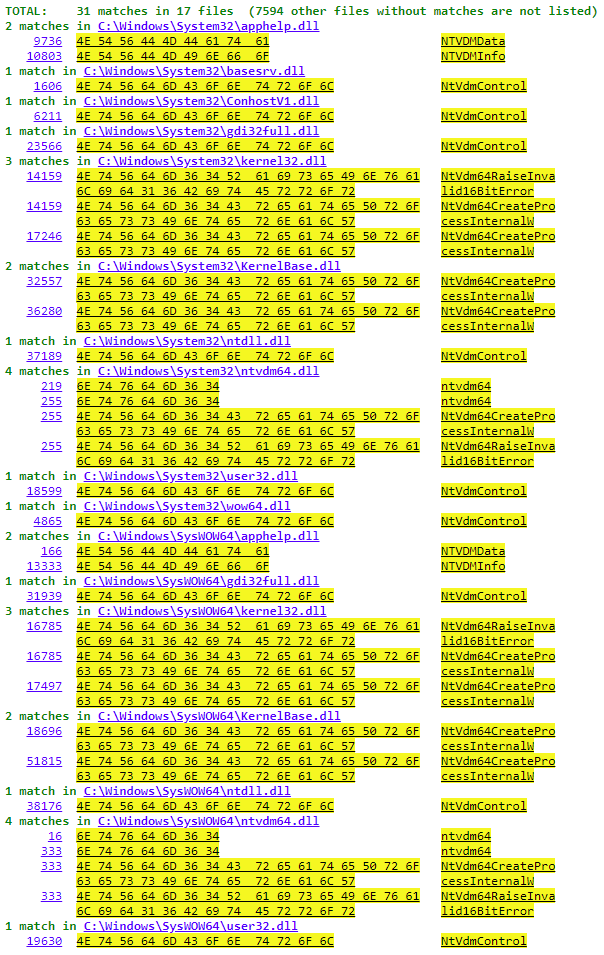
Also, I've added the result of grepping ntvdm\w+ in system32 and syswow64, check html file in repo:
aybe
on 30 Sep 2020
@aybe I had a look in the code. It is certainly very useful to find out the importance of the ntvdm64 function functions like NtVdm64CreateProcessInternalW. At this time I am not entirely sure how big the NtVdm64CreateProcessInternalW function is, but I think a prototype can be found here:
https://github.com/leecher1337/ntvdmx64/blob/master/ntvdmpatch/src/ldntvdm/ldntvdm/ldntvdm.c
I am also very interested in how (and in which file) the message "Unsupported 16-Bit Application" is displayed (when you try to launch a DOS executable in 64-bit Windows without using dosbox-x-launcher). If we could find it out, it can be very helpful to our purpose.
Moreover, I checked the ConsoleApplication1.cpp file in your repository. I think you can get the address of NtVdm64CreateProcessInternalW in ntvdm64.dll as well, but you have to use LoadLibrary(L"ntvdm64.dll") first, or it apparently won't work.
The result from the grepping gives us more ideas how ntvdm64.dll is called by Windows too, which is definitely useful. Which tool did you use to get this result?
Wengier
on 30 Sep 2020
ntvdmx64 is really handy as lot has been figured out in it.
For the message, I suppose it is shown by NtVdmRaiseInvalid16BitError ?
I was looking for the address of one loaded by system, but apparently it isn't.
And the software I used for searching is PowerGREP.
aybe
on 30 Sep 2020
@aybe I could not seem to find any information related to the function "NtVdmRaiseInvalid16BitError" online. But it is possible that this function is used for showing other error messages related to NTVDM, not the one we are looking for. Not really sure at this time unless more information is available.
Also, thanks for letting me know the name of the software, although it seems to be a shareware.
Wengier
on 1 Oct 2020
Yes it is shareware actually...
My idea was to act before executable is said to be invalid, more or less.
I looked a bit and basically this is the call stack:
????????.BasepProcessInvalidImage
Kernel32.RaiseInvalid16BitExeError
NtVdm64.NtVdm64RaiseInvalid16BitError
But BasepProcessInvalidImage is nowhere to be found!
Now searching yields some results:
https://www.google.com/search?q=BasepProcessInvalidImage
https://github.com/leecher1337/ntvdmx64/blob/master/ntvdmpatch/src/ldntvdm/ldntvdm/ldntvdm.c <- 🥇
I guess ntvdmx64 project is our new one stop shop!
(though now I'm wondering why do ntvdmx64 still has to ship patched DLLs...)
aybe
on 1 Oct 2020
I have to say that the more I look at ntvdmx64, the more I am left in the dust, technically it's beyond me ! 😅
While it'd definitely be a nice thing to have, it's not for the faint hearted.
aybe
on 4 Oct 2020
@aybe I think you have already discovered a lot in the direction of Detours and ntvdmx64 recently, which is extremely helpful. Since DOSBox-X 0.83.6 has just been released, I have been cleaning up for the release and thus did not have enough time to do more research on this in the last 3 days. But I will continue to research for this soon! Thanks for your discoveries!
Wengier
on 4 Oct 2020
Thanks @Wengier.
aybe
on 4 Oct 2020
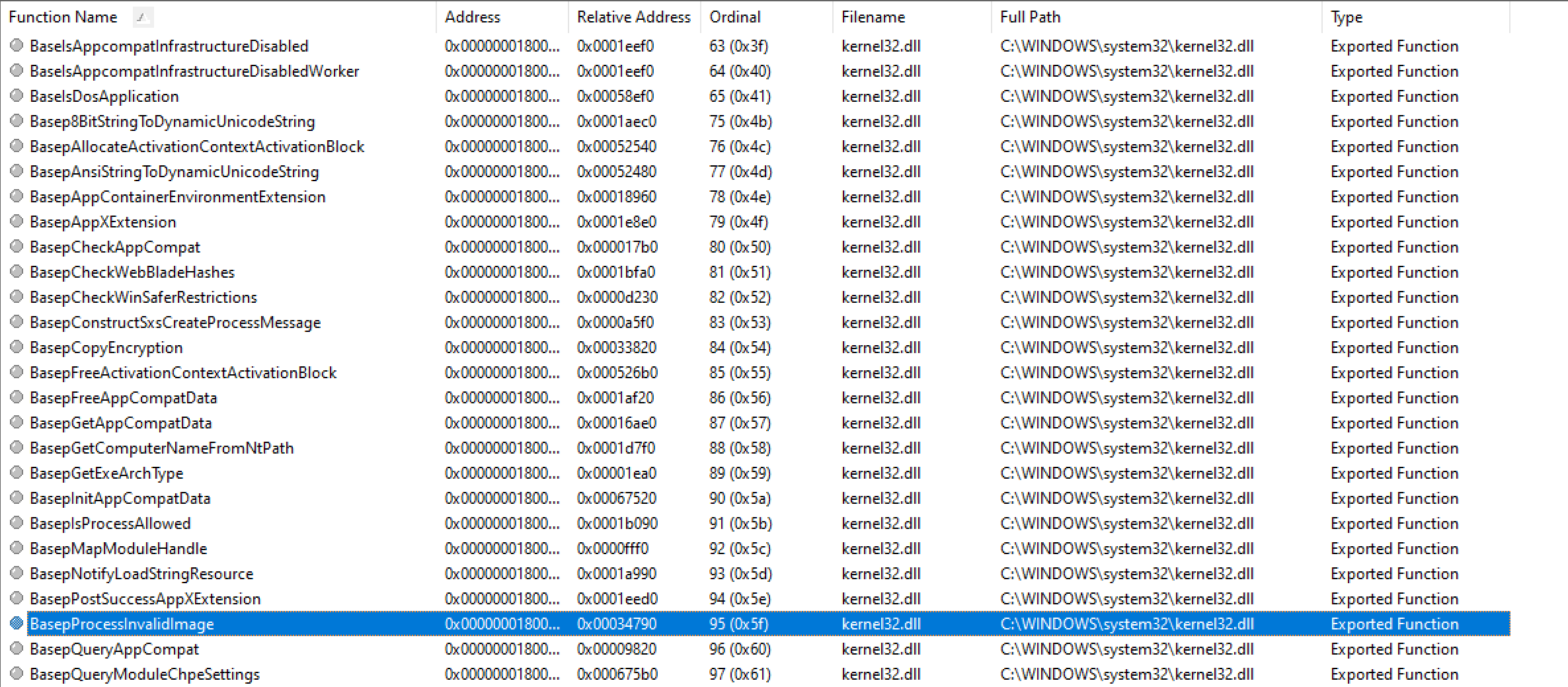
@aybe I have looked into this, and it appears that the function BasepProcessInvalidImage can be found in kernel32.dll:
And I have confirmed that the following code does work:
module = GetModuleHandle(L"Kernel32.dll");
if (module == NULL) {
    std::cout << "Couldn't get module handle, GetLastError is " << GetLastError() << "\n";
    return 1;
}
address = GetProcAddress(module, "BasepProcessInvalidImage");
Moreover, according to NTVDMx64's ldntvdm.c file (https://github.com/leecher1337/ntvdmx64/blob/master/ntvdmpatch/src/ldntvdm/ldntvdm/ldntvdm.c) it seems clear that the BasepProcessInvalidImage function will call the BaseIsDosApplication function (also found in kernerl32.dll as shown above) to check if the executable is a DOS application (BinarySubType = BaseIsDosApplication(PathName, Error)), and it will launch the VDM if it is the case. So I think we can probably use this approach to launch DOSBox-X. What do you think?
Wengier
on 6 Oct 2020
If I understand correctly, ntvdmx64 still register itself as an appinit_dlls in registry because there's no way around it.
So the general logic would be IsDOS = false, IsWin16 = true then the appinit_dll would do the rest.
In the end, I think most of ntvdmx64 logic could be reused, the only hope I had was if it'd be possible without having to replace system files, but as time passes, it seems that it might be an impossible task however.
(the author pretty much nailed it so I believe if he could have done without overwriting system files, he would have done so)
(just a guess)
aybe
on 6 Oct 2020
@aybe Will Detours help in this case to avoid overwriting system files?
Wengier
on 6 Oct 2020
@Wengier Supposedly it should but will it work for such tightly integrated feature in Windows ? I don't know...
aybe
on 6 Oct 2020
@aybe Do you have sample code to show how to actually hook and rewrite Windows functions using Detours? Once it is confirmed to work for other functions this one can be tried too.
Wengier
on 6 Oct 2020
https://github.com/microsoft/Detours/wiki/Samples
https://github.com/microsoft/Detours/tree/master/samples
aybe
on 6 Oct 2020
@aybe I have tested the following sample and it works:
https://github.com/microsoft/Detours/blob/master/samples/simple/simple.cpp
It detours the SleepEx function well. For detouring functions like BasepProcessInvalidImage or BaseIsDosApplication, I think they need to included in some header file for the code to build. If this can be done it may work.
Wengier
on 7 Oct 2020
The function has 19 parameters:
https://github.com/leecher1337/ntvdmx64/blob/f8367595fd4133f66592a804a7d7a216e6b38500/ntvdmpatch/src/ldntvdm/ldntvdm/ldntvdm.c#L234
The only thing I'm wondering is, does Windows have some protection measures on hooking the kernel or not.
aybe
on 7 Oct 2020
@aybe I think perhaps the better question is: does Detours has the power to hook the kernel functions? Perhaps we can check if there is any documentation mentioning this, or if a similar question is already asked in its issue tracker.
Wengier
on 7 Oct 2020
Apparently it works, but from what I understood, you always get a copy in memory of the kernel, you never get to patch the real one. Which makes me think, maybe that explorer shall become a potential target to modify its copy.
aybe
on 8 Oct 2020
@aybe Do you have any sample code showing the progress?
Wengier
on 9 Oct 2020
Sorry no, I don't.
aybe
on 9 Oct 2020
Related issues
 kcgen
·
11Comments
kcgen
·
11Comments
 forthrin
·
11Comments
forthrin
·
11Comments
 maximus105
·
18Comments
maximus105
·
18Comments
 joncampbell123
·
7Comments
joncampbell123
·
7Comments
 rangerxusa
·
13Comments
rangerxusa
·
13Comments