I'm creating this issue because I have absolutely no information on MCGA hardware, nor am I able to obtain any PS/2 systems with MCGA hardware.
If it's not too difficult to do so, I'd like to see future DOSBox-X builds support machine=mcga.
Here's what I know:
- It's an embedded video chipset (on the motherboard) on very old PS/2 systems.
- It apparently supports only text, CGA, 640x480 2-color, and 320x200 256-color modes. It lacks the 16-color planar modes, it seems.
I have no information on I/O port layout or video timing.
Here's what I can guess:
- The memory is probably linear, not planar, with one chip (lack of 16-color modes)
- The I/O ports must resemble CGA in some fashion, if it can still run games written for the CGA
- It might have a bit to divide the dot clock by 2, for the 40-column text and 320-pixel wide graphics CGA modes.
- It might be limited to 64KB of video RAM, considering that all supported video modes require less than 64KB to run.
I have no idea what the other I/O ports must look like since they probably do not resemble EGA/VGA ports in any way.
Anyone have any MCGA technical documentation?
 joncampbell123
All 125 comments
I'm told the old books on EGA/VGA also cover MCGA, however I'm not certain if it does so at the register level (which is what I'm interested in). In any case, I'll leave this issue open as a collection point for MCGA documentation.
joncampbell123
on 21 Jun 2018
https://www.cknow.com/cms/ref/video-display-standards.html
https://www.vogons.org/viewtopic.php?t=29203
https://en.wikipedia.org/wiki/Multi-Color_Graphics_Array
https://files.support.epson.com/pdf/e1e___/e1e___ps.pdf p24
https://en.wiki.ng/wiki/Talk:Multi-Color_Graphics_Array
 aybe
on 21 Jun 2018
aybe
on 21 Jun 2018
The only question these links do not answer is what exactly the I/O port layout looks like.
I imagine that some of it looks like CGA I/O ports, the question is what do the rest look like.
joncampbell123
on 21 Jun 2018
Richard Wilton's book covers MCGA very well, but usually defers to the BIOS calls whenever possible, which was completely understandable (and desirable) back then. Chapter 10 has info on changing fonts, character height, and other stuff with a mixture of BIOS calls and port writes. Chapter 12 has the very interesting information that MCGA is capable of a hardware vertical retrace interrupt on IRQ 2 (and has complete source for a handler). But you probably want to read chapter 2 first, as that covers the ports of MCGA's CRTC.
For anything where he references the BIOS, just grab the BIOS ROM of the IBM PS/2 Model 25 which is guaranteed to have the code for those interrupts. (Don't grab a Model 30 BIOS because there were two models, one with VGA, so it's possible you'll get the wrong one and get confused.)
Given the nature of dosbox-x and doslib, I'm going to assume you don't need help reverse-engineering a BIOS, but give a shoutout if you want help.
 MobyGamer
on 21 Jun 2018
MobyGamer
on 21 Jun 2018
It appears that Microsoft MS-DOS 6.22 Plus Enhanced Tools specifically supports MCGA !? 🥇

See the differences in setup.bat:
:cpcga
call %1\sd6copy cga.grb         %1\dosshell.grb NC %1
call %1\sd6copy cga.ini         %1\dosshell.ini NC %1
call %1\sd6copy cga.vid         %1\dosshell.vid NC %1
goto cpddone

:cpvga
call %1\sd6copy vga.grb         %1\dosshell.grb NC %1
call %1\sd6copy ega.ini         %1\dosshell.ini NC %1
call %1\sd6copy vga.vid         %1\dosshell.vid NC %1
goto cpddone

:cpmcga
call %1\sd6copy vga.grb         %1\dosshell.grb NC %1
call %1\sd6copy cga.ini         %1\dosshell.ini NC %1
call %1\sd6copy cga.vid         %1\dosshell.vid NC %1
goto cpddone

...
DOSSHELL supports MCGA? Good! I have some MS-DOS 6.22 disk images lying around to try just that.
joncampbell123
on 22 Jun 2018
I still don't have a whole lot of information, but I have a copy of "Programmer's Guide to the EGA, VGA, and Super VGA cards" that mentions the MCGA in brief.
It still doesn't provide specifics but it refers to the MCGA as a superset of CGA. So, all 16 I/O ports (or CRTC registers?) are downward compatible with CGA, but the mode timings are different. So it's like CGA, but it has the VGA style "protect bit" in the mode control register. So it has CRTC registers that don't exist in CGA.
So, either MCGA is a superset of CGA hardware with 640x480 2-color and 320x200 256-color tacked on, or, it's just VGA hardware that's missing the bitplane display and ROP logic needed for 16-color modes.
joncampbell123
on 22 Jun 2018
If you plan to support MCGA then basically you plan to have a new machine type ps2 as well ?
😃
aybe
on 22 Jun 2018
PS/2 is too similar to PC/AT to bother, but I do plan on adding machine=mcga.
joncampbell123
on 22 Jun 2018
So, either MCGA is a superset of CGA hardware with 640x480 2-color and 320x200 256-color tacked on, or, it's just VGA hardware that's missing the bitplane display and ROP logic needed for 16-color modes.
If what I've been reading about the hardware is anything to go by then I really doubt it's a stripped down VGA (in fact, it feels more like it was the opposite and mode 13h was tacked onto VGA to make it compatible with MCGA programs). MCGA was never its own discrete card, it was simple video hardware on the PS/2 motherboard itself (with the 8514/A support being provided by a discrete video card that took over when enabled). Including all of VGA and removing stuff sounds like it'd be quite cumbersome.
So I'd place my bets on it being a modified CGA. Probably won't know for sure without probing an actual PS/2 though.
 sikthehedgehog
on 22 Jun 2018
sikthehedgehog
on 22 Jun 2018
@sikthehedgehog Could it be a CGA with a VGA-like CRTC controller? The original CGA had to interleave scanlines in graphics modes because the 6845 couldn't count up to 200 scan lines, yet the MCGA 640x480 mode is non-interleaved 1 bit/pixel mode.
There's also mention of having the same "protect" bit on the MCGA as the VGA hardware to protect against older DOS programs that directly program video hsync/vsync parameters.
I'm also guessing that the monitor that shipped with MCGA is the VGA type of monitor that's probably designed for 400-line or 480-line modes, so the "max scanline" and "doublescan" bits are probably there as well.
I've also heard that the MCGA also had the BIOS functions to set the font in alphanumeric text mode. Even if the CRTC is a CGA-like 6845, I suppose someone at IBM could replace the circuitry originally tied to ROM chips and connect it to what would be bitplane #2 (the 3rd 64KB RAM chip).
I bring up the possibility of a cut-down VGA because (from experience with programming hardware) it's actually quite common for hardware manufacturers to design their product, then release lower cost versions where parts of the circuit are disabled, masked out, or removed. The Wikipedia article for PS/2 mentions MCGA existing on the low-end 8086 systems. That's what makes me wonder if MCGA is just VGA with 64KB of video RAM and the planar 16-color circuitry removed/disabled.
joncampbell123
on 22 Jun 2018
Try to think like a business for a second: Product differentiation. There's the product, then there's the low-end model to make it affordable to people who wouldn't otherwise buy your product at the normal price. To make the low-end model possible, you need to cut or scale back features and parts. Use a lower-end CPU, less RAM, less video RAM, use lower-end versions of the same chipsets. If you make the chipsets, then you use versions of your own where non-crucial features (according to you, anyway) are removed. Don't put too much effort into it, because the actual product takes priority, and besides, the low end model might be discontinued in a few years when technology improves to the point of making the low end model impractical.
Or something like that. Every business has it's variations of this, and mistakes too.
joncampbell123
on 22 Jun 2018
@sikthehedgehog Another possibility is that the MCGA might be the CGA, with VGA parts. It might be CGA circuitry with the CRTC and the DAC of a VGA. It might have the "divide by 2" clock bit of a VGA to permit 320 and 640 pixel/row modes, but not the clock selection to enable 720 pixel/row (hercules) compatible modes. It might have the doublescan bit of the VGA so that all modes display properly on a VGA monitor at 400/480-line resolution. Finally, it might have some magic bit somewhere that switches on the 256-color mode. It might be the same bit as actual vga: http://www.osdever.net/FreeVGA/vga/graphreg.htm
It would have to be a VGA-like CRTC because the 6845 on the original CGA can't count enough scanlines for a 640x480 monochrome format (not without interleaving scanlines). Remember that CGA and Hercules graphics modes had interleaved scan lines because of that.
The 640x480x1 and 320x200x256 modes are not interleaved like that.
The divide by 2 dot clock thing could be turned off for text mode and 640x480x1 graphics, and turned on for CGA graphics and 320x200x256 mode.
Doublescan would permit 200-line CGA modes to display on a VGA monitor, and the 200-line 256-color mode.
Anyone who has a PS/2 with MCGA is welcome to boot up MS-DOS with DEBUG and poke at I/O ports 3C0-3DF to help answer these questions :)
joncampbell123
on 22 Jun 2018
Actually, even better: A dump of the BIOS on a PS/2 with MCGA would help as well!
joncampbell123
on 22 Jun 2018
Here's the diff between cga.ini and ega.ini:
:cpcga
call %1\sd6copy cga.grb         %1\dosshell.grb NC %1
call %1\sd6copy cga.ini         %1\dosshell.ini NC %1
call %1\sd6copy cga.vid         %1\dosshell.vid NC %1
goto cpddone

:cpega
call %1\sd6copy ega.grb         %1\dosshell.grb NC %1
call %1\sd6copy ega.ini         %1\dosshell.ini NC %1
call %1\sd6copy ega.vid         %1\dosshell.vid NC %1
goto egainst

:cpvga
call %1\sd6copy vga.grb         %1\dosshell.grb NC %1
call %1\sd6copy ega.ini         %1\dosshell.ini NC %1
call %1\sd6copy vga.vid         %1\dosshell.vid NC %1
goto cpddone

:cpmcga
call %1\sd6copy vga.grb         %1\dosshell.grb NC %1
call %1\sd6copy cga.ini         %1\dosshell.ini NC %1
call %1\sd6copy cga.vid         %1\dosshell.vid NC %1
goto cpddone
*** C:/Users/Aybe/Desktop/CGA.INI   Tue May 31 06:22:00 1994
--- C:/Users/Aybe/Desktop/EGA.INI   Fri Jun 22 18:48:40 2018
***************
*** 15,21 ****
  ***********************************************
  [savestate]
  screenmode = text
! resolution = low2
  startup = filemanager
  filemanagermode = shared
  sortkey = name
--- 15,21 ----
  ***********************************************
  [savestate]
  screenmode = text
! resolution = low
  startup = filemanager
  filemanagermode = shared
  sortkey = name
Hey, guys, is this thing on? I already posted above that Richard Wilton's book already has the full lowdown on what MCGA is and isn't. It has capabilities and ports and font ram details and the hardware video retrace interrupt and everything you need to start emulation. If you need a copy of the book, pick it up from ftp://ftp.oldskool.org/pub/misc/xtfiles.rar and look in xtfiles.rar\xtfiles\developr\PROGRAM\CGA\INFO\PCVIDEO for the complete book.
There's a lot of incorrect assumptions flying around in the thread, so I'd highly recommend reading Wilton's reference before guessing any further. And yes, DOSSHELL supports MCGA's 640x480x2 mode, if memory serves.
MobyGamer
on 23 Jun 2018
@MobyGamer I hear you. I don't have those books yet but I just ordered a copy.
joncampbell123
on 23 Jun 2018
Electronic copy in my prior message.
When it comes to emulating MCGA, I'm not sure anything ever used the hardware VINT so that might have to be something programmed and tested on a real PS/2 Model 25 first. Also, I'm not actually sure if/how games detected MCGA (and differentiated it from VGA). This is another good piece of code to swipe from Wilton's book, as he has a very good detection routine based on using the BIOS first, then falling through to testing individual ports.
MobyGamer
on 23 Jun 2018
It came!
Now I can stop guessing and log more informative information here.
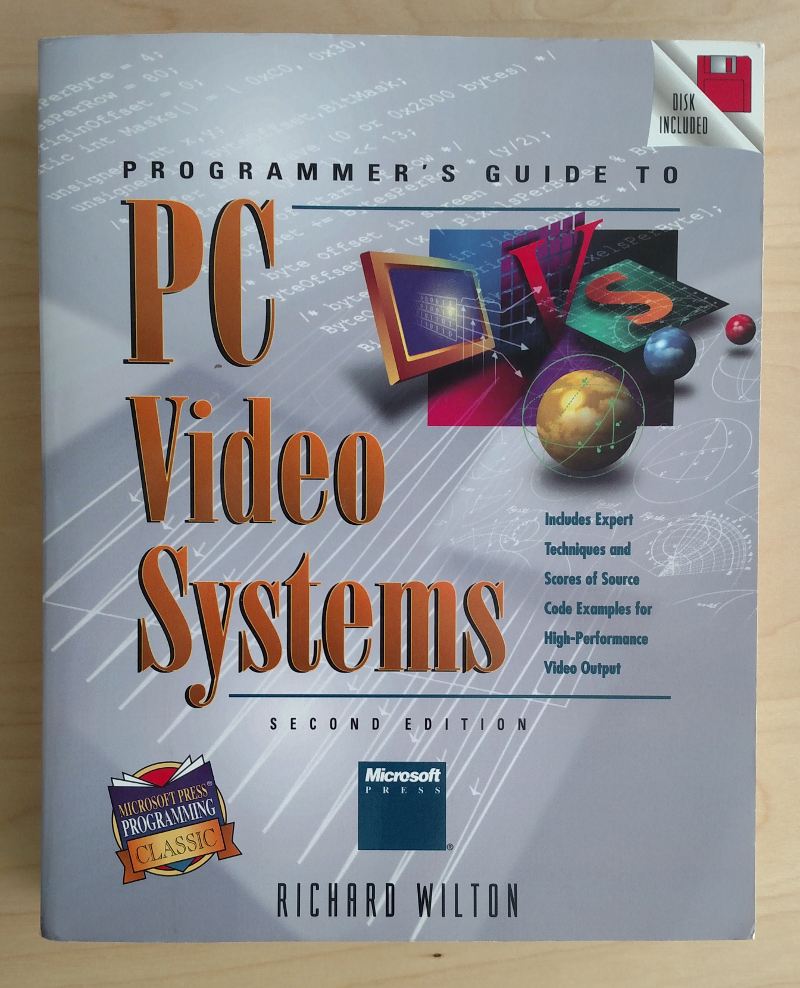
This is the 1994 version, according to the copyright date.
joncampbell123
on 25 Jun 2018
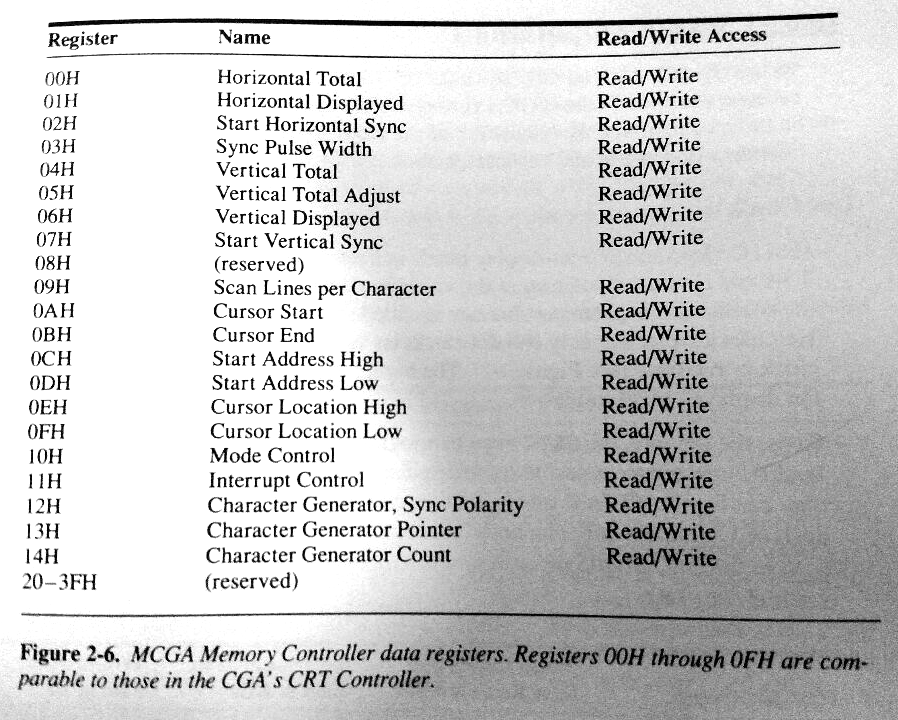
MCGA is not mentioned much in this edition, however I pulled out a copy of "PC & PS/2 video systems" that mentions it.
It even mentions the CRTC register map!
joncampbell123
on 26 Jun 2018
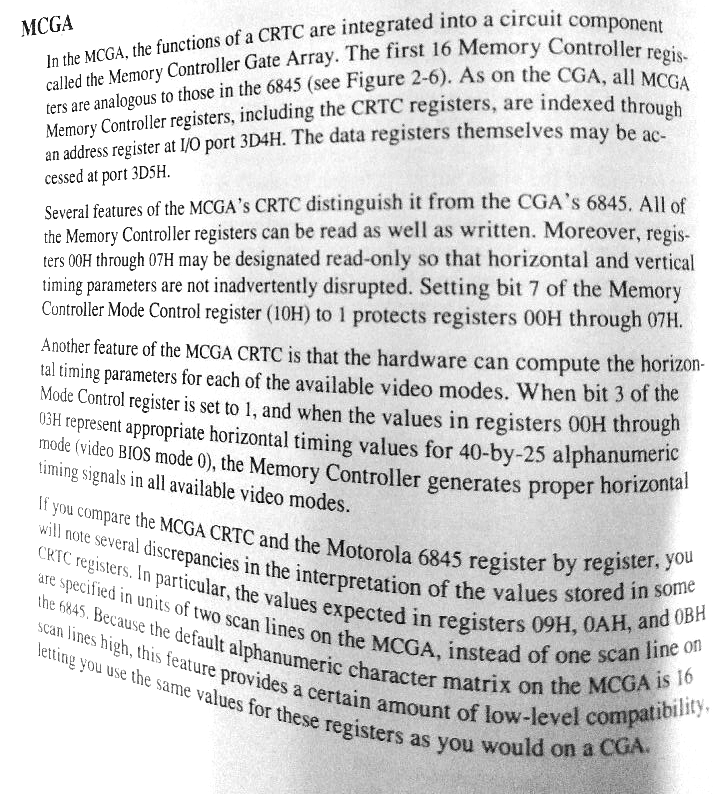
Also according to the book:
- CRTC registers are 3D4h-3D5h
- CRTC (or Memory Controller?) registers are readable
- CRTC registers 0 to 7 can be made read-only (just like VGA). The lock bit is in register 10h bit 7, instead of register 11h bit 7 on VGA. (Did the author make a mistake?)
joncampbell123
on 26 Jun 2018
joncampbell123
on 26 Jun 2018
It has a Mode Control register, with the same bit layout as CGA EXCEPT that the "color burst disabled" bit changes meaning (bit 2).
bit 2:
- 1=foreground color from video DAC register 7
- 0=foreground color from the video DAC register specified in bits 0-3 of the palette register 3D9h
BIOS mode vs Mode Control register
- Mode 0x00 = 40x25 alpha (mono) Mode Control = 0x2C (0x28 on MCGA)
- Mode 0x01 = 40x25 alpha Mode Control = 0x28
- Mode 0x02 = 80x25 alpha (mono) Mode Control = 0x2D (0x29 on MCGA)
- Mode 0x03 = 80x25 alpha Mode Control = 0x29
- Mode 0x04 = 320x200 4-color graphics Mode Control = 0x2A (0x0A on MCGA)
- Mode 0x05 = 320x200 4-color graphics (mono) Mode Control = 0x2E (0x0A on MCGA)
- Mode 0x06 = 640x200 2-color graphics Mode Control = 0x1C (0x18 on MCGA)
- Mode 0x07 = 80x25 alpha MDA only Mode Control = 0x29 (not possible on MCGA)
- Mode 0x11 = 640x480 2-color graphics Mode Control = 0x18 on MCGA
- Mode 0x13 = 320x200 256-color graphics Mode Control = 0x08 on MCGA
joncampbell123
on 26 Jun 2018
Additional mode control registers:
- CRTC register 0x10 - Memory Controller Mode Control
- I/O port 0x3DD - Extended Mode Control Register
joncampbell123
on 26 Jun 2018
MCGA Memory Controller Mode Control Register (CRTC index 0x10)
- bit 0: 1=select 320x200 256-color mode, 0=(all other modes)
- bit 1: 1=select 640x480 2-color mode, 0=(all other modes)
- bit 2: reserved
- bit 3: 1=horizontal timing parameters computed in hardware for video mode, 0=horizontal timing parameters as specified in registers 0x00-0x03
- bit 4: 1=enable dot clock (should always be 1)
- bit 5: reserved
- bit 6: Inverse of bit 8 of Vertical Displayed Register (0x06)
- bit 7: 1=write protect registers 0x00-0x07, 0=allow writing registers 0x00-0x07
joncampbell123
on 26 Jun 2018
"An extended mode control register is mapped to I/O port 3DDH. This register is only used during machine coldstart; it has no practical use in application programs."
EDIT: According to register snapshots, it reads back 00h in all modes except mode 13h 320x200 256-color mode where it reads back 04h.
joncampbell123
on 26 Jun 2018
The MCGA's 64KB video buffer is mapped to A000:0000 and A000:FFFF.
The second 32KB, starting at A800:0000, also maps to the CGA video buffer address range B800:0000 to B800:7FFF.
CPU access to the MCGA;s video buffer and I/O ports can be disabled by setting bit 2 of the system board control port at I/O port 0x65 to zero.
There is an INT 10h call to do this as well.
AH = 0x12 (INT 10h function)
AL = 1 (disable addressing), or 0 (enable addressing)
BL = 0x32 (subfunction)

mov  ah,12h
mov  al,1
mov  bh,32h
int  10h
cmp  al,12h
jne  ErrorExit
The MCGA has a DAC mask register (0x3C6) that works the same as it does on VGA.
joncampbell123
on 26 Jun 2018
Cursor start and end are handled as if CGA and doubled in hardware for the video output (200 to 400 line conversion)
joncampbell123
on 26 Jun 2018
Cursor start/end is said to be 4 bits large, not 5 bits as is documented by FreeVGA.
joncampbell123
on 26 Jun 2018
There are consistent references to a 256-color DAC and mapping CGA compatible modes through it.
There is no definite confirmation yet that the palette DAC works on the same I/O ports as VGA (ports 3C7h-3C9h).
joncampbell123
on 26 Jun 2018
The default MCGA palette is described in a way that effectively matches the same given in VGA 320x200x256 mode.
joncampbell123
on 26 Jun 2018
CRTC register 0x11 is the Interrupt Control register.
Clear bit 5 to enable interrupts.
Clear bit 4 to acknowledge the interrupt so another can happen.
Read bit 6 to determine if an interrupt has occurred.
joncampbell123
on 26 Jun 2018
MCGA memory is NOT planar.
CGA compatible video memory is in the second 32KB of video memory (B800:0000 to B800:7FFF), and the font RAM is in the first 32KB of video memory (A000:0000 to A000:7FFF) which can hold 4 8KB font definitions (which probably means 256 8x32 font bitmaps).
joncampbell123
on 26 Jun 2018
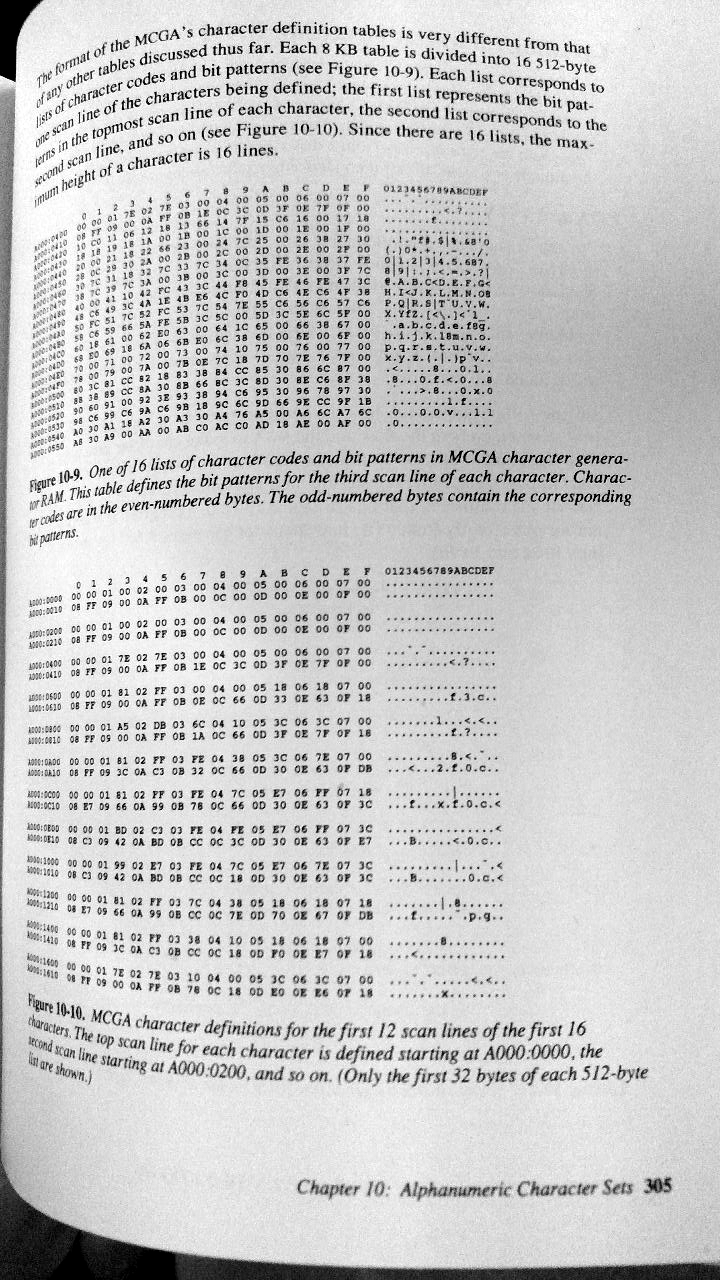
Actually the MCGA font RAM is very unusual.
It's defined as 16 x 512-byte "lists of character codes and bit patterns". Each list corresponds to one scan line of each character.
Each "list" is 256 characters, one scan line each interleaved with the character code it belongs to (why?).
First scan line at A000:0000, second at A000:0200, third at A000:0400, so on.
The maximum height is 16 lines.
joncampbell123
on 26 Jun 2018
A picture of the page can explain it better:
joncampbell123
on 26 Jun 2018
@MobyGamer Officially, a DOS program can detect EGA, VGA, and MCGA by two INT 10h calls.
One to detect EGA:
http://www.ctyme.com/intr/rb-0162.htm
One to then detect MCGA/VGA:
joncampbell123
on 26 Jun 2018
There's confirmation, only from a snippet of FractInt source code so far, that the MCGA may have the same palette DAC registers (3C8h-3C9h) as the VGA (doesn't confirm the existence of 3C7h though).
joncampbell123
on 26 Jun 2018
Additional confirmation that FractInt is in fact aware that the card is VGA or MCGA at that point:
joncampbell123
on 26 Jun 2018
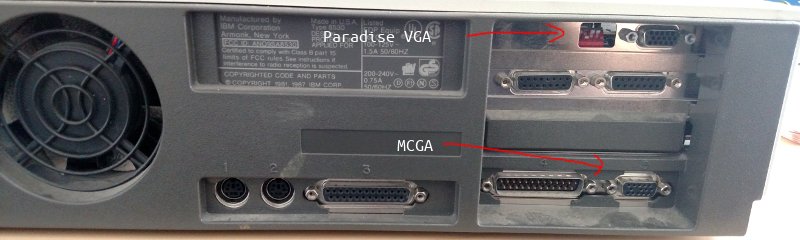
Good news,
I now have real hardware with MCGA video to develop and validate against.
I can tell it's MCGA by the fact that the eBay seller (or previous owner) had installed a Paradise VGA card to get proper video, giving the backside two visible VGA connectors.
Note the bottom VGA connector is too low to come from any ISA card because the ISA riser card doesn't go that low. It's at motherboard level.
joncampbell123
on 23 Aug 2018
I wasn't aware that was possible given that MCGA and VGA share address space in the A000-BFFF range. This is a PS/2 Model 30 (8086), yes? You may want to completely remove the VGA card for your testing.
MobyGamer
on 24 Aug 2018
As far as I know, the BIOS is designed to detect and use a VGA card if it sees it, or fallback to the MCGA hardware. It won't use both at the same time, that's impossible.
Of course I'm going to remove the VGA card! I'm only showing the state that it arrived. It might find a good home in another old PC.
This is a Model 30 8086 model, yes. The 8086 model is documented to have MCGA. I already have the 286 model with VGA.
joncampbell123
on 24 Aug 2018
Also, IBM PS/2 documentation mentions a bit in port 65h that enables/disables MCGA memory and I/O port resources.
joncampbell123
on 24 Aug 2018
That makes more sense. Both of those (a bit that disables MCGA, and a BIOS that knows about it) is required to make this work. You can't do that kind of thing in earlier systems.
MobyGamer
on 24 Aug 2018
Apparently with the Paradise VGA card in, the BIOS will still turn on the MCGA output, but the MCGA output will stay blank.
Taking the PVGA out allows the display to start normally.
I can tell by the chunky cursor that this is MCGA.
Trying various INT 10h modes with DEBUG.EXE shows a refusal to accept any mode other than 0x00 through 0x06 inclusive, 0x11, and 0x13.
Apparently if you power on the unit without a monitor attached, then attach a VGA monitor, it will output 200-line VGA, which my LCD display doesn't like.
joncampbell123
on 24 Aug 2018
In addition to the two 720K 3.5" drives, there's also a 3.5" SCSI drive in the unit, along with a SCSI card. I can tell by the big wide ribbon cable it's 50-pin SCSI.
It looks like a really old hard drive, but it still works, and it boots into MS-DOS 5.0.
I like that, because there are adapters you can buy that allow you to connect micro SD cards to 50-pin SCSI.
The ability to load new code onto the hard drive using only a SD card reader and my laptop would be very helpful.
joncampbell123
on 24 Aug 2018
Finally, the unit had a "Suncom" card with two unknown 15-pin (not VGA, just two rows) D-sub female connectors on the card. There's nothing on the card to indicate what it does. Anyone know?
joncampbell123
on 24 Aug 2018
In case you think it might be something proprietary, a "SCSI BIOS" makes itself known at boot time to confirm that it sees a drive, before booting from it.
joncampbell123
on 24 Aug 2018
Video memory map (Mode 3):
A0000-A7FFF: Font RAM (looks just like the memory dump in the PS/2 book)
A8000-AFFFF: Alias of B8000-BFFFF
B0000-B7FFF: Nothing (FF)
B8000-BFFFF: Alphanumeric text (CGA compatible)
joncampbell123
on 24 Aug 2018
Unlike CGA, BC000-BFFFF is not a 16KB alias of B8000-BBFFF
joncampbell123
on 24 Aug 2018
Just like the PS/2 book shows, A0000-A7FFF is byte pairs, with the character value and one row of the font.
However scribbling on it with DEBUG.EXE doesn't seem to cause any visible change to the display so far.
EDIT: It can't be a latch that locks out writing, because reading back what I scribbled in that region shows the bytes made it to video RAM there. Hm...
joncampbell123
on 24 Aug 2018
Also, there is no VGA BIOS or any kind of BIOS whatsoever at C000:0000.
joncampbell123
on 24 Aug 2018
I'm having difficulty connecting the MCGA output to my VGA capture card. The VGA connector is one of those types where unused pins are blocked off in the connector, requiring the use of an older VGA cable that's missing those pins. Naturally all my VGA capture cards have male connectors with all 15 pins present.
I was finally able to arrange capture by connecting the old VGA cable to a VGA-DVI adapter and then connect the DVI end to the capture card.
joncampbell123
on 24 Aug 2018
VGA DAC-like ports do exist on the card.
3C6h: PEL mask (just like VGA)
3C7h: Read index/status
3C8h: Write index
3C9h: DAC R/G/B data
EDIT: If you're wondering, yes, they affect 80x25 text mode just like they do on VGA. Changing DAC index 7 affects anything light gray on the console.
joncampbell123
on 24 Aug 2018
However, 3D8h changes mode just like CGA.
joncampbell123
on 24 Aug 2018
"An extended mode control register is mapped to I/O port 3DDH. This register is only used during machine coldstart; it has no practical use in application programs."
Apparently, it reads 0x00 normally.
Writing 0xFF turns 80x25 text mode into meaningless colorful blocks.
Writing 0x00 doesn't undo that (EDIT: Actually, it only didn't work because typing blind, I made a typo). But "MODE CO80" can undo it.
joncampbell123
on 24 Aug 2018
VGA DAC mapping acts as if there is absolutely no attribute controller palette at all.
If you write to 80x25 text mode something with attribute 0x0F (bright white on black), then change DAC index 0x0F, anything bright white will change color.
This is unlike standard VGA, where you have to change DAC index 0x3F (because of EGA-compatible attribute controller mapping) to affect bright white.
joncampbell123
on 24 Aug 2018
CGA 4-color mode acts as if the hardware first converts the 2-bit value to a 4-bit RGBI value, THEN sends it through the DAC.
For example, 320x200x4-color mode with the black-cyan-magenta-white palette (full brightness), you can affect the cyan color by modifying DAC index 0x0B.
joncampbell123
on 24 Aug 2018
Likewise for CGA 640x200x2-color, pixels are mapped to either DAC index 0, or DAC index 15.
joncampbell123
on 24 Aug 2018
MCGA 640x480x2-color mode acts the same. DAC index 0, or DAC index 15.
joncampbell123
on 24 Aug 2018
In CGA 640x200 and MCGA 640x480, I was able to turn the screen red by changing DAC index 15, then turn it light gray by writing 0x07 to port 3C6h (PEL mask).
joncampbell123
on 24 Aug 2018
"you can affect the cyan color by modifying DAC index 0x0B" Yes, some games did this to have the speed of CGA but with a slightly nicer color palette. This will have to be emulated.
MobyGamer
on 24 Aug 2018
In MCGA 320x200x256-color mode, B0000 still does not map to anything (0xFF) but B8000 is still an alias of the last 32KB half of video memory at A0000-AFFFF.
joncampbell123
on 24 Aug 2018
I'm getting the impression that MCGA is hard-wired to map 64KB of memory from A0000-AFFFF and alias the last 32KB at B8000-BFFFF regardless of video mode.
joncampbell123
on 24 Aug 2018
@MobyGamer That's easy enough. I should undo the CGA-MCGA hackery I've made in DOSBox-X and remap it to alias the VGA emulation somewhat.
joncampbell123
on 24 Aug 2018
By the way the previous owner left a shitload of old DOS games lying around the hard drive, including Duke Nukum and Commander Keen. Those wouldn't run with MCGA of course, but remember the previous owner installed a Paradise VGA card for a reason :)
joncampbell123
on 24 Aug 2018
I just noticed the molex connector to the SCSI hard drive comes from the SCSI ISA card, not the power supply. Can you do that??
joncampbell123
on 24 Aug 2018
I just removed the hard disk from the PS/2 and plugged it into a separate Linux system that has a SCSI host card. Linux can see it just fine, "dd" shows a read speed of about 230KB/sec. The hard disk is 83MB according to Linux.
joncampbell123
on 24 Aug 2018
Of course, 'dd' is writing to a USB pen drive, so perhaps the actual throughput may be higher.
joncampbell123
on 24 Aug 2018
Jill of the Jungle on this system doesn't work with MCGA because it uses VGA mode X tricks. But you can see a tiny version alternating between the top and bottom of the screen. You'll have to use the CGA mode.
joncampbell123
on 24 Aug 2018
Unlike CGA, MCGA lets you read back port 3D8h and 3D9h.
joncampbell123
on 24 Aug 2018
The offset CRTC register works differently than VGA for 256-color mode.
On VGA: The 16-bit offset register is a byte offset into the planar memory, and treated as a multiple of 4.
On MCGA: The 16-bit offset register is a word offset, and effectively a multiple of 2. MCGA memory is 64KB, so offset 0x0000 and 0x8000 result in the same display.
joncampbell123
on 24 Aug 2018
MCGA modes (except 640x480) are 70Hz.
joncampbell123
on 24 Aug 2018
If your code counts scanlines, you will only count 200 active scanlines on MCGA even though the raster going to the monitor has 400 lines, in 256-color mode.
Copper bar effects (with the color palette) are possible as long as you adjust your code to that fact.
joncampbell123
on 24 Aug 2018
Copper bar effects do NOT work in 640x480x2-color mode, though DAC changes do take effect at the start of frame (??)
Could MCGA mode 0x11 (640x480x2-color) be the one and only video chipset to latch DAC colors at active start and not allow changes mid-frame?
joncampbell123
on 24 Aug 2018
They do work in CGA graphics modes, though, including the 80x25 and 40x25 text modes, though they still count as if 200-line modes despite the 400-line output.
joncampbell123
on 24 Aug 2018
I/O ports 3D0-3D7 are aliases of 3D4-3D5, same as CGA
joncampbell123
on 24 Aug 2018
There is nothing at 3C0-3C5, 3CA-3CF.
There is something at 3DEh.
The MCGA appears to decode all 16 bits of the I/O address. There are no aliases every 10 bits as there would be on the ISA bus.
joncampbell123
on 24 Aug 2018
I want to clarify my comments.
Not only does the hardware emulate port 3DAh as if a 200-line mode, changes to the DAC appear to take effect only every other line as well (except 640x480x2-color mode, where it takes effect only at the start of active display).
The only hardware state that is not affected by the line doubling is the DAC "noise" that happens when you write to port 3C9h during active display.
If that were not the case, the random jitter at starting the copper effect would have fallen between the doubled lines. However, they always fell on an even scan line (as seen on my capture card anyway).
joncampbell123
on 24 Aug 2018
Since all CRTC registers are readable on MCGA, I'll whip up something to run through INT 10h modes and take snapshots of the CRTC registers in each mode.
I'm not certain what the dot clock rate is on MCGA. It can't be just double CGA because all modes come out at VGA standard 70hz 400-line (except 640x480). As far as I know the MCGA lacks the 9-pixel/clock mode of VGA, so it might be the same as the 25MHz clock on VGA.
joncampbell123
on 24 Aug 2018
Did you ever read Richard Wilton's book? I think some of this is covered, including the phenomenon of how it is double-scanned.
MobyGamer
on 24 Aug 2018
I did, references are farther up this list.
My recent comments are there to confirm that is in fact what the hardware does (rather than take the book's word for it as gospel).
Writing a "copper bar effect" to change the palette per scanline shows that, despite the 400-line raster going out to display, the code is only able to change once every other line.
joncampbell123
on 24 Aug 2018
MCGA rendering TODO [DONE]:
- Text mode is now rendered at 32bpp through the DAC like the VGA emulation does
- CGA 2-color mode ported
- CGA 4-color mode ported
joncampbell123
on 24 Aug 2018
machine=mcga 320x200 256-color mode and 640x480 2-color mode are implemented.
MCGA Mode Control (CRTC register 0x10) is implemented.
Most of the modes so far operate as a superset of CGA, including the 200-line rendering in DOSBox-X.
Code is in place to count scanlines as if CGA 200-line, but double-step the VGA draw line functions to produce 400-line output. So far, the only emulation to do this is the 640x480 2-color mode.
Yet to do:
- Alphanumeric text modes need to double-scan and render the text as 8x16 instead of continuing to use CGA-mode 8x8 rendering [DONE]
- Cursor emulation needs to render according to CGA-like cursor start/stop values, doubled to 400-line mode, just like real hardware. [DONE]
- CRTC register snapshot program to see what is actually programmed into the MCGA for each mode. DOSBox-X so far operates on the assumption that all modes are programmed as if 200-line CGA. Perhaps 640x480 2-color mode has a few surprises. [DONE]
- Check MCGA palette errors with "Night Shift" when the game is fading in/fading out. Either it's something that happens on real hardware or DOSBox-X is mis-emulating it. [FIXED]
joncampbell123
on 25 Aug 2018
It seems that Sierra's port of Thexder, and Rockford (two of the earliest games with MCGA support) couldn't switch to graphics mode in current MCGA emulation of Dosbox-X. @joncampbell123
 yksoft1
on 25 Aug 2018
yksoft1
on 25 Aug 2018
They have to use the BIOS to switch to mode 0x13 (320x200 256-color mode).
If they switch to a mode not supported by MCGA, then the graphics mode will not change. Look at the console output or log output, INT 10h may be logging an attempt to set an unsupported mode.
It's possible you have to configure the game to use MCGA graphics, it may be trying to use EGA graphics.
joncampbell123
on 25 Aug 2018
MCGA has CGA-like circuitry with a VGA-like DAC. It lacks the ability to do 16-color EGA/VGA modes. It can only do CGA compatible modes 0x00-0x06, 640x480 2-color mode 0x11, and 320x200 256-color mode 0x13.
joncampbell123
on 25 Aug 2018
If you want to force Thexder to run MCGA (I don't know what it uses as the detection method, probably looking up the PS/2 Model 25 or 30 model byte), then from https://trixter.oldskool.org/2017/10/01/the-first-256-color-game-on-the-ibm-pc/ there is this: "you can force MCGA graphics to kick in by making a copy of your disk and then copying MAINPS to MAINEG, which will replace the EGA graphics code with the MCGA graphics code."
MobyGamer
on 25 Aug 2018
I just wrote a DOSLIB program to snapshot the MCGA registers in each mode.
Note that unlike the original CGA/MDA hardware, all registers are readable on MCGA.
The horizontal/vertical CRTC parameters are surprisingly consistent across all modes. They all describe 200-line CGA modes (which are doubled to 400-line VGA in hardware), except mode 0x11 where only the vertical timing registers change to make 480-line VGA (640x480 2-color mode).
In fact, the horizontal/vertical timings are the same even between 40x25 and 80x25 text mode, where on CGA the horizontal timing parameters would be doubled for the 80x25 text mode.
joncampbell123
on 26 Aug 2018
At the time of the snapshot, the character RAM area A0000-A7FFF seemed very empty compared to what it should have been.
I'm starting to wonder if it's not really the character generator font RAM but some weird scratch space used by the BIOS for setting up the font RAM during modesetting. As stated before, scribbling on that area doesn't cause any visible changes to the alphanumeric characters on the display.
Perhaps the author of the PS/2 video subsystem book listed above only thought it was character RAM, when it's not.
I thought it seemed rather weird that MCGA would supposedly read character RAM by "lists" interleaved with the character code it belongs to.
Or, it could be character RAM, but you have to write to it in a special way to trigger a change in font on display.
It's entirely possible the A0000-A7FFF region is just junk data left over from the BIOS and that font RAM, if it can be changed, might be programmed through an I/O port (making it something like how PC-98 programs read the font ROM).
joncampbell123
on 26 Aug 2018
In any case, I also have a snapshot of that PS/2 system's ROM BIOS on Hackipedia as well, so it can be examined to see what the BIOS actually does to set the character font RAM.
I'm open to the possibility as well that perhaps MCGA inherits the CGA design of using character ROM, not RAM.
joncampbell123
on 26 Aug 2018
It's entirely possible the A0000-A7FFF region is just junk data left over from the BIOS and that font RAM, if it can be changed, might be programmed through an I/O port (making it something like how PC-98 programs read the font ROM).
Dumb thought, but if the font does turn out to be writeable, maybe there's the chance that it's compressed and hence the scratch space would be used to decompress it? (although then I'd wonder where does it get the font for drawing in graphics modes)
sikthehedgehog
on 26 Aug 2018
It seems that Thexder does not correctly detect MCGA mode 0x13 itself. Replace MAINEG with MAINPS worked.
yksoft1
on 26 Aug 2018
I'll fix the DOSBox-X BIOS to put a PS/2 model 30 model byte at FFFFE and commit the change.
Let me know if that helps Thexder autodetect MCGA.
joncampbell123
on 26 Aug 2018
Might be more correct/future-proof to put a Model 25 byte there instead. The Model 30 could be upgraded; the Model 25 cannot (well, it can, technically, but hardly anyone did because it required wiring up a new harness for the embedded monitor, and you'd lose one of the only two ISA slots).
MobyGamer
on 26 Aug 2018
I don't have documentation on what that model byte is, but I do have a reference that lists the PS/2 model 30 model byte.
http://flint.cs.yale.edu/feng/cos/resources/BIOS/mem.htm
I can confirm from a snapshot of the BIOS I took today that 0xFA is indeed the model byte on my PS/2 model 30 MCGA.
EDIT: I just made the commit. See if Thexder likes it.
joncampbell123
on 26 Aug 2018
According to the Ralph Brown Interrupt List, the MCGA BIOS has functions to load the 8x16 font and to retrieve pointers to it. There doesn't seem to be any supported call for loading a custom font.
Since the font displayed is 8x16 anyway and there doesn't seem to be anything to set any other size font or load a custom font, it's probably a no-op.
I'll poke at the hardware again to check but it seems at first glance there's no BIOS support for loading custom fonts. It may turn out after all that there's no font RAM on MCGA systems and that it's all in ROM.
joncampbell123
on 26 Aug 2018
Rather than guess, I figured I'd disassemble Thexder. It does indeed check for a Model 30, which surprised me. Here's the code:
seg000:0948                 mov     ah, 0C0h
seg000:094A                 int     15h             ; Return system config params (PS/2 only)
seg000:094C                 jb      short notSupported
seg000:094E                 mov     al, es:[bx+2]   ; ES:BX = pointer to system descriptor table in ROM:
seg000:094E                                         ;
seg000:094E                                         ; Offset Size   Description
seg000:094E                                         ;
seg000:094E                                         ;   00   word   length of descriptor (8 minimum)
seg000:094E                                         ;   02   byte   model byte (same as F000:FFFE, not reliable)
seg000:094E                                         ;   03   byte   secondary model byte
seg000:094E                                         ;   04   byte   BIOS revision level (zero based)
seg000:094E                                         ;   05   byte   feature information, see below
seg000:094E                                         ;   06   dword  reserved
seg000:0952                 cmp     al, 0FAh        ; Is model byte FA (PS/2 Model 30)?
seg000:0954                 jnz     short notSupported
Ah,
I'll make one more commit so that the proper model byte appears at FFFFE and through INT 15h AH=C0h
joncampbell123
on 26 Aug 2018
There's no need to hook INT 15h,C0h if the BIOS code already checks that location...
MobyGamer
on 26 Aug 2018
No, the change is to have INT 15h C0h report model byte 0xFA in DOSBox-X if machine=mcga.
The code to build that table in DOSBox-X is separate from the code to write the model byte at FFFFE, therefore both need to be updated to write 0xFA if machine=mcga.
joncampbell123
on 26 Aug 2018
That's not a design decision I made, that's a design decision DOSBox-X inherited from DOSBox SVN.
joncampbell123
on 26 Aug 2018
@MobyGamer Mind if I edit your asm post to display properly?
All you have to do is put 4 spaces at the start of every line for the Markup syntax to show it as code.
joncampbell123
on 26 Aug 2018
Just did so, didn't see any difference, free free to edit. (4 spaces? Damn python!)
MobyGamer
on 26 Aug 2018
@MobyGamer Looks good here now.
joncampbell123
on 26 Aug 2018
joncampbell123
on 20 Aug 2019
Need to verify what MCGA BIOSes do with INT 10h AH=12h BL=10h
joncampbell123
on 21 Aug 2019
Do you have access to a Model 25 or Model 30 8086 system?
MobyGamer
on 25 Aug 2019
Yes I do, just need some free time this afternoon to do the check.
DOSBox-X's MCGA emulation has been developed as far as it has so far because of the unit.
joncampbell123
on 25 Aug 2019
When I have the unit out, are there any other tests you recommend that I do? INT 10h tests? I/O port tests?
EDIT: One quick check I might do is to see if MCGA systems have the BIOS table pointer at 40:A8 like VGA does.
joncampbell123
on 25 Aug 2019
By the way I was able to figure out why Thexder refused to use MCGA 320x200 256-color mode when machine=mcga.
The game checks the machine byte but then makes the INT 10h call to ask about EGA information. It fills the registers with invalid values for a response and then makes the call. If the registers values are still unusual for that call then the game figures it's MCGA.
joncampbell123
on 25 Aug 2019
MCGA PS/2 testing:
It does have a pointer at 40:A8.
Just as predicted, INT 10h AH=12h BL=00h does absolutely nothing. No registers are changed, not even CF. So, DOSBox-X already emulates MCGA behavior in that regard, and Thexder will reliably detect MCGA the way it does.
joncampbell123
on 27 Aug 2019
Regarding MCGA video parameter data, there are some notes and a snapshot of the MCGA PS/2 BIOS in the NOTES folder.
TODO: Take the modeset data captured in the snapshot and incorporate into DOSBox-X, when machine=mcga.
joncampbell123
on 27 Aug 2019
I think I know why Thexder does such careful checks for MCGA.
MCGA based PS/2 systems do accept ISA cards. If you put a VGA card in it, then the BIOS will use the VGA card instead.
So even if the machine ID byte says it's an MCGA PS/2, that doesn't necessarily mean it's running the MCGA hardware.
joncampbell123
on 24 Sep 2019
Contrary to the "MCGA character pointer" and "character count" registers, writing them doesn't seem to do anything to text mode.
However the BIOS does set 13h and 14h to 0x00 and 0xFF in text mode and 0x00 and 0x00 in other modes.
joncampbell123
on 29 Sep 2019
Port 3DDh and 3DEh notes included with latest MCGA snapshot:
joncampbell123
on 29 Sep 2019
Notes are as follows:
MCGA text mode bug noted in capture (modes 2 and 3):
- Apparently "setpixel" writes to video memory anyway, despite text mode. Note the 0x1B and ';' garbage at the bottom of the screen.
MCGA DAC notes:
- MCGA DAC noise occurs if reading the palette registers, noted during MCGACAPM.EXE
Undocumented port 3DDh notes:
- bit 0: unknown, no effect
- bit 1: Enables a sort of packed 4-bit graphics mode (affects shift register to DAC). Each nibble (high, low) is sent to DAC as 4-bit value.
In 256-color mode appears to skip every other byte.
In alphanumeric text mode, disables character ROM rendering and treats character value (not attribute) as two 16-color values to render
the entire character cell. 0x20 renders alternating green/black for example.
The BIOS will never set this bit. If IBM had tested this mode to completion, and halved the rate at which the CRTC advances through
RAM, they could have offered a 16-color packed mode that takes only 32KB of RAM, within which page flipping would have been possible.
In CGA 4-color mode, setting this bit suddenly changes the shift register to read 4 bits at a time instead of 2, repeating the two
nibbles twice through the CGA memory byte.
In CGA 2-color mode, the two nibbles alternate within the 8-pixel byte block.
MCGA 640x480 2-color, same behavior as CGA 2-color. - bit 2: Enables 256-color mode. This is set by the BIOS for mode 0x13 320x200 256-color mode.
In alphanumeric text mode, disables character ROM rendering and treats character value (not attribute) as one 256-color value to render
the entire character cell.
In CGA 4-color mode and 2-color mode, setting this bit causes each CGA memory byte to render as one solid 256-color value.
MCGA 640x480 2-color, same behavior as CGA 2-color.
If this bit is set, it takes priority over bit 1. - bit 3: unknown, no effect
- bit 4: unknown, no effect
- bit 5: unknown, no effect
- bit 6: unknown, no effect
- bit 7: Setting this bit does not affect writes to video memory but affects reads from video memory, either reading back as nothing
(0x00) or reading back as mostly zero with some bits remaining. Always reads back as zero. In 80x25 text modes, once readback
has occurred the screen goes completely blank until next mode change. It's probably some diagnostic function.
- bits 0, 1, and 2 can be written and read back.
- bits 3, 4, 5, 6, and 7 will always read back 0 even if written.
Undocumented port 3DEh notes:
- BIOS never writes this port or uses it.
- bit 0: unknown, no effect
- bit 1: unknown, no effect
- bit 2: unknown, no effect
- bit 3: unknown, no effect
- bit 4: unknown, no effect
- bit 5: unknown, no effect
- bit 6: unknown, no effect
- bit 7: unknown, no effect
- bits 0, 1, and 2 can be written and read back.
- bits 3, 4, 5, 6, and 7 will always read back 0 even if written.
- This register doesn't appear to do anything.
joncampbell123
on 29 Sep 2019
"Character Generator, sync polarity" CRTC register 12h
bit 0: ?
bit 1: Unknown. Always set by BIOS except mode 11h. Clearing appears to have no effect.
bit 2: must be set, or signal not valid?
bit 3: Memory write disable? Setting bit causes console output to freeze, resetting restores console.
bit 4: ?
bit 5: Unknown. In alphanumeric modes, changes font to some unknown bitmap data. For humor's sake I'll just call it "magic eye" mode for now.
bit 6: Unknown. Always set by BIOS except mode 11h. Clearing appears to have no effect.
bit 7: ?
joncampbell123
on 29 Sep 2019
In 400-line doublescanned mode:
Max scanline register (0x09) seems to behave as if only the low 3 bits matter. Even if the rendered text is 8x16, it is still programmed with 0x07 as if CGA 8x8.
Writing 0x08 seems to cause text mode to behave as if rendering 8x1 text.
In 200-line non-doublescanned mode:
Max scanline register (0x09) seems to behave as if only the low 4 bits matter.
joncampbell123
on 29 Sep 2019
By the way, on 200-line mode, changing the max scanline register reveals very VGA-like behavior where beyond the 8x8 font is rendered and then apparently the 8x16 font that was overwritten finishes out below that.
It's still unclear to me whether or not MCGA has the ability to change the font.
joncampbell123
on 29 Sep 2019
INT 10h functions to change font don't really change the font. The BIOS does fake it a bit by changing the number of rows. You can even tell it to load the 43-line font and it will allow more text lines than visible display. But it looks like MCGA doesn't have software-changeable fonts.
However by some unknown mechanism, the BIOS can change the font between 8x8 and 8x16.
joncampbell123
on 29 Sep 2019
Noted: You can change the max scanline register without disrupting the video mode, unlike CGA, which means that whatever the values mean in vertical CRTC parameters they are not character rows.
joncampbell123
on 29 Sep 2019
MCGA tool to play with fonts:
https://twitter.com/HakemonMike/status/1309922208454672385
MCGA.zip
joncampbell123
on 26 Sep 2020
joncampbell123
on 26 Sep 2020
Related issues
 bob12111
·
17Comments
bob12111
·
17Comments
 rangerxusa
·
13Comments
rangerxusa
·
13Comments
 almeath
·
18Comments
almeath
·
18Comments
 BPaden
·
4Comments
BPaden
·
4Comments
 whocares0101
·
15Comments
whocares0101
·
15Comments