Dosbox-x: NEC PC-98 (and compatible) emulation
Such machines are said to be similar to IBM PC, though with different video hardware and proprietary bus, but with DOS just the same. Would be a nice feature to add to the DOSBox-X codebase.
 joncampbell123
All 132 comments
Info:
http://people.freebsd.org/~kato/pc98-arch.html
http://euc.jp/articles/pc9800.en.html
https://en.wikipedia.org/wiki/NEC_PC-9801
Video chipset:
https://en.wikipedia.org/wiki/NEC_%C2%B5PD7220
(Aybe)
some more info:
General
Documents
Index of /docs/content/computing/NEC <- BIOS docs, Japanese X)
To translate with Chrome:
http://hackipedia.org/browse/Computer/Platform/PC%2c%20NEC%20PC%2d98
Emulators
joncampbell123
on 19 Aug 2015
I have my doubts that the PC-98 is really that close enough. I mean, there are nearly perfect ports of Rusty and Totsugeki Mix, and I know Windows was ported to the PC-98 too (using dedicated drivers), but besides the CPU I have my doubts of it having enough in common to make it trivial. Just warning.
That said, having an easy to use PC-98 emulator on Linux would be nice :P (no need to rely on Wine anymore)
 sikthehedgehog
on 20 Aug 2015
sikthehedgehog
on 20 Aug 2015
True, however I am making some architectural changes that would better allow alternate PC-98 emulation to coexist with the DOS emulation we have now.
joncampbell123
on 20 Aug 2015
I really need this feature :)
 sairoutine
on 30 Jul 2017
sairoutine
on 30 Jul 2017
Would be cool, yes. The changes are going to take a lot of time to work in by myself.
Basically 99% of DOSBox-X assumes PC/AT hardware. Conditional code needs to be added so that if machine=pc98 is given it emulates PC-9821 hardware. Lesser changes need to be made for the DOS kernel, since DOS is the only thing common between PC-98 and IBM PC.
Pick something small to work on and submit patches for me to integrate. I do have a life to live. I will help too, since I just got a PC-98 laptop to test against.
I have been gathering PC-98 software and whatever bits of information I have. Most of it is in Japanese so I'll need help with translating it. I can provide that as well to help.
joncampbell123
on 30 Jul 2017
Isn't the DOS actually quite diferent? I mean, if I recall correctly it has extensions in order to draw Shift-JIS text for the sake of kanji support (for the record, there's a DOS extender for the same purpose for IBM PCs). Of course one could probably just use a disk image in the meanwhile.
The only thing in common is pretty much the CPU, albeit the bitmap support meant that Windows could be ported to it (that's a whole story on its own).
sikthehedgehog
on 30 Jul 2017
From what I understand, it's MS-DOS with modifications for the PC-98 BIOS, a proprietary PC-98 partition table, and support for SHIFT-JIS, with all text in Japanese. If that weren't true, I would not have been able to run PKUNZIP on an old PC-98 last night to transfer files over floppy. Everything else is proprietary to PC-98.
In the long run PC-98 emulation will have to affect the BIOS interrupt vectors, PIC mapping, I/O ports, etc. but in the meantime it might help to add minor things like DOS/V emulation, a SHIFT-JIS font and rendering, and modifications to the DOS kernel to emulate more PC-98-ish things if machine=pc98. I know DOS/V is Microsoft MS-DOS for IBM PC, the point is that would be one way to add, test, and develop SHIFT-JIS console rendering at the start.
I don't expect DOSBox-X to run something like Touhou Project for a long while, but you do have to take steps to get there.
I could do my part if I were to add support for the D88 disk image format that the PC-98 world seems to like to use. The D88 format's representation of the physical tracks and sectors would also help emulate MS-DOS games that use intentional bad sectors or funny sectors as a form of copy protection.
One thing I will want to do on my end to keep the code working is add test cases and self-testing code to make sure things work properly despite these modifications, in order not to break anything as we proceed. That's what I'll be doing with DOSBox-X in the coming months. Patches are welcome, though they will be applied to branches off of master to keep master stable, then eventually merged into master.
I will be able to help with emulation as I have just recently acquired an old NEC PC-98 Lt2 486DX laptop which I will be able to poke at now from the DOSLIB project. Contrary to what I've heard about 3.5" 3-mode it takes the IBM 1.44MB format just fine.
joncampbell123
on 30 Jul 2017
I have been able to collect some documentation so far on PC-98:
http://www.hackipedia.org/browse/Computer/Platform/PC,%20NEC%20PC-98
I will add to this collection as I find more.
All of it is in Japanese, but that's all I can find.
joncampbell123
on 15 Sep 2017
I can speak (sorta) Japanese but I don't have much time (and translation takes a lot of time, I'm not particularly fluent to be fair) so I can't help much :/
Thankfully tech docs tend to be reasonably easy to guess if you have a vague idea of what to look for (unlike most text). I'd suggest to just machine translate it and then maybe ask for help if a particular part doesn't seem clear.
sikthehedgehog
on 15 Sep 2017
Machine translation is.... okayish... so far, though it doesn't help with some of the PDFs that were scanned from manuals (no text to copy-paste).
joncampbell123
on 18 Sep 2017
It's not feasible to rewrite the DOSBox-X bootup process to emulate machine=pc98. So to develop it gradually, machine=pc98 boots up into IBM PC/AT vgaonly mode, and the Z: drive contains a GOTOPC98.COM that replaces interrupt vectors and signals emulation to relocate I/O ports to emulate NEC PC-9821. Interrupts and I/O ports can be implemented gradually this way, until full emulation is complete and machine=pc98 can eventually boot up entirely in PC-98 mode.
joncampbell123
on 18 Sep 2017
Machine translation is.... okayish... so far, though it doesn't help with some of the PDFs that were scanned from manuals (no text to copy-paste).
Ack. Some PDF readers do OCR on the fly to select text, but yeah OK that sounds like an issue :/
sikthehedgehog
on 18 Sep 2017
At the risk of stating the blindingly obvious - have you considered peering at the nekoproject II source for clues? It's a completely different project than DOSBox, but the source is fairly well organised. If anything it might help with hardware details that may not be documented well, even in Japanese.
 john-at-charpa
on 17 Oct 2017
john-at-charpa
on 17 Oct 2017
I definitely have! It's one of my major references to PC-98 hardware and documentation, even if many parts aren't all that well commented.
joncampbell123
on 17 Oct 2017
Also, recently I've managed to acquire actual PC-9821 hardware to test against to confirm whether or not the documentation is correct. It is thanks to Neko Project II and some PC-9821 laptops that I have been able to test and develop DOSLIB on PC-98 as far as I have right now!
joncampbell123
on 17 Oct 2017
Fantastic job. I've been smiling into my coffee all morning at the Pentium Pro CHANGELOG entry too. Emulate ALL the things!
john-at-charpa
on 17 Oct 2017
The latest commit adds 8255 emulation, and hacks the timer and interrupt emulation to move to different I/O ports when you run GOTOPC98.COM to switch into PC-98 mode. It's very minimal at this stage but it works so far.
I've tried to make comments comprehensive enough to explain what I'm doing and why.
As a side effect of that development, there is now a RE-DOS.COM command that exits and restarts the DOS kernel (without rebooting the whole system).
joncampbell123
on 13 Nov 2017
Self notes for further development:
- The keyboard itself seems to handle the CAPS, KANA and NUM key states (including toggling the LEDs).
- The NUM key does not return any scan codes
- CAPS and KANA will only send a code on keypress. When sent, the make/break state depends on whether pressing the key has enabled or disabled the mode.
- Pressing and releasing a key produces make/break scancodes as you'd expect.
- However, holding a key produces a repeating sequence of make/break codes (instead of IBM PC/AT keyboards that re-send the make code while held down). When the key is finally released, a break code is sent.
- The serial codes (thankfully) do not have multi-byte "escapes" for newer keys that AT keyboard do.
joncampbell123
on 14 Nov 2017
I just added code to emulate the text VRAM of the GDC.
I added code to use ANEX86.BMP from the Anex86 emulator for the character ROM, which works great though it doesn't quite cover the odd unusual and non-JIS character bitmaps seen on real hardware (outside normal shift-JIS range).
I have an important question about ANEX86.BMP. Is it legal to build it into DOSBox-X or should I just leave it as a file you have to pick up elsewhere off the internet?


joncampbell123
on 16 Nov 2017
I've done a lot of work on the video emulation lately that some games are even playable. Even, surprisingly, Touhou Project (though you need a cycles count of at least 30000 to avoid flickering sprites, and the scoreboard on the right doesn't show for some reason).
I'm not sure what to make of the various INT 18h calls yet, so things are still iffy and this is where I need help.
- How do games call INT 18h in a way that clear the text RAM? Hard to play games with your DOS prompt still on top of the graphics...
- How do games switch between the 400-line and 200-line doubled graphics modes? (Marble Madness is playable but squeezed vertically until I figure this out).
- Can I legally incorporate ANEX86.BMP into Dosbox-X?
- If so, can I also incorporate some nonstandard (in font RAM but outside normal SHIFT-JIS encoding) characters that some games use? (ex. Hearts, sweat drops, gradient blocks, a ghost...)
- Why do Marble madness and Sim City act as if someone is always holding a joystick up and to the left?
- Anything use EGC graphics modes? Currently neither EGC nor 256-color mode are implemented.
- Any games that expect to manipulate the digital 8-color palette vs the analog 8/16-color palette?
- The 4th bitplane at E0000h on real hardware is mapped out until enabled. Where is the enable?
Considering the sparse and even a bit contradictory documentation I have I appreciate any inputs or corrections on the emulation as it progresses and it might help to playtest as many PC-98 games as possible.
joncampbell123
on 20 Nov 2017
Update:
- Most games can call an INT 18h call to fill the screen with a character and attribute (normally to clear the screen). Other games seem to rely on GDC mode changes to clear the screen (my best guess that works well enough is implemented now, so that you can play games without your DOS prompt overlaid on top).
- Implementing font RAM load call in int 18h makes overlay text and graphics visible. Marble Madness is now able to show score and messages. Several other games are now able to show their menus. The only odd one out is Touhou Project which appears to rely on loading font RAM but does not use the BIOS to do it (??). If I can figure that one out the scoreboard and text will become visible.
- It turns out that, contrary to good MS-DOS programming practice, several games (including Touhou Project) relied on poking at variables directly within MS-DOS kernel memory. Touhou Project in particular relies on a byte at 0x70:0x12 to determine the number of text rows (or else, it cannot clear the text layer properly). This poking at DOS memory is even encouraged by the "undocumented PC-98 collection" with a full list of these variables. Eugh.
- I was able to add INT 18h GDC modesetting code well enough that games using the 640x200 graphics mode display correctly now (Marble Madness, Tetris, Pacman, some misc. beat 'em up games). However the PC-98 port of "Gods" doesn't page flip correctly, yet and some screens show twice instead of changing content.
- Page flipping and scrolling are supported in the games, but I don't believe I have the timing correct on when the GDC would latch the scan offset vs when to fire the vertical retrace interrupt. Many games when scrolling come off as jumpy and sometimes flicker, as if DOSBox-X is not matching expectations.
joncampbell123
on 21 Nov 2017
Update:
- I figured out how PC-98 games were "page flipping" and made other fixes.
- Flickering in many games is resolved.
- Jumpiness and scrolling is perfect now.
- "Edge" opening "cut scenes" render properly, instead of one or two panels showing up garbled.
- "Gods" renders correctly now, though it runs very fast at high cycles counts.
Yet to resolve:
- Touhou Project isn't clearing the text layer properly, preferring to just draw new text on the old (making a bit of a mess). Also one sprite is drawn in a XOR ROP mode (the lens flare in the background of one level) that isn't properly emulated yet. Everything else is perfect.
- Based on running the same set of games on real hardware, "Edge" shows that there's at least some kind of horizontal panning control that the game uses during some of the opening cutscenes, but I can't figure out how to emulate that yet.
- A few games using the 8-color modes (Tetris) have stopped working entirely (nothing shows up). UPDATE: Just fixed that, Tetris works again.
Findings on real hardware:
- If you have the PC-9801-86 FM card, DON'T run Gods on an NEC PC-9821. The random noise is atrocious to the ears. Perhaps it's the same I/O relay problem with Yamaha FM synthesis that IBM PC games face talking to the Adlib ports 388 and 389, I don't know. Several other old titles have the same problem. The newer hardware is too fast, apparently. Newer titles do not have this problem. However, "PCM" digitized audio seems to work.
- The particular unit I tested on was the newer generation with VGA ports rather than the 15-pin analog connector. The PC-98 640x400 graphics+text mode was being rendered at VGA-like 70Hz mode (31KHz) rather than the 56Hz mode (24KHz) most games were made for. This is fine, except that the BIOS seems to misprogram the master GDC sync parameters in a way that causes horizontal sync to overlap the left edge of the active display area (over the first 16 pixels) which confuses my VGA capture cards a bit (some render that part dark and active video causes dark streaks over the picture, others won't capture properly). Since I found the datasheet for the GDCs NEC uses, I might write a tool to send new sync parameters to move horizontal sync off the screen later on. Windows 98 SE doesn't have this problem once the desktop switches to 1024x768 mode on the system.
- One game (Kemesis, I think) reprograms the graphics GDC in a way that produces scrambled rolling graphics beneath the text layer (meaning, now the text and graphics GDC are out of sync with each other)
I've gone as far as I can developing this code, so I will be moving on to other things now. A lot of what I've done is guesswork and a few hacks. The code assumes 16-color mode at all times at this moment, the switch between 8-color, 16-color, and 256-color is not implemented at this time (nor analog/digital mode). Have fun and throw your PC-98 library at DOSBox-X to see what works and what doesn't. Post your results here, with screenshots if desired.
joncampbell123
on 23 Nov 2017
Additional information:
- One thing with the graphics GDC, by the way, is that there is parameter RAM that defines "display partitions" in terms of VRAM offset and number of lines. This can be used to do scrolling, and splitscreen effects. The NEC datasheet officially defines up to two partitions for graphics, and four for character mode. The latter 8 bytes are supposed to be for graphics drawing operations. "Edge" seems to have been written for hardware that permitted all 16 bytes to define four partitions, because otherwise some cutscenes will not appear correctly and the health bar at the bottom will not display correctly. DOSBox-X allows all four for this reason, however real NEC PC-9821 hardware appears to violate this assumption and enforce two (at least the late generation model I have). I do not yet know if older generations and PC-9801 allow four display partitions.
joncampbell123
on 23 Nov 2017
One more thing to know:
- DOSBox-X does not translate filenames. If the game relies on Shift-JIS file names, then they will have to exist on your system with the exact byte sequence of the original filename, even if that appears garbled on your host system. Not a problem on Linux ext3/ext4 filesystems but may stand in the way of emulation on Windows. I'm considering adding code to use GNU libiconv on Linux to translate the filenames from guest to host for this reason (using the currently active "code page" in MS-DOS emulation).
joncampbell123
on 23 Nov 2017
Good to know that PC-98 is just as messy as its IBM counterpart.
I'm assuming many old games just plain won't work on newer machines for touching things they weren't supposed to touch.
sikthehedgehog
on 24 Nov 2017
Hello.
Speaking of the PC-98, there's a quite active Discord server (of which I am a part of) in which people there can provide help.
I do own a real machine (a PC-9821Xb10/J8), but I need to do some things to it first (such as adding a soundboard and replacing the floppy drive (which is dead) with a HxC or a Gotek flashed with the HxC firmware).
 cuba200611
on 24 Nov 2017
cuba200611
on 24 Nov 2017
Cool. I have a discord account as well, I'd like to talk to the group. How do I join?
joncampbell123
on 24 Nov 2017
Here's the link: https://discord.gg/Egzfsy
(It'll expire in 24 hours)
cuba200611
on 24 Nov 2017
Can I legally incorporate ANEX86.BMP into Dosbox-X?
IANAL, but to my knowledge you can't copyright typefaces, and bitmap fonts are raster images rather than "programs" (such as .ttf or .otf files) that generate text in a certain typeface using vector outlines.
 WalterBarrett
on 24 Nov 2017
WalterBarrett
on 24 Nov 2017
Not a lawyer either but I recall that only being true in the US (and fonts being copyrightable elsewhere). Not to mention that's for typefaces themselves, the situation regarding their digital incarnations is a tad more muddly.
Always better to stay on the safe side, but no idea how much games rely on fonts being accurate to the real thing. Otherwise you can always just do like Cave Story Mega Drive (where you just get some script to render all glyphs you need to a bitmap and the import the result).
sikthehedgehog
on 24 Nov 2017
Whoops, I rewrote that message so many times that the "in the US" part got left out at some point. Sorry about that.
WalterBarrett
on 25 Nov 2017
Just use the gnu unifont glyphs
 stgiga
on 3 Dec 2017
stgiga
on 3 Dec 2017
The Utf32 version is right here: https://sourceforge.net/projects/c418sodddream/files/UnifontFullMediumMono.ttf/download
stgiga
on 3 Dec 2017
Thanks, though it's funny to me to have a TTF font that looks a bitmap font.
joncampbell123
on 3 Dec 2017
Speaking of fonts, Neko Project II and T98 Next use a file called FONT.ROM, which is an actual dump of the system font.
cuba200611
on 5 Dec 2017
Where can I get FONT.ROM?
Also, I wrote my own CG font downloader tool in DOSLIB that reads from the CG ROM and writes to ANEX86.BMP.
joncampbell123
on 5 Dec 2017
Google is your friend to get it.
stgiga
on 6 Dec 2017
One can also dump it from real hardware.
cuba200611
on 7 Dec 2017
I found FONT.ROM, don't worry.
Also, I was able to write a tool in the DOSLIB project that you can run to dump the CG ROM into ANEX86.BMP.
Source code:
https://github.com/joncampbell123/doslib/blob/master/hw/necpc98/cgdump.c
joncampbell123
on 7 Dec 2017
Working excellent! Thanks! But
- How to run FILMTNH file manager: http://coraksoft1.narod.ru/emu/pc98/soft/DOS622-FILMTNH.7z
- Mouse capturing, but not moving (tried on Power Dolls 2): http://coraksoft1.narod.ru/emu/pc98/gam/P_DOLLS.7z
 Corak667
on 9 Dec 2017
Corak667
on 9 Dec 2017
FILMTHN: I'm not sure. It used to crash outright, until I put a dummy INT DCh handler because a lot of things seem to call it (seems to be NEC's ANSI driver?). Now it just complains (something) about the CNF file.
INT 33h seems to be broken at this time.
By the way is there any documentation out there about INT DCh on PC-98? So far I have found only one buried within NEC's MS-DOS 5.0 documentation that covers only a limited subset (and I don't understand enough Japanese to read what that's about). It seems to be related to the console (based on the SYS files it's related to), character font (TH01 renders gibberish text over the game screen without it), and other JIS console functions.
joncampbell123
on 9 Dec 2017
PD_2 seems to call INT 33h AH=0 and then nothing else.
joncampbell123
on 9 Dec 2017
In fact it seems to call INT 33h AH=0 and then go off poking at I/O ports which means it might just be resetting the mouse driver (if it exists) and then talking directly to the mouse in hardware.
I noticed that when it calls INT 33h AH=0 it does CMP AX,FFFF but then goes on without branching on the compare to poke at I/O ports.
EDIT: It goes on to poke at ports 7FDB-7FDF which according to documentation I have does in fact correspond to the mouse. I was wrong at stating it was port 90h. 90h is the data value it writes, not the port.
If it was poking at port 90h it would be playing with the floppy controller.
EDIT: 7FD9-7FDF seem to be a 8255 which kind of sort of connects the mouse but a bunch of other functions are mixed in as well. If Google Translate isn't mucking anything up, one of the ports has bits that control whether the RAM at 80000-9FFFFh is connected and what DMA channel the HD uses. Yikes. Stick to Port A and C.
joncampbell123
on 9 Dec 2017
I googled a bit about DCh and found some references:
http://www.hackipedia.org/browse/Computer/Platform/PC,%20NEC%20PC-98/Collections/Undocumented%209801,%209821%20Volume%202%20(webtech.co.jp)/memdos.txt
https://github.com/st63jun/ng/blob/master/sys/msdos/fepctrl.c
http://fullmotionvideo.free.fr/phpBB3/viewtopic.php?f=1&t=5
Sound ID (0A460h) = 41h : PC-9821A?/2/3,Cs2,Ce/2,PC-9801-86(0188h)
FM/SSG/Rhythm音源 = OPNA拡張モード
SoftwareDS (881ES) = DCh
Uhhhh in fact it seems to call INT 33h AH=0 and then go off poking at I/O ports which means it might just be resetting the mouse driver (if it exists) and then talking directly to the mouse in hardware.
Also it's blocks any windows keyboard command (even Ctrl+Alt+Del or Alt+Tab), only dosbox termination Ctrl+F9 or mouse capturing disable Ctrl+F10 works.
Also there is everything related to PC98 i found and collected long time:
https://cloud.mail.ru/public/Ause/hgr1tyTox/Emulator/NEC_PC98/
Corak667
on 9 Dec 2017
Cool, thanks for your help!
joncampbell123
on 9 Dec 2017
Long term then the game will have to be run with INT 33h emulation disabled. The game calls INT 33h to reset the mouse but the code following it obviously doesn't care about the result. Either way it talks directly to the mouse.
joncampbell123
on 9 Dec 2017
While we're on this subject, the PC-98 version of Sim City also pokes directly at the mouse I/O ports, which explains why the cursor drifts up and to the left currently with no control.
joncampbell123
on 9 Dec 2017
Btw, if you are interested, there is source codes from TAKEDA Toshiya. He added support of Almost every existing japanese PC-machines on his emulator engine:
https://cloud.mail.ru/public/Ause/hgr1tyTox/Emulator/NEC_PC98/Emuls/takeda-toshiya/
Full archived copy of his website:
https://cloud.mail.ru/public/Ause/hgr1tyTox/Emulator/takeda-toshiya.my.coocan.jp_2017-06-22.7z
his active website:
http://takeda-toshiya.my.coocan.jp
PC88-98 related frame-page:
http://takeda-toshiya.my.coocan.jp/pc9801/index.html
Latest src:
http://takeda-toshiya.my.coocan.jp/common/index.html
Corak667
on 9 Dec 2017
I am! That will be a very important reference.
I will be comparing that against the other bits I've collected and actual hardware I've obtained.
I am almost finished throwing in basic 8255 mouse emulation in the develop branch. In all but Sim City I am able to move the mouse now.
joncampbell123
on 9 Dec 2017
I can now move the mouse in Sim City, PD_2, and Blackbird.
joncampbell123
on 9 Dec 2017
Upd: FILMTNH working, just had to replace his absolute path in .com file A:\COMMANDS\ to .\
http://picsee.net/upload/2017-12-10/551897a2913c.png
But currently most keys (cursor and commands) stucks somehow, and cannot control it normally:
http://coraksoft1.narod.ru/emu/pc98/emu/Dosbox-x-pc98.7z
Corak667
on 9 Dec 2017
Can be added some function to hotseat multiplayer over IP, for Phantasmagoria of Dim. Dream?
 TheKoakuma
on 10 Dec 2017
TheKoakuma
on 10 Dec 2017
@Corak667 I believe the inability to browse in FILMTHN is related to the way that it probably expects keyboard codes to come in from MS-DOS on NEC PC-98 systems.
Looking at MS-DOS console input on real hardware using HEXSTDIN.EXE, NEC's MS-DOS has it's own set of control codes for the function keys and arrow keys. These codes are not yet emulated by DOSBox-X. Programs that expect to read them from CON / stdin will not see them.
https://github.com/joncampbell123/dosbox-x/blob/master/src/dos/dev_con.h#L215
The BIOS, based on the behavior of real hardware, has it's own funny scan code translation for keys when SHIFT or CTRL is held down.
https://github.com/joncampbell123/dosbox-x/blob/master/src/ints/bios_keyboard.cpp#L610
Until MS-DOS console behavior is updated to reflect that, arrow keys aren't going to work for any program that depends on them through MS-DOS.
However, games that use INT 18h directly work fine so far.
joncampbell123
on 10 Dec 2017
@TheKoakuma It depends. How does TH03 accept input for the second player?
joncampbell123
on 10 Dec 2017
@Corak667 The INT DCh references you point me to only list the "extended" function calls. DOSBox-X is reporting to the log that TH01 is making unknown INT DCh calls that don't match that profile. Lack of emulation may be related to TH01 rendering gibberish on top of the game field instead of the text that you expect (i.e. "HURRY UP"). Does INT DCh have any functions related to getting or setting CG character bitmaps?
LOG: PC-98 INT DCh unknown call AX=0000 BX=7D86 CX=0E0F DX=2490 SI=0001 DI=0000 DS=209B ES=209B
LOG: PC-98 INT DCh unknown call AX=00FF BX=7D86 CX=000C DX=192A SI=0001 DI=0000 DS=209B ES=209B
LOG: PC-98 INT DCh unknown call AX=0001 BX=0001 CX=000D DX=1C3C SI=0001 DI=0000 DS=209B ES=209B
LOG: PC-98 INT DCh unknown call AX=0002 BX=0002 CX=000D DX=1C3C SI=0001 DI=0000 DS=209B ES=209B
LOG: PC-98 INT DCh unknown call AX=0003 BX=0003 CX=000D DX=1C3C SI=0001 DI=0000 DS=209B ES=209B
LOG: PC-98 INT DCh unknown call AX=0004 BX=0004 CX=000D DX=1C3C SI=0001 DI=0000 DS=209B ES=209B
LOG: PC-98 INT DCh unknown call AX=0005 BX=0005 CX=000D DX=1C3C SI=0001 DI=0000 DS=209B ES=209B
LOG: PC-98 INT DCh unknown call AX=0006 BX=0006 CX=000D DX=1C3C SI=0001 DI=0000 DS=209B ES=209B
LOG: PC-98 INT DCh unknown call AX=0007 BX=0007 CX=000D DX=1C3C SI=0001 DI=0000 DS=209B ES=209B
LOG: PC-98 INT DCh unknown call AX=0008 BX=0008 CX=000D DX=1C3C SI=0001 DI=0000 DS=209B ES=209B
LOG: PC-98 INT DCh unknown call AX=0009 BX=0009 CX=000D DX=1C3C SI=0001 DI=0000 DS=209B ES=209B
LOG: PC-98 INT DCh unknown call AX=000A BX=000A CX=000D DX=1C3C SI=0001 DI=0000 DS=209B ES=209B
LOG: PC-98 INT DCh unknown call AX=000B BX=000B CX=000D DX=1C3C SI=0001 DI=0000 DS=209B ES=209B
LOG: PC-98 INT DCh unknown call AX=000C BX=000C CX=000D DX=1C3C SI=0001 DI=0000 DS=209B ES=209B
LOG: PC-98 INT DCh unknown call AX=000D BX=000D CX=000D DX=1C3C SI=0001 DI=0000 DS=209B ES=209B
LOG: PC-98 INT DCh unknown call AX=000E BX=000E CX=000D DX=1C3C SI=0001 DI=0000 DS=209B ES=209B
LOG: PC-98 INT DCh unknown call AX=000F BX=000F CX=000D DX=1C3C SI=0001 DI=0000 DS=209B ES=209B
LOG: PC-98 INT DCh unknown call AX=0010 BX=0010 CX=000D DX=1C3C SI=0001 DI=0000 DS=209B ES=209B
LOG: PC-98 INT DCh unknown call AX=0011 BX=0011 CX=000D DX=1C3C SI=0001 DI=0000 DS=209B ES=209B
LOG: PC-98 INT DCh unknown call AX=0012 BX=0012 CX=000D DX=1C3C SI=0001 DI=0000 DS=209B ES=209B
LOG: PC-98 INT DCh unknown call AX=0013 BX=0013 CX=000D DX=1C3C SI=0001 DI=0000 DS=209B ES=209B
LOG: PC-98 INT DCh unknown call AX=0014 BX=0014 CX=000D DX=1C3C SI=0001 DI=0000 DS=209B ES=209B
LOG: PC-98 INT DCh unknown call AX=0015 BX=0015 CX=000D DX=1C3C SI=0001 DI=0000 DS=209B ES=209B
LOG: PC-98 INT DCh unknown call AX=0016 BX=0016 CX=000D DX=1C3C SI=0001 DI=0000 DS=209B ES=209B
LOG: PC-98 INT DCh unknown call AX=0017 BX=0017 CX=000D DX=1C3C SI=0001 DI=0000 DS=209B ES=209B
LOG: PC-98 INT DCh unknown call AX=0018 BX=0018 CX=000D DX=1C3C SI=0001 DI=0000 DS=209B ES=209B
LOG: PC-98 INT DCh unknown call AX=0019 BX=0019 CX=000D DX=1C3C SI=0001 DI=0000 DS=209B ES=209B
LOG: PC-98 INT DCh unknown call AX=001A BX=001A CX=000D DX=1C3C SI=0001 DI=0000 DS=209B ES=209B
LOG: PC-98 INT DCh unknown call AX=001B BX=001B CX=000D DX=1C3C SI=0001 DI=0000 DS=209B ES=209B
LOG: PC-98 INT DCh unknown call AX=001C BX=001C CX=000D DX=1C3C SI=0001 DI=0000 DS=209B ES=209B
LOG: PC-98 INT DCh unknown call AX=001D BX=001D CX=000D DX=1C3C SI=0001 DI=0000 DS=209B ES=209B
LOG: PC-98 INT DCh unknown call AX=001E BX=001E CX=000D DX=1C3C SI=0001 DI=0000 DS=209B ES=209B
LOG: PC-98 INT DCh unknown call AX=001F BX=001F CX=000D DX=1C3C SI=0001 DI=0000 DS=209B ES=209B
LOG: PC-98 INT DCh unknown call AX=0020 BX=0020 CX=000D DX=1C3C SI=0001 DI=0000 DS=209B ES=209B
LOG: PC-98 INT DCh unknown call AX=0021 BX=0021 CX=000D DX=1C3C SI=0001 DI=0000 DS=209B ES=209B
LOG: PC-98 INT DCh unknown call AX=0022 BX=0022 CX=000D DX=1C3C SI=0001 DI=0000 DS=209B ES=209B
LOG: PC-98 INT DCh unknown call AX=0023 BX=0023 CX=000D DX=1C3C SI=0001 DI=0000 DS=209B ES=209B
LOG: PC-98 INT DCh unknown call AX=0024 BX=0024 CX=000D DX=1C3C SI=0001 DI=0000 DS=209B ES=209B
LOG: PC-98 INT DCh unknown call AX=0025 BX=0025 CX=000D DX=1C3C SI=0001 DI=0000 DS=209B ES=209B
LOG: PC-98 INT DCh unknown call AX=0026 BX=0026 CX=000D DX=1C3C SI=0001 DI=0000 DS=209B ES=209B
LOG: PC-98 INT DCh unknown call AX=0027 BX=0027 CX=000D DX=1C3C SI=0001 DI=0000 DS=209B ES=209B
LOG: PC-98 INT DCh unknown call AX=0028 BX=0028 CX=000D DX=1C3C SI=0001 DI=0000 DS=209B ES=209B
LOG: PC-98 INT DCh unknown call AX=0029 BX=0029 CX=000D DX=1C3C SI=0001 DI=0000 DS=209B ES=209B
LOG: PC-98 INT DCh unknown call AX=002A BX=002A CX=000D DX=1C3C SI=0001 DI=0000 DS=209B ES=209B
LOG: PC-98 INT DCh unknown call AX=002B BX=002B CX=000D DX=1C3C SI=0001 DI=0000 DS=209B ES=209B
LOG: PC-98 INT DCh unknown call AX=002C BX=002C CX=000D DX=1C3C SI=0001 DI=0000 DS=209B ES=209B
LOG: PC-98 INT DCh unknown call AX=002D BX=002D CX=000D DX=1C3C SI=0001 DI=0000 DS=209B ES=209B
LOG: PC-98 INT DCh unknown call AX=002E BX=002E CX=000D DX=1C3C SI=0001 DI=0000 DS=209B ES=209B
LOG: PC-98 INT DCh unknown call AX=002F BX=002F CX=000D DX=1C3C SI=0001 DI=0000 DS=209B ES=209B
LOG: PC-98 INT DCh unknown call AX=0030 BX=0030 CX=000D DX=1C3C SI=0001 DI=0000 DS=209B ES=209B
LOG: PC-98 INT DCh unknown call AX=0031 BX=0031 CX=000D DX=1C3C SI=0001 DI=0000 DS=209B ES=209B
LOG: PC-98 INT DCh unknown call AX=0032 BX=0032 CX=000D DX=1C3C SI=0001 DI=0000 DS=209B ES=209B
LOG: PC-98 INT DCh unknown call AX=0033 BX=0033 CX=000D DX=1C3C SI=0001 DI=0000 DS=209B ES=209B
LOG: PC-98 INT DCh unknown call AX=0034 BX=0034 CX=000D DX=1C3C SI=0001 DI=0000 DS=209B ES=209B
LOG: PC-98 INT DCh unknown call AX=0035 BX=0035 CX=000D DX=1C3C SI=0001 DI=0000 DS=209B ES=209B
LOG: PC-98 INT DCh unknown call AX=0036 BX=0036 CX=000D DX=1C3C SI=0001 DI=0000 DS=209B ES=209B
LOG: PC-98 INT DCh unknown call AX=0037 BX=0037 CX=000D DX=1C3C SI=0001 DI=0000 DS=209B ES=209B
LOG: PC-98 INT DCh unknown call AX=0038 BX=0038 CX=000D DX=1C3C SI=0001 DI=0000 DS=209B ES=209B
joncampbell123
on 10 Dec 2017
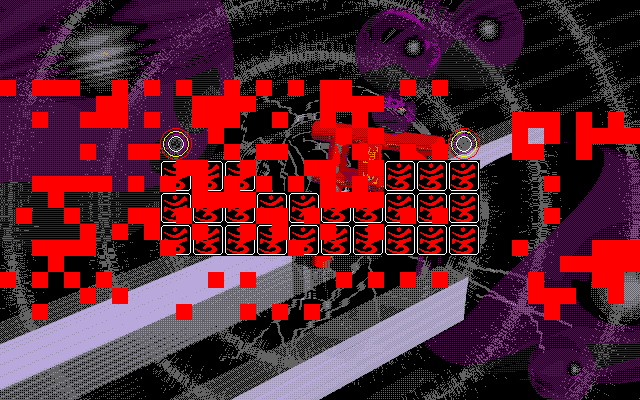
The TH01 gibberish in question:
joncampbell123
on 10 Dec 2017
Can I legally incorporate ANEX86.BMP into Dosbox-X?
yes when it is not dumped from real machine, but generated from free fonts.
There is a win32 program that is able to do so.
http://retropc.net/cvs/cvsweb/index.cgi/mkfont32/
Just use the gnu unifont glyphs
unifont uses Chinese standard based font/glyphs, which is not suitable for PC98, although it fits in 16x16 grids.
Use izmg16(Izumi Gothic, a public domain Japanese 16x16 bitmap font) is better choice. It is converted to TrueType font using unifont scripts (use 12pt-96dpi a.k.a. 16px will be pixel-level-fit)
https://sites.google.com/site/rtfreesoft/font-drop/izmg16-ext.7z?attredirects=0&d=1
 roytam1
on 10 Dec 2017
roytam1
on 10 Dec 2017
@roytam1 Unifont was originally based on a Japanese font in unicode 5 according to the original maker roman czyborra, before missing glyphs were drawn using wenquanyi glyphs and roman's uglier glyphs were redrawn to that style, so as to unify the glyphs and free space. Unicode also encodes trad. Chinese, to remain neutral, and those keep Japanese style. Please note that all this was done as a compromise between Japanese users who dislike oversimplification and over complexity, and both types of Chinese and Korean users, plus other cjkvtmsh users who has be different national tastes. Also, in the user area of @joncampbell123's anex86.bmp dump, emoji like the sweat drop and anger icon exist that are nonexistent in the izmg16 font. My font patch to unifont covers all of unicode that I can fit, making it include those in supplementary areas. The font complies with iso10646:2017, iso646, iso8859-1, iso9421-3:1992, and all related standards. It also is a foss replacement for the iso9421-3:1992 fonts (8x16) in pc-dos and ms-dos, because of glyph shape. It also works in the windows console, as well as monospace-only GUI font menus. There ARE pc98 games that use the anger symbol and sweatdrops. I forked dosbox-x to have my own branch with the font for safekeeping.PC98 also has c0 control characters, which are only found in my font. Basically, Izumi gothic is NOT needed, as it lacks any sjis extensions, including sweatdrops and anger symbols, which were added as emoji by Japanese telcos. Plus, for lfn support like in vfat, we need unicode support in all levels, and my font provides it.
stgiga
on 10 Dec 2017
Also glyph shape is not a disqualifying factor, plus it will distinguish it from hardware.
stgiga
on 10 Dec 2017
@joncampbell123 TH03 assumes that both players are using the same keyboard or one using keyboard and other using Joystick.
While both using the same Keyboard, the controls are the following in versus mode:
P1
RTY ↖ ↑ ↗
F H = ← →
VBN ↙ ↓ ↘
Shoot: Z
Bomb: X
P2
7 8 9 ↖ ↑ ↗
4 6 = ← →
1 2 3 ↙ ↓ ↘
Shoot: ← key
Bomb: → key
I have tried with an Multilaser JS030 Dualshock (a.k.a Generic PS2-like USB Joystick), but PoDD doesn't recognize my joystick in Anex86, NP2 and Dosbox-x (even working in TH16),
TheKoakuma
on 10 Dec 2017
I have just built FREECG98.BMP using a wii consolized version of NP2, which allows for truetype conversion. Here it is: https://sourceforge.net/projects/c418sodddream/files/FREECG98.BMP/download
stgiga
on 10 Dec 2017
@stgiga Nice! I'll have DOSBox-X look for FREECG98.BMP if ANEX86.BMP is not present.
joncampbell123
on 10 Dec 2017
@joncampbell123 Make sure to redownload the bitmap. I forgot to specify 9821 mode when drawing it.
stgiga
on 10 Dec 2017
Font ROM data structure and How To create font ROM file from Free JIS-encoded BDF bitmap font:
http://www.areanine.gr.jp/~nyano/makefont.html
source:
http://www.areanine.gr.jp/~nyano/archives/slzaurus/mkfnt_0.1_src.tar.gz
so you can reduce from 512KB to 288768 bytes
roytam1
on 11 Dec 2017
Nice!
stgiga
on 11 Dec 2017
@TheKoakuma I'm pretty certain that running TH03 on both computers isn't going to produce the same game state and screen output even if they do indirectly talk to one another over a network.
The only way a multiplayer TH03 could work as far as I know is if DOSBox-X were to transmit the display to the second player, and accept keyboard input from the second player, remapped to appear as second player input.
The easiest way I can think of for sending, is to use the video compression I already have for capture (H.264 video + AAC audio) and enable sending that to the second player over UDP (which would work for LAN parties but not the internet), and then the second player could run a client to display that video to the player and send input back that is mapped to what TH03 expects the second player to input. I only suggest UDP so that network lag and TCP/IP buffering doesn't cause problems since game input is time-sensitive. This option for the most part relies on getting FFMPEG to compile for your target of choice, so it may not be an option.
Another option could be to look at where TH03 is storing it's state in memory and share it over the network between the two DOSBox-X instances, forcibly synchronizing game state (hopefully without crashing).
This option could be a lot easier if only TH03 had implemented a multiplayer mode that operated over a serial port, like what DOOM and Quake had.
joncampbell123
on 11 Dec 2017
Zun didn't this, and since he doesn't make another Danmaku Multiplayer since TH09, probably he will not return to TH03 source code only to implement this :/
TheKoakuma
on 12 Dec 2017
@TheKoakuma I was afraid of that. I've been asked by others to enable scriptable hacking of DOS games and the TH03 multiplayer case could benefit from that.
joncampbell123
on 12 Dec 2017
@TheKoakuma everything is easy - use TeamViewer to play :D
Corak667
on 12 Dec 2017
@Corak667 Personal experience says you could play by TeamViewer but there's a bit too much lag there to make a worthwhile multiplayer session.
joncampbell123
on 12 Dec 2017
Done. It looks for ANEX86.BMP, then FREECG98.BMP, for the font data.
joncampbell123
on 14 Dec 2017
Although this is off-topic, but IIRC, you mentioned that you wanted to implement DEC Rainbow support. Here's one in sale on Ebay: https://www.ebay.com/itm/VINTAGE-Digital-DEC-Rainbow-100-PC100-A1-Dual-Floppy-Desktop-Computer-PC-NO-HDD/401453560920?_trkparms=aid%3D222007%26algo%3DSIM.MBE%26ao%3D2%26asc%3D49566%26meid%3D000f8fa7e7434f23b388f341674edb98%26pid%3D100623%26rk%3D2%26rkt%3D6%26sd%3D292371377042&_trksid=p2047675.c100623.m-1
cuba200611
on 17 Dec 2017
@cuba200611 I would like to, however I have enough on my plate right now with IBM PC and PC-98 emulation, plus all the bugs and mess in the current codebase.
It might be better for DOSBox-X cleanup to pass on the offer personally, and let someone else here fork DOSBox-X, obtain the unit, and rewrite the emulation around the Rainbow instead. The two could merge sometime in the future.
Besides, that's just the computer. I don't have it's keyboard or monitor.
joncampbell123
on 17 Dec 2017
@Corak667 i've already tried to do this, TV doesn't recognize long pressed keys (it sends as the same key pressed repeatedly), but i got play PoDD in multiplayer using Google Chrome Remote Desktop
TheKoakuma
on 17 Dec 2017
Hi,
.fdi image files seem not to be able to be read. Is it possible to support those files?
Many PC-98 emulators use the format.
 tokumeiwokiboushimasu
on 22 Dec 2017
tokumeiwokiboushimasu
on 22 Dec 2017
FDI images are supported, however many I've tested use a 256 byte/sector format that isn't MS-DOS formatted in any way that I can think of.
If the disk was formatted with 512 or 1024 bytes per sector and it has a valid FAT filesystem, DOSBox-X can mount it and present the filesystem.
joncampbell123
on 22 Dec 2017
Some games I've tested like to do funny things with the FAT filesystem as well. One game I tested formatted the second disk with a FAT filesystem minus the BPB needed to read it (I guess you infer it from the first disk's BPB??). Others use an unknown "ADOS" that isn't a valid FAT filesystem.
These games will work someday when the PC-98 mode supports the "boot" command to run from the BIOS instead of DOS.
joncampbell123
on 22 Dec 2017
OK, I'll wait that time. Thank you.
tokumeiwokiboushimasu
on 22 Dec 2017
When you implement 'boot' command, I want an option to use real BIOS. PC-98's BIOS rom (except for PC-9821 series) contains rom BASIC, and disk BASIC (N88 Disk BASIC) and some other games need it.
tokumeiwokiboushimasu
on 22 Dec 2017
That will have to come a lot later, because hardware will have to be implemented first. But we'll get there.
Also I have a 9821-type laptop that seem to have the ROM BASIC as a boot option still. Did they remove it from desktop units first?
EDIT: I think it's of the 9821 type, it seems to have been produced sometime in 1994.
EDIT: To be fair, DOSBox-X also lacks support for the IBM ROM BASIC as well still.
joncampbell123
on 22 Dec 2017
Speaking of the "BOOT" command, I have no documentation how the BIOS loads the boot sector into memory.
On the IBM PC platform, the BIOS loads the first sector (512 bytes) into memory at 0000:7C00 and jumps to it. If it's a hard drive it might validate that there's 0x55 0xAA at the end first.
I get that the PC-98 does something similar, but I don't have enough detail. I can tell that it also reads the sector and executes it by the fact that when I leave an IBM formatted disk in the drive at boot time, the PC-98 system hangs and I have to push RESET. That tells me that the IBM PC boot sector code is running (though hitting all the wrong interrupts of course).
EDIT: The above scenario was tested and verified on a PC-9821 that supports both 1.2MB and 1.44MB floppies and of course is impossible on the PC-9801 which evidently does NOT support 1.44MB formatted floppies.
joncampbell123
on 22 Dec 2017
There's also HDM, which are basically raw floppy images.
You can rename them to IMG...
cuba200611
on 22 Dec 2017
So they are "raw" meaning that on a well formatted floppy, the contents of the file are the contents read in a simple sequential manner, like Windows rawread/rawwrite or Linux "dd"?
joncampbell123
on 22 Dec 2017
So they are "raw" meaning that on a well formatted floppy, the contents of the file are the contents read in a simple sequential manner, like Windows rawread/rawwrite or Linux "dd"?
Yes, normal HDM is so (unless mis-named)
roytam1
on 22 Dec 2017
Then you should be able to mount then right now. DOSBox-X does not enforce that raw images have any particular file extension.
joncampbell123
on 22 Dec 2017
Also I have a 9821-type laptop that seem to have the ROM BASIC as a boot option still. Did they remove it from desktop units first?
Ah, you are lucky. Some 9821 have rom BASIC.
tokumeiwokiboushimasu
on 23 Dec 2017
Quick question: Does keyboard input in pc98 command prompt working?
In my VS2013 build, here is only "A" "Q" "1" keys are inputable.
roytam1
on 25 Dec 2017
Keyboard input at the prompt only supports the alphanumeric keys, numeric keys, some punctuation, tab, enter, backspace at this time.
It's currently written for the US keyboard layout. Are you using a different layout?
joncampbell123
on 25 Dec 2017
It's currently written for the US keyboard layout. Are you using a different layout?
Yes I'm using default(US) layout, no keymaps loaded.
roytam1
on 25 Dec 2017
Bring up the mapper (CTRL+F1) and see if the keys are set up.
Also, SDL 1.x and SDL 2.x builds have incompatible mapper files.
joncampbell123
on 25 Dec 2017
They're set as default, and keys are working in non-PC98 mode.
roytam1
on 25 Dec 2017
BTW how can we debug keyboard input in PC98 shell prompt?
roytam1
on 8 Jan 2018
There's no input debug code built-in, same as IBM PC emulation.
However I would use DOSLIB binaries and configure dosbox.conf to run the various tools to show raw input.
There's one for PC-98 raw keyboard input (from the 8251 serial hardware directly), another for raw PC-98 INT 18h BIOS keyboard input, and another for raw console input from DOS.
The last one was written to help reverse engineer the ANSI codes returned by NEC's version of MS-DOS on real hardware and to take notes that are in the DOSBox-X source code.
joncampbell123
on 8 Jan 2018
On December 31st, Immediately after I gave you FREECG98.BMP, the base font, GNU Unifont, received updates, some of them involving CJK Character Width. When I made my updates to the font before rasterizing it, after trial and error, I got it to look clearer in more situations by accident. I also optimized it in various ways. The raster image now looks better. I also noticed that certain Asian characters have been respaced. To fix the errors of the old font, here is the new version. https://sourceforge.net/projects/c418sodddream/files/FREECG98.BMP/download
Here is the source ttf: https://sourceforge.net/projects/c418sodddream/files/UnifontMediumMonoFixedClear.ttf.bz2/download
stgiga
on 19 Feb 2018
According to git that's the same FREECG98.BMP file as before, no changes.
joncampbell123
on 21 Feb 2018
It seems to be the same exact BMP file as what is already in DOSBox-X's source tree under FONT/
joncampbell123
on 21 Feb 2018
Huh... guess the rasterization WAS perfect...
stgiga
on 22 Feb 2018
@stgiga There is only one problem I see with the FREECG98.BMP you provided. The ASCII character code for the backslash should be the Yen symbol, not a backslash.
When the font is loaded, the DOS prompt should look like
C:¥>
Not
C:\>
There is a portion in FREECG98.bmp that contains half-width characters of different and strange style.
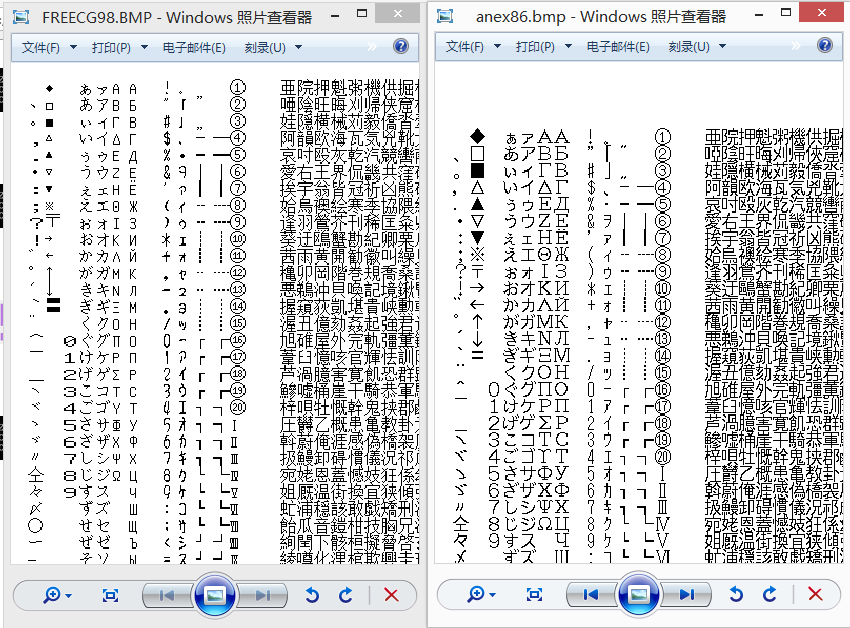
It might be made using Neko Project II and either NP2 or Windows chose a wrong font generating those characters. @stgiga
 yksoft1
on 19 May 2018
yksoft1
on 19 May 2018
I also pointed out that FREECG98.BMP needs to change the backslash to the Yen symbol.
joncampbell123
on 19 May 2018
bump
 aybe
on 23 Jun 2018
aybe
on 23 Jun 2018
@aybe Here is my collection of PC-98 documentation:
http://hackipedia.org/browse/Computer/Platform/PC%2c%20NEC%20PC%2d98
joncampbell123
on 24 Jun 2018
Added at top post.
aybe
on 24 Jun 2018
I just fixed a really dumb bug in the ANSI emulation for PC-98. Reading the cursor position as the max row doesn't help things. It may fix some games that don't print properly.
joncampbell123
on 21 Aug 2018
It might be made using Neko Project II and either NP2 or Windows chose a wrong font generating those characters.
those awkward glyphs are not generated from font, but embedded in FontMaker binary.
roytam1
on 21 Aug 2018
So... I've come across some PC-98 games that leave me with some questions how they could even work.
Anything pre-1994-ish can fail to handle interrupts properly because the interrupt handler doesn't acknowledge IRQ 8 or higher properly.
It acknowledges the slave PIC properly, but doesn't acknowledge the master PIC, leaving interrupts hung.
There is a fairly understandable convention as well not to blindly acknowledge the cascade interrupt on the master PIC if the ISR register of the slave indicates any other interrupt is in service (compared to IBM MS-DOS games that blindly ACK slave, then master), which in some games is flawed (Blackbird, and Quarth)
joncampbell123
on 7 Sep 2018
The most common one seems to be custom mouse interrupt handlers that acknowledge only the slave PIC and make NO attempt to acknowledge the master PIC to clear the "in service" bit for the cascade interrupt.
joncampbell123
on 7 Sep 2018
So the question is, what did these games (or the system around it) do to work regardless?
One clue may be to boot up a PC-9821 system and see what the stock IRQ handlers provided by the BIOS do.
joncampbell123
on 7 Sep 2018
Might it be the case that the PC-98 used a custom single-chip-master/slave-PIC by NEC that required only the slave PIC to be acknowledged, saving CPU time?
 sdsnatcher
on 16 Sep 2018
sdsnatcher
on 16 Sep 2018
That's a thought. Perhaps after using the Intel chips initially, they could have been integrated into a larger chip on the board with that modification to the silicon mask?
But that would mean the games in question would not work on the oldest PC-98 systems.
joncampbell123
on 16 Sep 2018
And if NEC did that, then they could just eliminate the cascade IRQ entirely, too.
joncampbell123
on 16 Sep 2018
It would help to pull out a real system and look at the ISR provided by the BIOS, which I'll do when I have free time to do it.
joncampbell123
on 16 Sep 2018
The very first generation of the PC-98 had only 8 digital colors (aka 3-bit RGB, or GDC) and no FM soundchip. Maybe when then transitioned to the 2nd generation (aka GRCG), that had 16 "analog" colors (16 colors out of a 12-bit RGB palette) and FM sound they also made the custom PIC chip, since new games wouldn't work on the 1st generation of PC-98 anyway.
Probably similar modifications happened when they transitioned for the PEGC video controller for the PC-9821.
And if NEC did that, then they could just eliminate the cascade IRQ entirely, too.
If they did that, older games from the GDC PC-98 wouldn't have worked in the newer GRCG generation.
sdsnatcher
on 16 Sep 2018
@sdsnatcher In fact, even in 90s, only some family-oriented PC-98s did have onboard FM sound chip. Most PC-98s are still business-oriented and require a sound board (PC-9801-86 etc.) for sound.
yksoft1
on 17 Sep 2018
I honestly was under the impression that FM was never onboard, just that it was so common among gamers that games expected it if you wanted sound. But I'm not an expert on PC-98, admittedly.
This actually doesn't seem to be that far off from what happened in the West (where many PCs still didn't have sound cards and hence games would be stuck to either PC speaker beeps or outright no sound altogether… playing Half-Life 1 and not knowing what people were saying wasn't fun). Not surprising either, computers were still expensive at the time and not the norm at homes yet.
sikthehedgehog
on 17 Sep 2018
From what I've found so far, you generally needed an addon card to get the FM synth.
However some documentation suggests there was a short-lived "CanBe" series that had some sort of FM emulation built-in (though the sources suggest it wasn't 100% compatible).
Of course I could be confusing a few things, recalling off the top of my head like this. Need to verify the sources.
joncampbell123
on 17 Sep 2018
This site has a list of models with built-in sound hardware: http://hp.vector.co.jp/authors/VA004562/ray/tips.htm
Although the CanBe models use an YMF288 (OPN3) with a Windows-compatible PCM chip - a Crystal one IIRC. The PC-9801-118 is basically the CanBe sound hardware on a card, and for it to work in DOS, you need to disable plug and play, but again, some games will not sound properly due to incompatible PCM hardware, among other things...
cuba200611
on 18 Sep 2018
No, the 118 is an opl3+opn3 chip called the ymf297
stgiga
on 23 Sep 2018
It might be made using Neko Project II and either NP2 or Windows chose a wrong font generating those characters.
those awkward glyphs are not generated from font, but embedded in FontMaker binary.
Seems I also found those glyphs in Neko Project II's fontdata.res file.
yksoft1
on 29 Sep 2018
Does VEMM486.EXE / VEMM386.EXE implement any additional function calls beyond the base Expanded Memory Manager interface?
I've already noted that Briganty crashes with EMM386.EXE loaded, both in DOSBox-X and on real hardware, however it doesn't seem to have any problems with VEMM386.EXE on real hardware (I'll check again to make sure).
However DOOM, DOOM II, Wolf98, Sim City 2000, and anything else involving a DOS extender crashes when VEMM386.EXE is loaded.
DOSBox-X already has an ems=emm386 setting, is it going to need a ems=vemm386 or ems=vemm486 setting too?
According to the original spec, function calls only go up to AH=5Dh. http://hackipedia.org/browse.cgi/Computer/Operating%20Systems/MS%2dDOS/EMS%2c%20Expanded%20Memory/Expanded%20Memory%20Specification%20%28Lotus%2c%20Intel%2c%20Microsoft%29%20v4%2e0%20%281987%2d10%29%5b2%5d%2etxt
joncampbell123
on 6 May 2019
What does EMS function AH=70h do?
Touhou Project 4 seems to call it at level start. It doesn't prevent the game from running but I am curious what that EMS function is supposed to do.
joncampbell123
on 6 May 2019
Good news. If PC-98 FM board emulation is enabled, and SOUND.ROM is in the current directory at startup, DOSBox-X will load that into memory instead of installing it's own stub routines. At least one game, Sente Hisshou, requires a working SOUND BIOS to play music and will only play silence with the stub routines provided without SOUND.ROM.
Of course said game will display nothing on screen without also working LIO BIOS routines...
joncampbell123
on 8 Sep 2019
Corak667
on 16 Dec 2019
joncampbell123
on 16 Dec 2019
joncampbell123
on 16 Dec 2019
joncampbell123
on 16 Dec 2019
joncampbell123
on 16 Dec 2019
Thank you! Site snapshotting in progress: wget --mirror --progress=bar --timestamping --connect-timeout=5 --read-timeout=15 --limit-rate=250K --wait=10 --random-wait --continue --dns-timeout=10 --force-directories --recursive --no-parent --wait=2 http://pc98.pulsethread.com/
joncampbell123
on 16 Dec 2019
 joncampbell123
on 26 Dec 2019
joncampbell123
on 26 Dec 2019
I found a list of graphics cards that are compatible with NEC PC-9821.
 RNMB15
on 22 Mar 2020
RNMB15
on 22 Mar 2020
I found a list of graphics cards that are compatible with NEC PC-9821.
there is more listed in http://hamlin.html.xdomain.jp/VGA/VGA98SE/VGA98SE.htm
roytam1
on 22 Mar 2020
There is now a PC-98 draft Wiki page here which explains DOSBox-X’s PC-98 system and how to use it to run PC-98 games or applications in DOSBox-X:
https://github.com/Wengier/dosbox-x-wiki/wiki/Guide:PC%E2%80%9098-emulation-in-DOSBox%E2%80%90X
If there are any suggestions please feel free to let me know.
 Wengier
on 29 Dec 2020
Wengier
on 29 Dec 2020
Related issues
 diaphone0
·
14Comments
Corak667
·
8Comments
diaphone0
·
14Comments
Corak667
·
8Comments
 almeath
·
18Comments
almeath
·
18Comments
 bob12111
·
17Comments
joncampbell123
·
7Comments
bob12111
·
17Comments
joncampbell123
·
7Comments
Most helpful comment
Thank you! Site snapshotting in progress: wget --mirror --progress=bar --timestamping --connect-timeout=5 --read-timeout=15 --limit-rate=250K --wait=10 --random-wait --continue --dns-timeout=10 --force-directories --recursive --no-parent --wait=2 http://pc98.pulsethread.com/