Domoticz: www.domoticz.com certificate is untrusted
While trying to update to the latest beta version of Domoticz (rpi3 raspbian stretch), an error is shown:
Connecting to www.domoticz.com (www.domoticz.com)|185.27.142.198|:443... connected.
ERROR: The certificate of ‘www.domoticz.com’ is not trusted.
ERROR: The certificate of ‘www.domoticz.com’ hasn't got a known issuer.
After verifying the certificate in the browser, I noticed the certificate was renewed today.
However SSLLabs show the certificate chain is incomplete:
https://www.ssllabs.com/ssltest/analyze.html?d=www.domoticz.com
I guess this prevents the download on Linux.
 TheReptile
All 16 comments
Jessie the same.
If i'm right this is caused by the fact that @gizmocuz disabled CloudFlare due to issues.
Which also caused the cert issue.
@gizmocuz
Don't know if it's corrected automatically or do we need to amend something or just wait for a while?
 Siewert308SW
on 4 Apr 2018
Siewert308SW
on 4 Apr 2018
same problem... what to do?
 JurikRistjouw
on 4 Apr 2018
JurikRistjouw
on 4 Apr 2018
If you want to update right now, then you can edit the updatebeta and add the --no-check-certificate flag to the wget-command.
Or wait.
 jeffreyveldt
on 4 Apr 2018
jeffreyveldt
on 4 Apr 2018
Waiting is always good... why the rush ? .. it should work now
 gizmocuz
on 5 Apr 2018
gizmocuz
on 5 Apr 2018
Not a domoticz issue i am afraid...just tried again here... it's working ok now (new cetificate)
gizmocuz
on 5 Apr 2018
try df-h
gizmocuz
on 5 Apr 2018
domoticz@domo-server:~ $ sudo wget -O domoticz_beta.tgz "https://gandalf.domoticz.com/releases/beta/domoticz_linux_armv7l.tgz"
--2018-04-05 09:00:34-- https://gandalf.domoticz.com/releases/beta/domoticz_linux_armv7l.tgz
Resolving gandalf.domoticz.com (gandalf.domoticz.com)... 146.185.159.228
Connecting to gandalf.domoticz.com (gandalf.domoticz.com)|146.185.159.228|:443... connected.
HTTP request sent, awaiting response... 200 OK
Length: 13221860 (13M) [application/octet-stream]
Saving to: 'domoticz_beta.tgz'
domoticz_beta.tgz 100%[===========================================================================>] 12.61M 3.15MB/s in 3.9s
2018-04-05 09:00:38 (3.19 MB/s) - 'domoticz_beta.tgz' saved [13221860/13221860]
domoticz@domo-server:~ $ tar xvfz domoticz_beta.tgz
domoticz
tar: domoticz: Cannot open: File exists
History.txt
tar: History.txt: Cannot open: File exists
License.txt
tar: License.txt: Cannot open: File exists
domoticz.sh
tar: domoticz.sh: Cannot open: File exists
server_cert.pem
tar: server_cert.pem: Cannot open: File exists
updatebeta
tar: updatebeta: Cannot open: File exists
(and on and on)
 EdKo66
on 5 Apr 2018
EdKo66
on 5 Apr 2018
seems you have no rights to write there
did you unpack or run this script before as administrator ? i hope not, but it seems this way
quick fix, 'sudo chown username.username -R *' from inside the domoticz folder for the current user (you need to replace username with the real username, like pi)
gizmocuz
on 5 Apr 2018
I think I created it with user domoticz, but I can't remember if it was as administrator.
EdKo66
on 5 Apr 2018
@gizmocuz The chain for www.domoticz.com is still incomplete. While the update issues might be resolved, this should be fixed as well.
TheReptile
on 5 Apr 2018
the 'chain' ? not sure what you mean with this ....
gizmocuz
on 5 Apr 2018
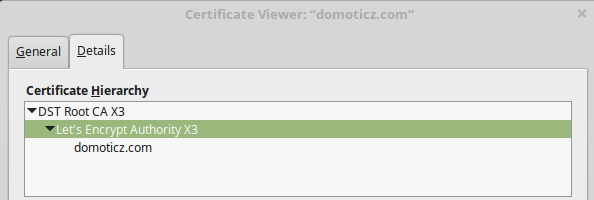
As you can see in the screenshot, the complete certificate chain contains 3 certificates.
The DST Root CA X3 certificate is in your browser store, so this is ok.
The "Let's Encrypt Authority X3' and "domoticz.com" certificates should be sent by the webserver.
Only the "domoticz.com" certificate is sent by the webserver.
I see from the headers Apache is used, so the following should be in your ssl config:
SSLCertificateFile <path to>/cert.pem
SSLCertificateKeyFile <path to>/privkey.pem
SSLCertificateChainFile <path to>/chain.pem
The last file should contain the "Let's Encrypt Authority X3" certificate.
If you need help, just give a shout. :)
TheReptile
on 5 Apr 2018
works now, thanx!
JurikRistjouw
on 5 Apr 2018
hi,
have the same error
ERROR: The certificate of ‘releases.domoticz.com’ is not trusted.
ERROR: The certificate of ‘releases.domoticz.com’ is not yet activated.
The certificate has not yet been activated
when i try to update domoticz..
i try with command sudo curl -L -k install.domoticz.com | sudo bash
and wget -O domoticz_beta.tgz "https://gandalf.domoticz.com/releases/b ... armv7l.tgz"
and ./updatebeta
but nothing.
how could i resolve?
 matteos1
on 30 May 2018
matteos1
on 30 May 2018
Nothing wrong with releases.domoticz.com see
https://www.sslshopper.com/ssl-checker.html#hostname=releases.domoticz.com
or install.domoticz.com
https://www.sslshopper.com/ssl-checker.html#hostname=%20install.domoticz.com
gizmocuz
on 30 May 2018
Don't know about your system, but maybe you should add letsencrypt to the trusted authorities
gizmocuz
on 30 May 2018
Related issues
 Lyr3x
·
22Comments
Lyr3x
·
22Comments
 DAVIZINH0
·
10Comments
DAVIZINH0
·
10Comments
 RemCom
·
9Comments
RemCom
·
9Comments
 gaeljw
·
22Comments
gaeljw
·
22Comments
 morilm
·
17Comments
morilm
·
17Comments
Most helpful comment
If you want to update right now, then you can edit the updatebeta and add the --no-check-certificate flag to the wget-command.
Or wait.