Domoticz: High memory use (100%) on 4.11690
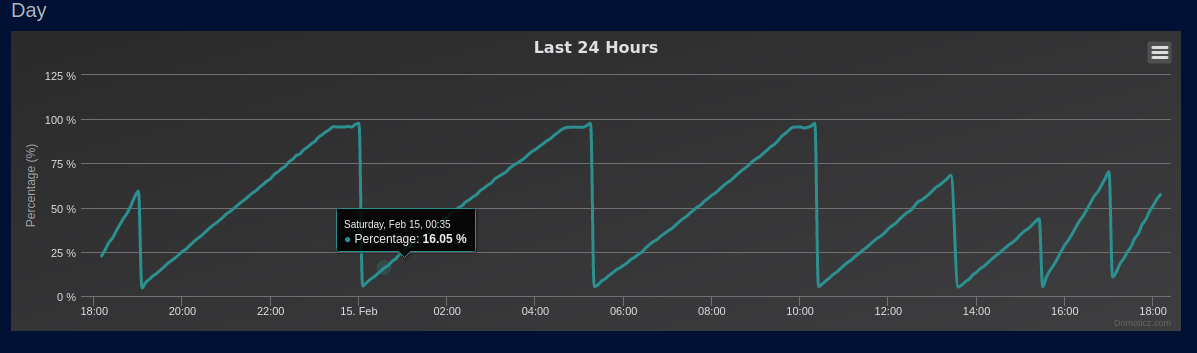
On version Version: 4.11690 Build Hash: f1c50073d domoticz is using 100% memory (~7,5 gb) within a hour of the start. After a few hours the high memory usage the system freeze up.
This is on a Debian 10 system.
This issue wasn't present in commit 91c3475ac3c629ed28171e8fa5c8fcc5b40d974b (9 Feb).
 RemCom
All 9 comments
Same problem...
Version: 4.11690
Build Hash: f1c50073d
Compile Date: 2020-02-14 14:59:38
dzVents Version: 3.0.0
Python Version: 3.6.9 (default, Nov 7 2019, 10:44:02) [GCC 8.3.0]
Feb 15 05:15:26 domoticz kernel: [36749.999537] Out of memory: Kill process 17526 (domoticz) score 912 or sacrifice child
Feb 15 05:15:26 domoticz kernel: [36749.999646] Killed process 17526 (domoticz) total-vm:6235420kB, anon-rss:3810188kB, file-rss:0kB, shmem-rss:0kB
Feb 15 05:15:26 domoticz kernel: [36750.179617] oom_reaper: reaped process 17526 (domoticz), now anon-rss:0kB, file-rss:0kB, shmem-rss:0kB
 cronyx
on 15 Feb 2020
cronyx
on 15 Feb 2020
Same here.
Version: 4.11690
Build Hash: f1c50073d-modified
Compile Date: 2020-02-14 12:59:38
dzVents Version: 3.0.0
Python Version: 3.6.9 (default, Nov 7 2019, 10:44:02) [GCC 8.3.0]
 HoekieN
on 15 Feb 2020
HoekieN
on 15 Feb 2020
Thx for reporting. It is being worked now so no further need for extra reports
 rwaaren
on 15 Feb 2020
rwaaren
on 15 Feb 2020
just noticed the same
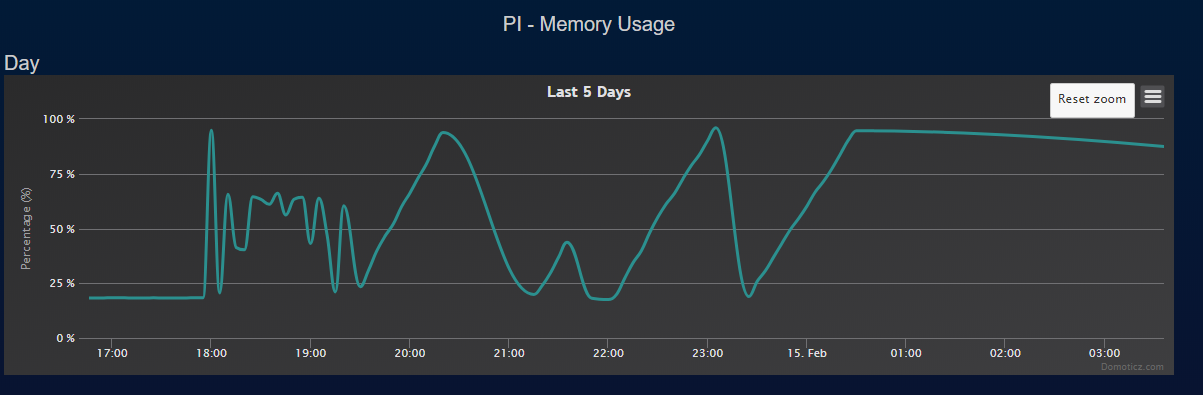
this time it is a massive memory leak.
installed V4.11690 at 15:13
at 20:30 it hit 100% memory usage
a second problem i noticed you can not roll back backups
i installed V4.11605 but i could not restore backup from v4.11690
i got a mesage that downgrade is not permitted
lucky i also made a 605 backup.
when did things change that we can not roll back?
 GravityRZ
on 15 Feb 2020
GravityRZ
on 15 Feb 2020
Just did a PR to solve the leak.
 MrHobbes74
on 15 Feb 2020
MrHobbes74
on 15 Feb 2020
when did things change that we can not roll back?
This is already the case for quite a long time. If the database schema changed between versions a rollback of the binary needs to be aligned with a rollback of the database.
An overview of Versions / database levels can be found at the wiki
There you can see that V4.11690 is aligned with DB Version 139 and V4.11605 with DB Version 138
rwaaren
on 16 Feb 2020
@rwaaren
thanks for the explanation. did not know this but this is exactly the reason why i make a backup before every upgrade.
GravityRZ
on 16 Feb 2020
Thanks @MrHobbes74 the fix worked :)
HoekieN
on 16 Feb 2020
Thanks @MrHobbes74 . Also here the issue is gone now
RemCom
on 16 Feb 2020
Related issues
 FireWizard52
·
11Comments
FireWizard52
·
11Comments
 kovainfo
·
4Comments
kovainfo
·
4Comments
 Lyr3x
·
22Comments
Lyr3x
·
22Comments
 empierre
·
17Comments
empierre
·
17Comments
 Hydci
·
7Comments
Hydci
·
7Comments
Most helpful comment
Thx for reporting. It is being worked now so no further need for extra reports