Docusaurus: v2 Documentation on modifying webpack config
📚 Documentation
This example showed in the v2 documentation (here) doesn't work and it throws an error:
// docusaurus-plugin/src/index.js
module.exports = function(context, options) {
  return {
    name: 'docusaurus-plugin',
    configureWebpack(config, isServer, utils) {
      const {getCacheLoader} = utils;
      config.modules.rules.push({
        test: /\.foo$/,
        use: [getCacheLoader(isServer), 'my-custom-webpack-loader'],
      });
      return config;
    },
  };
};
./blog/2019-05-28-hola.md
Module build failed (from ./node_modules/babel-loader/lib/index.js):
SyntaxError: /Users/equinusocio/Repositories/Oval/docus/blog/2019-05-28-hola.md: Identifier 'React' has already been declared (7:275)
 equinusocio
All 9 comments
Ah.. Of course it wont work. There is no such “my-custom-webpack-loader” ... Its just to indicate that you can add your webpack loader there/ you can modify your config.
PR welcome to edit the docs with simpler example of modifying webpack config
But your error seems unrelated though ✌️
Did you import React in blog ⭕️
 endiliey
on 7 Dec 2019
endiliey
on 7 Dec 2019
What I posted above is the example from the documentation. i just created a project with the classic template and added this:
plugins/cusotm-webpack-plugin/index.js
// docusaurus-plugin/src/index.js
module.exports = function(context, options) {
  return {
    name: 'cusotm-webpack-plugin',
    configureWebpack(config, isServer, utils) {
      const {getCacheLoader} = utils;
      config.modules.rules.push({
        test: /\.pcss$/,
        use: getStyleLoaders(isServer, {importLoaders: 1, modules: true}),
      });
      return config;
    },
  };
};
The first error is: config.module.rules.push and not config.modules.rules.push like in the example. config.modules is undefined. The second error, after fixing this is the one i posted above, the duplicated React import. Without doing anything else.
What works for me is:
module.exports = function() {
  return {
    name: 'custom-webpack-plugin',
    configureWebpack(_config, isServer, utils) {
      const {getStyleLoaders} = utils;
      return {
        module: {
          rules: [
            {
              test: /\.pcss$/,
              use: getStyleLoaders(isServer, {importLoaders: 1, modules: true})
            }
          ],
        },
      };
    },
  };
}
PS I need to do this because the most commond postcss file extension is .pcss and i compile a components library that use css modules (with .pcss) without the .module notation.
equinusocio
on 7 Dec 2019
PR welcome :)
endiliey
on 7 Dec 2019
Of course, the problem here that's not clear which is the correct way to do that. I don't know webpack very well.
equinusocio
on 7 Dec 2019
Hmm ok so you can actually direct modify the config like this
// docusaurus-plugin/src/index.js
module.exports = function(context, options) {
  return {
    name: 'cusotm-webpack-plugin',
    configureWebpack(config, isServer, utils) {
      config.entry.output.filename = "new.bundle.js"
    },
  };
};
Or you return a partial config. This one will be merged with webpack-merge
// docusaurus-plugin/src/index.js
module.exports = function(context, options) {
  return {
    name: "cusotm-webpack-plugin",
    configureWebpack(config, isServer, utils) {
      return {
        output: {
          filename: "new.bundle.js"
        }
      };
    }
  };
};
Ok, thank you. Another thing, as per https://github.com/facebook/docusaurus/issues/2084 should we mention that v2 uses postcss under the hood?
equinusocio
on 7 Dec 2019
Example https://github.com/algolia/docsearch-website/blob/master/plugins/my-loaders/index.js
How does this work, i've done the same as you :
Added plugins/my-loaders folder as dependencies
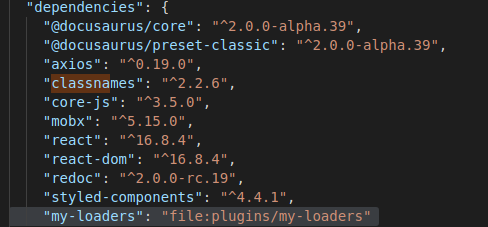
Then, write my plugins/my-loaders/index.js content :

Then 'npm start'

I got this error, even if i do a 'npm install', my project stay broken, no luck :cry:
PS: All this stuff for passing a props to a component on a route :see_no_evil:
 BobLamarley
on 17 Dec 2019
BobLamarley
on 17 Dec 2019
How did you get this working? It's not working for me. I've followed what's been done in the sample project that was linked...I just need image loaders to work for png. I get the same problem as @BobLamarley
EDIT: for future ppl I fixed it, my script name had a typo. Also need to make an empty package.json where the index.js is in the example https://github.com/algolia/docsearch-website/blob/master/plugins/my-loaders/index.js . Need to also set plugins: ['my-loaders'] in docusaurus.config.js.
 EthanSK
on 27 May 2020
EthanSK
on 27 May 2020
Related issues
 MoogyG
·
3Comments
endiliey
·
3Comments
MoogyG
·
3Comments
endiliey
·
3Comments
 omry
·
3Comments
omry
·
3Comments
 itelofilho
·
3Comments
itelofilho
·
3Comments
 ericnakagawa
·
3Comments
ericnakagawa
·
3Comments