Documentserver: chinese font not display correctly
is this problem caused by font or built in library?
 sidealice
All 30 comments
The reason of the issue may be that you do not have chinese fonts on the machine where Document Server is installed.
In order to resolve the issue, please, set chinese fonts using the package or put tff font to /usr/share/fonts/ directory.
Then run the script: documentserver-generate-allfonts.sh
Clear the browser cache and reopen the page.
After that you should choose the font for your document.
 AnaMih
on 25 Jun 2015
AnaMih
on 25 Jun 2015
thanks for your help , i would try to follow your way. by the way how to contribute to the project, I would like to make this update to the core and help other chinese clients to use it.
sidealice
on 25 Jun 2015
I regret to inform you that we do not currently have ssh protocol.
Feel free to fork the repo and continue working.
AnaMih
on 26 Jun 2015
thanks now get the font worked , but still not perfect. because if my original document was wrote in Chinese, when I open it , the document not rendered in Chinese by default. I have to select all text and choose the font again. Is this an improvement for the software or it was caused by the font missing or font auto detection issue on the server?
sidealice
on 28 Jun 2015
This is standard situation. The algorithm is: if the necessary font is not found the editors select the most suitable.
There are two solutions:
1) download the font package which supports Chinese language.
2) change the document fragments with incorrect symbols to the font that supports necessary characters.
AnaMih
on 30 Jun 2015
I solve the issue with this:
apt-get install fonts-arphic-ukai
cd /usr/share/fonts/
tar cv * | docker exec -i XXX tar x -C /usr/share/fonts/
docker exec XXX /var/www/onlyoffice/documentserver/Tools/GenerateAllFonts.sh
where XXX is the container ID
Then clear cache browser and logon again.
 libardoram
on 27 Sep 2015
libardoram
on 27 Sep 2015
Chinese font not display correctly in onlyoffice spreadsheet chart ?
 hisys3122
on 4 Mar 2016
hisys3122
on 4 Mar 2016
Please describe the issue more detailed and send us an examle for analyzing
Make sure that the fonts are installed
 ibnpetr
on 4 Mar 2016
ibnpetr
on 4 Mar 2016
Our test server:
- OS -> CentOS Linux release 7.2.1511 (Core)
- Docker -> 1.8.2 10.el7.centos
- Server -> HP DL360 G8
- onlyoffice documentserver -> image download from DockerHub
- chinese fonts -> copy from windows 7 and installed correctly.
We open the "Sample Spreadsheet" file, and change Rank 1 "USA" to Chinese fonts, chinese font not display correctly in the chart.
Screenshot is in the attache file.

hisys3122
on 7 Mar 2016
Hello
The feature is planned for future versions, at the moment areal font only can be used in the chart inside the spreadsheet.
ibnpetr
on 9 Mar 2016
Dear ONLYOFFICE users!
We are working hard on implementation of asian fonts in Document Server. So we need both standard and non-standard fonts to analyze their behaviour in our product. Please send us fonts via [email protected] or attach them to your messages. We will appreciate your assistance.
Best regards
John
ONLYOFFICE support team
 JohnPerkin
on 13 Mar 2017
JohnPerkin
on 13 Mar 2017
@JohnPerkin
Dear John!
Thanks for for your reply this issues.
I am Chinese, and I am more concerned about this problem.
Is it working right now?
 leangjia
on 8 Oct 2017
leangjia
on 8 Oct 2017
Hi @leangjia. Thank you for intresting for Document Server.
It's difficult feature, so we are still working on it.
 agolybev
on 9 Oct 2017
agolybev
on 9 Oct 2017
my doc 's Chinese fonts is ok,but the interface have some trouble.....

 carlsue
on 5 Dec 2017
carlsue
on 5 Dec 2017
Hi @jianbosu, could you provide us this document?
agolybev
on 5 Dec 2017
@agolybev 你的姓名.docx
carlsue
on 19 Jan 2018
@agolybev i delete all file in /usr/share/fonts, then cp my font into it. and run Then run the script: documentserver-generate-allfonts.sh && Clear the browser cache and reopen the page. Everything is worked perfect.

carlsue
on 19 Jan 2018
Hi, @jianbosu . 'my font', your font means which fonts?
 JoeLucky
on 26 Jan 2018
JoeLucky
on 26 Jan 2018
@jianbosu Did you delete all the fonts except Chinese fonts? So onlyoffice force all words to Chinese fonts. I donot think that is a good practice, though temporarily solved Chinese problem.
JoeLucky
on 26 Jan 2018
@JoeLucky yes,i copy some Chinese fonts into your system,and delete all others,clear browser cache,at the end everything will be work perfect。
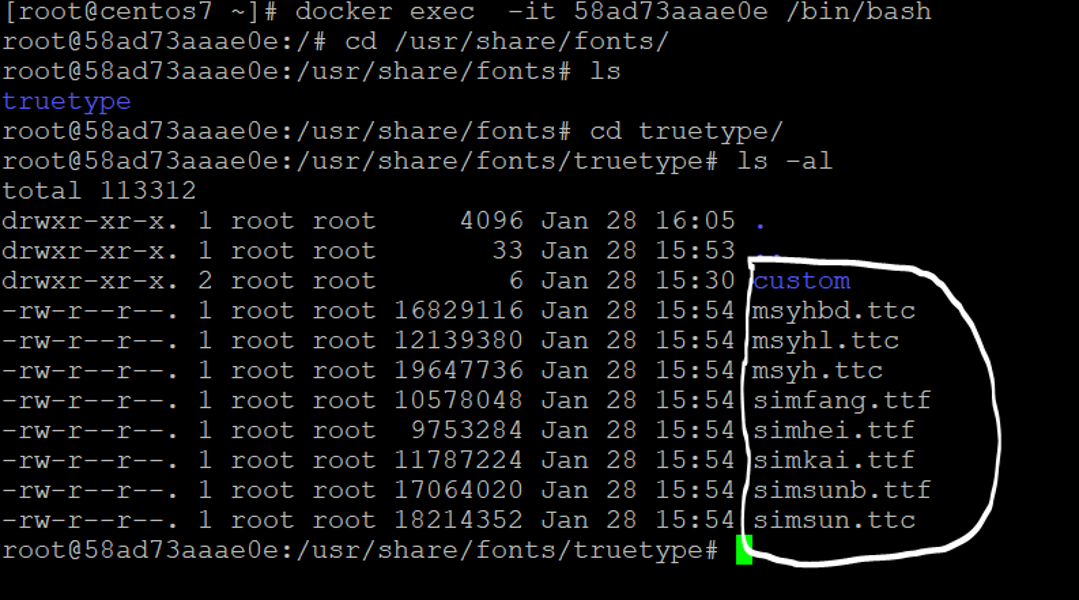
carlsue
on 29 Jan 2018
@jianbosu 请问你的界面是如何变成中文的?
How does your interface become Chinese?
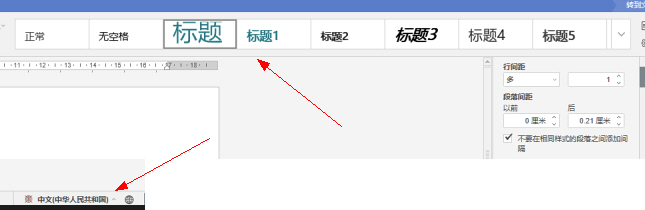
 3xxx
on 19 Feb 2018
3xxx
on 19 Feb 2018
THANK you,According to your method, now is ok. thank you。
"editorConfig": {
                    "callbackUrl": "http://192.168.99.1/url-to-callback?id={{.Doc.Id}}",
                    "user": {
                        "id": "{{.Uid}}",
                        "name": "{{.Uname}}"
                    },
                    "lang": "zh-CN",//"en-US",
                },
3xxx
on 19 Feb 2018
@3xxx 请问这个配置"editorConfig": 在哪个文件里面修改呢?
 xwinfo
on 24 Feb 2018
xwinfo
on 24 Feb 2018
在哪里加的
 tangpeibin123456
on 1 Mar 2018
tangpeibin123456
on 1 Mar 2018
https://github.com/3xxx/ONLYOFFICE-golang
@xwinfo 就是你调用的页面里。
<!DOCTYPE html>
<html style="height: 100%;">
<head>
    <title>fei-OnlyOffice</title>
</head>
<body style="height: 100%; margin: 0;">

    <div id="placeholder" style="height: 100%"></div>
    <script type="text/javascript" src="http://192.168.99.100:9000/web-apps/apps/api/documents/api.js"></script>
    <script type="text/javascript">
        // alert({{.Doc.FileName}});
        window.docEditor = new DocsAPI.DocEditor("placeholder",
            {
                "document": {
                    "fileType": "{{.fileType}}",
                    "key": "{{.Key}}",//"Khirz6zTPdfd7"
                    "title": "{{.Doc.FileName}}",
                    "url": "http://192.168.99.1/attachment/onlyoffice/{{.Doc.FileName}}"
                },
                "documentType": "{{.documentType}}",
                "editorConfig": {
                    "callbackUrl": "http://192.168.99.1/url-to-callback?id={{.Doc.Id}}",
                    "user": {
                        "id": "{{.Uid}}",
                        "name": "{{.Uname}}"
                    },
                    "lang": "zh-CN",//"en-US",
                },
                "height": "100%",
                "width": "100%"
            });
    </script>
</body>
</html>
为什么我的字体显示“yahei”而不显示“微软雅黑”
 linmsh
on 26 Jun 2018
linmsh
on 26 Jun 2018
Is this solution still valid? I installed new fonts on my host machine and they are not showing up in my onlyoffice instance. I tried running docker exec XXX /var/www/onlyoffice/documentserver/Tools/GenerateAllFonts.sh but it did not work. I ssh'd into the docker container and there does not appear to be a Tools folder as specified in this solution.
Any clue on how to fix this issue?
 jcklpe
on 17 Dec 2019
jcklpe
on 17 Dec 2019
Okay found the info. GenerateAllFonts is now in the usr/bin folder of the docker container.
I ran the script though and it didn't work. I'm looking through the script in nano and it does not look like it ever grabs anything from outside the container. Instead it seems to be loading from "core-fronts" and "fonts" in the documentserver folder.
Is this a change in OnlyOffice or am I missing something?
jcklpe
on 17 Dec 2019
I'm manually docker cp the fonts files into onlyoffice:/usr/share/font and run the generate font script and while now the files appear on the frontend of the instance, the actual fon is incorrect and it automatically tries to turn the text into a different unrelated font (which judging by it's name just happens to be whatever the next font is in line alphabetically)
jcklpe
on 17 Dec 2019
Related issues
 janxkoci
·
8Comments
janxkoci
·
8Comments
 cpot
·
8Comments
cpot
·
8Comments
 decentral1se
·
5Comments
decentral1se
·
5Comments
 ceeazy
·
4Comments
ceeazy
·
4Comments
 wenerme
·
9Comments
wenerme
·
9Comments
Most helpful comment
Dear ONLYOFFICE users!
We are working hard on implementation of asian fonts in Document Server. So we need both standard and non-standard fonts to analyze their behaviour in our product. Please send us fonts via [email protected] or attach them to your messages. We will appreciate your assistance.
Best regards
John
ONLYOFFICE support team