Docsify: The first h1 header is ignored in sidebar
Bug Report
As the title suggests, the first h1 markdown header is ignored in sidebar.
Steps to reproduce
Let's say we have two h1 headers 'a' and 'b', for each one of them, we have three h2 sub-headers a.1, a.2, a.3, and b.1, b.2, b.3 respectively. The output will be as if a.1, a.2, a.3, and b are h1 headers and b.1, b.2, b.3 as h2 sub-headers.
What is current behaviour
In other words, the input is :
# a
## a.1
## a.2
## a.3
# b
## b.1
## b.2
## b.3
and the generated sidebar looks like the following :
# a.1
# a.2
# a.3
# b
## b.1
## b.2
## b.3
a is ignored and all of its content (sub-headers) levels up!
What is the expected behaviour
The expected behavior is to have the same hierarchy as the original input.
Other relevant information
However, I have found a hack to fix this, just add an empty first header to replace the one ignored.
i.e. the input becomes :
#
# a
## a.1
## a.2
## a.3
# b
## b.1
## b.2
## b.3
- Your OS:
Ubuntu 18.04 - Node.js version:
v8.10.0 - npm/yarn version:
npm 6.12.0 - Browser version:
Google Chrome 80.0.3987.132 - Docsify version:
docsify-cli 4.4.0 - Docsify plugins:
Copy to Clipboard + Language Highlight (Python) + Full Text Search
Please create a reproducible sandbox
I tried to reproduce the same case on codesandbox.io but I couldn't, this is an error related to their website not to docsify.
Mention the docsify version in which this bug was not present (if any)
I'm using one version only, the latest one.
 stoufa
All 15 comments
I tried to reproduce the same case on codesandbox.io but I couldn't, this is an error related to their website not to docsify.
Can you explain this.
 anikethsaha
on 26 Mar 2020
anikethsaha
on 26 Mar 2020
@anikethsaha I get some errors when I try to fork the sandbox mentioned in the template. I tried my best to describe how to reproduce the same issue.
stoufa
on 26 Mar 2020
this is an error related to their website not to docsify.
its working fine from our end right cause our docs seems working fine and checked few other websites running docsify and seems to be working
anikethsaha
on 26 Mar 2020
This is not my case ! @anikethsaha

stoufa
on 26 Mar 2020
I guess after forking, try reloading the page
anikethsaha
on 26 Mar 2020
It took more than a simple refresh to be fixed, anyways, it's working now.
https://codesandbox.io/s/first-h1-header-hidden-docsify-bug-t2006
The issue now is : we have a different environment in this sandbox ! And the same code that didn't work for me is working fine there ! Here's an animation of the output I get with and without the hack I spoke about.

stoufa
on 26 Mar 2020
I create a initialization docsify project (docsify init ./docs).
and edit the README. md
# a
## a.1
## a.2
## a.3
# b
## b.1
## b.2
## b.3
the sidebar rendered correctly.
so, I think u could create a simple demo likes this.
if the bug isn't reproducible, I guess there may have others configurations/content get it broken.
otherwise we could investigate the environment problems.
 Koooooo-7
on 30 Mar 2020
Koooooo-7
on 30 Mar 2020
This issue has been automatically marked as stale because it has not had recent activity. It will be closed if no further activity occurs. Thank you for your contributions.
![stale[bot] picture](https://avatars3.githubusercontent.com/in/1724?v=4&s=40) stale[bot]
on 29 May 2020
stale[bot]
on 29 May 2020
I managed to reproduce the same error, here's the link.
Hope you find this helpful. 🙂
stoufa
on 29 May 2020
I met the same problem.
The steps are follows:
docsify init .
The README.md is as follows
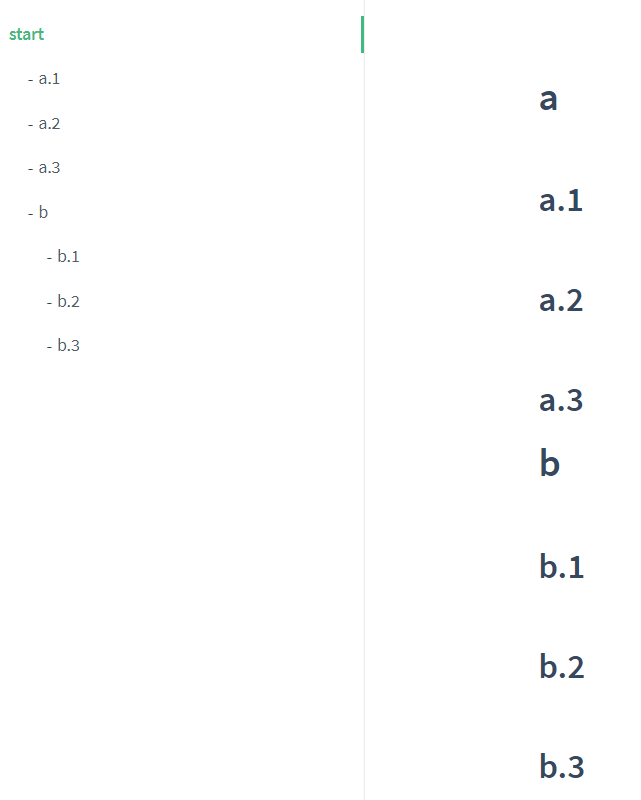
# a
## a.1
## a.2
## a.3
# b
## b.1
## b.2
## b.3
The index.html is as follows
window.$docsify = {
    name: '',
    repo: '',
    loadSidebar: true,
    subMaxLevel: 6
}
The _sidebar.md is as follows
- [start](README.md)
The sidebar is as follow
Environment
- OS: win10 1909
- nodejs: v13.11.0
- browser: MS Edge 83.0.478.61 and IE 11
- docsify-cli: 4.4.1
 h-hg
on 14 Jul 2020
h-hg
on 14 Jul 2020
I think it's the right thing to do. The sidebar description should be the same as for h1.
 sy-records
on 15 Jul 2020
sy-records
on 15 Jul 2020
I think it's the right thing to do. The sidebar description should be the same as for h1.
Thanks. I get it.
h-hg
on 15 Jul 2020
The issue also happened with me. As @stoufa shown, adding the # before the first header hides the problem.
Your OS: Ubuntu 18.04.5 LTS
Node.js version: v12.18.4
npm/yarn version: npm 6.14.6
Browser version: Edge Version 85.0.564.63 (Official build) (64-bit)
Docsify version: docsify-cli 4.4.1
Docsify plugins: none
 glaucoleme
on 29 Sep 2020
glaucoleme
on 29 Sep 2020
In most cases, we'll only have one h1 in a file, rather than multiple.
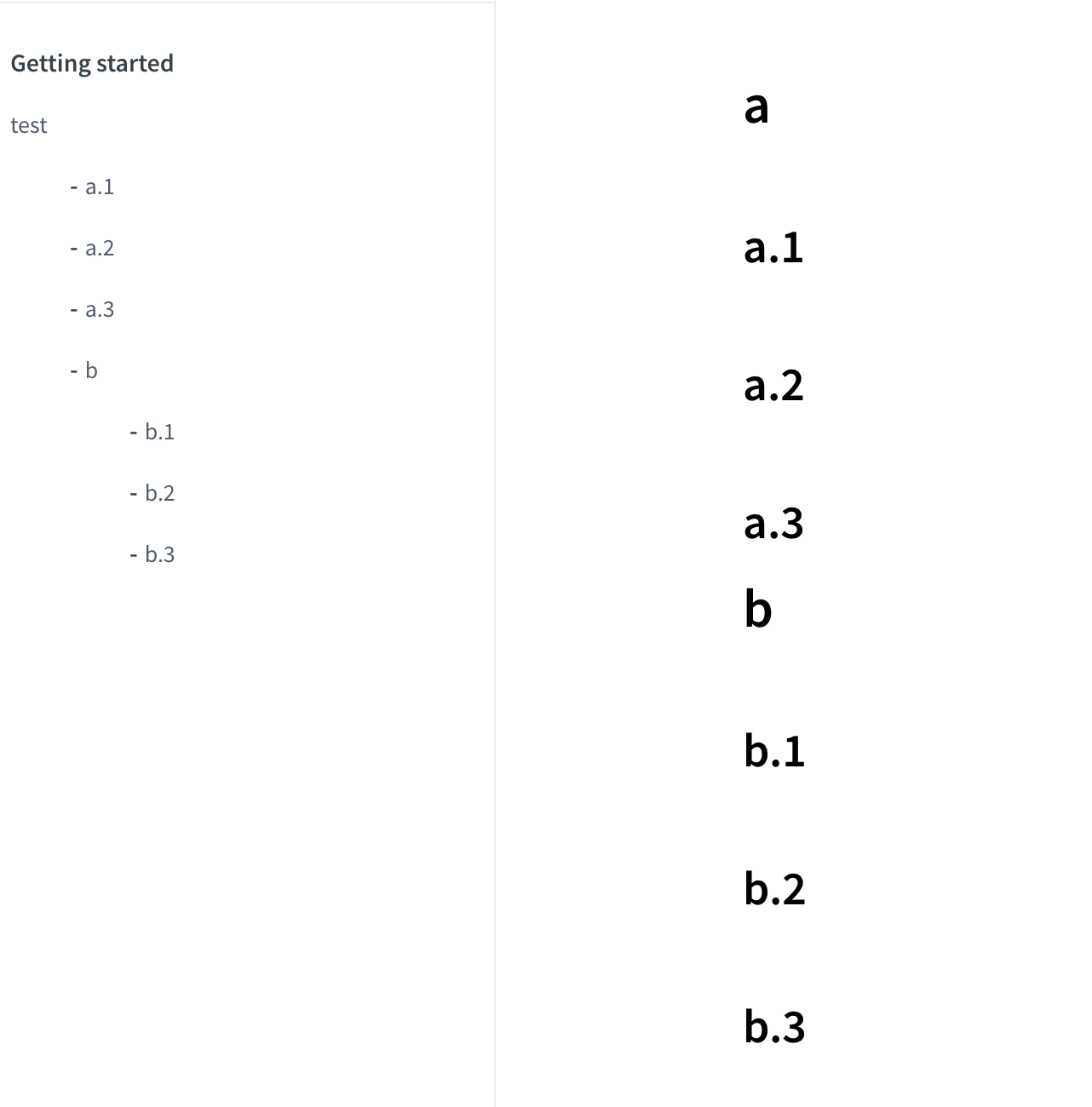
<!-- docs/_sidebar.md -->

- Getting started

* [test](/)
# a

## a.1

## a.2

## a.3

# b

## b.1

## b.2

## b.3
Here the test should be equal to a, so we omit the h1 rendering from the sidebar
sy-records
on 30 Sep 2020
Sorry @sy-records, I ignored your previous comment. If you consider the top level header as a good practice, that is the expected behaviour indeed. Thanks
glaucoleme
on 1 Oct 2020
Related issues
 Mohsens22
·
4Comments
Mohsens22
·
4Comments
 Jadyli
·
3Comments
Jadyli
·
3Comments
 petrdvorak
·
3Comments
petrdvorak
·
3Comments
 dialex
·
4Comments
dialex
·
4Comments
 SidVal
·
3Comments
SidVal
·
3Comments