Docsify: Put the hamburger where it belongs
I don't see why hamburger menu is in the bottom left corner. Nobody we showed the documentation was able to find it there. Is it possible to move the button to the upper left corner?
Also, the documentation "name" could be moved to the top of the sidebar, above the search bar.
See this quick mockup:
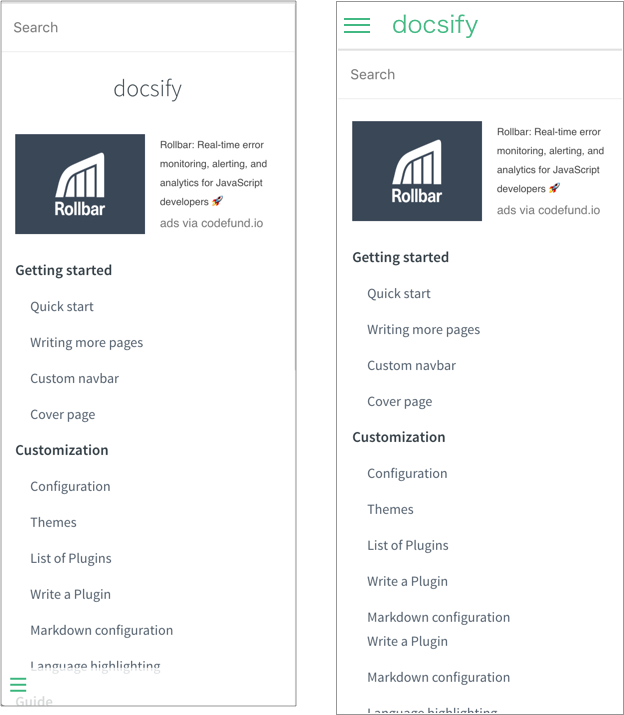
Having own custom layout can make a page look interesting, but it should not be at the sake of non-standard UX.
 petrdvorak
All 3 comments
Done! :wink:
https://jhildenbiddle.github.io/docsify-themeable
The location of the sidebar toggle (the hamburger) is just one of many changes in docsify-themeable, all of which can be customized using CSS custom properties (see the Customization section for details). There's even a demo sandbox to play with if you want to take it for a spin.
The issue with the layout suggested by @petrdvorak is that the content found at the top of the sidebar varies from site to site. It could be the project name, a logo image, a search box, or something custom. The flexibility to customize the sidebar makes it impossible to design a toggle icon size, color, and location near the top of the sidebar that will work in all scenarios. My guess is that this likely contributed to docsify's decision to place the toggle towards the bottom of the sidebar (which I agree is unintuitive). This is why docsify-themeable opted to locate the toggle just outside of the sidebar and within the content gutter so that it won't interfere with either the sidebar or markdown content.
 jhildenbiddle
on 10 Jun 2018
jhildenbiddle
on 10 Jun 2018
@jhildenbiddle Love it! :)
I understand the problem with placing the burger into the sidebar... I believe that we can close this issue, if fixing can be done with a simple plugin...
petrdvorak
on 10 Jun 2018
FWIW, docsify-themeable isn't a plugin. It's probably easiest to just describe it as a different theme, but it's really a few things:
- A complete rewrite of docsify's CSS with a focus on customization using CSS custom properties
- A collection of themes based off of the rewritten CSS
- A plugins (6.3k min+gzip) that adds new features and fixes docsify issues and bugs
Just wanted to clarify for others that may stumble on the thread.
Thanks!
jhildenbiddle
on 17 Jun 2018
Related issues
 sy-records
·
4Comments
sy-records
·
4Comments
 smlbiobot
·
5Comments
smlbiobot
·
5Comments
 randName
·
4Comments
randName
·
4Comments
 dialex
·
4Comments
dialex
·
4Comments
 sijakret
·
3Comments
sijakret
·
3Comments
Most helpful comment
FWIW, docsify-themeable isn't a plugin. It's probably easiest to just describe it as a different theme, but it's really a few things:
Just wanted to clarify for others that may stumble on the thread.
Thanks!