Docs: document custom CA for Kubernetes Operator
From https://github.com/cockroachdb/cockroach/issues/59156:
Kubernetes has deprecated and is removing the ability for us to use CSRs to issue node certs in an upcoming release. This is going to break almost all of our install patterns except 'config file with custom ca' including the helm chart and the operator. This is already disabled in EKS and only has limited functionality in OpenShift and Tanzu. This will likely drive both engineering work and docs updates.
 taroface
All 24 comments
cc @piyush-singh @mikeCRL - I self-assigned this for now, but am happy to change ownership if needed
taroface
on 19 Jan 2021
This is a Kubernetes 1.22 change that can be (partially) addressed by https://github.com/cockroachdb/cockroach-operator/issues/292. This docs issue will be used to track the work in the cockroach-operator repo.
We will also need to update all other install patterns that use the K8s CA. These will be tracked in separate issues.
taroface
on 20 Jan 2021
Using the following steps after completing "Configure the cluster" in the Operator docs:
Create CA:

    cockroach cert create-ca --certs-dir=certs --ca-key=my-safe-directory/ca.key

Create root user (client) certs (`client.root.crt`):

    cockroach cert create-client root --certs-dir=certs --ca-key=my-safe-directory/ca.key

Add secret for client certs:

    kubectl create secret tls cockroachdb.client.root --key=certs/client.root.key --cert=certs/client.root.crt

Create node certs (`node.crt`):

    cockroach cert create-node localhost 127.0.0.1 cockroachdb-public cockroachdb-public.default cockroachdb-public.default.svc.cluster.local *.cockroachdb *.cockroachdb.default *.cockroachdb.default.svc.cluster.local --certs-dir=certs --ca-key=my-safe-directory/ca.key

Add secret for node certs:

    kubectl create secret tls cockroachdb.node --key=certs/node.key --cert=certs/node.crt

Get secrets:

    kubectl get secrets

Update `example.yaml` with

    clientTLSSecret: cockroachdb.client.root
    nodeTLSSecret: cockroachdb.node

Apply `example.yaml`:

    kubectl apply -f example.yaml
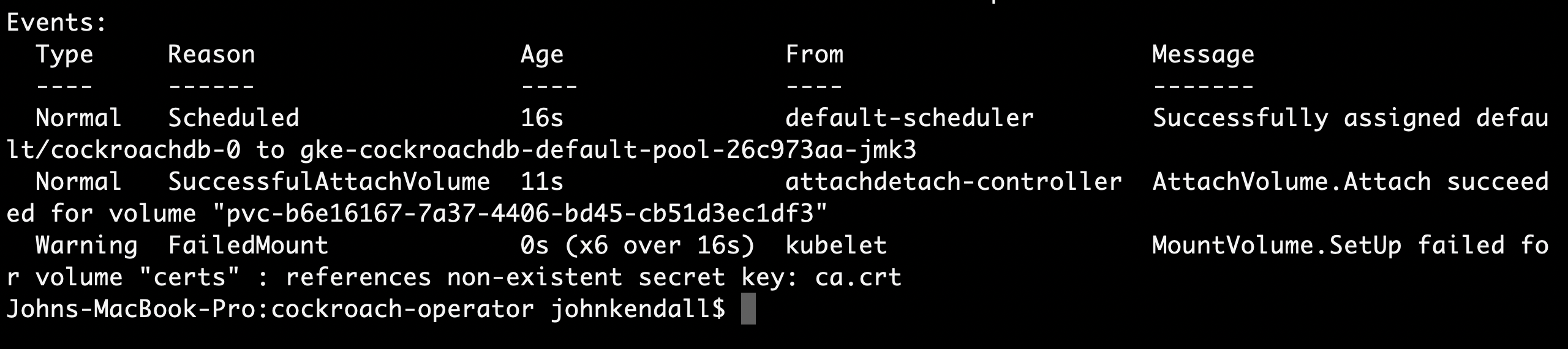
pod cockroachdb-0 is stuck at ContainerCreating with the following error:
Warning FailedMount 4s (x7 over 36s) kubelet, gke-cockroachdb-default-pool-dbd6110b-05kl MountVolume.SetUp failed for volume "certs" : references non-existent secret key: ca.crt
@keith-mcclellan @johnrk Can you reproduce and/or help troubleshoot? Maybe one of my paths is incorrect?
taroface
on 22 Jan 2021
Worked with @keith-mcclellan on this. These are the working steps:
Create CA:

    cockroach cert create-ca --certs-dir=certs --ca-key=my-safe-directory/ca.key

Create root user (client) certs (`client.root.crt`):

    cockroach cert create-client root --certs-dir=certs --ca-key=my-safe-directory/ca.key

Add secret for client certs:

    kubectl create secret tls cockroachdb.client.root --key=certs/client.root.key --cert=certs/client.root.crt

Create node certs (`node.crt`):

    cockroach cert create-node localhost 127.0.0.1 cockroachdb-public cockroachdb-public.default cockroachdb-public.default.svc.cluster.local *.cockroachdb *.cockroachdb.default *.cockroachdb.default.svc.cluster.local --certs-dir=certs --ca-key=my-safe-directory/ca.key

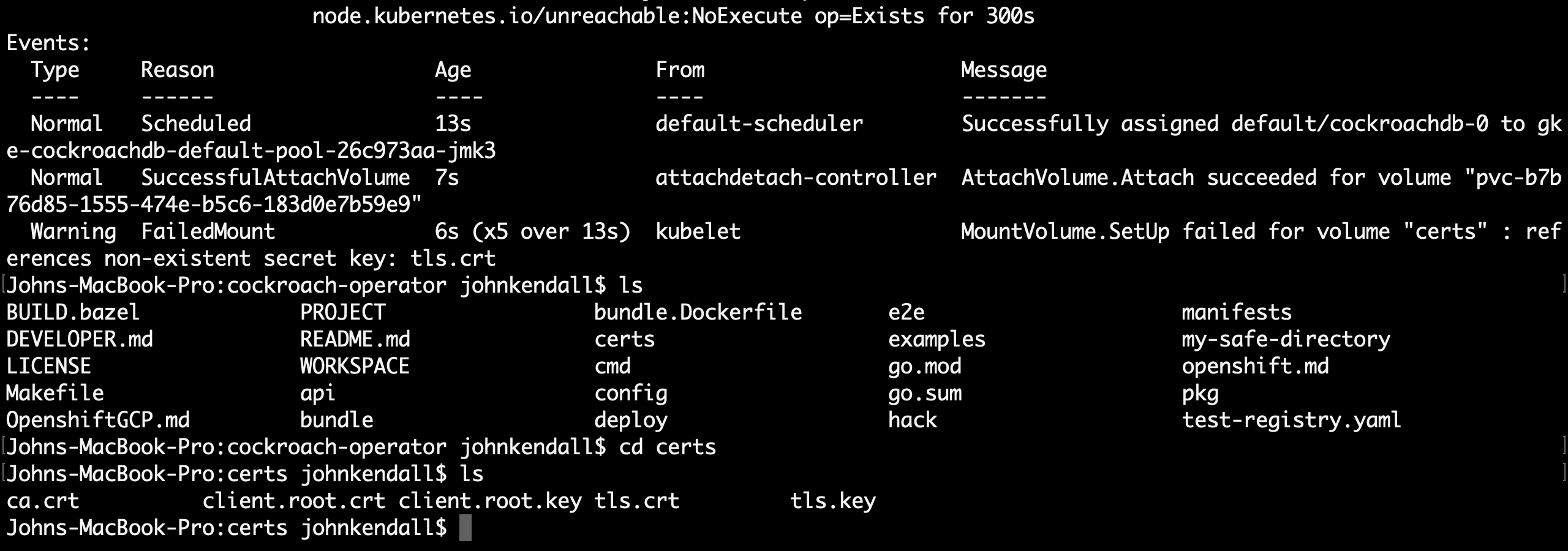
Rename `node.key` and `node.crt` to `tls.key` and `tls.crt` (these filenames are hardcoded in the Operator API)

Add secret for node certs:

    kubectl create secret generic cockroachdb.node --from-file=certs/tls.key --from-file=certs/tls.crt --from-file=certs/ca.crt

Get secrets:

    kubectl get secrets

Update `example.yaml` with

    clientTLSSecret: cockroachdb.client.root
    nodeTLSSecret: cockroachdb.node

Apply `example.yaml`:

    kubectl apply -f example.yaml
The Operator should be changed to accept certs from cockroach cert without requiring us to rename the files generated by cockroach cert create-node. Will create a ticket for this in the Operator project.
taroface
on 22 Jan 2021
We need to still confirm that we can launch cockroach sql both from inside the db pods and from a separate client pod since we did slightly change how we're building these secrets to make them more discrete
 keith-mcclellan
on 22 Jan 2021
keith-mcclellan
on 22 Jan 2021
SQL works on the Cockroach pods:
kubectl exec -it cockroachdb-2 -- ./cockroach sql --certs-dir cockroach-certs
However, when I tried using this client pod:
# Copyright 2020 The Cockroach Authors
#
# Licensed under the Apache License, Version 2.0 (the "License");
# you may not use this file except in compliance with the License.
# You may obtain a copy of the License at
#
#     https://www.apache.org/licenses/LICENSE-2.0
#
# Unless required by applicable law or agreed to in writing, software
# distributed under the License is distributed on an "AS IS" BASIS,
# WITHOUT WARRANTIES OR CONDITIONS OF ANY KIND, either express or implied.
# See the License for the specific language governing permissions and
# limitations under the License.
#
# This config file demonstrates how to connect to the CockroachDB StatefulSet
# deployed using the Kubernetes Operator.
#
# The pod that this file defines will sleep in the cluster not using any
# resources. After creating the pod, you can use it to open up a SQL shell to
# the database by running:
#
# kubectl exec -it cockroachdb-client-secure -- ./cockroach sql --url="postgres://root@cockroachdb-public:26257/?sslmode=verify-full&sslcert=/cockroach-certs/client.root.crt&sslkey=/cockroach-certs/client.root.key&sslrootcert=/cockroach-certs/ca.crt"
apiVersion: v1
kind: Pod
metadata:
  name: cockroachdb-client-secure
  labels:
    app: cockroachdb-client
spec:
  serviceAccountName: cockroach-operator-sa
  containers:
  - name: cockroachdb-client
    image: cockroachdb/cockroach:v20.2.0
    # Keep a pod open indefinitely so kubectl exec can be used to get a shell to it
    # and run cockroach client commands, such as cockroach sql, cockroach node status, etc.
    command:
    - sleep
    - "2147483648" # 2^31
    volumeMounts:
    - name: client-certs
      mountPath: /cockroach-certs
  volumes:
  - name: client-certs
    secret:
      secretName: cockroachdb.client.root
      # If you didn't use cockroach cert to generate the client certificate,
      # change this to the appropriate secret name
      defaultMode: 256
The pod was created but the command
kubectl exec -it cockroachdb-client-secure -- ./cockroach sql --certs-dir=/cockroach-certs --host=cockroachdb-public
resulted in an error:
W210122 01:36:33.705717 1 security/certificate_loader.go:338  bad filename /cockroach-certs/tls.crt: unknown prefix "tls"
ERROR: cannot load certificates.
Check your certificate settings, set --certs-dir, or use --insecure for insecure clusters.

problem using security settings: no certificates found; does certs dir exist?
Failed running "sql"
command terminated with exit code 1
Per @keith-mcclellan client pod now works when generating the client secret as follows:
kubectl create secret generic cockroachdb.client.root --from-file=certs/client.root.key --from-file=certs/client.root.crt --from-file=certs/ca.crt
@taroface it turns out getting the operator to use our naming standard to generate the TLS certs automatically is not trivial - I can get it to work by default using a custom CA but it breaks the K8s CA signer. Since that latter part is going away soon it's not worth the additional effort to fix. In the meantime if we could write up the docs with the workaround instructions (renaming node.key and node.crt to tls.key and tls.crt) that would likely be best. Thanks!
keith-mcclellan
on 27 Jan 2021
Per @keith-mcclellan client pod now works when generating the client secret as follows:
kubectl create secret generic cockroachdb.client.root --from-file=certs/client.root.key --from-file=certs/client.root.crt --from-file=certs/ca.crt
@taroface , what changed in this updated step? What are we doing special here? I assume this is replacing how we add secrets for client certs by using "generic" instead of "tls"?
If that's the case, what's the difference?
 johnrk
on 1 Feb 2021
johnrk
on 1 Feb 2021
johnrk
on 1 Feb 2021
@keith-mcclellan : you need to rename node.crt and node.key to tls.crt and tls.key.
Next, run kubectl create secret generic cockroachdb.node --key=certs/tls.key --cert=certs/tls.crt --key=certs/ca.crt
and the client command: kubectl create secret generic cockroachdb.client.root --key=certs/client.root.key --cert=certs/client.root.crt --cert=certs/ca.crt
johnrk
on 1 Feb 2021
@keith-mcclellan , @taroface , It appears renaming node.crt to tls.crt does not work for me. In the kubectl describe output of a pod that is stuck in "ContainerCreating" state, it says "MountVolume.SetUp failed for volume "certs" : references non-existent secret key: tls.crt"
johnrk
on 3 Feb 2021
@johnrk after you rename the certs, you have to inject them into the secrets before restarting.
keith-mcclellan
on 8 Feb 2021
@keith-mcclellan , what do you mean by "inject"?
I followed the step for adding them after renaming:
kubectl create secret tls cockroachdb.node --key=certs/node.key --cert=certs/node.crt
johnrk
on 8 Feb 2021
kubectl create secret tls cockroachdb.node --key=certs/tls.key --cert=certs/tls.crt
keith-mcclellan
on 8 Feb 2021
@keith-mcclellan , As stated above, I followed that step, and it resulted in this failure, which is why I suspect we have an bug with renaming here.
johnrk
on 8 Feb 2021
We'll have to run thru it live. Your error message is stating that the cockroach.node secret doesn't include tls.crt but not sure why.
keith-mcclellan
on 8 Feb 2021
sounds good. I'll file a bug with repro steps.
johnrk
on 8 Feb 2021
@keith-mcclellan @johnrk This is not working for me anymore. I'm also getting the error:
Events:
  Type     Reason                  Age                From                                                 Message
  ----     ------                  ----               ----                                                 -------
  Warning  FailedScheduling        18s (x3 over 20s)  default-scheduler                                    0/3 nodes are available: 1 Insufficient cpu, 1 Insufficient memory, 2 pod has unbound immediate PersistentVolumeClaims.
  Normal   Scheduled               15s                default-scheduler                                    Successfully assigned default/cockroachdb-0 to gke-cockroachdb-default-pool-86ccd046-pm60
  Normal   SuccessfulAttachVolume  9s                 attachdetach-controller                              AttachVolume.Attach succeeded for volume "pvc-86b8d65f-53e3-4877-9cd8-a56d41381f51"
  Warning  FailedMount             8s (x5 over 15s)   kubelet, gke-cockroachdb-default-pool-86ccd046-pm60  MountVolume.SetUp failed for volume "certs" : [references non-existent secret key: ca.crt, references non-existent secret key: tls.crt]
I did rename node.key/node.crt to tls.key/tls.crt. Used this command to upload the secrets:
kubectl create secret generic cockroachdb.node --from-file=certs/tls.key --from-file=certs/tls.crt --from-file=certs/ca.crt
I'm going to skip documenting this for now.
taroface
on 14 May 2021
@taroface can you find some time on the calendar for us to work thru this on Monday please?
keith-mcclellan
on 14 May 2021
@keith-mcclellan Here's what I currently have drafted for the custom CA steps:
### Example: Authenticating with `cockroach cert`

1. Create two directories:

    {% include copy-clipboard.html %}
    ~~~ shell
    $ mkdir certs my-safe-directory
    ~~~

    Directory | Description
    ----------|------------
    `certs` | You'll generate your CA certificate and all node and client certificates and keys in this directory.
    `my-safe-directory` | You'll generate your CA key in this directory and then reference the key when generating node and client certificates.

1. Create the CA certificate and key pair:

    {% include copy-clipboard.html %}
    ~~~ shell
    $ cockroach cert create-ca \
    --certs-dir=certs \
    --ca-key=my-safe-directory/ca.key
    ~~~

1. Create a client certificate and key pair for the root user:

    {% include copy-clipboard.html %}
    ~~~ shell
    $ cockroach cert create-client \
    root \
    --certs-dir=certs \
    --ca-key=my-safe-directory/ca.key
    ~~~

1. Upload the client certificate and key to the Kubernetes cluster as a secret:

    {% include copy-clipboard.html %}
    ~~~ shell
    $ kubectl create secret \
    generic cockroachdb.client.root \
    --from-file=certs/client.root.key \
    --from-file=certs/client.root.crt \
    --from-file=certs/ca.crt
    ~~~

    ~~~
    secret/cockroachdb.client.root created
    ~~~

1. Create the certificate and key pair for your CockroachDB nodes:

    {% include copy-clipboard.html %}
    ~~~ shell
    cockroach cert create-node \
    localhost 127.0.0.1 \
    cockroachdb-public \
    cockroachdb-public.default \
    cockroachdb-public.default.svc.cluster.local \
    *.cockroachdb \
    *.cockroachdb.default \
    *.cockroachdb.default.svc.cluster.local \
    --certs-dir=certs \
    --ca-key=my-safe-directory/ca.key
    ~~~

1. In the `certs` directory, rename `node.key` to `tls.key`.

    {% include copy-clipboard.html %}
    ~~~ shell
    mv certs/node.key certs/tls.key
    ~~~

    Rename `node.crt` to `tls.crt`.

    {% include copy-clipboard.html %}
    ~~~ shell
    mv certs/node.crt certs/tls.crt
    ~~~

    These filenames are currently required by the Operator.

1. Upload the node certificate and key to the Kubernetes cluster as a secret:

    {% include copy-clipboard.html %}
    ~~~ shell
    $ kubectl create secret \
    generic cockroachdb.node \
    --from-file=certs/tls.key \
    --from-file=certs/tls.crt \
    --from-file=certs/ca.crt
    ~~~

    ~~~
    secret/cockroachdb.node created
    ~~~

1. Check that the secrets were created on the cluster:

    {% include copy-clipboard.html %}
    ~~~ shell
    $ kubectl get secrets
    ~~~

    ~~~
    NAME                      TYPE                                  DATA   AGE
    cockroachdb.client.root   Opaque                                3      13s
    cockroachdb.node          Opaque                                3      3s
    default-token-6js7b       kubernetes.io/service-account-token   3      9h
    ~~~

1. Add `nodeTLSSecret` and `clientTLSSecret` to the custom resource, specifying the generated secret names:

    ~~~ yaml
    spec:
      nodeTLSSecret: cockroachdb.node
      clientTLSSecret: cockroachdb.client.root
    ~~~

    Then [apply](#apply-settings) the new values.
@keith-mcclellan I tried this again and got the error:
Events:
  Type     Reason                  Age                From                                                 Message
  ----     ------                  ----               ----                                                 -------
  Warning  FailedScheduling        40s (x2 over 40s)  default-scheduler                                    0/3 nodes are available: 3 pod has unbound immediate PersistentVolumeClaims.
  Normal   Scheduled               37s                default-scheduler                                    Successfully assigned default/cockroachdb-0 to gke-cockroachdb-default-pool-5f49d3eb-4m3m
  Normal   SuccessfulAttachVolume  32s                attachdetach-controller                              AttachVolume.Attach succeeded for volume "pvc-f88bb92c-6689-4806-9444-6aaa80528cdd"
  Warning  FailedMount             5s (x7 over 37s)   kubelet, gke-cockroachdb-default-pool-5f49d3eb-4m3m  MountVolume.SetUp failed for volume "certs" : references non-existent secret key: tls.crt
The pod is stuck at:
cockroachdb-0 0/1 ContainerCreating 0 34s
The secrets on the cluster:
NAME                                TYPE                                  DATA   AGE
cockroach-database-sa-token-7zvc5   kubernetes.io/service-account-token   3      77s
cockroach-operator-sa-token-ffrgc   kubernetes.io/service-account-token   3      76s
cockroachdb.client.root             Opaque                                3      9s
cockroachdb.node                    Opaque                                3      2s
default-token-vm2mz                 kubernetes.io/service-account-token   3      57m
The secret that was generated did not have the name tls.crt in it, so the file is not mounted to the directory. Can we please update the instructions to include how to make the certificates the name that the operator expects? We have this documented for the node secret in the code comments:
    // (Optional) The secret with certificates and a private key for the TLS endpoint
        // on the database port. The standard naming of files is expected (tls.key, tls.crt, ca.crt)
        // Default: ""
        // +optional
    NodeTLSSecret string `json:"nodeTLSSecret,omitempty"`
I would need to look at the code to figure out what the client ca needs.
 chrislovecnm
on 14 Jun 2021
taroface
on 23 Jun 2021
chrislovecnm
on 14 Jun 2021
taroface
on 23 Jun 2021
Related issues
 pirate
·
7Comments
pirate
·
7Comments
 yzdocs
·
6Comments
yzdocs
·
6Comments
 sploiselle
·
3Comments
sploiselle
·
3Comments
 awoods187
·
8Comments
awoods187
·
8Comments
 dankellycockroach
·
3Comments
dankellycockroach
·
3Comments