Docs-website: Hero: Table's width is too wide and doesn't render entirely on screen
Tell us what you need
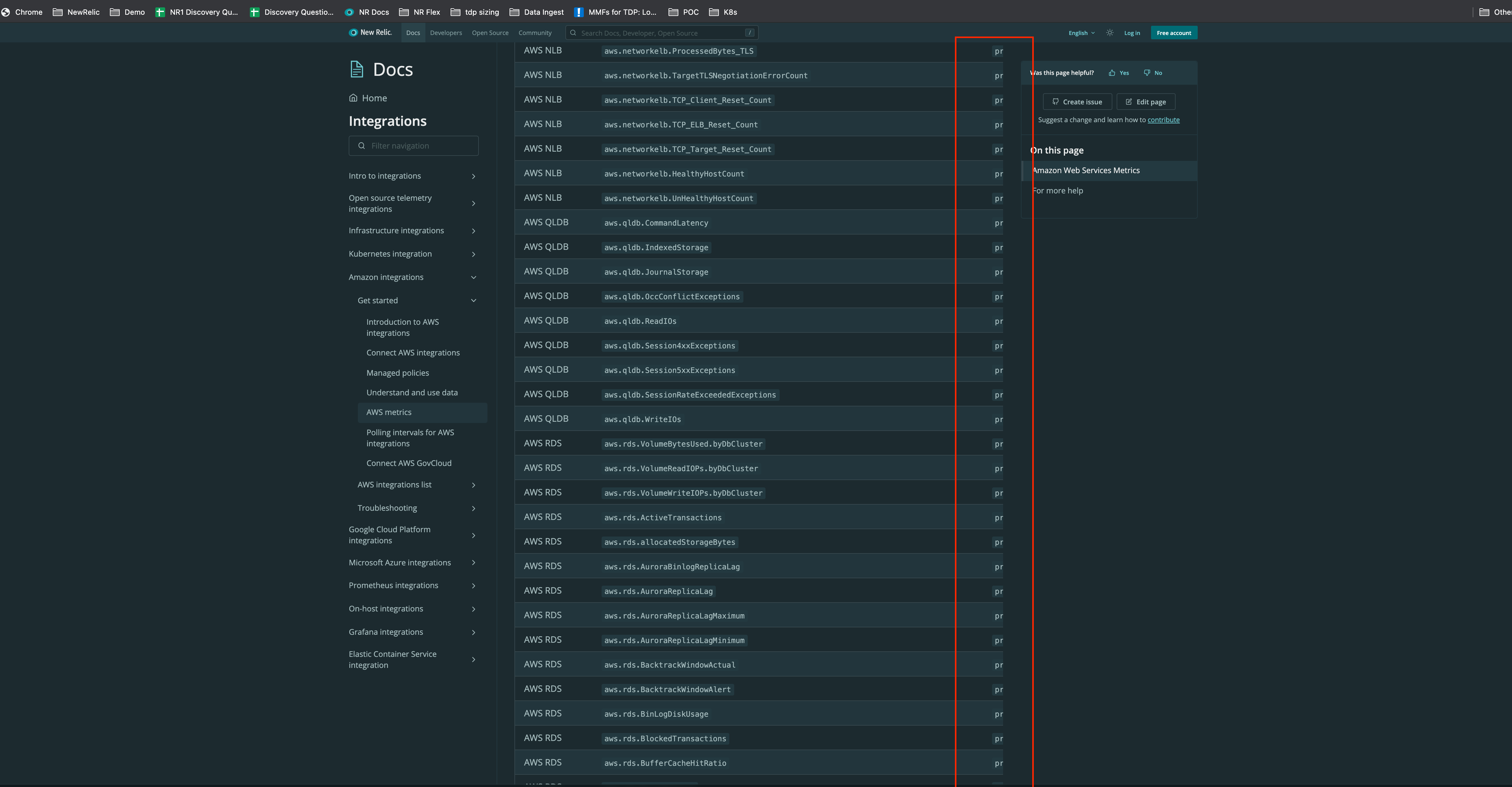
The table in the AWS Integrations Metrics doc is far too wide. Some cells have extremely long contents and make the table extremly hard to navigate. Not sure what the solution is, but we could explore wordwrap or something.
Report:
"Hello @Hero not sure if this was reported earlier but this what i am seeing on the Docs page. Not sure if this is how it supposed to look...FYI. Here is the link: https://docs.newrelic.com/docs/integrations/amazon-integrations/get-started/aws-integrations-metrics"
Anything else you'd like to share?
 bradleycamacho
All 8 comments
I'm also seeing this issue when tables have code blocks in them. For example, here: https://docs.newrelic.com/docs/alerts-applied-intelligence/applied-intelligence/incident-intelligence/get-started-incident-intelligence/#configure-algorithmia
This is especially messy when those tables are inside collapsers :D
 paperclypse
on 5 May 2021
paperclypse
on 5 May 2021
I would like to echo the previous comments and emphasize that this seriously compromises the value of some of our docs. Essentially, users can't read some of these tables, unless they were to do something like view the source.
 rhetoric101
on 5 May 2021
rhetoric101
on 5 May 2021
This is currently tagged as a content issue, but I'm going to ping @jpvajda and label it as eng since it seems to be a styling issue.
bradleycamacho
on 5 May 2021
@bradleycamacho / @paperclypse given the <table> component is being referenced in the collapser I'm wondering if we just have a bug in the table component.
But I agree, this is a pretty bad bug, so we'll see if we can knock it out in sprint 4
 jpvajda
on 6 May 2021
jpvajda
on 6 May 2021
this is likely due to loooong attribute / metric names like this:
aws.glue.glue.driver.ExecutorAllocationManager.executors.numberMaxNeededExecutors
we don't specify a rule for how to break the word in a <code> element, since i think the default is to not break / wrap it (for example at the end of a sentence.
adding this rule could fix the issue, though would want to verify this doesn't create weirdness elsewhere: word-break: break-word;
 roadlittledawn
on 7 May 2021
roadlittledawn
on 7 May 2021
@roadlittledawn ahh I see! good assessement!
jpvajda
on 8 May 2021
just tried out word-break: break-word and it does solve the first issue. it's not amazing looking but that's just the nature of fitting this particular table into a pretty narrow area.
the second issue that @paperclypse mentioned is separate i think, we can easily say a single line of code should wrap if it exceeds the width of the container its in, but in the case of formatted code blocks it gets a little harder. ~i feel like at best we could make the block fit within the table but it will still have to have a side scroll unless the code example gets edited (its got a really long nrql string on one line which gives it all that width)~
nevermind, white-space: pre-wrap to the rescue!
 LizBaker
on 10 May 2021
LizBaker
on 10 May 2021
@LizBaker 👏 -- could you add some points to this issue when you have a chance?
jpvajda
on 11 May 2021
Related issues
 wrekone
·
3Comments
wrekone
·
3Comments
 austin-schaefer
·
10Comments
austin-schaefer
·
11Comments
austin-schaefer
·
10Comments
austin-schaefer
·
11Comments
 jbeveland27
·
4Comments
jbeveland27
·
4Comments
 jerelmiller
·
8Comments
jerelmiller
·
8Comments