Docs-website: Fix the OVERWHELMING docker image + consider transparent background images for these pages
Description
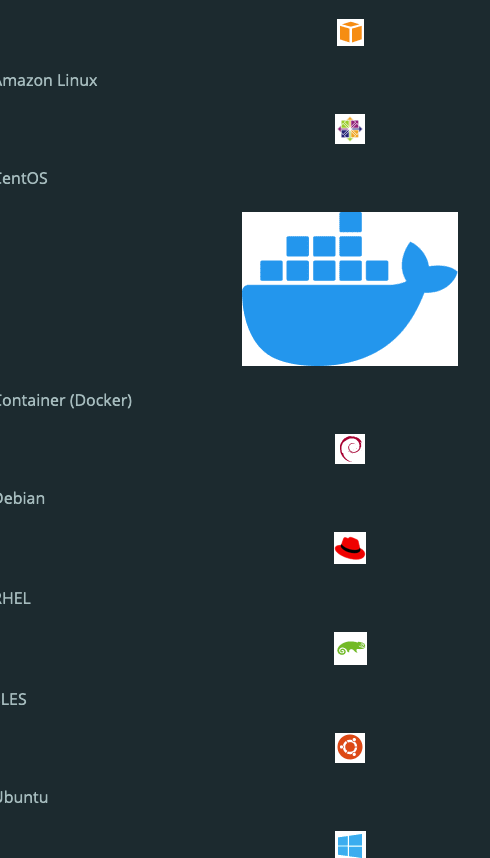
On a couple of pages, the icons have gone a little haywire in migration. Specifically, the docker icon is huge compared to the others, and then I'm also unsure if the plan is for the icons and labels to be in one big list.
as a bonus if we can also use transparent background images here, that would be ideal, preferably svgs.
Steps to reproduce
- Go to https://docs-preview.newrelic.com/docs/logs/enable-log-management-new-relic/enable-log-monitoring-new-relic/forward-your-logs-using-infrastructure-agent#install
- OR https://docs-preview.newrelic.com/docs/infrastructure/install-infrastructure-agent/linux-installation/install-infrastructure-agent-linux#install-agent
- See error and compare to this nice layout: https://docs.newrelic.com/docs/infrastructure/install-infrastructure-agent/linux-installation/install-infrastructure-monitoring-agent-linux#install-agent
 mmfred
All 10 comments
this is definitely a bug.. lol. I'd also like to look into to using images with transparent backgrounds here so we don't have this effect in dark mode.
 jpvajda
on 3 Feb 2021
jpvajda
on 3 Feb 2021
Hey @jpvajda,
I just took a look at some of these icons and realized one of two things is happening for each:
- The icons HAVE a white background, and are "correctly" rendering with the white background. We should go through and update these occurrences going forward.
- The icons have a transparent background, but render with a white background on the site. Not sure why this is happening, it seems like a bug. An example of this is the Docker icon.

 bradleycamacho
on 5 Feb 2021
bradleycamacho
on 5 Feb 2021
@bradleycamacho yep yep. we'll fix it!
jpvajda
on 5 Feb 2021
Nice, thank you!
bradleycamacho
on 5 Feb 2021
@jerelmiller thanks for asking about other pages. This is another page that has giant docker icon:
https://docs-preview.newrelic.com/docs/infrastructure/install-infrastructure-agent/get-started/install-infrastructure-agent
mmfred
on 5 Feb 2021
The only solution:

bradleycamacho
on 5 Feb 2021
☝️ The best response
 jerelmiller
on 5 Feb 2021
jerelmiller
on 5 Feb 2021
@bradleycamacho It looks like the Gatsby plugin we use to generate images is applying an inset box-shadow which causes the white background on those images. The image itself looks correct. We'll need to dig into the Gatsby plugin and see why they apply the box shadow. Likely this is something we can turn off. My guess is its related to that "blur up" effect on the images to provide a nice loading experience, but will double check.
jerelmiller
on 5 Feb 2021
Ok, I've got a PR that fixes the issue regarding these particular pages and that fancy tile grid. That should be deployed in the next day or so. I'm leaving this issue open for a bit longer as there are other images that need some help, particularly those that are rendered as inline images (instead of the big block image). I'd like to tackle those before closing this out.
Regarding this:
as a bonus if we can also use transparent background images here, that would be ideal
The transparency has been fixed. It looks like Gatsby's default was to add a white background image (hence the white background on those transparent pngs). This has been updated to be a transparent background.
Regarding this:
preferably svgs.
This is absolutely something I'd love to do post launch. We've now got a ton of logo SVGs that we use on the home page. It would be ideal to add the logos used in these tiles as SVGs so that we can use them for our Icon component. This also makes the markdown a bit simpler as we'd be able to provide the icon name as a prop to that tile.
Since our goal is to be 1:1, and these pages are generated based on the existing pages, I feel this is a bit out of scope to tackle as part of the migration. These should be easy to search for since these are now all named TechTile in the MDX pages. Let's definitely look at tackling the the change post-launch.
jerelmiller
on 10 Feb 2021
@jerelmiller sounds good. Thanks!
jpvajda
on 11 Feb 2021
Related issues
jpvajda
·
7Comments
bradleycamacho
·
8Comments
jpvajda
·
3Comments
jerelmiller
·
5Comments
jpvajda
·
3Comments
Most helpful comment
The only solution: