Dockstore: Hosted Workflows - Error Does Not Go Away After Correcting It
Bug Report
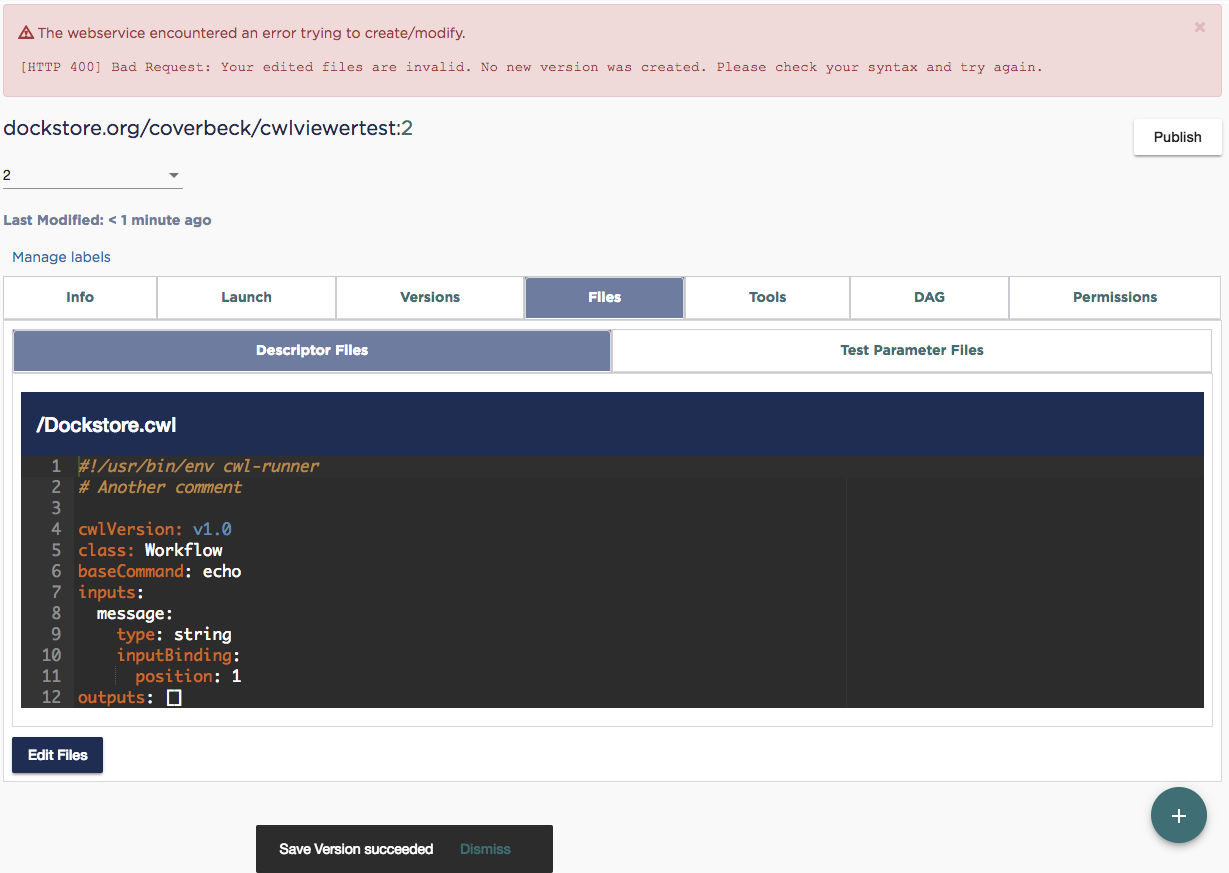
If you get a legitimate error trying to save a hosted workflow, then fix it, then save again, the error message does not go away.
- Go to My Workflows
- Register a hosted on Dockstore CWL workflow
- Go to Files tab
- Click Add Files
- Enter the following content, which is the CWL for a tool, not a workflow
!/usr/bin/env cwl-runner

cwlVersion: v1.0
class: CommandLineTool
baseCommand: echo
inputs:
  message:
    type: string
    inputBinding:
      position: 1
outputs: []
- Click Save as New Version
- You get an error message
[HTTP 400] Bad Request: Your edited files are invalid. No new version was created. Please check your syntax and try again. - Correct the CWL by changing
CommandLineTooltoWorkflow - Click Save as New Version again.
- It saves successfully, and you see a SnackBar message so indicating, but the big red box is still at the top of the page. See screenshot.
A couple of other notes, which maybe should be separated out into their own issues if there is agreement on doing any of them:
- It would be nice if the validation/error message could give better feedback as to what is wrong.
- Should we be using the SnackBar to display error messages instead of the current way? On the one hand, we've started doing it in some places. On the other hand, especially if we improve the feedback for a validation error, the SnackBar might not be the best place for that, both because of real estate and because the SnackBar disappears, although that time is configurable.
- Also, IMO, the UI shouldn't be showing the HTTP status code. I don't think that's helpful to most end users.
 coverbeck
All 4 comments
I think in general, SnackBar is used for short messages. If it's longer messages, the bootstrap alert is used...or we can set SnackBar duration to be relative to the length of the message :smile:
 garyluu
on 17 Aug 2018
garyluu
on 17 Aug 2018
The alert currently must be closed manually. Do we want alerts to disappear when another action is performed? If so I think the scope of this issue is a bit greater, since we should maintain some consistency with how we deal with alerts.
 agduncan94
on 21 Aug 2018
agduncan94
on 21 Aug 2018
We decided that any success message will clear any error state.
agduncan94
on 22 Aug 2018
Error message issue is fixed
Large issue of validation to be addresses in 1.6.0
See #766
 denis-yuen
on 24 Aug 2018
denis-yuen
on 24 Aug 2018
Related issues
 mvdbeek
·
5Comments
denis-yuen
·
3Comments
mvdbeek
·
5Comments
denis-yuen
·
3Comments
 wdesouza
·
5Comments
agduncan94
·
6Comments
denis-yuen
·
5Comments
wdesouza
·
5Comments
agduncan94
·
6Comments
denis-yuen
·
5Comments
Most helpful comment
We decided that any success message will clear any error state.