Dockerfile-maven: Cannot build docker image when the base image is not in docker.io
I try to build an image that extends from another imagine only available in local cache. The other imagine is not in docker hub. The plugin doesn't seem to be able find the local cache and try to retrieve from docker.io.
docker images show me
REPOSITORY                             TAG                    IMAGE ID
ixxus/alfresco-repository              5.1                    768225554bf7        3 days ago
[INFO] Building Docker context /Users/alu/Workspace/projects/ixxus/alfresco/repo-cms
[INFO]
[INFO] Image will be built as ixxus/new-image:spotify-plugin
[INFO]
[INFO] Step 1 : FROM ixxus/alfresco-repository:5.1
[INFO] Pulling repository docker.io/ixxus/alfresco-repository
[ERROR] Error: image ixxus/alfresco-repository:5.1 not found
[WARNING] An attempt failed, will retry 1 more times
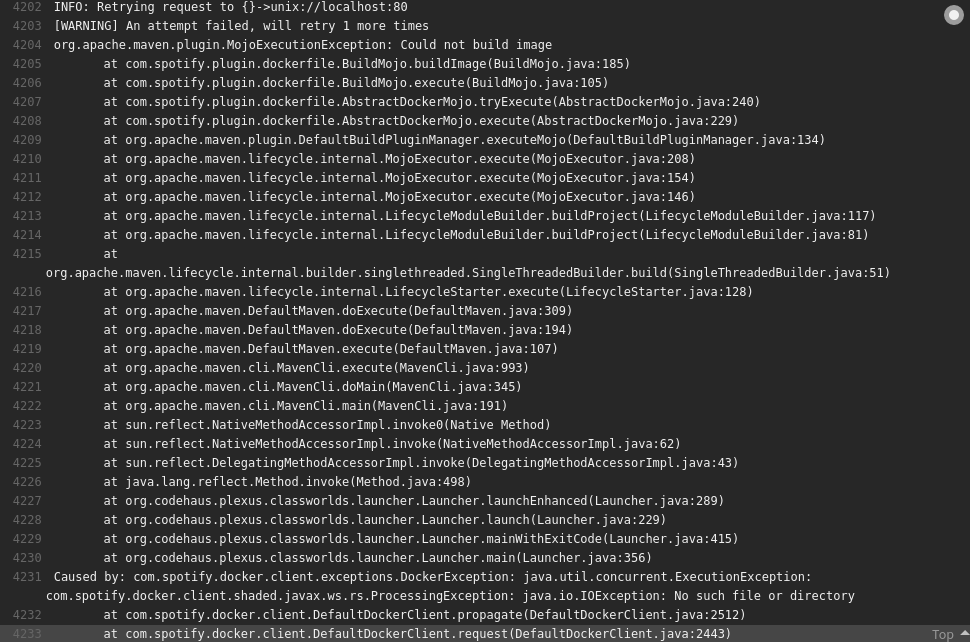
org.apache.maven.plugin.MojoExecutionException: Could not build image
        at com.spotify.plugin.dockerfile.BuildMojo.buildImage(BuildMojo.java:150)
        at com.spotify.plugin.dockerfile.BuildMojo.execute(BuildMojo.java:87)
        at com.spotify.plugin.dockerfile.AbstractDockerMojo.tryExecute(AbstractDockerMojo.java:206)
        at com.spotify.plugin.dockerfile.AbstractDockerMojo.execute(AbstractDockerMojo.java:195)
        at org.apache.maven.plugin.DefaultBuildPluginManager.executeMojo(DefaultBuildPluginManager.java:134)
        at org.apache.maven.lifecycle.internal.MojoExecutor.execute(MojoExecutor.java:207)
        at org.apache.maven.lifecycle.internal.MojoExecutor.execute(MojoExecutor.java:153)
        at org.apache.maven.lifecycle.internal.MojoExecutor.execute(MojoExecutor.java:145)
        at org.apache.maven.lifecycle.internal.LifecycleModuleBuilder.buildProject(LifecycleModuleBuilder.java:116)
        at org.apache.maven.lifecycle.internal.LifecycleModuleBuilder.buildProject(LifecycleModuleBuilder.java:80)
        at org.apache.maven.lifecycle.internal.builder.singlethreaded.SingleThreadedBuilder.build(SingleThreadedBuilder.java:51)
        at org.apache.maven.lifecycle.internal.LifecycleStarter.execute(LifecycleStarter.java:128)
        at org.apache.maven.DefaultMaven.doExecute(DefaultMaven.java:307)
        at org.apache.maven.DefaultMaven.doExecute(DefaultMaven.java:193)
        at org.apache.maven.DefaultMaven.execute(DefaultMaven.java:106)
        at org.apache.maven.cli.MavenCli.execute(MavenCli.java:863)
        at org.apache.maven.cli.MavenCli.doMain(MavenCli.java:288)
        at org.apache.maven.cli.MavenCli.main(MavenCli.java:199)
        at sun.reflect.NativeMethodAccessorImpl.invoke0(Native Method)
        at sun.reflect.NativeMethodAccessorImpl.invoke(NativeMethodAccessorImpl.java:62)
        at sun.reflect.DelegatingMethodAccessorImpl.invoke(DelegatingMethodAccessorImpl.java:43)
        at java.lang.reflect.Method.invoke(Method.java:498)
        at org.codehaus.plexus.classworlds.launcher.Launcher.launchEnhanced(Launcher.java:289)
        at org.codehaus.plexus.classworlds.launcher.Launcher.launch(Launcher.java:229)
        at org.codehaus.plexus.classworlds.launcher.Launcher.mainWithExitCode(Launcher.java:415)
        at org.codehaus.plexus.classworlds.launcher.Launcher.main(Launcher.java:356)
Caused by: com.spotify.docker.client.exceptions.DockerException: Error: image ixxus/alfresco-repository:5.1 not found
        at com.spotify.plugin.dockerfile.LoggingProgressHandler.handleError(LoggingProgressHandler.java:106)
        at com.spotify.plugin.dockerfile.LoggingProgressHandler.progress(LoggingProgressHandler.java:64)
        at com.spotify.docker.client.DefaultDockerClient.build(DefaultDockerClient.java:1162)
        at com.spotify.docker.client.DefaultDockerClient.build(DefaultDockerClient.java:1111)
        at com.spotify.plugin.dockerfile.BuildMojo.buildImage(BuildMojo.java:143)
        ... 25 more
 ghost
ghost
All 7 comments
Anyone???
ghost
on 25 Sep 2016
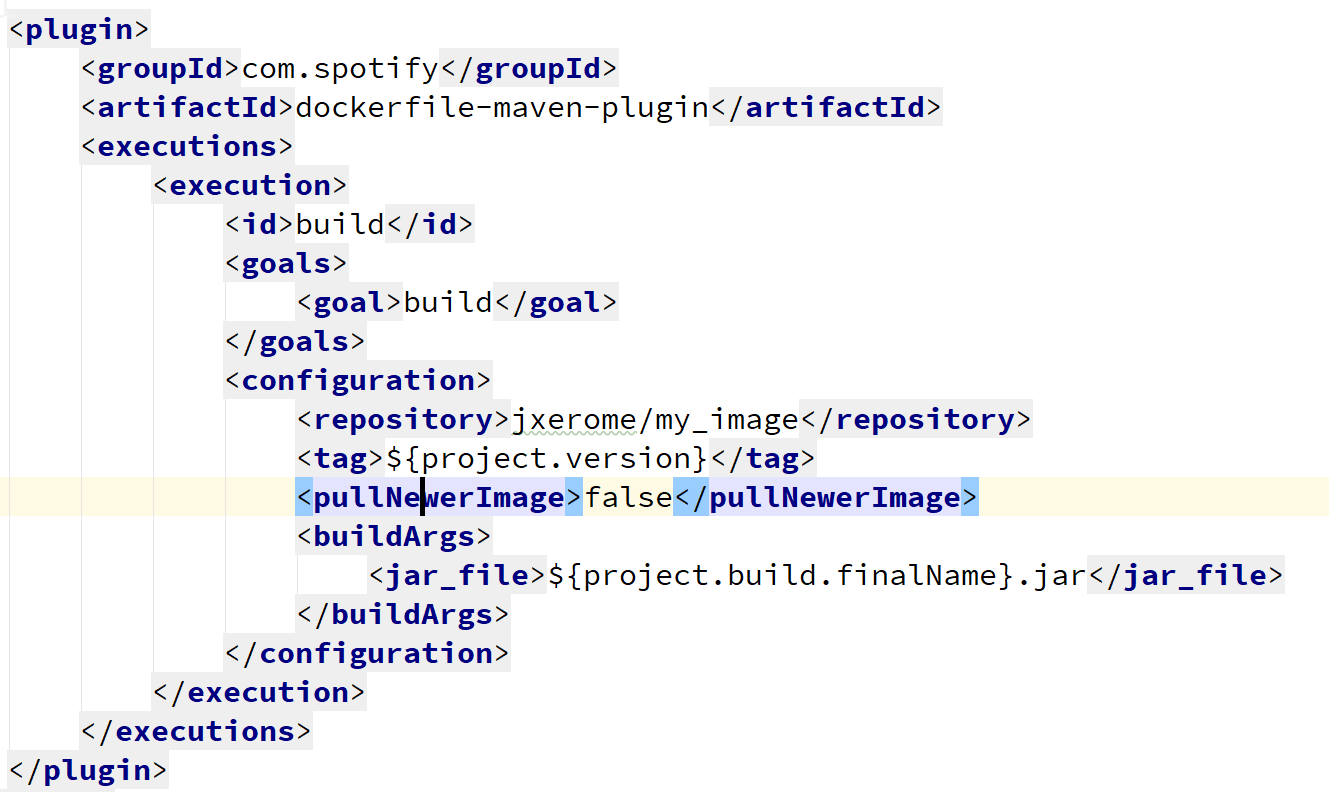
You haven't shared what your plugin configuration looks like, but I would assume that you need to set pullNewerImage to false, as it defaults to true.
 mattnworb
on 26 Sep 2016
mattnworb
on 26 Sep 2016
@mattnworb Thanks lots. That did the job.
ghost
on 30 Sep 2016
@mattnworb Is it possible to set private owned repository to pull newer images but not from docker.io? Thanks!
By the way, any ideas about how to set multiple tags via dockerfile-mave-plugin. I saw that it's possible for docker-maven-plugin. But seems it's not supported in dockerfile-maven-plugin.
 NancyChunlan
on 11 May 2017
NancyChunlan
on 11 May 2017
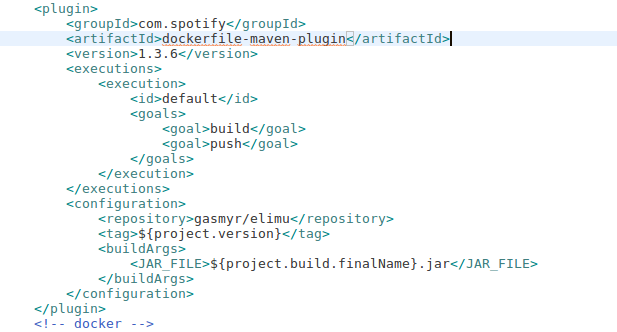
@mattnworb can you please show me an example where "pullNewerImage" is configure? I have the save issue when building docker image on Travis.
 syntrydy
on 25 Nov 2017
syntrydy
on 25 Nov 2017
syntrydy
on 25 Nov 2017
In the configuration.
 jxerome
on 7 Dec 2017
jxerome
on 7 Dec 2017
Related issues
 bjornbak
·
5Comments
bjornbak
·
5Comments
 publicocean0
·
12Comments
publicocean0
·
12Comments
 quentingodeau
·
3Comments
quentingodeau
·
3Comments
 albertoaflores
·
10Comments
albertoaflores
·
10Comments
 mmaeller
·
10Comments
mmaeller
·
10Comments
Most helpful comment
In the configuration.