Docker: Using Nextcloud Docker Image with Traefik
I have just started using Traefik as a proxy for docker containers. One thing it does is automatically provide a LetsEncrypt cert for all containers reachable via web. However when I try it with this nextcloud image, (with the docker-compose.yml described here) it won't let me access it
This page isn’t working

cloud.example.co.uk redirected you too many times.
Try clearing your cookies.
ERR_TOO_MANY_REDIRECTS
as you have to provide LetsEncrypt details to make it reachable via the web.
Until here your Nextcloud is just available from you docker host. If you want you Nextcloud available
from the internet adding SSL encryption is mandatory.
Is there anyway to disable this behaviour If i custom build this image?
 thetre97
All 8 comments
as you have to provide LetsEncrypt details to make it reachable via the web.
Until here your Nextcloud is just available from you docker host. If you want you Nextcloud available from the internet adding SSL encryption is mandatory.Is there anyway to disable this behaviour If i custom build this image?
The nextcloud image itself does not include any kind of ssl encryption. We just recommend using a reverse proxy in front, but you can use it as you need. Both examples, apache and fpm, include a simple webserver, that uses unencrypted http.
The fpm example you mentioned exposes the web server to port 8080 of your host. So it should already be rechable by using http://your-domain:8080.
I don't know how traefik works, so could you please verify what your problem with the nextcloud image is and provide an example configuration / logs?
 SnowMB
on 16 Sep 2017
SnowMB
on 16 Sep 2017
Maybe it could help, here is a link to my working docker-compose.yml with traefik :
https://github.com/Orybon/nextcloud-docker-compose/blob/master/docker-compose.yml
 Orybon
on 20 Sep 2017
Orybon
on 20 Sep 2017
docker-compose.yml in /
version: '2.3'
networks:
frontend_bridge:
external:
name: frontend
backend_bridge:
external:
name: backend
services:
traefik:
image: traefik
container_name: traefik
hostname: traefik
environment:
- LC_ALL=C.UTF-8
- TZ=America/Halifax
labels:
- traefik.enable=true
- traefik.backend=traefik
- traefik.frontend.rule=Host:traefik.**INSERTFQDNHERE**
- traefik.docker.network=frontend
- traefik.port=8080
restart: always
volumes:
- /var/run/docker.sock:/var/run/docker.sock
- ./traefik/config:/etc/traefik
mem_limit: 50M
memswap_limit: 50M
logging:
driver: json-file
options:
max-size: "10m"
max-file: "3"
networks:
- frontend_bridge
ports:
- 80:80
- 443:443
nextcloud:
image: stlouisn/nextcloud
container_name: nextcloud
hostname: nextcloud
environment:
- LC_ALL=C.UTF-8
- TZ=America/Halifax
labels:
- traefik.enable=true
- traefik.backend=nextcloud
- traefik.frontend.rule=Host:nextcloud.**INSERTFQDNHERE**
- traefik.docker.network=frontend
- traefik.port=80
restart: always
volumes:
- ./nextcloud/userdata:/var/www/html/data
- ./nextcloud/html:/var/www/html
logging:
driver: json-file
options:
max-size: "10m"
max-file: "3"
networks:
- frontend_bridge
- backend_bridge
depends_on:
mysql:
condition: service_healthy
mysql:
image: mariadb
container_name: mysql
hostname: mysql
environment:
- LC_ALL=C.UTF-8
- TZ=America/Halifax
- MYSQL_ALLOW_EMPTY_PASSWORD=yes
labels:
- traefik.enable=false
restart: always
volumes:
- ./mysql/init:/docker-entrypoint-initdb.d:ro
- ./mysql/data:/var/lib/mysql
logging:
driver: json-file
options:
max-size: "10m"
max-file: "3"
healthcheck:
test: mysqladmin ping -h localhost || exit 1
interval: 60s
timeout: 10s
retries: 5
networks:
- backend_bridge
expose:
- 3306
nextcloud.sql in /nextcloud/init
CREATE
USER IF NOT EXISTS 'nextcloud'@'172.%.%.%'
IDENTIFIED BY '**SETPASSWORDHERE**';
CREATE
DATABASE IF NOT EXISTS `nextcloud`;
GRANT
ALL PRIVILEGES
ON `nextcloud`.*
TO 'nextcloud'@'172.%.%.%';
FLUSH PRIVILEGES;
root.sql in /nextcloud/init
DELETE
FROM mysql.user
WHERE user='root'
AND host <> 'localhost';
UPDATE
mysql.user
SET password = ''
WHERE user='root';
TRUNCATE
TABLE mysql.proxies_priv;
FLUSH PRIVILEGES;
traefik.conf in /traefik/conf
logLevel = "INFO"
debug = false
checkNewVersion = false
defaultEntryPoints = ["http", "https"]
[web]
address = ":8080"
[entryPoints]
[entryPoints.http]
address = ":80"
[entryPoints.http.redirect]
entryPoint = "https"
[entryPoints.https]
address = ":443"
[entryPoints.https.tls]
[acme]
email = "**INSERTEMAILADDRESSHERE**"
storage = "/etc/traefik/acme.json"
entryPoint = "https"
onDemand = false
onHostRule = true
[docker]
endpoint = "unix:///var/run/docker.sock"
domain = "**INSERTFQDNHERE**"
watch = true
exposedbydefault = false
- in my example i have pre-created two docker networks: frontend, backend
- change everything inbetween TEXT to your applicable settings
- i customized the nextcloud image to use supervisord with cron, feel free to use it if you like
 stlouisn
on 7 Oct 2017
stlouisn
on 7 Oct 2017
I want to run nextcloud as well. When I run locally via a docker run (without traefik) the setup is all good.
When I run it behind traefik, something is breaking
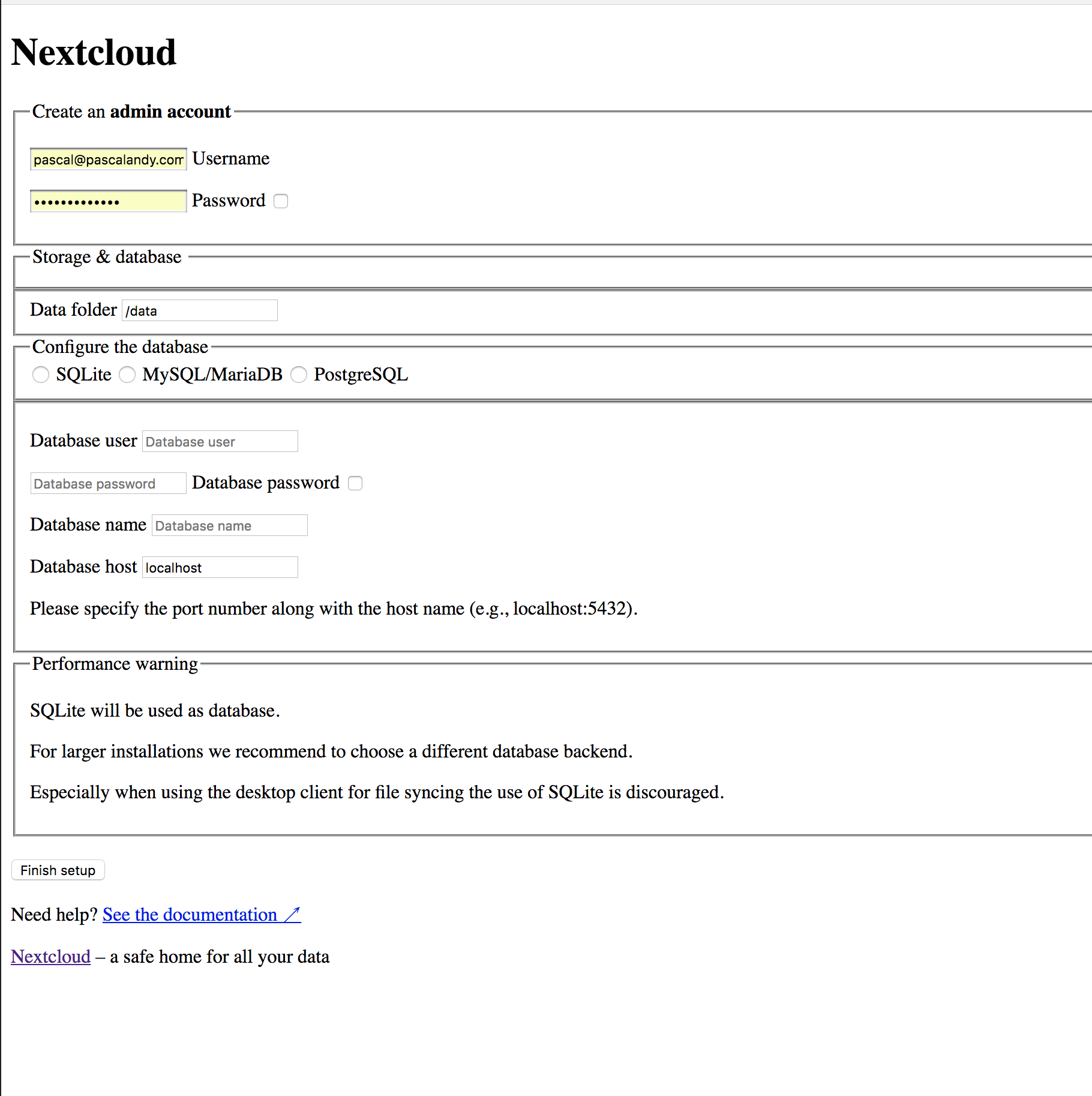
Here is my config
docker service create \
--name=nextcloud --hostname=nextcloud \
--network=ntw_front --replicas=1 \
--reserve-memory=128M --limit-memory=172M \
--restart-condition=any --restart-max-attempts=20 \
--update-delay=5s --update-parallelism=1 --update-monitor=1s \
--mount type=bind,src=/local/nextcloud/data,dst=/data \
--mount type=bind,src=/local/nextcloud/config,dst=/config \
--mount type=bind,src=/local/nextcloud/apps2,dst=/apps2 \
--mount type=bind,src=/local/nextcloud/themes,dst=/themes \
--mount type=bind,src=/local/nextcloud/php/session,dst=/php/session \
-e UID=1000 -e GID=1000 \
-e UPLOAD_MAX_SIZE=10G \
-e APC_SHM_SIZE=128M \
-e OPCACHE_MEM_SIZE=128 \
-e CRON_PERIOD=15m \
-e TZ=America/New_York \
-e DB_TYPE=sqlite3 \
-e DB_NAME=nextcloud \
-e DB_USER=nextcloud \
-e DB_PASSWORD=mypassw123 \
-e DB_HOST=db_nextcloud \
-e ADMIN_USER=pascal \
-e ADMIN_PASSWORD=mypassw456 \
-e DOMAIN=localhost \
--label "traefik.frontend.rule=Host:example.com;PathPrefix:/storage" \
--label "traefik.port=8888" \
--label "traefik.enable=true" \
--label "traefik.frontend.entryPoints=http" \
--label "traefik.docker.network=ntw_front" \
--label "traefik.frontend.priority=100" \
--label "traefik.weight=10" \
wonderfall/nextcloud:12.0
Docker run
docker run -d --name nextcloud \
-v next_data:/data \
-v next_config:/config \
-v next_apps:/apps2 \
-v next_themes:/nextcloud/themes \
-p 8888:8888 \
-e UID=1000 -e GID=1000 \
-e UPLOAD_MAX_SIZE=10G \
-e APC_SHM_SIZE=128M \
-e OPCACHE_MEM_SIZE=128 \
-e CRON_PERIOD=15m \
-e TZ=America/New_York \
-e ADMIN_USER=pascal \
-e ADMIN_PASSWORD=myfancypass123 \
-e DOMAIN=localhost \
-e DB_TYPE=sqlite3 \
-e DB_NAME=nextcloud \
-e DB_USER=nextcloud \
-e DB_PASSWORD=myfancypass456 \
-e DB_HOST=db_nextcloud \
wonderfall/nextcloud:12.0
 pascalandy
on 2 Nov 2017
pascalandy
on 2 Nov 2017
I just wanted to say Nextcloud and Traefik works fine for me with the following config:
version: "3.1"

services:
  traefik:
    image: traefik:1.4.0
    deploy:
      placement:
        constraints:
          - node.role == manager
    ports:
      - "80:80"
      - "443:443"
      - "8080:8080"
    volumes:
      - "/var/run/docker.sock:/var/run/docker.sock"
      - "/mnt/data/traefik:/etc/traefik/"
    command: traefik --loglevel=WARN
    networks:
      - frontend

  nextcloud:
    image: nextcloud:12.0.3-apache
    volumes:
      - "/mnt/data/nextcloud/data:/var/www/html/data"
      - "/mnt/data/nextcloud/custom_apps:/var/www/html/custom_apps"
      - "/mnt/data/nextcloud/config:/var/www/html/config"
    deploy:
      labels:
        - "traefik.port=80"
        - "traefik.frontend.rule=Host:cloud.example.com"
        - "traefik.enable=true"
        - "traefik.docker.network=swarm_frontend"
    networks:
      - frontend
      - backend
Note that currently has a regression in 1.4.1 and 1.4.2 which breaks DAV: https://github.com/containous/traefik/issues/2351
 jacksgt
on 8 Nov 2017
jacksgt
on 8 Nov 2017
I think this is a Traefik configuration issue instead of a Nextcloud problem. There are several working examples and my Nextcloud server (12.04) is working properly with Traefik / SSL in Docker Swarm.
**Traefik:**
image: traefik
command: --docker \
  --docker.swarmmode \
  --docker.watch \
  --web \
  --entryPoints='Name:http Address::80 Redirect.EntryPoint:https'
  --entryPoints='Name:https Address::443 TLS'
  --defaultEntryPoints=http,https

**Nextcloud** labels:
    - 'traefik.docker.network=proxy'
    - 'traefik.port=80'
    - 'traefik.frontend.rule=Host:example.com'
    - 'traefik.backend.loadbalancer.swarm=true'
    - 'traefik.backend.loadbalancer.method=wrr'
I think this can be closed.
 marceljd
on 7 Jan 2018
marceljd
on 7 Jan 2018
As I mentioned previously, for me this was related to https://github.com/containous/traefik/issues/2351 (but has been fixed).
jacksgt
on 7 Jan 2018
Thank you folks. I'll retry with the latest image.
P
pascalandy
on 7 Jan 2018
Related issues
 k1ngf15h3r
·
3Comments
k1ngf15h3r
·
3Comments
 aanno
·
3Comments
aanno
·
3Comments
 christianvw
·
3Comments
christianvw
·
3Comments
 happinesslijian
·
3Comments
happinesslijian
·
3Comments
 vancky
·
3Comments
vancky
·
3Comments
Most helpful comment
I just wanted to say Nextcloud and Traefik works fine for me with the following config:
Note that currently has a regression in
1.4.1and1.4.2which breaks DAV: https://github.com/containous/traefik/issues/2351