Docker: Use docker inside docker with jenkins user
version:
Client:
 Version:      1.11.1
 API version:  1.23
 Go version:   go1.5.4
 Git commit:   5604cbe
 Built:        Wed Apr 27 00:34:42 2016
 OS/Arch:      linux/amd64

Server:
 Version:      1.11.1
 API version:  1.23
 Go version:   go1.5.4
 Git commit:   5604cbe
 Built:        Wed Apr 27 00:34:42 2016
 OS/Arch:      linux/amd64
I have a docker container (jenkins). I've mounted the sockets to my container so that I can perform docker commands inside my jenkins container. This works fine when I am root user in my container:
docker run -d -v /var/run/docker.sock:/var/run/docker.sock -v
/usr/bin/docker:/usr/bin/docker:ro -v
/lib64/libdevmapper.so.1.02:/usr/lib/x86_64-linux-gnu/libdevmapper.so.1.02
-v /lib64/libudev.so.0:/usr/lib/x86_64-linux-gnu/libudev.so.0
-p 8080:8080 --name jenkins -u root --privileged=true -t -i
my-jenkins:1.0
My dockerfile now looks like this: I add my jenkins user to the docker group so I can perform docker commands with my jenkins user:
My dockerfile:
FROM jenkins:1.651.1
COPY plugins.txt /usr/share/jenkins/plugins.txt
RUN /usr/local/bin/plugins.sh /usr/share/jenkins/plugins.txt
 USER root
 RUN apt-get update
 RUN groupadd docker && gpasswd -a jenkins docker
 USER jenkins
When I start this container I'm not able to perform the docker commands with my jenkins user. But jenkins is in the dockergroup:
docker run -d -v /var/run/docker.sock:/var/run/docker.sock -v
/usr/bin/docker:/usr/bin/docker:ro -v
/lib64/libdevmapper.so.1.02:/usr/lib/x86_64-linux-gnu/libdevmapper.so.1.02
-v /lib64/libudev.so.0:/usr/lib/x86_64-linux-gnu/libudev.so.0
-p 8080:8080 --name jenkins -u jenkins --privileged=true -t -i
my-jenkins:1.0
But than it does not work
jenkins@bc145b8cfc1d:/$ docker ps
Cannot connect to the Docker daemon. Is the docker daemon running on this host?
jenkins@bc145b8cfc1d:/$ whoami
jenkins
This is the content of my /etc/groupon my container
jenkins:x:1000:
docker:x:1001:jenkins
my jenkins user is in the docker group
jenkins@bc145b8cfc1d:/$ groups jenkins
jenkins : jenkins docker
 lvthillo
All 81 comments
most likely you are mixing your container users/groups with the host users/groups, that have the same name but not the same uid/gid.
You should ask in docker mailing list
https://github.com/jenkinsci/docker/blob/master/CONTRIBUTING.md
 carlossg
on 9 May 2016
carlossg
on 9 May 2016
It's quite likely that @carlossg is right about mixing container and host users and groups.
Instead of mounting everything inside the Jenkins container, consider following https://docs.docker.com/engine/installation/linux/debian/ and building an image based on the Jenkins image but with Docker installed, i.e. by doing something like (untested):
RUN apt-get update \
&& apt-get install apt-transport-https ca-certificates \
&& echo "deb https://apt.dockerproject.org/repo debian-jessie main" > /etc/apt/sources.list.d/docker.list \
&& apt-key adv --keyserver hkp://p80.pool.sks-keyservers.net:80 --recv-keys 58118E89F3A912897C070ADBF76221572C52609D \
&& apt-get update \
&& apt-get install -y docker-engine
Then you only need to mount /var/run/docker.sock to get Docker working inside the container, and that shouldn't cause any permission-related issues.
 konradstrack
on 9 May 2016
konradstrack
on 9 May 2016
@konradstrack
Thanks for your answer. I tried this as dockerfile but still I'm not able to use docker commands as jenkins user:
FROM jenkins:1.651.1
#COPY plugins.txt /usr/share/jenkins/plugins.txt
#RUN /usr/local/bin/plugins.sh /usr/share/jenkins/plugins.txt
USER root
RUN apt-get update \
&& apt-get install -y apt-transport-https ca-certificates \
&& echo "deb https://apt.dockerproject.org/repo debian-jessie main" > /etc/apt/sources.list.d/docker.list \
&& apt-key adv --keyserver hkp://p80.pool.sks-keyservers.net:80 --recv-keys 58118E89F3A912897C070ADBF76221572C52609D \
&& apt-get update -y \
&& apt-get install -y docker-engine
RUN gpasswd -a jenkins docker
USER jenkins
@lorenzvth7, please see https://github.com/jenkinsci/docker/issues/196#issuecomment-179486312. The gist of this is that as root I run
#!/bin/bash -x
# this only works if the docker group does not already exist
DOCKER_SOCKET=/var/run/docker.sock
DOCKER_GROUP=docker
if [ -S ${DOCKER_SOCKET} ]; then
DOCKER_GID=$(stat -c '%g' ${DOCKER_SOCKET})
groupadd -for -g ${DOCKER_GID} ${DOCKER_GROUP}
usermod -aG ${DOCKER_GROUP} ${JENKINS_USER}
fi
... and then drop down to jenkins via gosu
 dweomer
on 9 May 2016
dweomer
on 9 May 2016
@konradstrack your solution seems to work on Ubuntu but not on CentOS
lvthillo
on 10 May 2016
@dweomer I don't know gosu.
Can you help me a bit further:
This are my dockerfile and jenkins.sh at the moment:
FROM jenkins:1.651.1
MAINTAINER xxx
USER root
RUN apt-get update \
&& apt-get install -y apt-transport-https ca-certificates \
&& echo "deb https://apt.dockerproject.org/repo debian-jessie main" > /etc/apt/sources.list.d/docker.list \
&& apt-key adv --keyserver hkp://p80.pool.sks-keyservers.net:80 --recv-keys 58118E89F3A912897C070ADBF76221572C52609D \
&& apt-get update -y \
&& apt-get install -y docker-engine \
&& apt-get install sudo \
&& apt-get clean \
&& rm -rf /var/lib/apt/lists/* /tmp/* /var/tmp/*
ADD jenkins.sh /usr/local/bin/jenkins.sh
RUN chmod a+x /usr/local/bin/jenkins.sh
ENTRYPOINT ["/usr/local/bin/jenkins.sh"]
jenkins.sh:
#!/bin/bash -x
# this only works if the docker group does not already exist
DOCKER_SOCKET=/var/run/docker.sock
DOCKER_GROUP=docker
if [ -S ${DOCKER_SOCKET} ]; then
DOCKER_GID=$(stat -c '%g' ${DOCKER_SOCKET})
groupadd -for -g ${DOCKER_GID} ${DOCKER_GROUP}
usermod -aG ${DOCKER_GROUP} jenkins
fi
You don't need gosu. What you need is for the user 1000 in the host to have permissions to access /var/run/docker.sock
Try chmod 777 /var/run/docker.sock and then reduce permissions as needed
carlossg
on 10 May 2016
I'm having the same problem, and tracked it down to the fact that the jenkins vanilla docker image already comes with a /var/run/docker.sock directory and docker installed, belonging to root:root, it seems that this socket is somehow in use and the sock belongs to root:root with readonly rights, so that's why jenkins can't use it.
I can chmod the socket if I disable tini, but still I can't write anything to it even as root.
$ docker run -i -t jenkins /bin/bash
jenkins@4ffd3500c50b:/$ ls -la /var/run/docker.sock
drwxr-xr-x 2 root root 4096 Jun 17 11:05 docker.sock
jenkins@4ffd3500c50b:/$ docker ps
FATA[0000] Get http:///var/run/docker.sock/v1.18/containers/json: dial unix /var/run/docker.sock: permission denied. Are you trying to connect to a TLS-enabled daemon without TLS?
Currently I'm unable to use this jenkins image to run docker containers, which seems to me something that definitely should work, has anyone managed to use it?
thanks
 DonGiulio
on 17 Jun 2016
DonGiulio
on 17 Jun 2016
you must be using your own jenkins image, the latest one from the hub doesn't have /var/run/docker.sock
docker run -ti --rm --entrypoint ls jenkins -alF /var/run/docker.sock
ls: cannot access /var/run/docker.sock: No such file or directory
Thanks for the reply,
That's odd:
if I run your command:
$ docker run -ti --rm --entrypoint ls jenkins -alF /var/run/docker.sock
total 8
drwxr-xr-x 2 root root 4096 Jun 17 12:07 ./
drwxr-xr-x 4 root root 4096 Jun 10 14:01 ../
and if I run:
$ docker images --format "table {{.ID}}\t{{.Repository}}\t{{.Tag}}" jenkins
IMAGE ID REPOSITORY TAG
f947cbd645d7 jenkins latest
I dropped all the images on my local machine and ran your command and I get your same result... the file is not there.
what could have happened?
DonGiulio
on 17 Jun 2016
@DonGiulio Bad volume mount most-like.
Long version: docker.sock is not supposed to be a directory, it's a UDS (Unix domain socket) which we sometimes like to share between host and containers when we want to access the host Docker engine from containers. We do this with --volume=/run/docker.sock:/run/docker.sock (n.b. /var/run is usually just a symlink to ../run). Now this is the fun part: when the file on the host does not exist, Docker doesn't complain and instead maps an empty volume as a directory inside the container. I remember reading an issue which implied this was by design for various reasons, but naturally this generates very odd behaviors down the line when we're not careful.
So, random guess: maybe you've used -v /var/run/docker.sock:/var/run/docker.sock at some point when Docker wasn't installed on the host and sometime after that image was committed with the same tag (didn't test to see if it was plausible). Or, you've angered the sea gods somehow.
 tn-osimis
on 17 Jun 2016
tn-osimis
on 17 Jun 2016
Closing. Docker in docker is a bad idea for a jenkins CI setup anyway
 ndeloof
on 7 Sep 2016
ndeloof
on 7 Sep 2016
@ndeloof ,
This is not [in fact] “Docker-in-Docker”; the container only runs the CLI and connects back to the host to start sister containers.
pipeline-as-code-github-demo
 laugimethods
on 2 Mar 2017
laugimethods
on 2 Mar 2017
Actually, I'm able to sucessfully run the https://jenkins.io/doc/pipeline/tour/hello-world/ Java Pipeline Example by using this homemade Dockerfile:
FROM jenkins:2.32.3

USER root
RUN apt-get -qq update \
   && apt-get -qq -y install \
   curl

RUN curl -sSL https://get.docker.com/ | sh

RUN usermod -a -G staff jenkins

USER jenkins
> docker build -t jenkins_docker .
> docker run --rm -p 8080:8080 -p 4040:4040 -v /var/run/docker.sock:/var/run/docker.sock jenkins_docker
Closing. Docker in docker is a bad idea for a jenkins CI setup anyway
@ndeloof
Why do you think having jenkins in docker is a bad setup? I rather prefer it to managing the installation at the host level.
@laugimethods , this did not work at all for me.
I ended up with the following:
docker-compose.yaml
jenkins:
  build: jenkins
  volumes:
   - jenkins-master-data:/var/jenkins_home
   - /var/run/docker.sock:/var/run/docker.sock
   - /usr/bin/docker:/usr/bin/docker
jenkins dockerfile
FROM jenkins:2.7.1
USER 0
CMD DOCKER_GID=$(stat -c '%g' /var/run/docker.sock) && \
    groupadd -for -g ${DOCKER_GID} docker && \
    usermod -aG docker jenkins && \
    sudo -E -H -u jenkins bash -c /usr/local/bin/jenkins.sh
 brthor
on 12 Mar 2017
brthor
on 12 Mar 2017
@brthor I'm not saying running Jenkins in docker is a bad idea, I'm saying using docker-in-docker (https://github.com/jpetazzo/dind) is bad, with terrible infrastructure impacts. Prefer access to the underlying docker daemon from your jenkins container.
ndeloof
on 12 Mar 2017
Here are ready to use Jenkins & Blueocean Docker Images that can call the underlying docker daemon: https://github.com/Logimethods/docker-jenkins
@brthor Could you explain your environment & what did not work for you with my solution? (so to try to to fix it if possible)
@ndeloof I agree with you that literally running docker inside docker is a bad idea... But it is not what we all expect. So, would you agree to reopen that issue after renaming it like "Using Docker FROM a Jenkins Container"?
laugimethods
on 15 Mar 2017
@ndeloof, please reconsider and reopen this issue. I agree with others here that this feature would be useful and it should just be a simple Dockerfile or jenkins.sh change.
No one is talking about the old "docker in docker" scenario. We just want to use the docker client within jenkins and have this image automatically configure /var/run/docker.sock so that the jenkins user has access.
 jamshid
on 3 Apr 2017
jamshid
on 3 Apr 2017
I can't consider running a container as root as a "solution"
ndeloof
on 4 Apr 2017
@ndeloof , what do you mean by "as root"?
If you look at https://github.com/Logimethods/docker-jenkins/blob/master/jenkins/Dockerfile , the user at runtime is jenkins, not root.
laugimethods
on 4 Apr 2017
yes, as you explicitly had to switch to root user to add some tools, it's clear you have to roll back to jenkins user. If the docker image has USER root as last statement, 90% jenkins container will run as root without end user to customize it.
Making access to docker.sock easier would then just introduce a significant security regression (I'm not even sure this would be accepted for an official docker image on docker store).
So I'm definitively :-1: on this. If you want to contribute doc on setting up access to docker infrastructure, you're welcome
ndeloof
on 4 Apr 2017
@ndeloof So, then, how could we run Declarative Pipelines made of Docker Agents (https://jenkins.io/doc/pipeline/tour/hello-world/)?
Btw, that's probably my last comment.
"Le mieux est l’ennemi du bien." — (Voltaire, La Bégueule, 1772)
https://en.wikipedia.org/wiki/Perfect_is_the_enemy_of_good
laugimethods
on 4 Apr 2017
@laugimethods declarative pipeline doesn't use "docker agent", it uses plain classic jenkins agent with a local docker daemon so it can run docker containers (DSL translates into docker-pipeline-plugin).
Also, this isn't just a _beauty_ consideration to prevent root usage, for official docker image we can't just let end-user shoot in their own foot. I guess most production users will anyway prefer to run their own baked jenkins docker image with adequate tools/version under their own control
ndeloof
on 4 Apr 2017
@brthor see
Got permission denied while trying to connect to the Docker daemon socket at unix:///var/run/docker.sock
in setup like yours. Any ideas?
 aholbreich
on 11 May 2017
aholbreich
on 11 May 2017
You need the jenkins user to be in the "docker" group so it can access this socket. Start your container with --group-add xx (using adequate group ID)
ndeloof
on 11 May 2017
actually i gave the user permissions like this, but it didn't worked somehow.
 CMD DOCKER_GID=$(stat -c '%g' /var/run/docker.sock) && \
    groupadd -for -g ${DOCKER_GID} docker && \
    usermod -aG docker jenkins && \
what helped is:
sudo chmod 777 /var/run/docker.sock
inside container.
aholbreich
on 13 May 2017
I am facing the exactly same issue.
How we are supposed to do that? I tried to run first sample pipeline and it failed. It was really frustrating and disappointed.
Any proper workaround?
 goforgold
on 11 Sep 2017
goforgold
on 11 Sep 2017
@aholbreich
Are you on a custom image? I can't run sudo from on the default image.
actually i gave the user permissions like this, but it didn't worked somehow.
CMD DOCKER_GID=$(stat -c '%g' /var/run/docker.sock) && \
groupadd -for -g ${DOCKER_GID} docker && \
usermod -aG docker jenkins && \
what helped is:sudo chmod 777 /var/run/docker.sock
inside container.
goforgold
on 11 Sep 2017
@aholbreich simple workaround : run jenkins container with --group-add docker.
ndeloof
on 11 Sep 2017
another option is to run a side container to provide docker API passthrough without permission issue, like https://github.com/dockins/dockersock. You can also use a more advanced one to filter exposed APIs
ndeloof
on 11 Sep 2017
@ndeloof thanks for the prompt response.
I started docker container using the specified switch using below command:
docker run -p 8888:8080 --group-add docker jenkinsci/blueocean:latest
But still getting the same error during pipeline execution.
[jenkin-test_master-MXNJBW333G3XAISBGXCTVVZGS4GJ5DS6V6NEEORWPSORGJY5OCGA] Running shell script
+ docker pull php
Using default tag: latest
Warning: failed to get default registry endpoint from daemon (Cannot connect to the Docker daemon. Is the docker daemon running on this host?). Using system default: https://index.docker.io/v1/
Cannot connect to the Docker daemon. Is the docker daemon running on this host?
script returned exit code 1
Note: I am running on Windows 10 system if this could have anything to do with that.
goforgold
on 11 Sep 2017
@ndeloof
isn't there a way to use host OS docker daemon inside Jenkins container like many people have tried? I also tried running this from this SO post. Container was started successfully but pipeline got same error. I think the mapping was not correctly done.
I also tried turning on this setting I found under Docker settings on my Windows host machine. But this also didn't work.
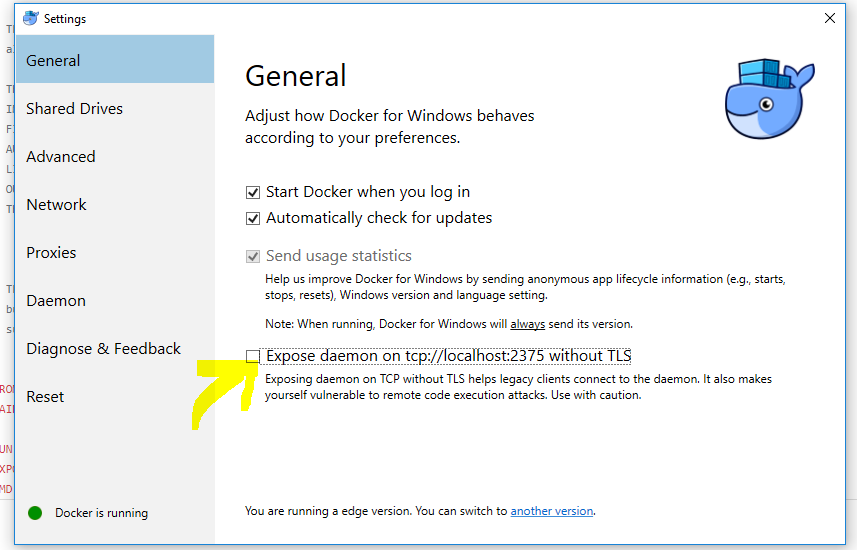
goforgold
on 11 Sep 2017
--group-add will give you permission to access docker socket, but you still need to bind-mount it inside your container with -v /var/run/docker.sock:/var/run/docker.sock
I assume you're running Docker4Windows, not native windows containers, are you ?
ndeloof
on 11 Sep 2017
@ndeloof
I have installed docker from here on my Windows 10 PC.
As per your instruction and from this SO post, I also tried starting container with below commands
docker run -p 8888:8080 --group-add docker -v /var/run/docker.sock:/var/run/docker.sock jenkinsci/blueocean:latest

docker run -p 8888:8080 --group-add docker -v //var/run/docker.sock:/var/run/docker.sock jenkinsci/blueocean:latest #Notice double forward sign in path (included in SO answer)
I get same error with both of the commands above.
goforgold
on 11 Sep 2017
This repo is for jenkins/jenkins docker image, which doesn't provide docker command line. You better should ask on https://github.com/jenkinsci/blueocean-plugin/, see https://github.com/jenkinsci/blueocean-plugin/blob/master/docker/official/Dockerfile#L6
ndeloof
on 11 Sep 2017
@brthor I'm not saying running Jenkins in docker is a bad idea, I'm saying using docker-in-docker (https://github.com/jpetazzo/dind) is bad, with terrible infrastructure impacts. Prefer access to the underlying docker daemon from your jenkins container.
It's unfortunate that you seem to have closed this without reading, based purely on a title misreading - what you said people should "prefer" is exactly what they were trying to work out how to do - people wanted to use, and were discussing "Using docker (client, to control the host docker) inside (a) docker (container)" - e.g. solving the permissions issues when bind-mounting docker.sock, not using the "Docker in Docker" project to run a docker host inside a docker container.
Fortunately, since this shows pretty high on search results for this problem, it looks like you have also provided the solution - the --group-add option, and even gotten docker-compose to add it via https://github.com/docker/compose/issues/3328.
Unfortunately, they seem to have removed it for their v3 API without any stated reason so it was only available for a few months. sigh.
 ndevenish
on 25 Sep 2017
ndevenish
on 25 Sep 2017
@ndevenish I've read with care before closing this issue :P
let's resume for better understanding
To run docker commands from a docker-ized jenkins master, we need to let this master invoke docker API
- Docker-in-docker has some serious infrastructure and security impacts. Master would then run in provileged mode, which just mean "I don't care about security" - until you fine tuned some AppArmor profile, USE AT YOUR OWN RISK
- Bind mount for docker.sock require the user to run jenkins to have special privileges. Using
--gorup-addcan be used for this purpose. The fact docker-compose v3 did remove this option is a docker issue (based on docker swarm mode restrictions IIUC), nothing we can do here. Anyway, access todocker.sockis a major security issue, as allowing bind mount is. So USE AT YOUR OWN RISK - Jenkins master container can be started with some docker API TLS keys and
DOCKER_HOSTenvironment variable set so it can access the docker API with legitimate credentials. Main benefits is jenkins is then an identified user for docker daemon authorization module, and one can plug an authz plugin (like mine) to prevent abuses, or rely on Docker EE client bundles with comparable API restrictions.
So, as a resume, nothing we can do inside this docker image to make this "simpler" without lowering the container security.
ndeloof
on 27 Sep 2017
loop @jamtur01 in this issue.
I run into this problem when building the continuous integration example in Chapter 5 "Testing with Docker" of "The docker book". Running docker commands in Jenkins Container using "/var/run/docker.sock" could cause "permission denied" issue:
Got permission denied while trying to connect to the Docker daemon socket at unix:///var/run/docker.sock: Get http://%2Fvar%2Frun%2Fdocker.sock/v1.29/containers/json: dial unix /var/run/docker.sock: connect: permission denied
hope @jamtur01 checking this issue
 jonefeewang
on 29 Sep 2017
jonefeewang
on 29 Sep 2017
@aholbreich Running chmod 777 /var/run/docker.sock as root in the running container worked for me as well. Could that happen in the Dockerfile before the container is started?
 afspear
on 29 Nov 2017
afspear
on 29 Nov 2017
@afspear you can't change permission of a bind mount (hopefully ! this would be a major security issue)
ndeloof
on 29 Nov 2017
@ndeloof could you point me in the direction for materials on connecting docker binary to an API? I'm running jenkins agents on kubernetes and would like to not expose docker socket if possible as well as not run container as root.
 zlance
on 8 Jan 2018
zlance
on 8 Jan 2018
@zlance your docker CLI or API client inside container will have to be configured using DOCKER_HOST env variable to connect to the actual docker daemon endpoint (or a proxy) and pass adequate credentials. Just like you do on any non-containerized host to access your dicker infrastructure.
ndeloof
on 8 Jan 2018
If anyone has a Dockerfile that runs any of the Jenkins Hello world examples out of the box - I'd be super grateful!
(ive tried the above)
UPDATE: This one worked for me :)
https://getintodevops.com/blog/the-simple-way-to-run-docker-in-docker-for-ci
 AshCoolman
on 30 Jan 2018
AshCoolman
on 30 Jan 2018
Resolve it by chmod 777 /var/run/docker.sock.
 KeithTt
on 9 Feb 2018
KeithTt
on 9 Feb 2018
@KeithTt wrote:
Resolve it by
chmod 777 /var/run/docker.sock .
Honestly, it'd be more secure to just run the Jenkins container as root.
dweomer
on 9 Feb 2018
@dweomer My jenkins installed locally in tomcat, and running as user tomcat...
KeithTt
on 9 Feb 2018
got error not found group docker. When i use --group-add docker options @ndeloof
docker: Error response from daemon: linux spec user: Unable to find group docker.
I also tried to add a jenkins user with 1000 id and add it into group docker in host
 raphaelsoul
on 8 Mar 2018
raphaelsoul
on 8 Mar 2018
The user in the container must belong to a group in the container having a group id same with the the docker group in the host system.
e.g. if running on Amazon EC2 AMI, the docker group id when installing docker is 994. In my docker image, added these:
RUN groupadd -g 1000 jenkins \
  && useradd -c "Jenkins user" -d $HOME -u 1000 -g 1000 -m jenkins \
  && groupadd -g 994 dockerami \
  && usermod -aG dockerami jenkins
 n3v3rf411
on 13 Apr 2018
n3v3rf411
on 13 Apr 2018
Thanks @n3v3rf411 ! It works like a charm !
 pcmanprogrammeur
on 14 Apr 2018
pcmanprogrammeur
on 14 Apr 2018
better than hard-coding the host's ID for docker group in your Dockerfile, you can run your container with --group-add docker
ndeloof
on 15 Apr 2018
@ndeloof --group-add docker fails with the error @raphaelsoul showed.
If you pass the gid directly on the docker run, and now you do not need to hardcode it in your image as per your suggestion, it works. eg:
getent group docker|cut -d: -f3
Also, the justification and clarification of the previous post was the answer that perhaps should have been given when you closed the issue. It is better to convince and explain people of the consequences of their choices than just saying "we do not support your crazyness" ;). Regardless thank you
 ptsneves
on 1 May 2018
ptsneves
on 1 May 2018
@laugimethods Thank you
 ukid
on 16 Jun 2018
ukid
on 16 Jun 2018
The solution I've come up with is to start the Jenkins container as root, fix the gid inside the container in the entrypoint, and then run the Jenkins app as the Jenkins user with the corrected gid. That solution has an example here: https://github.com/sudo-bmitch/jenkins-docker
 sudo-bmitch
on 30 Jun 2018
sudo-bmitch
on 30 Jun 2018
I'm suspicious that anyone, anywhere, has been able to exploit a normal installation of Jenkins bind-mounted to the docker socket or running as root. Those stories are typically theoretical and rely on myraid factors that just don't exist in the real world. Exposing your docker daemon to the host's tcp stack (and thus exposing the daemon to the outside world) seems like a much riskier proposition, IMO.
 ntwrkguru
on 7 Aug 2018
ntwrkguru
on 7 Aug 2018
@sudo-bmitch, that's an interesting approach, but the container itself is still running as root, correct? Wouldn't that provide the same "risks" as running the container and Jenkins process as root within the container? Or am I missing something in the way in which Jenkins uses the socket binding?
ntwrkguru
on 7 Aug 2018
@ntwrkguru The gosu command is a su+exec to drop privileges to the jenkins user, so the Jenkins process is not running as root and there is no process still running as root in the container after the entrypoint completes. There's the small risk that something breaks the entrypoint which starts as root, and there's the risk that someone will docker exec to run a command as root in the container, but the more critical issue of a vulnerability of Jenkins resulting in a process running as root inside the container is eliminated.
sudo-bmitch
on 8 Aug 2018
@sudo-bmitch Kinda what I was thinking. So, all of this really just helps to protect against some possible Jenkins security flaw. I don't consider docker exec a possible vector because if someone has the ability to run docker commands from the host's shell, you're already done. Thanks.
ntwrkguru
on 8 Aug 2018
Thanks @laugimethods!
 bfwg
on 13 Oct 2018
bfwg
on 13 Oct 2018
@sudo-bmitch's example (https://github.com/sudo-bmitch/jenkins-docker) is the best/cleanest way I've been able to do this—I have tested in a build I'm using in a variety of environments (local Mac, local Windows, Ubuntu in AWS, Kubernetes in AKS, and Kubernetes in local VirtualBox with Debian).
To be clear, to do DinD with Jenkins in Docker, you should:
- Mount
/var/run/docker.sockinto the container from the host. - Have Docker installed inside the container (as part of your
Dockerfilebuild). - Have the Docker container start as root (
USER rootin the Dockerfile before your entrypoint at least). - Have an entrypoint script which:
- Retrieves the
dockergid from the host and modifies the containerdockergid to match. - Adds the
dockergroup to thejenkinsuser. - Starts Jenkins as the
jenkinsuser. (Start it as root at your own peril.)
- Retrieves the
Most of the other solutions I've seen in this thread are just too fragile or need a lot of weird conditions (or are outright dangerous, like setting 777 permissions on the socket file, or running Jenkins as root). Note that you don't need to use gosu; I just use the following command to actually start the Jenkins process at the end of my entrypoint script:
su -s /bin/bash -c "/usr/local/bin/jenkins.sh" jenkins
 geerlingguy
on 10 Nov 2018
geerlingguy
on 10 Nov 2018
Mount /var/run/docker.sock into the container from the host.
at your own peril. Actually way more dangerous than running jenkins as root. Or maybe you use some docker API proxy to limit the risks ?
Have Docker installed inside the container (as part of your Dockerfile build).
Would be nice not to fully install docker, but only get the CLI. Jenkins image is already big ;)
Have an entrypoint script which: Retrieves the docker gid from the host and modifies the container docker gid to match. Adds the docker group to the jenkins user.
Running container with --group-add docker does the same without having to manage this from whithin the container.
ndeloof
on 10 Nov 2018
Would be nice not to fully install docker, but only get the CLI. Jenkins image is already big ;)
This would be fairly trivial to add with the 18.09 packaging, so I pushed an update to do exactly that just now. (https://github.com/sudo-bmitch/jenkins-docker)
Have an entrypoint script which: Retrieves the docker gid from the host and modifies the container docker gid to match. Adds the docker group to the jenkins user.
Running container with
--group-add dockerdoes the same without having to manage this from whithin the container.
It does not. It will add a user to a group according to the GID already defined inside the container. It does not correct the GID of that group to match the GID of the host. In fact the group doesn't even need to exist on the host.
Note that you don't need to use
gosu; I just use the following command to actually start the Jenkins process at the end of my entrypoint script:
su -s /bin/bash -c "/usr/local/bin/jenkins.sh" jenkins
You do not need gosu, but you will want it for signal handling. Using gosu will eliminate the additional process running:
# su -s /bin/bash jenkins
jenkins@c3b212b41830:/$ ps -ef
UID        PID  PPID  C STIME TTY          TIME CMD
root         1     0  0 14:23 pts/0    00:00:00 /bin/sh
root         8     1  0 14:24 pts/0    00:00:00 su -s /bin/bash jenkins
jenkins      9     8  0 14:24 pts/0    00:00:00 bash
jenkins     10     9  0 14:24 pts/0    00:00:00 ps -ef
jenkins@c3b212b41830:/$ exit
exit
# gosu jenkins /bin/bash
jenkins@c3b212b41830:/$ ps -ef
UID        PID  PPID  C STIME TTY          TIME CMD
root         1     0  0 14:23 pts/0    00:00:00 /bin/sh
jenkins     20     1  0 14:24 pts/0    00:00:00 /bin/bash
jenkins     25    20  0 14:24 pts/0    00:00:00 ps -ef
Adding exec to that means that the command being run will now show up as pid 1, and receives signals like the request to stop the container gracefully, without the need for intermediate processes to forward those signals. The issue most encounter is that a /bin/sh running as pid 1 does not respond to a SIGTERM resulting in a 10 second delay before the SIGKILL is sent stopping the application without any graceful shutdown.
sudo-bmitch
on 10 Nov 2018
It does not. It will add a user to a group according to the GID already defined inside the container. It does not correct the GID of that group to match the GID of the host. In fact the group doesn't even need to exist on the host.
Rereading some of the above comments, I see the suggestion was to use --group-add ${docker_gid} rather than a direct --group-add docker. The former will work, but requires that you get your local GID, which can differ on each host you run the container on. I've just moved the steps to get that GID and fix permissions from outside of the container to an entrypoint that drops permissions from root to the jenkins user when done. It means someone only needs to run docker run or docker stack deploy without any external scripting to set the variable. It's also a lot easier for users where docker is an embedded VM or external system and the GID where they run docker commands is different from the GID where docker runs containers.
sudo-bmitch
on 10 Nov 2018
Most of the other solutions I've seen in this thread are just too fragile or need a lot of weird conditions (or are outright dangerous, like setting 777 permissions on the socket file, or running Jenkins as root). Note that you don't need to use gosu; I just use the following command to actually start the Jenkins process at the end of my entrypoint script:
Agree with @geerlingguy However, the major issue I see all come down to docker designed to run as a root account, which is a fundamental mistaken in the modern distributed systems.
 ayasuda2OO3
on 2 Jan 2019
ayasuda2OO3
on 2 Jan 2019
you can just use --user "UID:{docker-sock-gid-here}"
Or User: "1000:994" in AWS docker compose. It won't solve underlying permissions mismatch issue, but your user will at least be able to use socket and you will be able to update image with docker pull without further modifications/hacks.
 gdzien
on 23 Feb 2019
gdzien
on 23 Feb 2019
You don't need gosu. What you need is for the user
1000in the host to have permissions to access/var/run/docker.sock
Trychmod 777 /var/run/docker.sockand then reduce permissions as needed
it's ok
 zoulux
on 27 Feb 2019
zoulux
on 27 Feb 2019
chmod 777 /var/run/docker.sock is the worst thing to do on host from a security point of view. It means you potentially elevate EVERY unix user to root privileges by letting them run arbitrary docker commands.
ndeloof
on 27 Feb 2019
chmod 777 /var/run/docker.sockis the worst thing to do on host from a security point of view. It means you potentially elevate EVERY unix user to root privileges by letting them run arbitrary docker commands.
any form of docker in docker have the same issue basically. But yeah, 777 on docker socket is something people who don't understand basics of Linux would do.
But setting 777 on any file is generally a bad idea.
gdzien
on 27 Feb 2019
Got the same pb. Solved adding docker run parameter --group-add $(stat -c '%g' /var/run/docker.sock), because the host docker gid was different from the container docker gid.
 phk0
on 15 Mar 2019
phk0
on 15 Mar 2019
Thanks @phk0 👍 perfect solution...
 PeterProbst
on 28 Mar 2019
PeterProbst
on 28 Mar 2019
nice! thanks for sharing @ndeloof @phk0
 rogaha
on 20 Apr 2019
rogaha
on 20 Apr 2019
@phk0 Perfect solution. It saved many days for me.
 ashokaklt
on 29 Jun 2019
ashokaklt
on 29 Jun 2019
Got the same pb. Solved adding docker run parameter
--group-add $(stat -c '%g' /var/run/docker.sock), because the host docker gid was different from the container docker gid.
@phk0 I got this error after adding your run parameter:
webroot: EnvVars.masterEnvVars.get("JENKINS_HOME")
Exception in thread "main" java.lang.reflect.InvocationTargetException
    at sun.reflect.NativeMethodAccessorImpl.invoke0(Native Method)
    at sun.reflect.NativeMethodAccessorImpl.invoke(NativeMethodAccessorImpl.java:62)
    at sun.reflect.DelegatingMethodAccessorImpl.invoke(DelegatingMethodAccessorImpl.java:43)
    at java.lang.reflect.Method.invoke(Method.java:498)
    at Main._main(Main.java:375)
    at Main.main(Main.java:151)
Caused by: java.lang.IllegalArgumentException: Unrecognized option: --group-add
    at winstone.cmdline.CmdLineParser.parse(CmdLineParser.java:52)
    at winstone.Launcher.getArgsFromCommandLine(Launcher.java:363)
    at winstone.Launcher.main(Launcher.java:334)
Any idea?
 tuanalumi
on 2 Jul 2019
tuanalumi
on 2 Jul 2019
Oh shoot, I added the param in wrong place. It needs to be before the jenkinsci/blueocean part.
I am feeling stupid now...
tuanalumi
on 2 Jul 2019
Tried several posted solutions but only this helped:
jenkins:
      build:
        context: .
        dockerfile: jenkins.Dockerfile
      container_name: jenkins
      ports:
          - '8080:8080'
          - '50000:50000'
      image: cicd/jenkins
      volumes:
      - "jenkins_home:/var/jenkins_home"
      - "/var/run/docker.sock:/var/run/docker.sock"
Dockerfile:
FROM jenkins/jenkins:2.150.1
...
USER root
RUN curl -fsSL https://get.docker.com -o get-docker.sh && sh get-docker.sh
RUN usermod -a -G root jenkins
USER jenkins
 infa-rbliznet
on 15 Aug 2019
infa-rbliznet
on 15 Aug 2019
Got the same pb. Solved adding docker run parameter
--group-add $(stat -c '%g' /var/run/docker.sock), because the host docker gid was different from the container docker gid.
Is there any way to make this solution to work on Docker for Windows?
 felipecrs
on 17 Sep 2019
felipecrs
on 17 Sep 2019
Got the same pb. Solved adding docker run parameter
--group-add $(stat -c '%g' /var/run/docker.sock), because the host docker gid was different from the container docker gid.Is there any way to make this solution to work on Docker for Windows?
Run with --group-add 0.
Can confirm the group id of docker.sock using the following command on windows (turns out you can mount volume on MobyLinux VM in Windows):
docker run -it --rm -v /var/run:/var/run busybox stat -c %g /var/run/docker.sock
 deskoh
on 4 Nov 2019
deskoh
on 4 Nov 2019
Got the same pb. Solved adding docker run parameter
--group-add $(stat -c '%g' /var/run/docker.sock), because the host docker gid was different from the container docker gid.Is there any way to make this solution to work on Docker for Windows?
Run with
--group-add 0.Can confirm the group id of
docker.sockusing the following command on windows (turns out you can mount volume on MobyLinux VM in Windows):docker run -it --rm -v /var/run:/var/run busybox stat -c %g /var/run/docker.sock
Thank you so much. It works :).
My final code is:
DOCKER_SOCK=/var/run/docker.sock
if [[ "$WINDOWS" == "true" ]]; then
  DOCKER_SOCK_GID=$($DOCKER run --rm -v /$DOCKER_SOCK:$DOCKER_SOCK alpine stat -c '%g' /$DOCKER_SOCK)
else
  DOCKER_SOCK_GID=$(stat -c '%g' $DOCKER_SOCK)
fi
This solved our problem after going through all the options. Adding jenkins to sudoers
USER root

#install docker
RUN curl -sSL https://get.docker.com/ | sh

#install sudo
RUN apt-get update \
      && apt-get install -y sudo \
      && rm -rf /var/lib/apt/lists/*

#Adding jenkins to sudoers list and making an alias for sudo docker
RUN echo "jenkins ALL=NOPASSWD: ALL" >> /etc/sudoers \
      && printf '#!/bin/bash\nsudo /usr/bin/docker "$@"' > /usr/local/bin/docker \
      && chmod +x /usr/local/bin/docker

USER jenkins
 imsathyakumar
on 15 Nov 2019
imsathyakumar
on 15 Nov 2019
You don't need gosu. What you need is for the user
1000in the host to have permissions to access/var/run/docker.sock
Trychmod 777 /var/run/docker.sockand then reduce permissions as needed
yes , this help me!, chmod a+rw /var/run/docker.sock
 yadoudou
on 9 Feb 2020
yadoudou
on 9 Feb 2020
Is there a way to get this working from a Jenkins pipeline job?
Example:
pipeline{
    agent{
      sh "echo test"
      docker{
        label "linux-docker-proper"
        image "test-image"
        args "--group-add \$(stat -c '%g' /var/run/docker.sock) -v /var/run/docker.sock:/var/run/docker.sock"
      }
    }
    stages{
      stage("test"){
        steps{
          sh "docker ps -a"
        }
      }
    }
}
The job produces this command + error.
$ docker run -t -d -u 153734:153734 --group-add $(stat -c %g /var/run/docker.sock) -v /var/run/docker.sock:/var/run/docker.sock -w "/home/_jenkinssoftserv/remote/workspace/AutomationServices/dockerAgents PoC/Linux Docker Agent via Pipeline Script" -v "/home/_jenkinssoftserv/remote/workspace/AutomationServices/dockerAgents PoC/Linux Docker Agent via Pipeline Script:/home/_jenkinssoftserv/remote/workspace/AutomationServices/dockerAgents PoC/Linux Docker Agent via Pipeline Script:rw,z" -v "/home/_jenkinssoftserv/remote/workspace/AutomationServices/dockerAgents PoC/Linux Docker Agent via Pipeline Script@tmp:/home/_jenkinssoftserv/remote/workspace/AutomationServices/dockerAgents PoC/Linux Docker Agent via Pipeline Script@tmp:rw,z" -e ******** -e ******** -e ******** -e ******** -e ******** -e ******** -e ******** -e ******** -e ******** -e ******** -e ******** -e ******** -e ******** -e ******** -e ******** -e ******** -e ******** -e ******** -e ******** -e ******** -e ******** -e ******** -e ******** -e ******** -e ******** -e ******** test-image cat
[Pipeline] // withDockerContainer
[Pipeline] }
[Pipeline] // node
[Pipeline] End of Pipeline
java.io.IOException: Failed to run image 'test-image'. Error: invalid argument "%g" for "-c, --cpu-shares" flag: strconv.ParseInt: parsing "%g": invalid syntax
See 'docker run --help'.
If I copy / paste the exact docker run command Jenkins shows in the output it works fine. Something to do with the way Jenkins is trying to parse things, but I haven't figured out the solution.
Ask expected if I quote the $() portion it treats it as a literal string (despite this working on the CLI too)
args "--group-add \"\$(stat -c '%g' /var/run/docker.sock)\" -v /var/run/docker.sock:/var/run/docker.sock"
Error: docker: Error response from daemon: Unable to find group $(stat -c '%g' /var/run/docker.sock).
 bverkron
on 24 Nov 2020
bverkron
on 24 Nov 2020
Also, what are the repercussions of mapping the /etc/passwd (and in this case /etc/group) file as read-only in the docker run command? I did that initially and it worked perfectly and easily but I could not get a good sense of the risks so went back to manually or dynamically creating them in the container. One drawback though is this won't work for LDAP users as they're not listed in the /etc/passwd file
pipeline{
    agent{
      sh "echo test"
      docker{
        label "linux-docker-proper"
        image "test-image"
        args "-v /var/run/docker.sock:/var/run/docker.sock -v /etc/passwd:/etc/passwd:ro"
      }
    }
    stages{
      stage("test"){
        steps{
          sh "docker ps -a"
        }
      }
    }
}
Related issues
 manoj150283
·
3Comments
manoj150283
·
3Comments
 Mr-LiuDC
·
3Comments
Mr-LiuDC
·
3Comments
 simonCor
·
3Comments
simonCor
·
3Comments
 esterkin
·
5Comments
esterkin
·
5Comments
 jingliancui
·
3Comments
jingliancui
·
3Comments
Most helpful comment
Actually, I'm able to sucessfully run the https://jenkins.io/doc/pipeline/tour/hello-world/
Java PipelineExample by using this homemade Dockerfile: