Docker-mailserver: Rapid container growth with fresh/barebones install
I've set up a dedicated Ubuntu 18.4 machine that only has docker on it for the purpose of running docker-mailserver.
After a fresh install, the mailserver works well, and is doing some light duty (It currently is only serving as the mailserver for a Jira instance to use for outgoing email notifications... maybe 1000 small notofication emails per day).
Even though the load is light, the server is growing quite quickly, as can be seen in the monitoring below (the mailserver was turned on, after installing basic server elements like docker, somewhere around the red marker line).
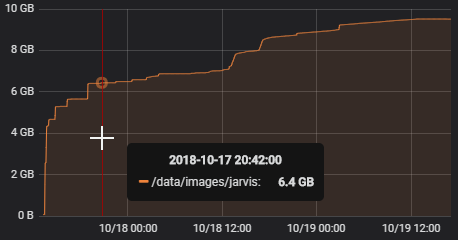
Nothing else is running on this machine except docker and the docker-mailserver image.
Space seems to be getting added in bursts on a regular 5 minute cycle. See the bandwidth chart below for what I mean):
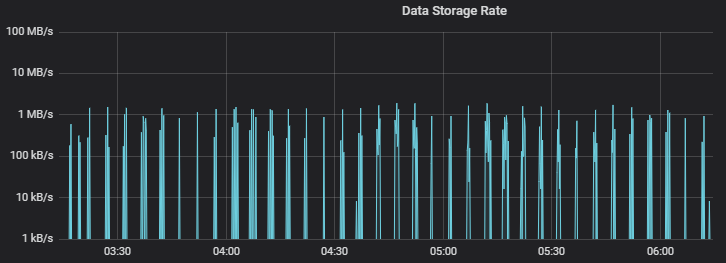
What could be causing the rapid/bursty growth?
Your Environment
Ubuntu 18.04 LTS
Docker 18.06.1-ce
Docker-compose 1.22.0
3 GB RAM
 rwarren
All 4 comments
You could enter the container and do a du -sh / and after a day or so do it again to see where the data went.
 johansmitsnl
on 20 Oct 2018
johansmitsnl
on 20 Oct 2018
Is this still relevant or can we close? I would guess a combination of logs and e-mails (perhaps unwanted ones).
 erik-wramner
on 24 Oct 2019
erik-wramner
on 24 Oct 2019
Did something change that might have changed this?
This container is still seeing huge disk usage, although I now have more on it so it is hard to distinguish what is what anymore.
Of major note is that this is on a sparse VM volume that probably wasn't trimming properly at that time, so this "growth" could be the result of a lot of creating and deleting of files (if not total file size at a given time).
Even if this is due to data churn on disk versus total file size growth, I still think it is highly undesirable. I don't see why a mail server should churn up the disk so much.
I don't have the bandwidth to run another test case on this, so maybe close it until someone else sees the same issue? Especially since it is almost certainly an upstream thing (although could be configuration, I suppose).
rwarren
on 24 Oct 2019
We would need a lot more details to find out if something is wrong, so in that case I'll close it. If you want to report it again later please check what directories or files that are responsible for the growth. You can enter the container and run find to locate files changed during the recent hour, for example, and du to find disk usage per folder. If you repeat the same du command once per hour it is easy to see the trend.
erik-wramner
on 25 Oct 2019
Related issues
 cottonthread
·
4Comments
cottonthread
·
4Comments
 nicklayb
·
4Comments
nicklayb
·
4Comments
 domdorn
·
4Comments
domdorn
·
4Comments
 Dubbeldrank
·
4Comments
Dubbeldrank
·
4Comments
 phish108
·
5Comments
phish108
·
5Comments