Docker-jitsi-meet: No way to disable HSTS
Steps to reproduce:
- Download and unpack the latest release (5142-3 at the time of writing)
- Generate secrets, change ports to 80 and 443, input public URL.
- Set
LETSENCRYPT_USE_STAGINGto1 docker-compose up -d- Open the site in your browser
- See that you can't test it in a staging environment :tada:
- Run
curl (yourUrl) --head --insecure - See that
strict-transport-securityheader is set :tada: - See that there are 0 mentions of HSTS in the docs and no appropriate env variables are present.
Result: I cannot even test Jitsi before using Letsencrypt production certs :tada: And if I do use prod certs but will need to change something four times I will be banned for a week :tada:
What an experience :facepalm:
 CosmoMyzrailGorynych
All 5 comments
I see 4 🎉 vs 1 🤦 , that's a pretty good result, isn't it?
Now, on to the real issue. What would you need to customize. We have extended options as needs arise, and you are the first to bring this issue up IIRC.
 saghul
on 15 Dec 2020
saghul
on 15 Dec 2020
The need is new as the ability to use Let's Encrypt's staging certificates appeared, I believe, a couple of months ago?.
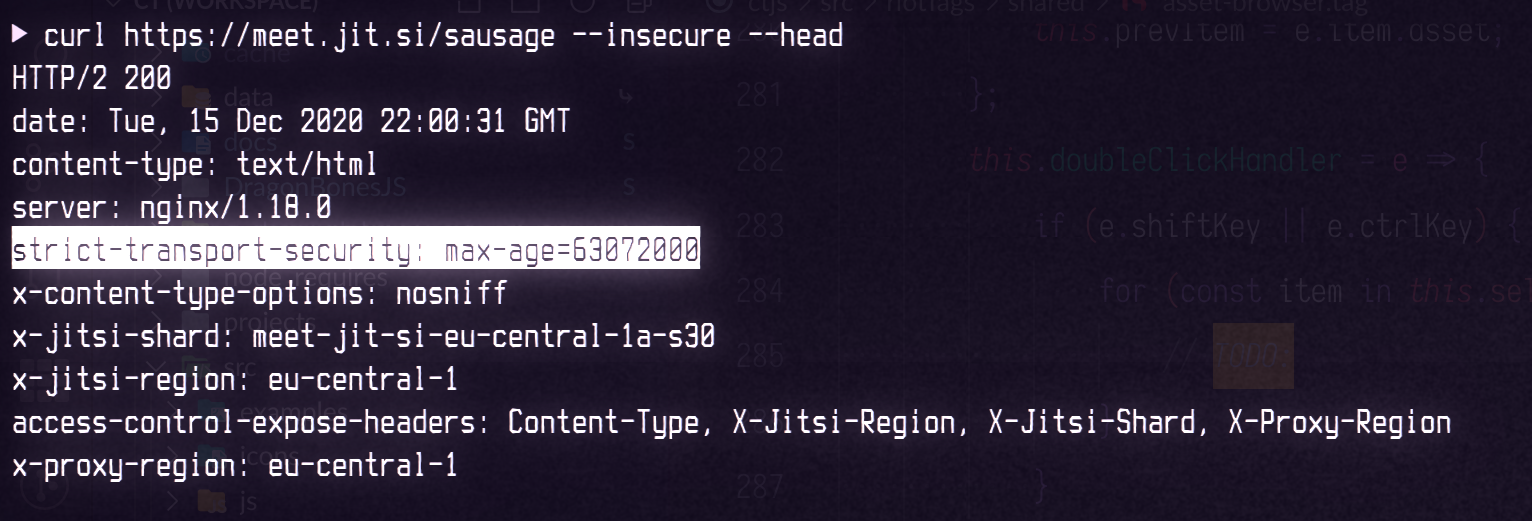
HSTS response header aka strict-transport-security prohibits browsing any site under http protocol or under an insecure certificate. This header is supported in all the maintained mainstream browsers. More docs here on MDN.
Now, Jitsi Meet sends this header on each request, forcing browsers to use secure and trusted connection, which is de facto absent if we are using Let's Encrypt staging certificates. Because of that, the app is not usable in staging environments. Browsers don't let you open this site.
Due to that, the env variable LETSENCRYPT_USE_STAGING becomes useless, and self-issued certificates are useless per se.
There should be a flag (an environment variable) to disable the HSTS header in Jitsi Meet's responses. This will allow users to use the app with staging or other untrusted certificates. Ideally HSTS should be disabled automatically if LETSENCRYPT_USE_STAGING is 1, though automagic is always a questionable matter and is a subject for maintainers' judgement.
The presence of a header can be checked with curl $url --insecure --head. For example:
CosmoMyzrailGorynych
on 15 Dec 2020
Got it, makes sense! Looks like a straightforward change. All we'd need to do is gate this: https://github.com/jitsi/docker-jitsi-meet/blob/eedac14370e49e5c746efd6956ff5799ea2cd657/web/rootfs/defaults/ssl.conf#L26 with some ENABLE_HSTS env var which would default to true. Are you up for writing a PR?
saghul
on 16 Dec 2020
If lines https://github.com/jitsi/docker-jitsi-meet/blob/eedac14370e49e5c746efd6956ff5799ea2cd657/web/rootfs/defaults/ssl.conf#L7-L13 work as I would expect, then the task looks pretty trivial. I'll try with a private repo, test it out, then will send a PR if all goes well.
CosmoMyzrailGorynych
on 16 Dec 2020
Done. It was hard. O_O
A side note: MDN doesn't mention cases with insecure certificates in HTTPS protocol, but https://tools.ietf.org/html/rfc6797#section-11.3 clearly states how browsers should handle these.
Also, as observed, it seems that browsers (Firefox Dev Edition, Chromium) do let you visit the page if they haven't connected to them with a valid certificate before. Or maybe something other affects this behavior. I was able to open the site with this header and with an untrusted certificate. Magic happened, shortly.
For those who already got trapped in HSTS headers, there are ways to "forget" these sites, e.g. as listed here: https://appuals.com/how-to-clear-or-disable-hsts-for-chrome-firefox-and-internet-explorer/
CosmoMyzrailGorynych
on 17 Dec 2020
Related issues
 serban-mihai
·
4Comments
serban-mihai
·
4Comments
 albe
·
9Comments
albe
·
9Comments
 badsmoke
·
5Comments
badsmoke
·
5Comments
 ErrorInPersona
·
3Comments
serban-mihai
·
13Comments
ErrorInPersona
·
3Comments
serban-mihai
·
13Comments