Docker-jitsi-meet: Authentication with JWT just doesn't work
From dev branch:
I tried to make jitsi to autenticate with JWT but it just doesn't wanna work.
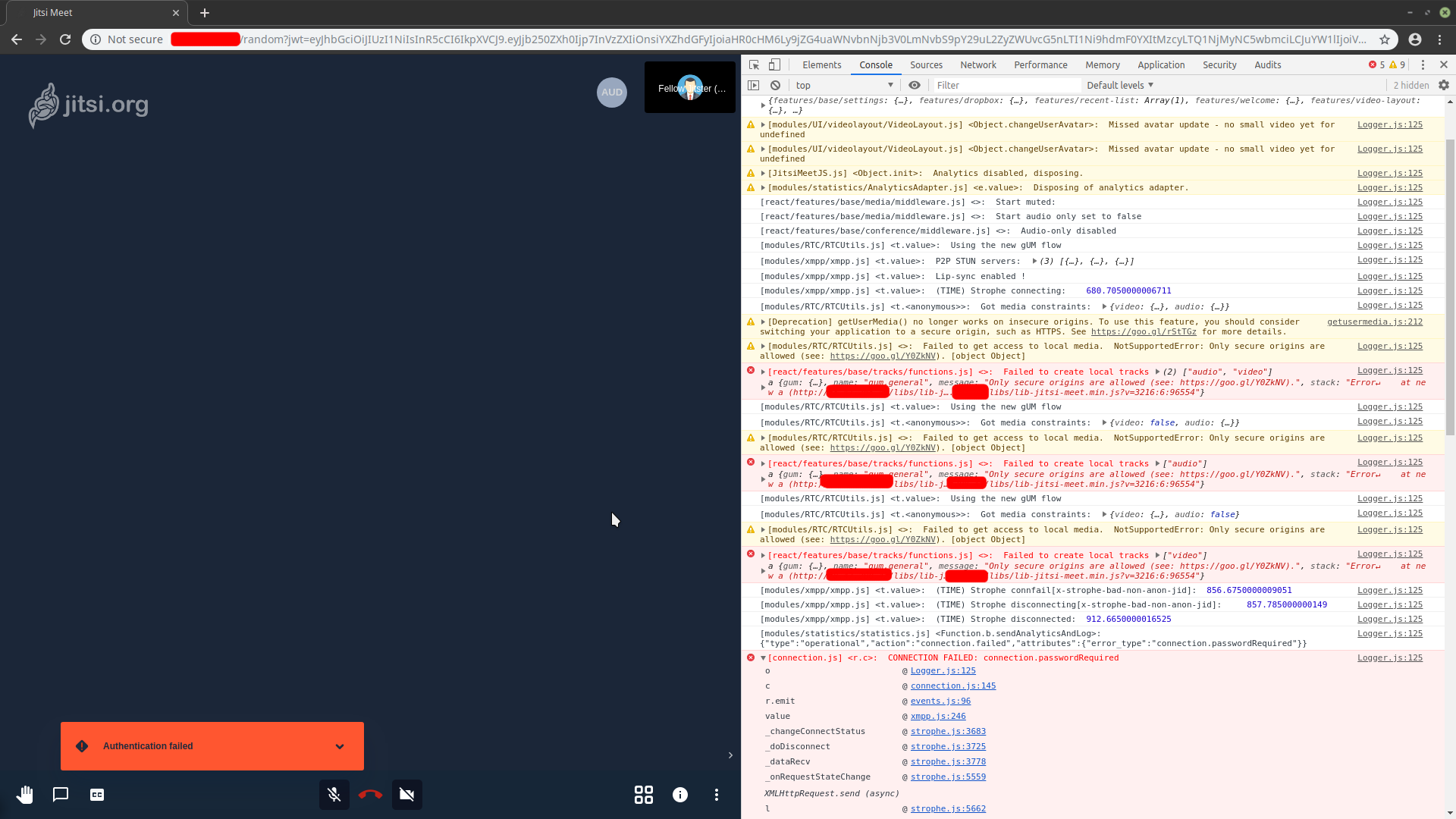
Now I started to think that maybe is my token structure that is broken since there are no relevant info in any log and the parameter passed with ?jwt= in the URL are recognized correctly from the browser that just gives always back an error about connection.passwordRequired but I suspect that is referred to the room pass that is never present.
Logs from docker-compose when authenticating with JWT:

This is what I get every time I try to get into any room with a token:
And this is the Token structure I use:

As you can see (as today's date) the token isn't expired either so I don't think that's the problem.
Since I didn't set issuers and audience I put the ENV variable's JWT_APP_ID value in both "aud" and "iss" fields while I put the XMPP_DOMAIN in "sub" and let the "room" to "*".
There is also the JWT_APP_SECRET value in the signature.
At first I need to create at least one user in prosody's running container who will become administrator after creating a room but when I try to join the same room through JWT the result is the same as above.
ENABLE_AUTH and JWT_ENABLE_TOKEN_AUTH are both set to 1.
The result is the same also if I set ENABLE_GUESTS to 1 or not...
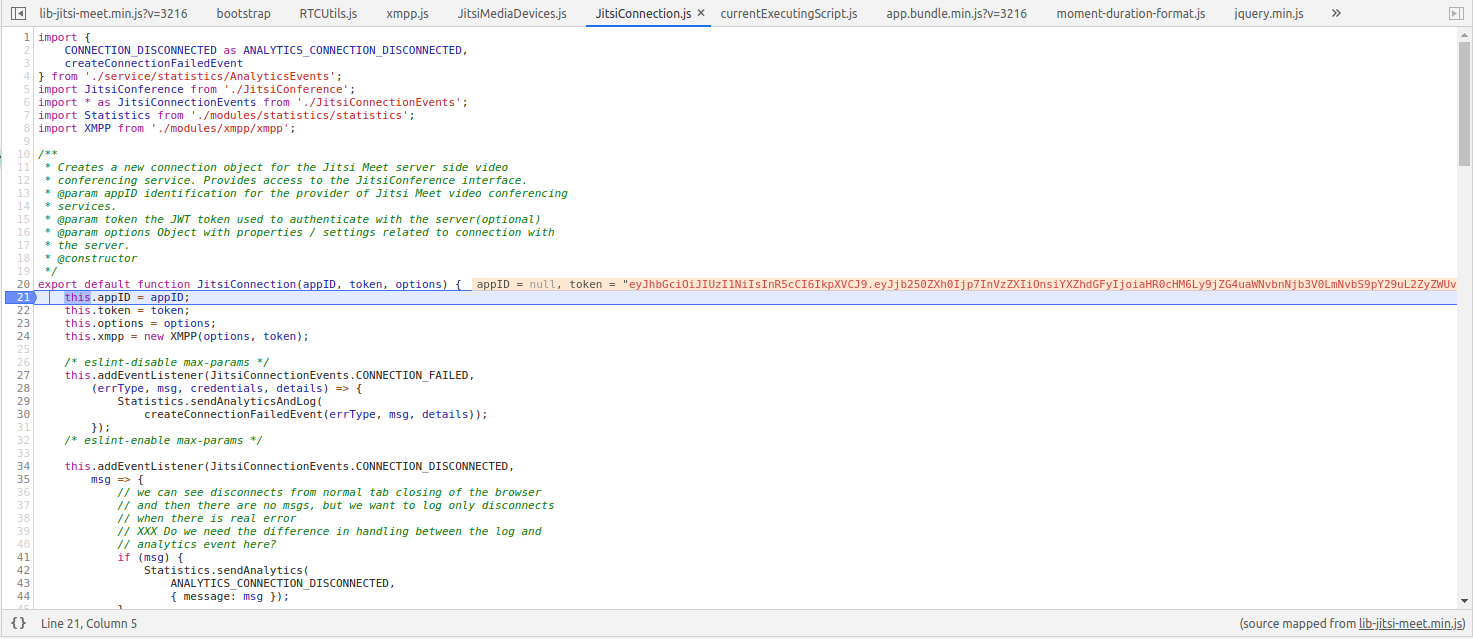
Chrome's Debugger sends me to this line of the JitsiConnection function that suggests me that the script doesn't get the appID but I'm not sure about this

Does someone have an idea about what I'm getting wrong?
I've been stuck with this problem for about a week and I'm running out of ideas
 serban-mihai
All 13 comments
How does your .env file (the JWT relevant options, that is) look like?
 saghul
on 21 Mar 2019
saghul
on 21 Mar 2019
Thanks for replying so fast!
CONFIG=~/.jitsi-meet-cfg
ENABLE_AUTH=1
ENABLE_GUESTS=1
JWT_ENABLE_TOKEN_AUTH=1
JWT_APP_ID=my_jitsi_app_id
JWT_APP_SECRET=some_secret
JWT_ACCEPTED_ISSUERS=my_web_client,my_app_client
JWT_ACCEPTED_AUDIENCES=my_server1,my_server2
XMPP_DOMAIN=meet.jitsi
All the other variables are as I got them by default from the repository
serban-mihai
on 21 Mar 2019
Hey you are accessing http resource, this will not work with webrtc, you need https.
 damencho
on 21 Mar 2019
damencho
on 21 Mar 2019
Hey you are accessing http resource, this will not work with webrtc, you need https.
Even with HTTPS the results are the same, now isn't enabled cause I surpassed the limit for LetsEncrypt renewal
serban-mihai
on 21 Mar 2019
After spending a couple of hours on the Js Debugger I noticed that, at runtime, the appID field (which I think should be "my_jitsi_app_id" as specified in the .env) is always null. Not sure why or if that's how it's supposed to be but could anyone give me some feedback?
serban-mihai
on 21 Mar 2019
Did you change the value in the env file at some point after the containers were first started?
saghul
on 22 Mar 2019
Did you change the value in the env file at some point after the containers were first started?
Nope, I never touched anything in the root folder after starting the containers, I also always removed the CONFIG folder and also stopped the containers with docker-compose down --rmi all to make sure that there are no possible error trace that could be left behind before another run
serban-mihai
on 22 Mar 2019
Ok, you seem to be doing everything right. I'll take a look and see if I can reproduce it.
saghul
on 23 Mar 2019
Any update about JWT Auth?
Besides the fact that the backend doesn't send many info such as appID correctly it also seems to fail because of "passwordRequired" for JID.
Even by injecting these info manually through the debugger at runtime it still breaks somewhere...
serban-mihai
on 16 Apr 2019
Hi, sorry for the delay. I just tested the dev branch and it worked just fine with the following test JWT:
{
  "context": {
    "user": {
      "avatar": "https:/gravatar.com/avatar/abc123",
      "name": "John Doe",
      "email": "[email protected]"
    }
  },
  "aud": "my_jitsi_app_id",
  "iss": "my_jitsi_app_id",
  "sub": "meet.jitsi",
  "room": "*"
}
Have you deleted the config directory every time you have changed the .env file? Also, check the prosody logs when JWT auth fails, they usually contain the reason.
saghul
on 17 Apr 2019
Hi, sorry for the delay. I just tested the dev branch and it worked just fine with the following test JWT:
{
  "context": {
    "user": {
      "avatar": "https:/gravatar.com/avatar/abc123",
      "name": "John Doe",
      "email": "[email protected]"
    }
  },
  "aud": "my_jitsi_app_id",
  "iss": "my_jitsi_app_id",
  "sub": "meet.jitsi",
  "room": "*"
}
Have you deleted the config directory every time you have changed the
.envfile? Also, check the prosody logs when JWT auth fails, they usually contain the reason.
Thanks for the feedback, I'll try as soon as I can and I'll let you know!
serban-mihai
on 17 Apr 2019
I'm going to close this since I verified it does work. Please reopen if you run into other issues.
saghul
on 23 Apr 2019
I tried again many times without results.
Using the following .env file:
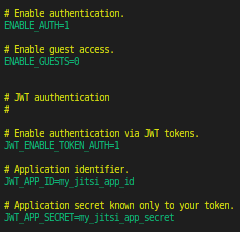
We noticed that once the containers are started, the config file (jitsi-meet.cfg.lua) in prosody's container isn't build as it should be:

Standing to the prosody/rootfs/defaults/conf.d/jitsi-meet.cfg.lua the VirtualHost "meet.jitsi" should have had:
authentification = "token" instead of "internal_plain"
app_id and app_secret are missing as well as allow_empty_token
"token_verification" is missing as well from the modules_enabled
This seems to happen due to the lua script that builds the config files, even though the ENABLE_AUTH and JWT_ENABLE_TOKEN_AUTH are both set to eithter 1 or true it seems that the script doesn't get into the token if while building the VirtualHost and the XMPP_MUC_DOMAIN Component
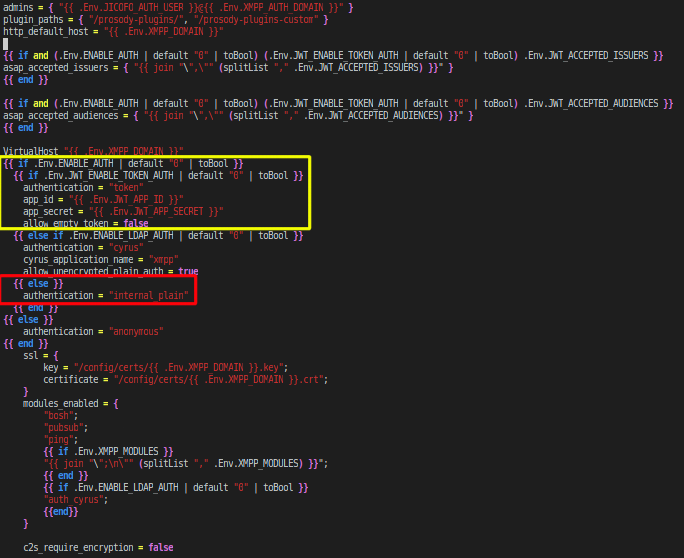
(In Yellow is the condition that should be executed, in Red is the condition that is actually executed despite the fact that env variables are recognized correctly from inside the container)

(Please don't mind the "true" value instead of "1", it was just a temp test but the result is the same)
Has anyone else faced this problem before?
I think that could be some Lua syntax mistake somewhere because even on GitHub or in my text editor the lua syntax highlighter reports me an unexpected { in the first if condition of the file, but since I never programmed in Lua I can't say that for sure.
What I'm still asking myself is why it works for you and not for me, is there anything else that I'm missing?
serban-mihai
on 8 May 2019
Related issues
 phlegx
·
10Comments
phlegx
·
10Comments
 albe
·
9Comments
albe
·
9Comments
 mikemorris
·
8Comments
mikemorris
·
8Comments
 gerroon
·
6Comments
gerroon
·
6Comments
 chovy
·
11Comments
chovy
·
11Comments
Most helpful comment
I tried again many times without results.

Using the following .env file:
We noticed that once the containers are started, the config file (jitsi-meet.cfg.lua) in prosody's container isn't build as it should be:

Standing to the prosody/rootfs/defaults/conf.d/jitsi-meet.cfg.lua the VirtualHost "meet.jitsi" should have had:
authentification = "token" instead of "internal_plain"
app_id and app_secret are missing as well as allow_empty_token
"token_verification" is missing as well from the modules_enabled
This seems to happen due to the lua script that builds the config files, even though the ENABLE_AUTH and JWT_ENABLE_TOKEN_AUTH are both set to eithter 1 or true it seems that the script doesn't get into the token if while building the VirtualHost and the XMPP_MUC_DOMAIN Component
(In Yellow is the condition that should be executed, in Red is the condition that is actually executed despite the fact that env variables are recognized correctly from inside the container)
(Please don't mind the "true" value instead of "1", it was just a temp test but the result is the same)
Has anyone else faced this problem before?
I think that could be some Lua syntax mistake somewhere because even on GitHub or in my text editor the lua syntax highlighter reports me an unexpected { in the first if condition of the file, but since I never programmed in Lua I can't say that for sure.
What I'm still asking myself is why it works for you and not for me, is there anything else that I'm missing?