Directus: Support multiple independent projects
Feature Request
Add an abstraction on top of Directus to support multiple projects which are independent of each other. While it's currently possible to use multiple projects, these projects can be viewed from the public, they are not supposed to serve different companies at the same time and they're not tied to users. This would also mean there should be a signup process and a "create a new project" flow.
What problem does this feature solve?
When using Directus at an Agency for clients, I have to set up a database and a project for each client manually, which uses more resources and adds a lot of administration overhead. This also means that all companies can see all projects on the login page. It would be very powerful if you would be able to create projects or even a company type, so a single company can only view their own project(s).
How do you think this should be implemented?
This is just an idea which probably means a lot of work, I just wanted to propose this and check if this is could be a long term goal or if this is out of scope.
Would you be willing to work on this?
See above.
 steebchen
All 12 comments
Perhaps some inspiration could be taken from how WordPress handles the databases for its multi-site setup: where each DB gets a numbered prefix, relating to the ID of the child site.
So the core install is wp_0_, then the second site would be wp_1_ etc
 iaremarkus
on 15 Feb 2019
iaremarkus
on 15 Feb 2019
Curently you should be able to use mutliple Databases with one admin project by setting allowOtherApi = true
https://github.com/directus/app/blob/master/public/config_example.js
Well, the client would have to know the api url and there wont be a dropdown with project names.
I am not sure, but i think this solves your problem maily or?
 dev7ch
on 15 Feb 2019
dev7ch
on 15 Feb 2019
There's two "camps" for the admin app. Some people would like to have a dropdown to select between projects when logging in, while others want to keep the projects truly standalone (eg don't have your clients see other clients names)
We could potentially return the project names publically in the / route of the api and use that in the admin app dropdown, but I'm not sure if that's a solution that would work for everyone
 rijkvanzanten
on 15 Feb 2019
rijkvanzanten
on 15 Feb 2019
We could take some inspiration from how Slack does their sign-in: Where you first enter your Slack instance subdomain, and _then_ login.
I'm sure when creating sub-projects on my Directus instance, I would specify a project name? Maybe this name could be used when signing in.
Login could either be a 2-step process like Slack does it - first capturing the project name, and then logging in - or you could simply specify your install name along with your email & password and login in a single step.
That way, other projects on a Directus install would be kept private.
iaremarkus
on 18 Feb 2019
@wondergryphon Directus already has a setting where you can enter any API url to login to :)
rijkvanzanten
on 18 Feb 2019
Awesome @rijkvanzanten :)
I realise that this might require managing a unique table of users, in order to know which user is 'super admin' (and has access to all sites), but how about:
Login Scenario - Single project user
https://mywebsite.com/public/admin/#/login - Login form is updated to allow user to type in their project name. This would log them into their unique project:
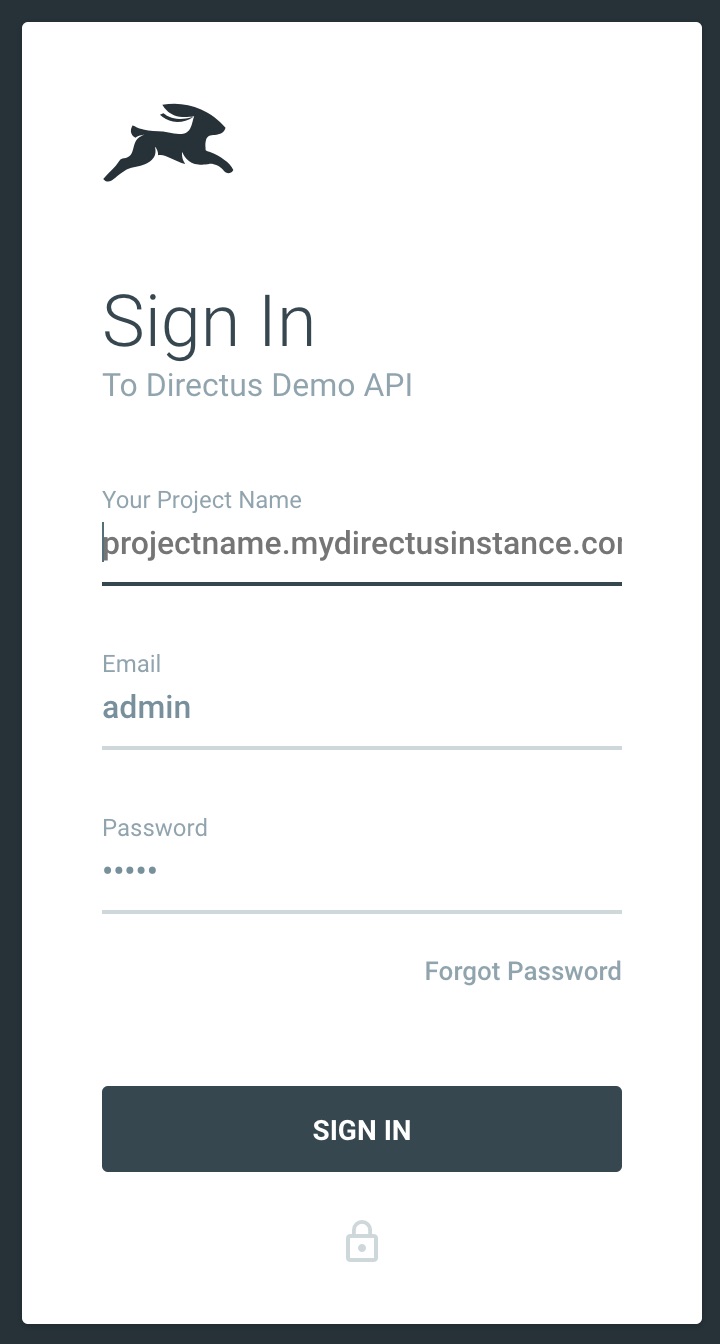
Once logged in, they would see their unique project and nothing else.
Login Scenario - Super Admin
Config files allow you to specify your (super admin) email address. https://mywebsite.com/public/admin/#/login?super - A unique url parameter removes the project name field, and attempts to do the login of that super user.
Once logged in, the admin can show a 'site switcher' that will be a drop down of all projects for easy & quick switching between instances.
Just a thought 🤷♂️😊
iaremarkus
on 18 Feb 2019
Some additional thoughts:
- A super admin is a user that is an admin in every project and can create / delete projects
- To support super admin users, we should have a "master" database that holds these super users (and meta info on the projects?)
- As an alternative to having the user paste the full API url, we could maybe configure an API base URL in the application so the user only has to type the project name itself
- ^ That would break support for logging in to non-base-url APIs 🤔
- Alternatively, we could scope the project in the application URL, so instead of
/#/loginit could be/#/ranger/login. That way, the "master" login / switcher / project manager could live on/#/login
rijkvanzanten
on 18 Feb 2019
Thanks @wondergryphon — some really great ideas here! One issue that I foresee with the "super-admins":
Presumably we would configure super-admins in a master "parent" database (seems we all agree on that). But by default these super-admins could only perform "instance-level functions" (eg: create/delete project, see instance details). They could also log into individual child projects to READ/VIEW... but would not be able to to make edits (as admins) _unless they are also in directus_users for that project's database too_.
The reason for this is that all project activity, comments, and accountability needs to know who performed the action, storing that info in directus_activity (related to the user's PK). If we're using a user's PK/ID from a different database (master) we would have conflicting keys, and even if using a UUID user key, I don't like the idea of relating to data in an entirely different database.
I think we'd need to scope super-users to performing global instance actions and perhaps READ access to sub-projects... but might need to restrict any updates/activity unless they have a matching user _within_ the project.
Does that make sense? Thoughts on this?
 benhaynes
on 18 Feb 2019
benhaynes
on 18 Feb 2019
Makes perfect sense @benhaynes.
Again, I think WordPress Multisite handles this well: When a super-admin creates a new sub-site, they're automatically made an admin user of that site too. This would give them write-level access to that sub-site and let them administer it.
So their super-admin abilities let them quickly switch between sites, and then as admin of each site they switch to, they're also able to CRUD.
Feasible?
iaremarkus
on 18 Feb 2019
I like it. There would be no guarantee that those would stay in sync depending on the order you add projects and super-admins... but this could be an interface in the global Instance Settings.
As Rijk mentioned, we'll need an App GUI for Instance Settings in the root (/) where super-admins can manage the instance, and then we'd scope projects within that (/[project-name]). We could have a section of that master app interface that shows/manages which super admins are in which projects.
Eventually we could extend this to also manage "normal" users across all instances, but that can wait.
benhaynes
on 18 Feb 2019
Yeah the WP system has a table for sites/blogs IIRC, and it lists USER ID's, and the blog/site ID's that they are a part of (because they handle multiple users, being part of multiple sites too). The more we talk, the more having a new table to manage this, makes sense in the long run :)
@rijkvanzanten also mentioned storing site/project meta, which I think is a great idea.
Might also be a good idea to include in the config files, a boolean for if an install is meant to be a multi-site instance, or a single-site instance. This way, the GUI can stay as-is for single-site instances and only show all this extra stuff, to users who are intending to use their instance in that way?
iaremarkus
on 18 Feb 2019
In v8, the api will return the list of public projects to the app, which in turn populates it's dropdown for selecting the project.
When all projects are marked private, the app won't render this dropdown. Instead, the user can add the project in the url (?project=my-project) (exists now), or enter this value in an input (yet to be implemented).
rijkvanzanten
on 29 Nov 2019
Related issues
benhaynes
·
4Comments
 Varulv1997
·
4Comments
benhaynes
·
4Comments
Varulv1997
·
4Comments
benhaynes
·
4Comments
 andriusign
·
3Comments
andriusign
·
3Comments
 SharkWipf
·
3Comments
SharkWipf
·
3Comments
Most helpful comment
Awesome @rijkvanzanten :)
I realise that this might require managing a unique table of users, in order to know which user is 'super admin' (and has access to all sites), but how about:
Login Scenario - Single project user
https://mywebsite.com/public/admin/#/login- Login form is updated to allow user to type in their project name. This would log them into their unique project:Once logged in, they would see their unique project and nothing else.
Login Scenario - Super Admin
Config files allow you to specify your (super admin) email address.
https://mywebsite.com/public/admin/#/login?super- A unique url parameter removes the project name field, and attempts to do the login of that super user.Once logged in, the admin can show a 'site switcher' that will be a drop down of all projects for easy & quick switching between instances.
Just a thought 🤷♂️😊