Directus: "Server Error" using MAMP Pro
Hello,
I've been attempting to locally install v7 on MAMP, but I keep getting this error:
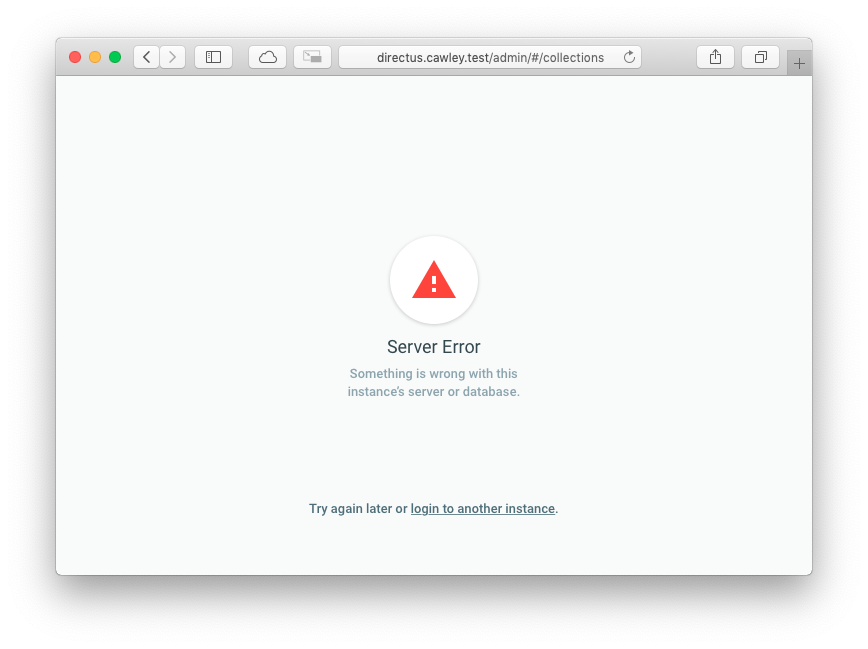
Server Error / Something is wrong with this instance’s server or database. / Try again later or login to another instance.
This is a fresh installation of Directus. I've tried PHP 5.6.37, 7.1.20, and 7.2.8 so far. I've been following the "Installing the Directus Suite" guide, but when trying to login (after completing step 3), I get this error immediately.
I have attached the Directus log. The first error in the log is a somewhat ambiguous "This instance of the Directus API has not been configured properly," so I'm not sure if the rest of the errors have anything to do with the initial configuration (nor do I understand what I've misconfigured).
You may also notice in the logs that I'm storing my site files in iCloud Drive. However, I also receive the same error outside of iCloud Drive.
Any help is appreciated!
Thanks,
Matt
 mattbisme
All 78 comments
Does your user have read access? From what I see, your user is being denied access to read the tables.
When you say you've tried v7, is that master or 7.0.1/2/3/4? There's someone else in slack who I believe has had a similar issue with user not having API access after a fresh install.
[2018-10-28 16:28:48] api[_].ERROR: Directus\Permissions\Exception\ForbiddenCollectionReadException: Reading items from "directus_users" collection was denied in /Users/mattbisme/Library/Mobile Documents/com~apple~CloudDocs/Sites/Client/cawley.farm/directus/src/core/Directus/Permissions/Acl.php:988
 shealavington
on 28 Oct 2018
shealavington
on 28 Oct 2018
I have given the DB user full read/write access. As for the version… I've been using the Installing the Directus Suite guide which asks me to use git:
git clone https://github.com/directus/directus.git
Just prior to submitting this ticket I followed it once more. So, I presume it would be the latest (7.0.4). Is there an easy way for me to check? That said, I previously grabbed a manual download of the 7.0.3 (I think) ZIP'd release, but had the same issues.
I've checked, double checked, and triple checked my DB credentials, tried various users and clean DBs… so I'm really not sure why Directus is being denied Read access.
mattbisme
on 28 Oct 2018
If you get past the login screen, then it's probably not a database_user issue, but a directus_user permissions issue, but yeah if you've just done a clone then you're on the latest version.
shealavington
on 28 Oct 2018
Upon login, I immediately get the error. So, I guess that's "past" the login screen? How do I troubleshoot a directus_user permission?
mattbisme
on 28 Oct 2018
If you see a username in the bottom left that looks like the following then it shouldnt be a database user error.

As for troubleshooting the issue you're having, if you open the database, goto the table directus_user_roles and ensure you have an entry of ID:1, user:1, role:1, and go to the directus_users table and also ensure your user is there, that will determine if the user has admin privilege, other than that, I'm unsure.
shealavington
on 28 Oct 2018
I have checked those tables and found everything to match; it looks like my user has admin privilege. However, I do not have that admin menu in the bottom left either. All I have is this error message (attached).
mattbisme
on 29 Oct 2018
Hmm, I'm not sure then, the URL is sitting at /Collections, so it seems authenticated. But I'm not too sure, sorry I can't be much more help.
If you wanted, if you export your database, and zip your files, I can try load them up see if I can get the same issue?
- I also wonder if it's because Directus is dependant on a PHP module that you might not have? For example curl, but I'm not sure what that may be if it was that.
shealavington
on 29 Oct 2018
That would be great, I really appreciate that. I imagine that you'll need the admin email/password as well?
mattbisme
on 29 Oct 2018
No worries, If you'd like to provide that(provided it's not a personal password), then sure, if not, I'll probably throw my keys and hashed password in there. 👍
shealavington
on 29 Oct 2018
I just created (yet another) fresh installation with the following user/password:
[email protected] / directus_test
I figure it's probably better to keep everything "the same" as possible for testing anyway. Thanks for the help!
GitHub didn't seem to like the size of the ZIP file, so I've uploaded it to Dropbox:
https://www.dropbox.com/s/xxjmn7lnidbgq0x/directus_test.zip?dl=0
mattbisme
on 29 Oct 2018
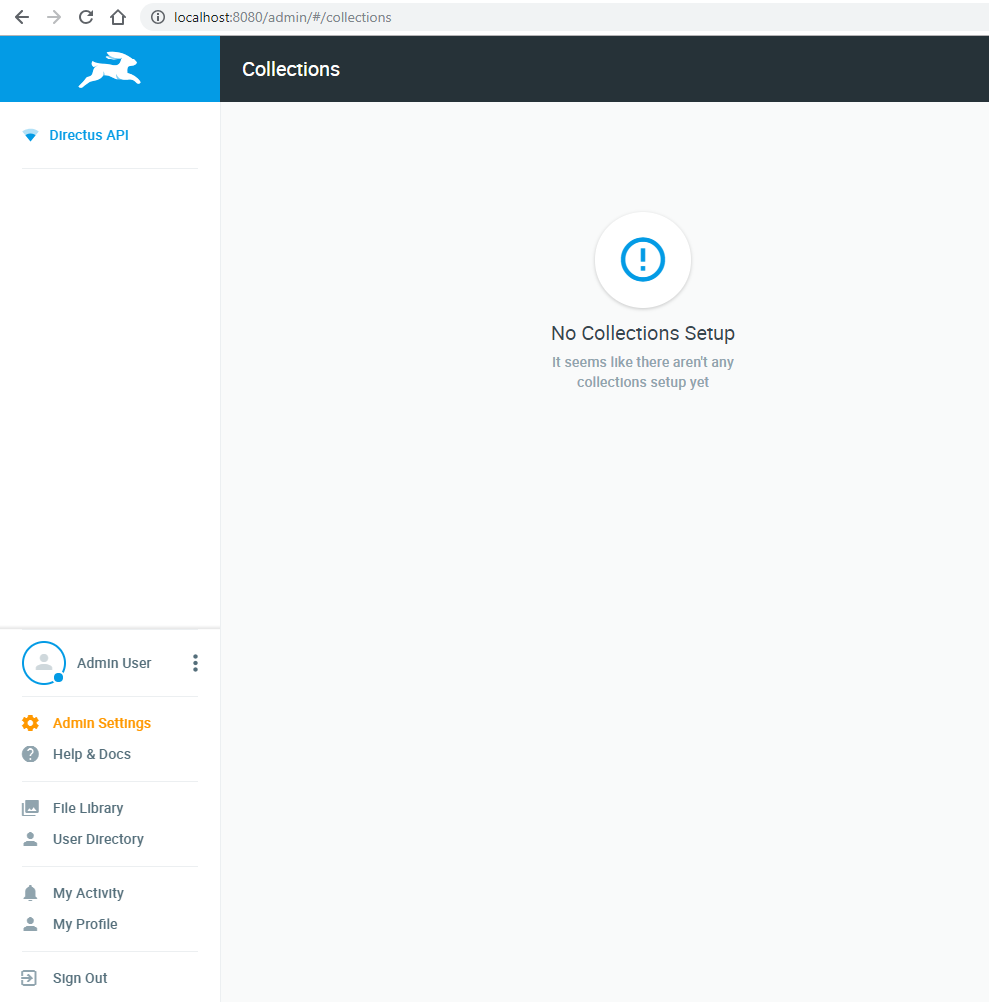
I threw it up in a docker container on my PC and I ran into an issue where it couldnt connect to the database, I changed localhost to an absolute IP for my computer, and it worked. Perhaps instead of localhost, try the IP of where the database is, just to see if that works.
I'm about to test this on my server too. I've just tested this and it seems to be working fine on my server... :/
shealavington
on 29 Oct 2018
I have tried your suggestion. I used my local IP as well as 127.0.0.1 (just to be thorough). I even tried switching to a socket connection. None of the options allowed me to login; I just see the same error.
Keep in mind that I'm using MAMP Pro for my development environment, not Docker. Ultimately, it should be possible to run Directus v7 on either one, correct?
mattbisme
on 29 Oct 2018
I've never used MAMP, so I can't answer that, but I've tried it on Docker and i've now put it on my server and it seems to work fine there too, and that's a default PHP 7.1 and mysql environment.
shealavington
on 29 Oct 2018
MAMP should work too! I know @benhaynes is using MAMP for local development. Have you run into any similar issues @benhaynes?
 rijkvanzanten
on 29 Oct 2018
rijkvanzanten
on 29 Oct 2018
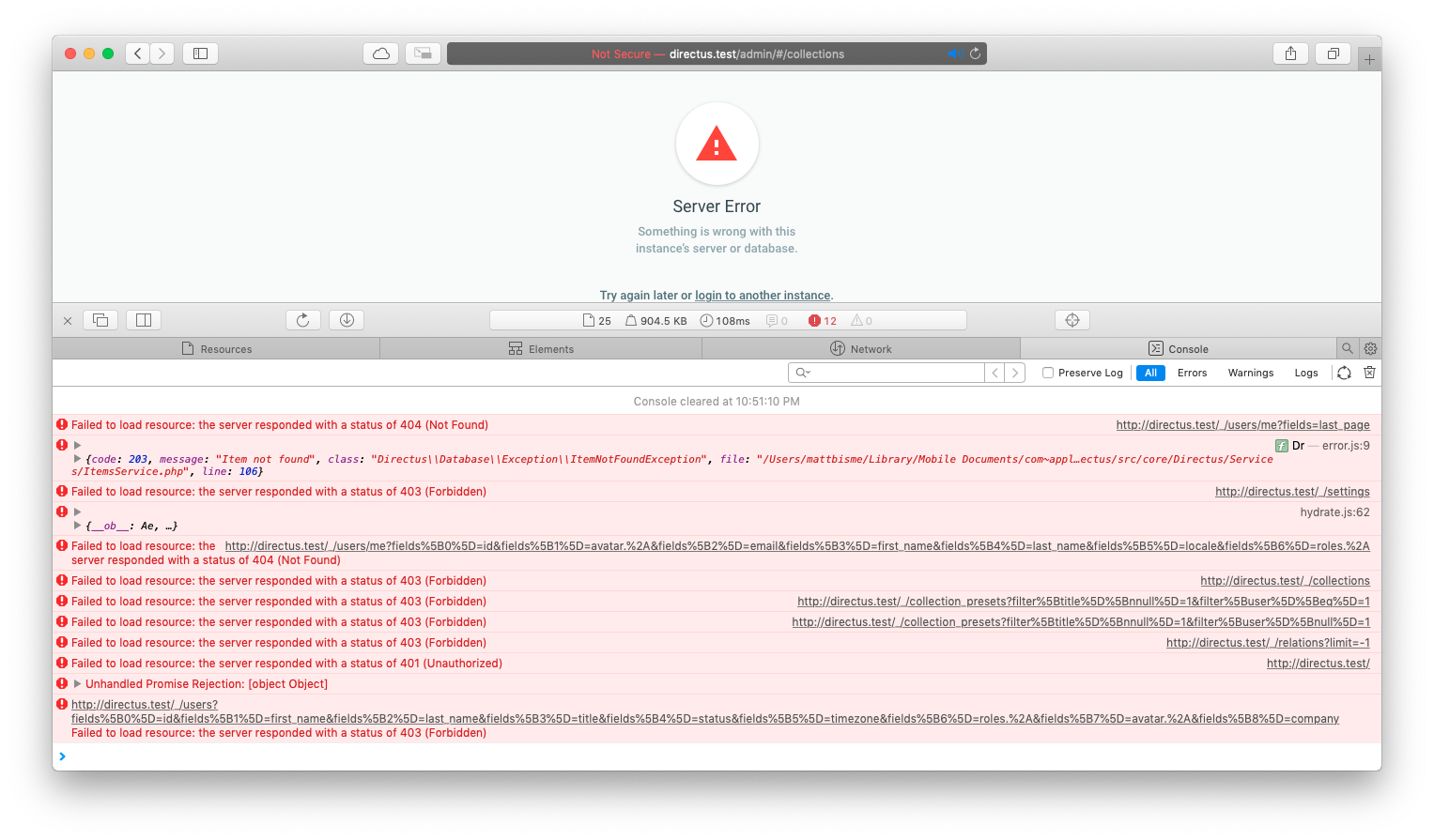
Can you copy what's displayed in the devtools @mattbisme? When that big red error shows up, it should log the reason why on the browsers JS console
rijkvanzanten
on 29 Oct 2018
It's odd, as there's someone called KP in the slack with a fairly identical issue, my best guess is that there's something about the environment, as I've taken a copy and ran it on docker fine, and uploaded it to a typical web-server and it's worked fine every time. D:
He gets a console error of {code: 108, message: "User not authenticated", class: "Directus\Authentication\Exception\UserNotAuthenticatedException", file: "/home/thewrite/public_html/directus/src/core/Direc…ation/Http/Middleware/AuthenticatedMiddleware.php", line: 21}
shealavington
on 29 Oct 2018
Hmm, that's weird. The app shouldn't even try fetching data at that point. Can you try clearing all caches / try an incognito tab?
rijkvanzanten
on 29 Oct 2018
It's both good and bad news that you can't reproduce it @shealavington. I'm hoping it's an isolated issue caused by some very specific configuration in MAMP, but I'm afraid there might be a harder to catch :bug: in the app's login flow itself
rijkvanzanten
on 29 Oct 2018
Well, I'm glad to hear that MAMP should work, at least. I've just checked the console per your suggestion, @rijkvanzanten. And wow, there seems to be a log going on there (I think the console is the only log I haven't looked at, at this point 😅).
The 403s confuse me a bit; that sounds like a directory permissions issue, but everything is set to 755 with the appropriate user that allows MAMP access. Per the installation guide, I set MAMP to use Apache to serve the public folder as the document root. Do I have that right?
I'm not sure if a screenshot or a literal copy/paste is preferred, so I'll just include both:
[Error] Failed to load resource: the server responded with a status of 404 (Not Found) (me, line 0)
[Error] {code: 203, message: "Item not found", class: "Directus\\Database\\Exception\\ItemNotFoundException", file: "/Users/mattbisme/Library/Mobile Documents/com~appl…ectus/src/core/Directus/Services/ItemsService.php", line: 106}
    Dr (app.b28b6081.js:1:128869)
    $emit (chunk-vendors.e8f6ed14.js:25:16426)
    (anonymous function) (app.b28b6081.js:1:191067)
    promiseReactionJob
[Error] Failed to load resource: the server responded with a status of 403 (Forbidden) (settings, line 0)
[Error] {__ob__: Ae, …}
    (anonymous function) (app.b28b6081.js:1:130239)
    promiseReactionJob
[Error] Failed to load resource: the server responded with a status of 404 (Not Found) (me, line 0)
[Error] Failed to load resource: the server responded with a status of 403 (Forbidden) (collections, line 0)
[Error] Failed to load resource: the server responded with a status of 403 (Forbidden) (collection_presets, line 0)
[Error] Failed to load resource: the server responded with a status of 403 (Forbidden) (collection_presets, line 0)
[Error] Failed to load resource: the server responded with a status of 403 (Forbidden) (relations, line 0)
[Error] Failed to load resource: the server responded with a status of 401 (Unauthorized) (directus.test, line 0)
[Error] Unhandled Promise Rejection: [object Object]
    (anonymous function)
    promiseReactionJob
[Error] Failed to load resource: the server responded with a status of 403 (Forbidden) (users, line 0)
mattbisme
on 29 Oct 2018
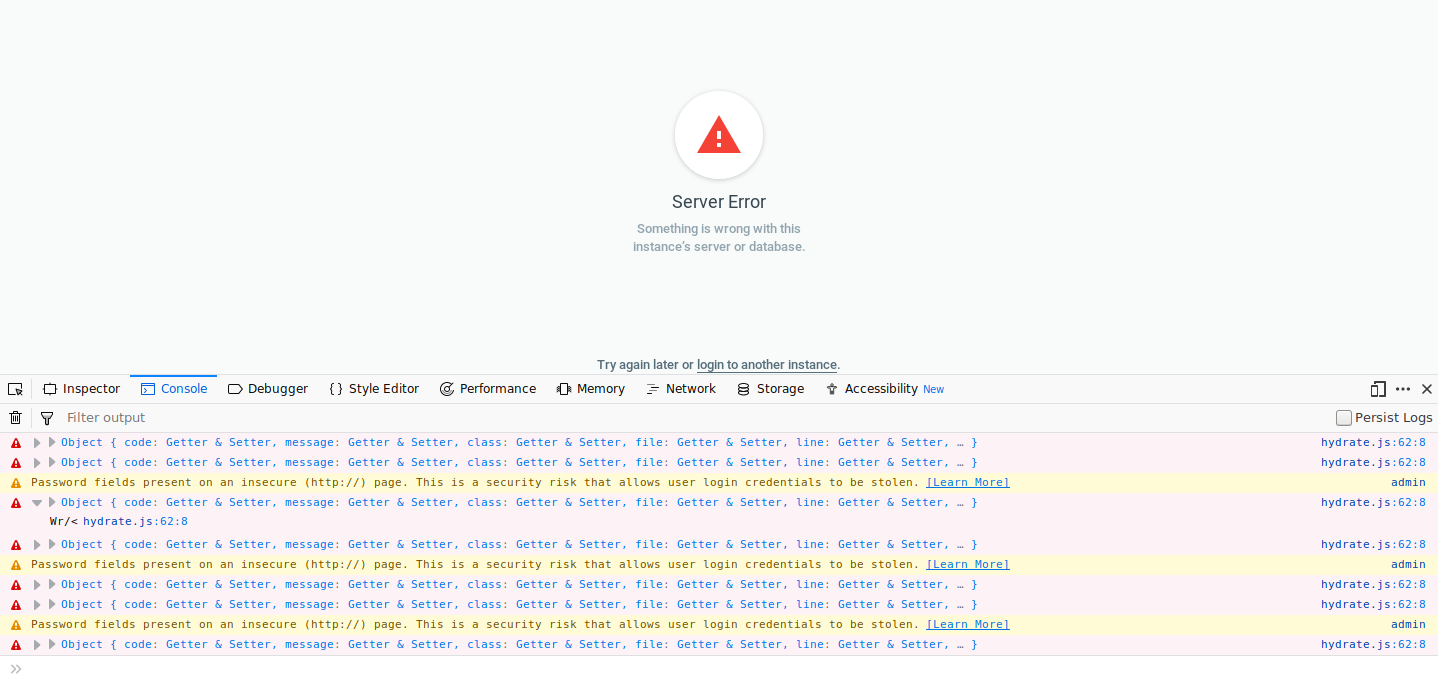
Having same error page on my VPS running Debian 9 PHP 7.0.3 Directus git cloned today
Directus stack trace
Error stack trace
[2018-10-29 06:12:05] api[_].ERROR: TypeError: Argument 1 passed to Directus\Util\DateTimeUtils::createFromDateTime() must be an instance of DateTime, boolean given, called in /home/directus/src/core/Directus/Util/DateTimeUtils.php on line 123 and defined in /home/directus/src/core/Directus/Util/DateTimeUtils.php:96

Stack trace:
0 /home/directus/src/core/Directus/Util/DateTimeUtils.php(123): Directus\Util\DateTimeUtils::createFromDateTime(false)
1 /home/directus/src/core/Directus/Util/DateTimeUtils.php(109): Directus\Util\DateTimeUtils::createDateFromFormat('Y-m-d H:i:s', 'CURRENT_TIMESTA...', 'UTC')
2 /home/directus/src/core/Directus/Database/Schema/SchemaManager.php(568): Directus\Util\DateTimeUtils::createFromDefaultFormat('CURRENT_TIMESTA...', 'UTC')
3 /home/directus/src/core/Directus/Database/Schema/SchemaManager.php(268): Directus\Database\Schema\SchemaManager->createFieldFromArray(Array)
4 /home/directus/src/core/Directus/Database/Schema/SchemaManager.php(143): Directus\Database\Schema\SchemaManager->getFields('civicrm_activit...', Array, false)
5 /home/directus/src/core/Directus/Services/TablesService.php(1447): Directus\Database\Schema\SchemaManager->getCollection('civicrm_activit...')
6 /home/directus/src/core/Directus/Services/TablesService.php(1307): Directus\Services\TablesService->mergeSchemaCollection('civicrm_activit...', Array)
7 /home/directus/src/core/Directus/Services/TablesService.php(66): Directus\Services\TablesService->mergeMissingSchemaCollections(Array, Array)
8 /home/directus/src/endpoints/Collections.php(58): Directus\Services\TablesService->findAll(Array)
9 [internal function]: Directus\Api\Routes\Collections->all(Object(Directus\Application\Http\Request), Object(Directus\Application\Http\Response), Array)
10 /home/directus/vendor/slim/slim/Slim/Handlers/Strategies/RequestResponse.php(41): call_user_func(Array, Object(Directus\Application\Http\Request), Object(Directus\Application\Http\Response), Array)
11 /home/directus/vendor/slim/slim/Slim/Route.php(356): Slim\Handlers\Strategies\RequestResponse->__invoke(Array, Object(Directus\Application\Http\Request), Object(Directus\Application\Http\Response), Array)
12 /home/directus/src/core/Directus/Application/Http/Middleware/AbstractRateLimitMiddleware.php(34): Slim\Route->__invoke(Object(Directus\Application\Http\Request), Object(Directus\Application\Http\Response))
13 [internal function]: Directus\Application\Http\Middleware\AbstractRateLimitMiddleware->__invoke(Object(Directus\Application\Http\Request), Object(Directus\Application\Http\Response), Object(Slim\Route))
14 /home/directus/vendor/slim/slim/Slim/DeferredCallable.php(43): call_user_func_array(Object(Directus\Application\Http\Middleware\UserRateLimitMiddleware), Array)
15 [internal function]: Slim\DeferredCallable->__invoke(Object(Directus\Application\Http\Request), Object(Directus\Application\Http\Response), Object(Slim\Route))
16 /home/directus/vendor/slim/slim/Slim/MiddlewareAwareTrait.php(70): call_user_func(Object(Slim\DeferredCallable), Object(Directus\Application\Http\Request), Object(Directus\Application\Http\Response), Object(Slim\Route))
17 /home/directus/src/core/Directus/Application/Http/Middleware/AuthenticationMiddleware.php(80): Slim\Route->Slim{closure}(Object(Directus\Application\Http\Request), Object(Directus\Application\Http\Response))
18 [internal function]: Directus\Application\Http\Middleware\AuthenticationMiddleware->__invoke(Object(Directus\Application\Http\Request), Object(Directus\Application\Http\Response), Object(Closure))
19 /home/directus/vendor/slim/slim/Slim/DeferredCallable.php(43): call_user_func_array(Object(Directus\Application\Http\Middleware\AuthenticationMiddleware), Array)
20 [internal function]: Slim\DeferredCallable->__invoke(Object(Directus\Application\Http\Request), Object(Directus\Application\Http\Response), Object(Closure))
21 /home/directus/vendor/slim/slim/Slim/MiddlewareAwareTrait.php(70): call_user_func(Object(Slim\DeferredCallable), Object(Directus\Application\Http\Request), Object(Directus\Application\Http\Response), Object(Closure))
22 /home/directus/src/core/Directus/Application/Http/Middleware/TableGatewayMiddleware.php(25): Slim\Route->Slim{closure}(Object(Directus\Application\Http\Request), Object(Directus\Application\Http\Response))
23 [internal function]: Directus\Application\Http\Middleware\TableGatewayMiddleware->__invoke(Object(Directus\Application\Http\Request), Object(Directus\Application\Http\Response), Object(Closure))
24 /home/directus/vendor/slim/slim/Slim/DeferredCallable.php(43): call_user_func_array(Object(Directus\Application\Http\Middleware\TableGatewayMiddleware), Array)
25 [internal function]: Slim\DeferredCallable->__invoke(Object(Directus\Application\Http\Request), Object(Directus\Application\Http\Response), Object(Closure))
26 /home/directus/vendor/slim/slim/Slim/MiddlewareAwareTrait.php(70): call_user_func(Object(Slim\DeferredCallable), Object(Directus\Application\Http\Request), Object(Directus\Application\Http\Response), Object(Closure))
27 /home/directus/vendor/slim/slim/Slim/MiddlewareAwareTrait.php(117): Slim\Route->Slim{closure}(Object(Directus\Application\Http\Request), Object(Directus\Application\Http\Response))
28 /home/directus/vendor/slim/slim/Slim/Route.php(334): Slim\Route->callMiddlewareStack(Object(Directus\Application\Http\Request), Object(Directus\Application\Http\Response))
29 /home/directus/vendor/slim/slim/Slim/App.php(515): Slim\Route->run(Object(Directus\Application\Http\Request), Object(Directus\Application\Http\Response))
30 /home/directus/src/core/Directus/Application/Http/Middleware/AbstractRateLimitMiddleware.php(34): Slim\App->__invoke(Object(Directus\Application\Http\Request), Object(Directus\Application\Http\Response))
31 [internal function]: Directus\Application\Http\Middleware\AbstractRateLimitMiddleware->__invoke(Object(Directus\Application\Http\Request), Object(Directus\Application\Http\Response), Object(Directus\Application\Application))
32 /home/directus/vendor/slim/slim/Slim/DeferredCallable.php(43): call_user_func_array(Object(Directus\Application\Http\Middleware\IpRateLimitMiddleware), Array)
33 [internal function]: Slim\DeferredCallable->__invoke(Object(Directus\Application\Http\Request), Object(Directus\Application\Http\Response), Object(Directus\Application\Application))
34 /home/directus/vendor/slim/slim/Slim/MiddlewareAwareTrait.php(70): call_user_func(Object(Slim\DeferredCallable), Object(Directus\Application\Http\Request), Object(Directus\Application\Http\Response), Object(Directus\Application\Application))
35 /home/directus/vendor/akrabat/rka-ip-address-middleware/src/IpAddress.php(93): Slim\App->Slim{closure}(Object(Directus\Application\Http\Request), Object(Directus\Application\Http\Response))
36 [internal function]: RKA\Middleware\IpAddress->__invoke(Object(Directus\Application\Http\Request), Object(Directus\Application\Http\Response), Object(Closure))
37 /home/directus/vendor/slim/slim/Slim/DeferredCallable.php(43): call_user_func_array(Object(RKA\Middleware\IpAddress), Array)
38 [internal function]: Slim\DeferredCallable->__invoke(Object(Directus\Application\Http\Request), Object(Directus\Application\Http\Response), Object(Closure))
39 /home/directus/vendor/slim/slim/Slim/MiddlewareAwareTrait.php(70): call_user_func(Object(Slim\DeferredCallable), Object(Directus\Application\Http\Request), Object(Directus\Application\Http\Response), Object(Closure))
40 /home/directus/src/core/Directus/Application/Http/Middleware/CorsMiddleware.php(66): Slim\App->Slim{closure}(Object(Directus\Application\Http\Request), Object(Directus\Application\Http\Response))
41 [internal function]: Directus\Application\Http\Middleware\CorsMiddleware->__invoke(Object(Directus\Application\Http\Request), Object(Directus\Application\Http\Response), Object(Closure))
42 /home/directus/vendor/slim/slim/Slim/DeferredCallable.php(43): call_user_func_array(Object(Directus\Application\Http\Middleware\CorsMiddleware), Array)
43 [internal function]: Slim\DeferredCallable->__invoke(Object(Directus\Application\Http\Request), Object(Directus\Application\Http\Response), Object(Closure))
44 /home/directus/vendor/slim/slim/Slim/MiddlewareAwareTrait.php(70): call_user_func(Object(Slim\DeferredCallable), Object(Directus\Application\Http\Request), Object(Directus\Application\Http\Response), Object(Closure))
45 /home/directus/src/core/Directus/Application/Http/Middleware/ResponseCacheMiddleware.php(47): Slim\App->Slim{closure}(Object(Directus\Application\Http\Request), Object(Directus\Application\Http\Response))
46 [internal function]: Directus\Application\Http\Middleware\ResponseCacheMiddleware->__invoke(Object(Directus\Application\Http\Request), Object(Directus\Application\Http\Response), Object(Closure))
47 /home/directus/vendor/slim/slim/Slim/DeferredCallable.php(43): call_user_func_array(Object(Directus\Application\Http\Middleware\ResponseCacheMiddleware), Array)
48 [internal function]: Slim\DeferredCallable->__invoke(Object(Directus\Application\Http\Request), Object(Directus\Application\Http\Response), Object(Closure))
49 /home/directus/vendor/slim/slim/Slim/MiddlewareAwareTrait.php(70): call_user_func(Object(Slim\DeferredCallable), Object(Directus\Application\Http\Request), Object(Directus\Application\Http\Response), Object(Closure))
50 /home/directus/vendor/slim/slim/Slim/MiddlewareAwareTrait.php(117): Slim\App->Slim{closure}(Object(Directus\Application\Http\Request), Object(Directus\Application\Http\Response))
51 /home/directus/vendor/slim/slim/Slim/App.php(406): Slim\App->callMiddlewareStack(Object(Directus\Application\Http\Request), Object(Directus\Application\Http\Response))
52 /home/directus/vendor/slim/slim/Slim/App.php(314): Slim\App->process(Object(Directus\Application\Http\Request), Object(Directus\Application\Http\Response))
53 /home/directus/src/core/Directus/Application/Application.php(161): Slim\App->run(false)
54 /home/directus/public/index.php(5): Directus\Application\Application->run()
55 {main} [] []
Console screenshot
 blackdoginet
on 29 Oct 2018
blackdoginet
on 29 Oct 2018
@blackdoginet that looks like another issue:
https://github.com/directus/api/issues/532
As far as I can tell, it's a different error stacktrace than the one @mattbisme provided 🙂
rijkvanzanten
on 29 Oct 2018
Thanks Riyk
After looking at issue you have marked mine IS identical to that one. Same environment same stack trace. Thanks for prompt response
blackdoginet
on 29 Oct 2018
getting exactly the same error.
I am able to login in local WAMP development server. But not on the ftp website host server
 benlo123
on 29 Oct 2018
benlo123
on 29 Oct 2018
To any one having issue with the date time described in https://github.com/directus/api/issues/532, that bug has been fixed by https://github.com/directus/api/commit/7245b7aee01e2362e38b9d79d6cc024c568bf276.
Reference:
TypeError: Argument 1 passed to Directus\Util\DateTimeUtils::createFromDateTime() must be an instance of DateTime, boolean given, called in /home/directus/src/core/Directus/Util/DateTimeUtils.php on line 123 and defined in /home/directus/src/core/Directus/Util/DateTimeUtils.php:96
 wellingguzman
on 29 Oct 2018
wellingguzman
on 29 Oct 2018
I'm at a bit of a loss on how to troubleshoot this. The web console is claiming 404 missing files, yet @shealavington was able to run my installation in Docker. Console is also claiming 403 Forbidden, yet all of my directories are 755 and .php files are 644.
There must be something I'm missing?
mattbisme
on 29 Oct 2018
Console is also claiming 403 Forbidden
I feel like this is because the user you're using doesn't have permissions in Directus (for some reason)
rijkvanzanten
on 29 Oct 2018
Directus uses the 403 status code when your user/role doesn't have access too... so it's not necessarily a directory issue.
 benhaynes
on 29 Oct 2018
benhaynes
on 29 Oct 2018
My user does have a role of 1 in the DB. Changing how a connection is made to the database worked for @shealavington in Docker, but hasn't worked for me with MAMP. Is config/api.php the only location where these changes can be made? Should using 'host' => 'localhost' be the correct configuration for MAMP?
Or, perhaps, am I approaching this entire problem from the wrong angle?
mattbisme
on 29 Oct 2018
I had a direct copy of everything Matt is using. all I did was open it up in a docker container and import the sql, and it worked fine for me in the container. Same user account.
Someone else in the Slack was having a similar issue, I couldn't work out why, the account had all permission, but upon taking a copy there too, it worked for me. 🤔
shealavington
on 29 Oct 2018
Sorry... busy day. I finally had a chance to test your zip locally, and it's working fine for me (MAMP). I've outlined my exact steps below... maybe it'll help you figure out what's up!
1. I downloaded your zip
2. I created a database and imported your SQL dump
3. I updated your api.php config which had different database credentials than my default MAMP. This might be the problem?
Yours
'name' => 'directus_test',
'username' => 'directus_test',
'password' => 'directus_test',
Mine
'name' => 'directus_test',
'username' => 'root',
'password' => 'root',
So maybe it would be good to double-check that you can login to the DB with something like Sequel Pro. Here's is what mine looks like:

4. I created a Virtual Host in MAMP
My MAMP virtual host was a basic setup: I set it to local.debug.com and pointed it to the /public directory. Then I saved MAMP (restarts servers) and went to local.debug.com/admin in Chrome... and got the login page.
5. Updated User Creds
Then I tried the default user creds (no luck)... so I updated them to the defaults:
[email protected]
$2y$10$KgoMYdA3WeJsWHX7Ros9NOo89dOSrbFwmF5rurSjsndnD7Y/RjLbO
# The above is a hash for `password`
6. Logged in... messed around... no issues!
benhaynes
on 30 Oct 2018
If it is a database connection problem, how can database update directus_activity upon [email protected] password login?
I can reproduce same error in web host provider, using exactly same file same setting as in local development server WAMP. If that is really a database connection error, I think it may probably be UNIX socket connection. Web host use unix but local doesnt, so it work fine on local not web host.
I dont know how to set unix in api.php, can anyone tell me what to fill in?
// When using unix socket to connect to the database the host attribute should be removed
'socket' => '/var/lib/mysql/mysql.sock',
benlo123
on 30 Oct 2018
Someone described their socket connection here: https://github.com/directus/directus/issues/2215#issuecomment-433776538
I don't know much about sockets, so I haven't been able to write any Docs for them... if anyone wants to take a stab at it that'd be great!
benhaynes
on 30 Oct 2018
Well, I've gone through the paces on this one. Ultimately, I was unsuccessful, but I will provide as much feedback as possible about what I learned in hopes that this can get narrowed down.
@benhaynes I have followed your steps verbatim, down to the hostname you used when troubleshooting this. With my latest testing, I'm convinced that the database connection has nothing to do with the errors.
To replicate Ben's steps, I switched from a database-specific user to the root user:
    'database' => [
        'type' => 'mysql',
        'host' => 'localhost', // Also tested 127.0.0.1
        'port' => 3306,
        'name' => 'directus_test',
        'username' => 'root',
        'password' => 'root',
        'engine' => 'InnoDB',
        'charset' => 'utf8mb4',
    ],
I also made sure to test the root user with Sequel Pro:
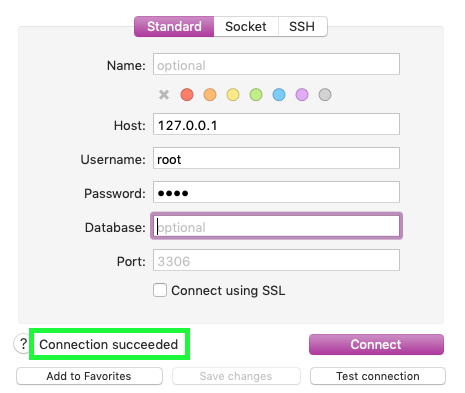
This still gave me the same 403 errors from before. For science, I also tested deliberately using the incorrect password to see if I would get the same 403s. Instead I just got a Cannot connect to database below the login form when trying to login.
This backs up what @benlo123 pointed out about directus_activity being updated upon "successful" login. To be clear… it seems the actual login process is successful, but then various resources fail to load.
It may also be worth mentioning that I tried a socket connection as well (notice the missing host setting):
    'database' => [
        'type' => 'mysql',
        'port' => 3306,
        'name' => 'directus_test',
        'username' => 'root',
        'password' => 'root',
        'engine' => 'InnoDB',
        'charset' => 'utf8mb4',
        'socket' => '/Applications/MAMP/tmp/mysql/mysql.sock',
    ],
This, as you can see, is specific to MAMP, but a non-MAMP user may find their socket location specified in MySQL's my.cnf config file.
Although Directus was willing to connect with this configuration, I still received the same 403 errors (and the like). So then I looked at 'charset' => 'utf8mb4' and started wondering about how my DB was setup.
MAMP was configuring my databases with these defaults: InnoDB with utf8 encoding and utf8_general_ci collation. My database did not match the encoding specified in api.php! I created a database using utf8mb4 encoding and utf8mb4_unicode_ci collation, cloned a new copy of Directus, and then ran the Suite wizard again. Still no luck.
Taking a look at the tables created by Directus, each was still using utf8 with utf8_general_ci. For science, I changed all of them to match the DB's utf8mb4 with utf8mb4_unicode_ci. Still no luck.
Although, this did make me wonder… why does Directus's Install wizard use a utf8 table schema when api.php specifies utf8mb4?
After all this, I figure there must be some environmental difference for me to be having these issues, right? Currently, I'm running:
MAMP Pro v5.1.1 (MySQL 5.7.23, PHP 7.1.20, 7.2.8)
macOS Mojave 10.14
I wouldn't expect OS to make a difference since MAMP is supposed to be "sandboxed," but it's probably worth at least mentioning. I haven't had any issues with any other project at this point (including Directus v6 installations).
@benhaynes What versions are you running? There can only be so many differences between our setups. I imagine the solution is hidden in those differences.
Thanks to everyone who has been providing me feedback so far!
mattbisme
on 30 Oct 2018
I am able to login in my local development server, but not web host.
In order to confirm that the error is not due to database connection error. I set api.php to connect my local database but still getting exactly same problem. It is the same database as the one i use for local development server. I confirmed that the database is accessible from web host. Therefore my conclusion is that this error is 90% sure not due to database.
I think it is due to php problem. I am trying to see how it works in php.
benlo123
on 30 Oct 2018
Problem is that the token returned and saved in local storage is incorrect.
This sounds like it could cause the problems described. A wrong token would make the app think that you're logged in, but would the make api return 403 permission denied.
What happens if you hit the "login to another instance" link when you get the error screen @mattbisme? That will flush the localstorage so it should log in "fresh".
Thanks for the help debugging this @benlo123 😄
rijkvanzanten
on 30 Oct 2018
Don't know if it's any help, but when I made the authenticate() $authToken match whatever was returned in my localStorage, it logs me in fine, however other times, when it's requesting the token from the class $this->getAuthToken($request) it was giving a Server Error frontend.
/directus/src/core/Directus/Application/Http/Middleware/AuthenticationMiddleware.php
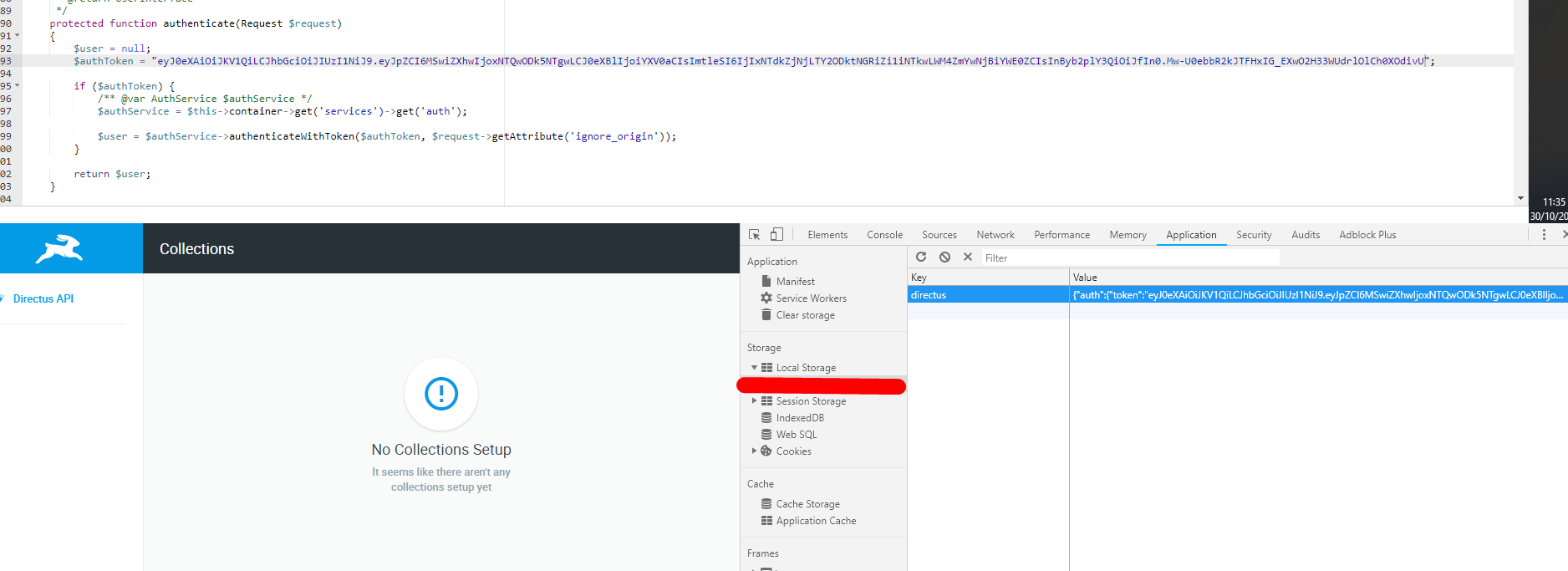
shealavington
on 30 Oct 2018
I think that is not token verification problem but generation problem. If it is verification problem, it will pass login in my local development server with token generated from web host server
benlo123
on 30 Oct 2018
@shealavington
Do you know where is the token generated so i can take a look? I want the path.
benlo123
on 30 Oct 2018
Pretty sure it's /directus/src/core/Directus/Application/Http/Middleware/AuthenticationMiddleware.php
105-147 getAuthToken( x ).
shealavington
on 30 Oct 2018
It appears none of the criteria is being met inside getAuthToken, therefore the return is null as defined on the first line in the method.
You can test this by adding the following to the end of the first if inside the method.
} else {
            $authToken = "your_localstoage_token";
        }
( On the note of it being an auth issue, the error seems really off haha, server error for a bad auth? )
- Update: It's an issue with
$request->hasHeader('Authorization')&$request->getHeader('Authorization'). Removing those variables from the method and replacing them with absolute token based on the request, it works. (Bearer 9q0r29j0q)
shealavington
on 30 Oct 2018
@WellingGuzman :bell:
rijkvanzanten
on 30 Oct 2018
May have something to do with this: https://github.com/slimphp/Slim/issues/831
People are saying it's a difference between PHP Server API FPM/FastCGI and CGI/FastCGI
https://stackoverflow.com/questions/40494213/apache-destroying-authorization-header
shealavington
on 30 Oct 2018
So basically, the app login is correct, the token should be correct but the token never reaches the API?
rijkvanzanten
on 30 Oct 2018
I would say that's what I'm seeing. Now we're on this path, I'm seeing a lot about CGI not passing authorization headers on, which makes sense as my server api is FPM whereas the one having issue is a CGI.
shealavington
on 30 Oct 2018
OH! Yeah I remember having run into some weird issues a long time ago when running MAMP in module mode (or the other one?). I think the default is the one that was causing trouble back then.
rijkvanzanten
on 30 Oct 2018
I just did a print of $_SERVER in the API web.php and there's no authorization token. 🤔 When I do this on my server, it comes though as HTTP_AUTHORIZATION 👍
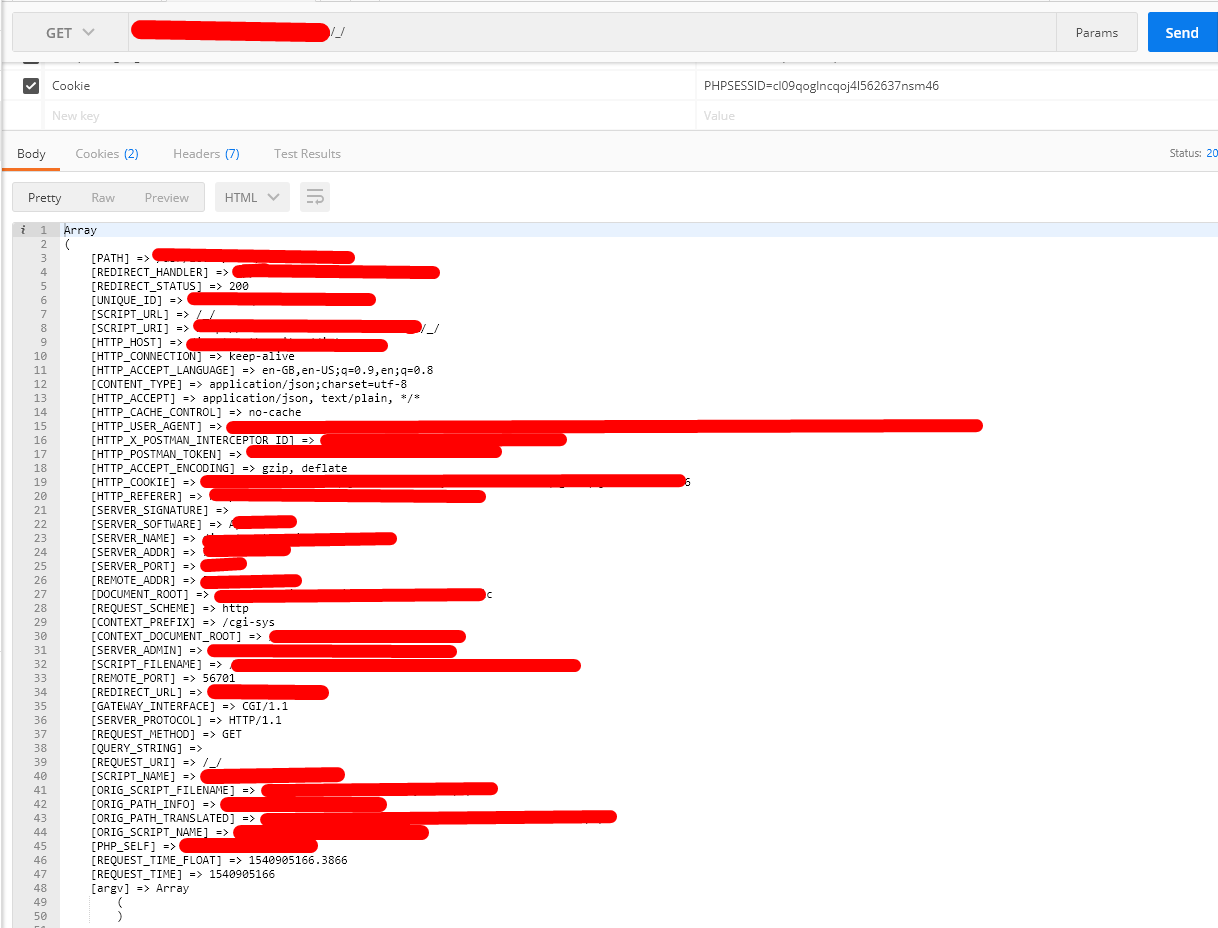
shealavington
on 30 Oct 2018
I've managed to get the login to work...
Albeit I'm not sure if it's secure or whatnot haha, and may need properly "fixing" but here's what I did if you wanted to try to login yourself!
1) Open the .htaccess, and add the following line:
RewriteRule .* - [E=REMOTE_USER:%{HTTP:Authorization}]
above
RewriteRule .* - [env=HTTP_AUTHORIZATION:%{HTTP:Authorization}]
2) Head to ./src/core/Directus/Application/Http/Middleware/AuthenticationMiddleware.php
Replace lines 133 & 134:
} elseif ($request->hasHeader('Authorization')) {
$authorizationHeader = $request->getHeader('Authorization');
With
} elseif (isset($_SERVER['REDIRECT_REMOTE_USER'])) {
$authorizationHeader = $_SERVER['REDIRECT_REMOTE_USER'];
shealavington
on 30 Oct 2018
@shealavington This is a fix? Or way to reproduce?
benlo123
on 30 Oct 2018
I mean... It did fix the issue for me, but I'm not sure on the security of it, haven't tested it on other servers etc.
shealavington
on 30 Oct 2018
Good news! It worked. @shealavington thanks so much
benlo123
on 30 Oct 2018
Yaaassss, excellent sleuthing @shealavington!!! @WellingGuzman (API Lead) will be back tomorrow morning and can weigh in on the security side. Until then, it seems like we've figured out the root cause (the hardest part)!
benhaynes
on 30 Oct 2018
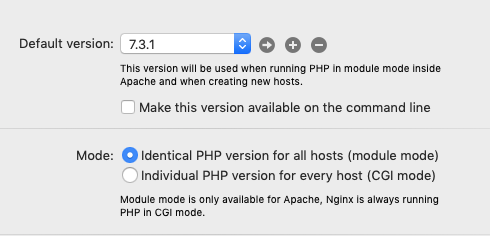
Sure enough, my issues stem from what @rijkvanzanten mentioned specifically. MAMP's PHP can use Module Mode (all hosts use the same PHP version) or CGI Mode (hosts are assigned a PHP version).
My MAMP installation was set to CGI Mode; upon setting it to Module Mode, Directus allowed me to login! I did have to do a fresh install though. This was likely the difference between my installation and @benhaynes.
I then switched back to CGI Mode, installed another fresh copy of Directus/DB, followed @shealavington's directions, and ran the wizard. Success again!
I am interested to see how the security checks out with this fix. I can run in Module Mode for now, but CGI Mode would be preferable. Looking forward to the exciting conclusion!
mattbisme
on 31 Oct 2018
Hey @shealavington, Someone else was having this problem months ago, and I didn't found what was causing this, but they solve it the same way you did. It seemed that the web server were removing the Authorization header and renaming to something else the web server passes that header.
While this is a solution ,I still feel this is a bit hacky, because it doesn't reveal or fix the actual problem, but is a workaround for this specific case.
Does anyone knows why the Apache with CGI removes the header?
wellingguzman
on 31 Oct 2018
I just did a print of
$_SERVERin the APIweb.phpand there's no authorization token. 🤔 When I do this on my server, it comes though as HTTP_AUTHORIZATION 👍
What was your setup here? If the HTTP_AUTHORZATION exists it should have been renamed to Authorization by the .htaccess
wellingguzman
on 31 Oct 2018
,I still feel this is a bit hacky, because it doesn't reveal or fix the actual problem
I felt exactly the same haha, it doesn't explain what was wrong or how to actually fix it, but is a workaround that works.
What was your setup here? If the
HTTP_AUTHORZATIONexists it should have been renamed toAuthorizationby the.htaccess
That's what I thought too, all I did was a fresh-install on a shared-server, run a print_r($_SERVER) in web.php, tried to authenticate, and saw Authorization wasn't coming through, although the correct token was being created on the front-end.
I came across some resources that lead me to what I tried in the end — as for why it's not doing what is expected, I'm not sure.
Perhaps we could just introduce a new error that's a little more explanatory for users that may encounter this in the future, that it may not be working due to CGI API. (Not the best solution by any-means, but it's better than people complaining it's a bug with Directus) } elseif (substr(php_sapi_name(), 0, 3) == 'cgi') { throw new Exception("Authentication is failing, please switch to module") } 🤔
shealavington
on 31 Oct 2018
Everyone using MAMP, would you care to share your generated httpd.conf file? It should be located in ~/Library/Application Support/appsolute/MAMP PRO/templates named httpd.conf.temp.
Also If anyone has access to the apache configuration try this:
# This will try to set the Authorization variable to `HTTP_AUTHORIZATION` ignoring the case
# This works if the setenvif module is enabled
<IfModule setenvif_module>
    SetEnvIfNoCase ^Authorization$ "(.+)" HTTP_AUTHORIZATION=$1
</IfModule>
The problem with php_sapi_name is that it can return random names from hosting providers, so it cannot be relied on it.
wellingguzman
on 31 Oct 2018
@WellingGuzman I believe I found what you are looking for here: ~/Library/Application Support/appsolute/MAMP PRO/httpd.conf (not in templates, which was empty). For client confidentiality, I have removed all <VirtualHost> listings except the relevant local.debug.com host used to test Directus; the rest of the config file remains untouched (so hopefully I didn't miss anything else that should be redacted).
httpd.conf
(Added ".txt" to the filename so GitHub would allow the upload)
mattbisme
on 1 Nov 2018
Thanks @mattbisme, providing your httpd.conf I don't see any SetEnvIfNoCase ^Authorization$ "(.+)" HTTP_AUTHORIZATION=$1 which that's the reason we have a similar statement in the .htaccess.
Would you care to add this in your virtual host to see if that fixes the problem. Also can you try to share you $_SERVER variables, Example: var_dump($_SERVER);. Is there any HTTP_AUTHORIZATION or REDIRECT_HTTP_AUTHORIZATION?
wellingguzman
on 2 Nov 2018
@WellingGuzman So sorry for the late response; been a busy week. That said, I'm ready for more rounds of testing, starting with your last request:
Adding SetEnvIfNoCase ^Authorization$ "(.+)" HTTP_AUTHORIZATION=$1 to the <VirtualHost> directive with a freshly cloned installation of Directus 7 did work! I also loaded var_dump($_SERVER) by itself in a separate file; the results were the same both with and without the SetEnvIfNoCase directive:
["REDIRECT_HTTP_AUTHORIZATION"] => string(0) ""
Was there somewhere in particular that you wanted me to capture the $_SERVER dump? Or did you just want to make sure that REDIRECT_HTTP_AUTHORIZATION existed at all?
mattbisme
on 8 Nov 2018
This issue has been automatically marked as stale because it has not had recent activity. It will be closed if no further activity occurs. Thank you for your contributions.
![stale[bot] picture](https://avatars.githubusercontent.com/in/1724?v=4&s=40) stale[bot]
on 11 Jan 2019
stale[bot]
on 11 Jan 2019
"Directus is developed and tested on the LAMP stack, and therefore this is the only officially supported environment." https://docs.directus.io/getting-started/installation.html#requirements. I attempted using MAMP locally and was faced with errors. I setup a Digital Ocean droplet using LAMP and it seemed to be successful so far...
 WayneEld
on 27 Jan 2019
WayneEld
on 27 Jan 2019
Glad to hear that LAMP is working out... if you (or anyone else) discovers which MAMP settings are causing issues we'd love to know about them so we can add them to our Docs!
benhaynes
on 28 Jan 2019
I can install everything on MAMP Pro but when I actually start working I get a lot of console errors.
These are some console errors after fooling around a bit with making new collections and trying to insert data, which it does not save in some One To Many fields.
dev.direct.test-1548934575211.log
And this is how my /public looks like:
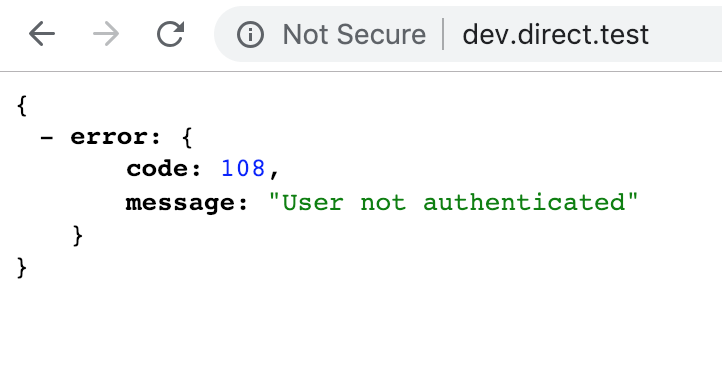
{
error: {
code: 108,
message: "User not authenticated"
}
}
 rubenmeines
on 31 Jan 2019
rubenmeines
on 31 Jan 2019
@rubenmeines i am thinking its correct how your /pulbic looks ... try better http://dev.direct.test/server/ping to verify the api response in the browser.
 dev7ch
on 31 Jan 2019
dev7ch
on 31 Jan 2019
@WellingGuzman probably you could set in the /public/.htaccess for CGI / FastCGI mode:
<IfModule mod_proxy_fcgi.c>
  SetEnvIf Authorization .+ HTTP_AUTHORIZATION=$0
</IfModule>
or only
SetEnvIf Authorization .+ HTTP_AUTHORIZATION=$0
... to make the var available.
taken from this this yii issue on mamp, not tested
@rubenmeines could you please try if this works?
dev7ch
on 6 Feb 2019
Thanks @dev7ch, some people have confirmed that worked for them before. Adding it to .htaccess will be ideal, that will probably reduce the issue with future installation.
Anyone having this issue can try adding this to their public/.htaccess and confirm it solves it?
<IfModule mod_proxy_fcgi.c>
    <IfModule mod_setenvif.c>
        SetEnvIfNoCase ^Authorization$ .+ HTTP_AUTHORIZATION=$0
    </IfModule>
</IfModule>
It will only be applied if the server has mod_proxy_fcgi and mod_setenvif enabled.
wellingguzman
on 11 Feb 2019
Doesn't work on my machine, same "Something is wrong with this instance’s server or database." error. I have all these mods applied (using latest MAMP PRO with PHP in cgi mode).
The only thing that works so far is from this comment by @shealavington
 Stiropor
on 11 Feb 2019
Stiropor
on 11 Feb 2019
thanks for the reply @WellingGuzman, yes it can help to reduce issues and seems to solves the Auth Header issue for fcgi mode.
Update
Sorry on a third setup it didn't work, don't waste ur time with this MAMP description ;)
But while testing the setup with MAMP i realized it`s quite tricky and I scratched my head several times ;)
@Stiropor this error message could be related to wrong db port or db socket or even to some host settings from MAMP
But I think, i found a solution without modifying the core files, which i ve tested on 2 independent system (Mac, Mojave)
This is a summay of problems and solutions:
- MAMP adds entries in
etc/hosts, which can lead into problems (removing ipv6 alias ::1or adding a virtual host pointing your directus/public helped me) - it worked with a domain alias with no port (e.g. not test.mamp.local:8888 ), should solve this commen
- If you are getting correctly invalid credentials but recieve a 500 Error with correct login data this could be related to mamp mysql, in paricular this:
{
    "error": {
        "code": 9,
        "message": "Failed generating the SQL query.",
        "query": "INSERT INTO `directus_activity` (`collection`, `action`, `action_by`, `item`, `action_on`, `ip`, `user_agent`) VALUES ('directus_users', 'authenticate', '1', '1', '2019-02-13 10:58:37', '::1', 'HTTPie/1.0.2')"
    }
}
... which i was able to solve be adding the missed AUTO_INCREEMENT to the id
of directus_activity table.
- it works in fcgi mode as well with domain alias with no port
Here is a step-by-step summary:
1.) Setup mamp env and remove port if set
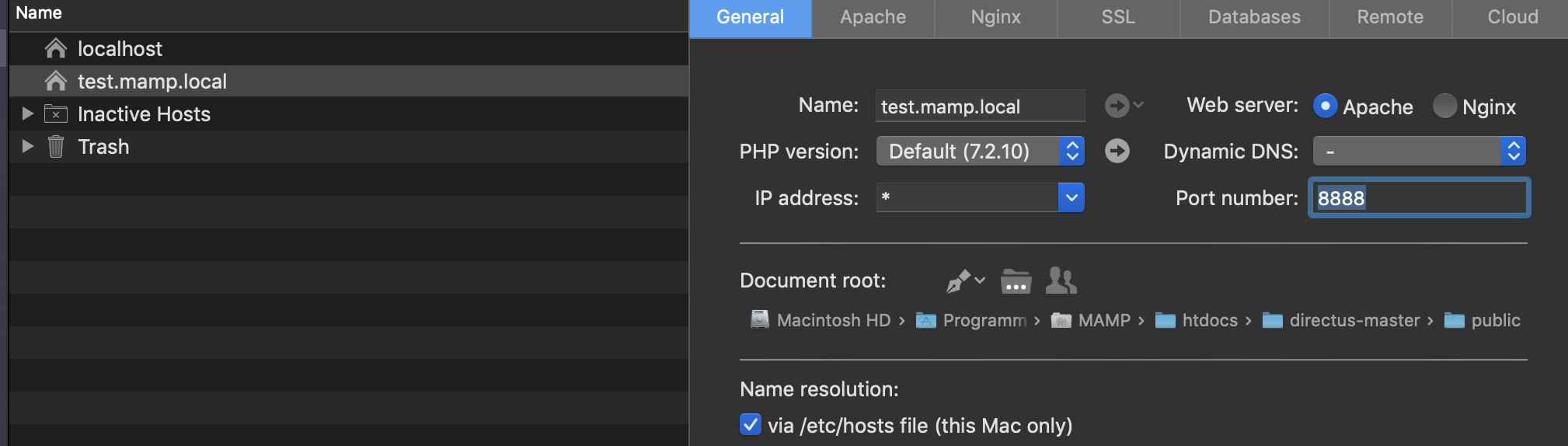
2.) git clone directus and install setup as written in the docs (have a look add the advanced links, regarding permissions and folders, eg. the default ownership of MAMP htdocs is usally sudo chown -R <username>:admin /path/to/MAMP/htdocs/your-project
3.) Adjust in API mysql socket configs.php, e.g like this:
        'type' => 'mysql',
        //'host' => 'localhost',
        'port' => 8889,
        'name' => 'test_directus',
        'username' => 'root',
        'password' => 'root',
        'engine' => 'InnoDB',
        'charset' => 'utf8mb4',
        // When using unix socket to connect to the database the host attribute should be removed
        //'socket' => '/var/lib/mysql/mysql.sock',
        'socket' => '/Applications/MAMP/tmp/mysql/mysql.sock'
4.) Install DB and User like written here
Finally, adding the correct mysql socket, adjust the virtual hosts as pointed out from @mattbisme or removing the ipv6 local loopback created by MAMP finally solved it on several machines.
In Genreral i think it is working with MAMP 👍
Hope this can help to solves other setup problems.
And also make shure not another apache is running ;) ... this was my problem with the ports, finallay the api worked aswell under mamp default ports :8888
Maybe if you need fpm support adding this to api public/.htacces could help (not tested):
RewriteRule .* - [E=HTTP_AUTHORIZATION:%{HTTP:Authorization}] # php-fpm support
and this could be quite important for this issue https://mampsupportforum.com/forums/latest/mamp-pro-disable-ipv6-mac-os-x
dev7ch
on 13 Feb 2019
Was there ever a solution to this? I've tried installing Directus 7 several times, but each time I try logging in I just get the "Server Error Something is wrong with this instance’s server or database."
I've installed Directus on my web hosting provider 1and1, can't seem to get it working.
 alxv2016
on 20 Feb 2019
alxv2016
on 20 Feb 2019
hey @alxv2016 sorry i have to say on a third setup it didn't work as described above by me. so it's not solved for MAMP as written.
dev7ch
on 20 Feb 2019
@wellingguzman probably you could set in the
/public/.htaccessfor CGI / FastCGI mode:<IfModule mod_proxy_fcgi.c> SetEnvIf Authorization .+ HTTP_AUTHORIZATION=$0 </IfModule>or only
SetEnvIf Authorization .+ HTTP_AUTHORIZATION=$0... to make the var available.
taken from this this yii issue on mamp, not tested
@rubenmeines could you please try if this works?
this fixed my issue!
 365degreetotalmarketing
on 2 May 2019
365degreetotalmarketing
on 2 May 2019
Hey, I installed Directus using Docker and am also receiving the Server Error "Something is wrong with this instance's server or database."
With inspect element, this is the exact error message received:
{"error":{"code":9,"message":"Failed generating the SQL query.","query":"SELECT user.* FROM user WHERE = '0' LIMIT 1"}}
It appears that there is something missing after WHERE and before the assignment.

 tpinto7
on 3 May 2019
tpinto7
on 3 May 2019
seems to be a different error than I had.
365degreetotalmarketing
on 3 May 2019
@365degreetotalmarketing @bjgajjar — is this .htaccess change something we want to update in the Core codebase? Or is it specific to user's installs? Maybe we should add it to the Docs so this solution is easier to find for users?
benhaynes
on 3 May 2019
Also, do we want to move this to the api repo or leave it here?
benhaynes
on 3 May 2019
I'm able to run Directus using MAMP Pro (v5.3 (17956)). If anyone has this same issue, feel free to hop onto https://directus.chat so we can discuss potential differences in MAMP config. I don't think this is a single issue in Directus specifically
rijkvanzanten
on 31 May 2019
I was able to get Directus working with MAMP on two computers so far. It appears that the issue was in the PHP settings where you have the option to use a single PHP version for all hosts that uses Apache and the other setting, which allows you to use multiple versions of PHP across hosts, uses NGINX. By setting the default PHP version to 7.3.1, and making sure that 'Identical PHP versions for all hosts' was selected, I was able to go through and set up Directus successfully on both computers. All other settings were left at their default values.
 champions-chris
on 27 Jun 2019
champions-chris
on 27 Jun 2019
Related issues
 dfgkzhang
·
4Comments
dfgkzhang
·
4Comments
 forcemagic
·
4Comments
benhaynes
·
4Comments
forcemagic
·
4Comments
benhaynes
·
4Comments
 andriusign
·
3Comments
andriusign
·
3Comments
 Varulv1997
·
4Comments
Varulv1997
·
4Comments
Most helpful comment
I've managed to get the login to work...
Albeit I'm not sure if it's secure or whatnot haha, and may need properly "fixing" but here's what I did if you wanted to try to login yourself!
1) Open the .htaccess, and add the following line:
RewriteRule .* - [E=REMOTE_USER:%{HTTP:Authorization}]above
RewriteRule .* - [env=HTTP_AUTHORIZATION:%{HTTP:Authorization}]2) Head to
./src/core/Directus/Application/Http/Middleware/AuthenticationMiddleware.phpReplace lines 133 & 134:
} elseif ($request->hasHeader('Authorization')) {$authorizationHeader = $request->getHeader('Authorization');With
} elseif (isset($_SERVER['REDIRECT_REMOTE_USER'])) {$authorizationHeader = $_SERVER['REDIRECT_REMOTE_USER'];