Directus: Request: Valet Driver for Directus
If someone have Laravel Valet Driver for Directus, is it possible to share it with us ?
 trk
trk
All 16 comments
Hey @trk – you'd probably have better luck asking around our Slack for something like this. Our next marketing site will have a community page and we'll consider adding in a public forum there too.
GitHub issues are reserved for bugs so I'm going to close this one.
 benhaynes
on 2 Aug 2017
benhaynes
on 2 Aug 2017
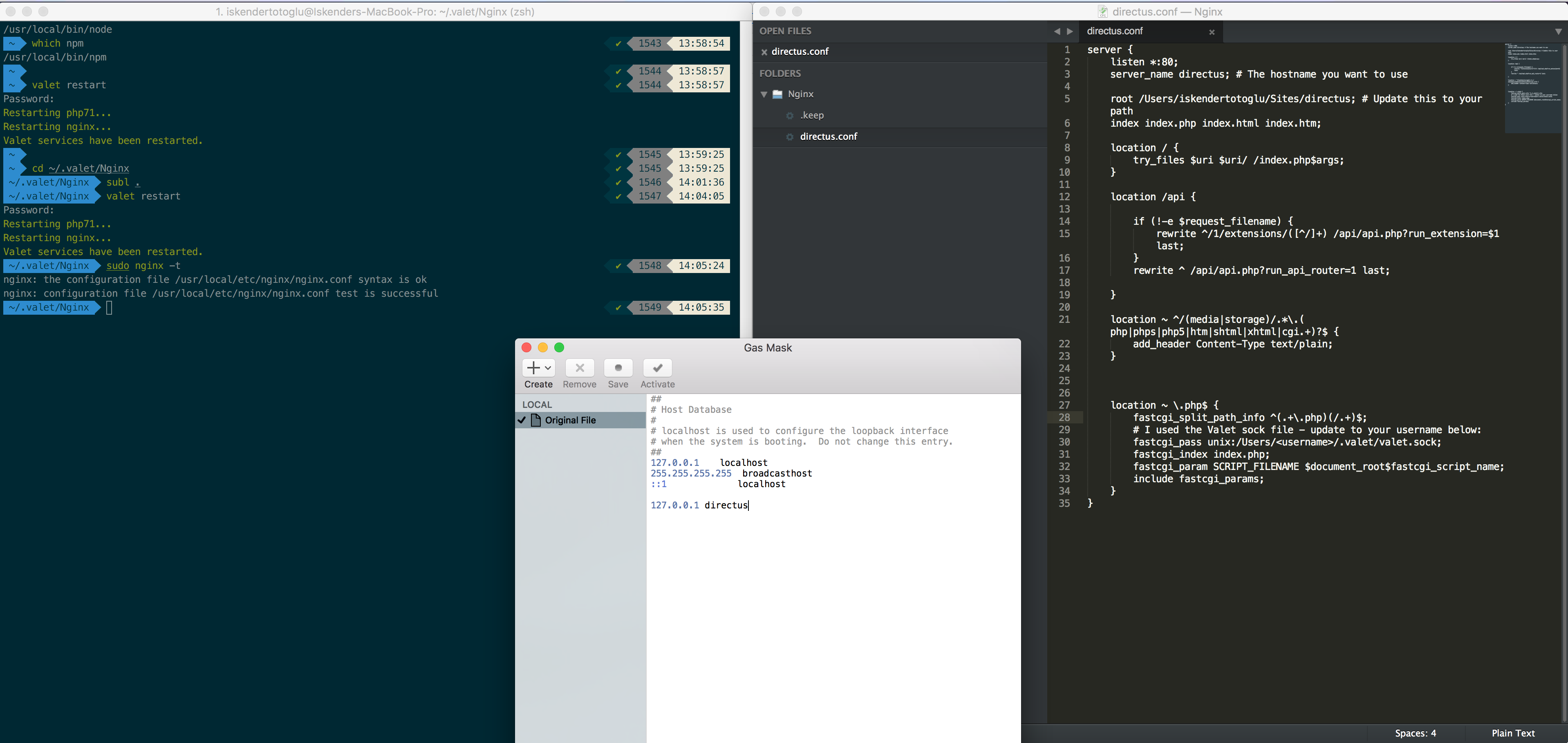
@trk - I was trying to get this to work too and in the end I found it simpler to add a custom Nginx configuration file to Valet. You can do so by adding the .conf file to your ~/.valet/Nginx/ directory (in the Valet setup, Nginx will load all configuration files from this directory).
In my case, I called it ~/.valet/Nginx/directus.conf. Here's a sample with a few notes if it helps:
server {
listen *:80;
server_name directus; # The hostname you want to use
root /full/path/to/directus; # Update this to your path
index index.php index.html index.htm;
location / {
try_files $uri $uri/ /index.php$args;
}
location /api {
if (!-e $request_filename) {
rewrite ^/1/extensions/([^/]+) /api/api.php?run_extension=$1 last;
}
rewrite ^ /api/api.php?run_api_router=1 last;
}
location ~ ^/(media|storage)/.*\.(php|phps|php5|htm|shtml|xhtml|cgi.+)?$ {
add_header Content-Type text/plain;
}
location ~ \.php$ {
fastcgi_split_path_info ^(.+\.php)(/.+)$;
# I used the Valet sock file - update to your username below:
fastcgi_pass unix:/Users/<username>/.valet/valet.sock;
fastcgi_index index.php;
fastcgi_param SCRIPT_FILENAME $document_root$fastcgi_script_name;
include fastcgi_params;
}
}
You will also need to manually add your hostname to your hosts file. In my case I have it running at http://directus/ so I added the following to my /etc/hosts file:
127.0.0.1 directus
Finally, you need to restart Valet and Nginx via this command: valet restart
Once you do that, it should work :)
 hybridvision
on 13 Aug 2017
hybridvision
on 13 Aug 2017
Thanks @hybridvision! if someone else can confirm this also work for them would be awesome!
 wellingguzman
on 13 Aug 2017
wellingguzman
on 13 Aug 2017
Not working on my side, only i can see login screen like before and when i try to login getting Server error occured error.
I am using macOS Sierra + PHP 7.1.8 with Valet
trk
on 14 Aug 2017
That's what I was getting before I made the custom Nginx configuration. The problem is with the URL rewriting and redirects. Did you make sure you followed all the steps and restarted Valet? Maybe it isn't using your new configuration because of an error.
You can make sure your Nginx configuration is ok by running: sudo nginx -t
Another thing to try: run the Directus installer again and see if it shows that everything is ok - you should not see any warnings about rewrites on the final confirmation page. It's essential that this is working otherwise none of the API calls will function.
You can also try calling some API endpoint URLs directly and see what you get.
hybridvision
on 14 Aug 2017
@trk what's on your api/logs directory? any error being logged?
wellingguzman
on 14 Aug 2017
Tried again, result is same on my side (not working).
Steps
Logs

I will try directus installer also
trk
on 15 Aug 2017
@trk: I think I see the problem: line 30 of your directus.conf file needs to be edited to have the correct path of your valet.sock file. In the example I gave I put <username> and I meant for you to replace that with your own username.
Try updating that and restarting Valet and then hopefully it will work.
You can test if the API rewrites are working by going to http://directus/api/1.1/ping - you should see the text pong in the window.
hybridvision
on 15 Aug 2017
Thanks @hybridvision Its worked, after fix valet.sock path.
Did you try to write a valet driver for directus ?
trk
on 15 Aug 2017
Great, I'm glad it worked :)
I did try writing a driver for Valet but trying to translate the Nginx rewrites was making my head hurt so I opted for this approach instead. It would be cleaner to have a driver but for my purposes, this is a reasonable compromise.
hybridvision
on 15 Aug 2017
I know this is long closed, but for anyone google searching this, here's a driver:
<?php

class DirectusValetDriver extends ValetDriver
{
    public function parseUrl($uri)
    {
        $URL = parse_url($uri);
        $URL['parts'] = explode('/', trim($URL['path'], '/'));
        $URL['first'] = reset($URL['parts']);
        $URL['last'] = end($URL['parts']);
        return $URL;
    }
    /**
     * Determine if the driver serves the request.
     *
     * @param  string  $sitePath
     * @param  string  $siteName
     * @param  string  $uri
     * @return bool
     */
    public function serves($sitePath, $siteName, $uri)
    {
        return file_exists($sitePath.'/bin/directus');
    }

    /**
     * Determine if the incoming request is for a static file.
     *
     * @param  string  $sitePath
     * @param  string  $siteName
     * @param  string  $uri
     * @return string|false
     */
    public function isStaticFile($sitePath, $siteName, $uri)
    {
        if ($uri === '/admin') {
            return false;
        }

        if (file_exists($staticFilePath = $sitePath.'/public/admin'.$uri)) {
            return $staticFilePath;
        }

        if (file_exists($staticFilePath = $sitePath.'/public'.$uri)) {
            return $staticFilePath;
        }

        return false;
    }

    /**
     * Get the fully resolved path to the application's front controller.
     *
     * @param  string  $sitePath
     * @param  string  $siteName
     * @param  string  $uri
     * @return string
     */
    public function frontControllerPath($sitePath, $siteName, $uri)
    {
        $url = $this->parseUrl($uri);

        if ($url['first'] === 'admin') {
            return $sitePath.'/public/admin/index.html';
        }

        if ($url['first'] === 'api') {
            if (strpos($url['path'], 'api/extensions') !== false) {
                return $sitePath.'/public/api.php?run_extension=' . implode('/', array_slice($url['parts'], 2));
            } else {
                return $sitePath.'/public/api.php?run_api_router=1';
            }
        }

        return $sitePath.'/public/index.php';
    }
}
I didn't thoroughly test it, so it may need some tweaking. Should be most of the way there though.
 incraigulous
on 6 Dec 2018
incraigulous
on 6 Dec 2018
@incraigulous driver works great for me (you're a champ!), except I could not run the configuration via the browser and had to follow these steps to manually finish the setup:
- bin/directus install:config -n myappname -u root -p localdatabasepassword
- import src/schema.sql
- browse to /admin and log in with [email protected]/password
 JannieT
on 11 Jul 2019
JannieT
on 11 Jul 2019
@bjgajjar @hemratna @rijkvanzanten — is this something we'd want to unofficially support and add into the docs?
I don't know anything about valet, but if we have a working config then it might be helpful for some users.
benhaynes
on 11 Jul 2019
I have no experience with Laravel Valet. Although the script is given by @incraigulous is working, then I am suggesting let's create a gist for it and link to docs.
@incraigulous @JannieT
It will be really helpful if anybody can help me to write a doc.
 hemratna
on 11 Jul 2019
hemratna
on 11 Jul 2019
@hemratna You should just need to link to this: https://laravel.com/docs/5.8/valet#local-drivers and provide the driver.
incraigulous
on 11 Jul 2019
Easiest solutions would be use the Valet Link. https://laravel.com/docs/5.8/valet#the-link-command
 woodinteractive
on 22 Jul 2019
woodinteractive
on 22 Jul 2019
Related issues
 avanwieringen-sensus
·
3Comments
avanwieringen-sensus
·
3Comments
 andriusign
·
3Comments
andriusign
·
3Comments
 adamkobor
·
3Comments
adamkobor
·
3Comments
 pvshum
·
4Comments
pvshum
·
4Comments
 walkwizus
·
4Comments
walkwizus
·
4Comments
Most helpful comment
I know this is long closed, but for anyone google searching this, here's a driver:
I didn't thoroughly test it, so it may need some tweaking. Should be most of the way there though.