Dim: dim api possible data loss situations
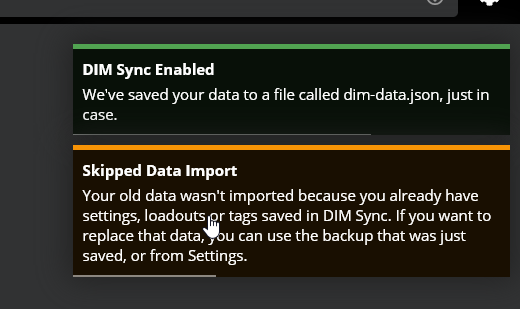
- [x] Enabling sync on a clean browser shows "skipped sync" if you have existing data in DIM API.
- [x] Import skipped dialog references a backup, but the backup isn't created when enabling from settings.
- [x] Figure out a way to better explain that your old data isn't gone, but you're not gonna see it.
- [ ] Explore merging data rather than skipping import?
- [x] Turning sync off, old data (tags specifically) don't show up.
delete all, restart chrome, visit beta, (sync unchecked), complete bungie auth
import my tags and settings

(tags are there in inventory view)enable sync in settings. get this message

what i expected: a file to download
what happened: a file didn't downloadcheck inventory
what happened: 6 tags that sync is storing for me, have been correctly applied to those items.
my other 500 items have become untagged
what i was hoping for: my existing information would be synced into dim sync like the name implies. merge i guess, into dim cloud's existing item information for me.turn sync off to try and get my data back
what i expected: from what bhollis described, maybe revert back to old info?
what happened: the 6 tags are still there,dim-api-enabledisfalse
 archived-2f4dd0
All 7 comments
delete all, restart chrome, visit beta, (sync unchecked), complete bungie auth
delete
dim-api-enabled.
does this sufficiently simulate being an existing user who has newly downloaded the new sync update?
it certainly gets me the notification.same import process
(notification is prompting me to enable sync)enable sync in settings.
again, get the "old data wasn't imported" message.
again, alleged backup doesn't download.what i expected: notif to go away
what happened: didn't until page refresh
same situation beyond that.
if people accept sync on their non-main device first, then on their main, they get their phone's tags or lack thereof etc.
archived-2f4dd0
on 19 Mar 2020
is there a difference in storage, between where settings go, if i select no sync, and then either
import a json:
then enabling sync gives me "skipped data import" and seems to wipe the local datatag an item:
then enabling sync gives me no notification at all, and when i turn sync back off, the item i tagged gets its local tag back
are these meant to be such different behaviors?
archived-2f4dd0
on 19 Mar 2020
ok so the "enable sync" notification triggers a backup file download,
and enabling via settings does not
archived-2f4dd0
on 19 Mar 2020
made sure sync was OFF
did

delete everything, restart chrome, visit beta, (sync unchecked), complete bungie auth
delete dim-api-enabled.
same import process
(notification is prompting me to enable sync)enabled sync via notification
got "skipped import"
console:
[importLegacyData] Don't need to import, this legacy data has already imported
api response: {}
payload to api on import attached
archived-2f4dd0
on 19 Mar 2020
i get the feeling that ^ doesn't represent true legacy user, is the json import i do going into the new settings object or the old?
archived-2f4dd0
on 20 Mar 2020
Commented in Slack - it's a bit hard to respond to these all in one big line without threaded replies. I think everything but your last case is expected but unclear to the user, and the last one is unexpected and I'll have to understand what is going on.
 bhollis
on 22 Mar 2020
bhollis
on 22 Mar 2020
I think I've handled all of this - LMK.
bhollis
on 22 Mar 2020
Related issues
 cbcrouse
·
4Comments
bhollis
·
4Comments
cbcrouse
·
4Comments
bhollis
·
4Comments
 KyoukanGG
·
3Comments
KyoukanGG
·
3Comments
 SunburnedGoose
·
4Comments
SunburnedGoose
·
4Comments
 joshminnie
·
4Comments
joshminnie
·
4Comments