Dim: Mobile version changing to desktop version
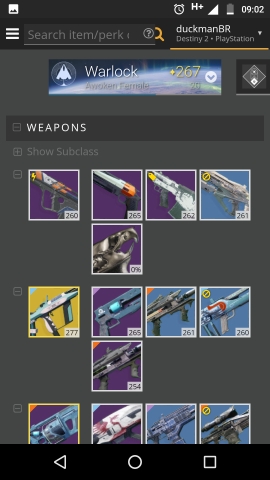
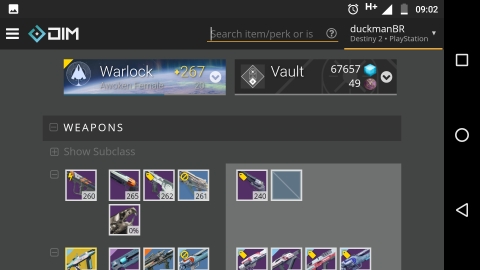
When I open the keyboard (to enter a search or an note) the app changes to the desktop version (wider area with smaller icons, vault side by side and wide header). If I close the keyboard the app reverts back to mobile.
It's impossible to add a note, because when the app resizes to desktop, the item window closes, then the keyboard closes and the app reverts back to mobile.
May be related to #2176...
Using the 4.15.0.1375 beta on Android (Nougat with SwiftKey)
 duckmanBR
All 14 comments
Sorry, forgot to mention that this happens in portrait.
And I said "desktop version" because of the inventory with 5 icons (that I set before this option was removed). But looks like this is also the landscape version.
duckmanBR
on 19 Sep 2017
Is this in beta, or the release version?
 bhollis
on 20 Sep 2017
bhollis
on 20 Sep 2017
Beta
duckmanBR
on 20 Sep 2017
Just to be clear:
Portrait / Portrait with keyboard open / Landscape

duckmanBR
on 22 Sep 2017
@kyleshay since you have a Pixel to test with, could you take a look at this?
bhollis
on 23 Sep 2017
I forgot to add this before, but it's also almost impossible to handle stackable items in portrait.
@bhollis, can I comment the input.focus(); on line 22 of move-amount.directive.js?
duckmanBR
on 2 Oct 2017
@duckmanBR could you explain more? Would it still be a problem if we fixed this issue?
bhollis
on 3 Oct 2017
It would be only a nuisance (like it is when in landscape) because the focus opens the keyboard. So in landscape I need to click the mod/shader, close the keyboard, then move/split/etc
In portrait I need to try to be faster than the keyboard to click store/vault, if I'm too slow the keyboard will open, triggering the page resize to landscape. With the resize the item window will close, which will close the keyboard, triggering the page resize back to portrait.
I really need to find a way to capture this, it would be a funny gif...
duckmanBR
on 3 Oct 2017
https://groups.google.com/a/chromium.org/forum/#!msg/blink-dev/Tr43oT4DQoY/XRxLWmrrEQAJ
bhollis
on 6 Oct 2017
bhollis
on 6 Oct 2017
bhollis
on 6 Oct 2017
I've just pushed an update to Beta that may help. @duckmanBR can you check it out, and @kyleshay can you try this with your super-zoomed-out Pixel? I'm going by the metrics at https://material.io/devices/
bhollis
on 6 Oct 2017
@kyleshay does the thumbs-up mean it works good on your phone? 😆
bhollis
on 6 Oct 2017
ah, sorry. i thumbs up and checked it but forgot to reply back. beta looks great!
 kyleshay
on 6 Oct 2017
kyleshay
on 6 Oct 2017
Related issues
bhollis
·
3Comments
kyleshay
·
7Comments
 michabbb
·
4Comments
michabbb
·
4Comments
 dhazelett
·
5Comments
dhazelett
·
5Comments
 SunburnedGoose
·
4Comments
SunburnedGoose
·
4Comments
Most helpful comment
I've just pushed an update to Beta that may help. @duckmanBR can you check it out, and @kyleshay can you try this with your super-zoomed-out Pixel? I'm going by the metrics at https://material.io/devices/