### Creating a bug report/issue
Required Information
- DietPi version |
cat /boot/dietpi/.version - Distro version |
echo $G_DISTRO_NAMEorcat /etc/debian_version - Kernel version |
uname -a - SBC model |
echo $G_HW_MODEL_NAMEor (EG: RPi3) - Power supply used | (EG: 5V 1A RAVpower)
- SDcard used | (EG: SanDisk ultra)
Additional Information (if applicable)
- Software title | (EG: Nextcloud)
- Was the software title installed freshly or updated/migrated?
- Can this issue be replicated on a fresh installation of DietPi?
- Bug report ID |
echo $G_HW_UUID
Steps to reproduce
- ...
- ...
Expected behaviour
- ...
Actual behaviour
- ...
Extra details
- ...
 hai3009
All 13 comments
Hi,
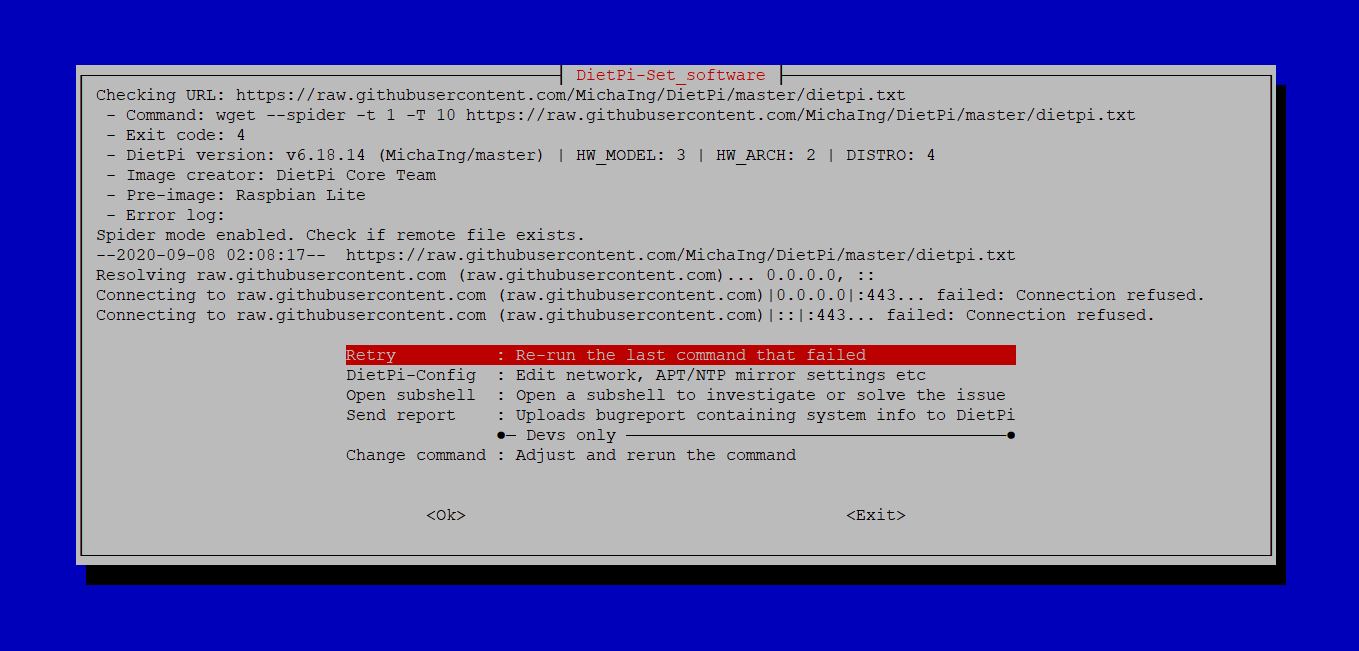
Many thanks for your report. Do you use PiHole? Because you are resolving Github with 0.0.0.0. Looks like your DNS request is blocked somewhere.
 Joulinar
on 8 Sep 2020
Joulinar
on 8 Sep 2020
thanks!Don't know how to use it PiHole
hai3009
on 8 Sep 2020
If you use PiHole, login to web interface, search on the logs if something from GitHub is blocked. If yes, put it to Whitelist.
Joulinar
on 8 Sep 2020
Jep indeed this is not the first time that Pi-hole (i.e. one of the available non-standard block lists) blocks githubusercontent.com, a shame.
But just to be sure it it really Pi-hole, as faulty ISP or local DNS servers or hosts file can do the same thing of course:
cat /etc/resolv.conf
grep '0\.0\.0\.0' /etc/hosts
curl -IL --dns-servers 9.9.9.9 raw.githubusercontent.com
Feel free to mask any contained private information/IPs etc, I'm just interested if there is any related hosts entry and if the configured DNS server is a local network one (e.g. Pi-hole), one from ISP (e.g. assigned via DHCP) or a global one, like 9.9.9.9 (Quad9) or 1.1.1.1 (Cloudflare).
 MichaIng
on 8 Sep 2020
MichaIng
on 8 Sep 2020
When will the latest image download be released?
hai3009
on 10 Sep 2020
@hai3009
what you mean? Or what do you looking for?
Joulinar
on 10 Sep 2020
I'll now create a new image for RPi, but that will not solve your issue as this is not related to DietPi but a blocking list or firewall rule on your side 😉.
MichaIng
on 10 Sep 2020
yep, last RPI image was released less than 2 month ago and it working fine. As already said, your issue seems to be some DNS blocking, aka PiHole 😉
Joulinar
on 10 Sep 2020
Thank you for your reply. I can only use dietpi first_ V6.18 is not upgraded
hai3009
on 10 Sep 2020
a new image will bring you to latest release DietPi v6.32.2, always.
But still, your issue on your very old/outdated V6.18 has nothing to do with DietPi. You are not able to complete your update, because there is something on your side who is blocking DNS resolution for raw.githubusercontent.com
Joulinar
on 10 Sep 2020
New image uploaded, after 1-2 positive feedback I'll move it to stable downloads: https://dietpi.com/downloads/images/testing/DietPi_RPi-ARMv6-Buster.7z
MichaIng
on 10 Sep 2020
Thank you. The new image can be used normally.
hai3009
on 11 Sep 2020
Many thanks for testing and feedback! I mark this issue as closed then. Feel free to reopen if required.
MichaIng
on 11 Sep 2020
Related issues
 oshank
·
3Comments
oshank
·
3Comments
 1021683053
·
3Comments
MichaIng
·
3Comments
1021683053
·
3Comments
MichaIng
·
3Comments
 bhaveshgohel
·
3Comments
bhaveshgohel
·
3Comments
 Fourdee
·
3Comments
Fourdee
·
3Comments