Devextreme: DataGrid and TreeList: Editing API Enhancements
The Problem
The DataGrid and TreeList components do not provide an API to perform the following tasks:
- Get or set updated/inserted/deleted rows
- Save all rows in one request in batch edit mode
- Cancel changes made to an individual row in batch edit mode
- Be notified when editing is finished
The Proposed Solution
We plan to introduce the following API:
Options
editing.editRowKey: any // key for the edited row

editing.editColumnName: string // name of the edited column

editing.changes: object[] // pending row changes
changes is an array of objects with the following fields:
type- "insert", "update", or "remove"data- the row's updated data fieldskey- the row's key
Events
onSaving: function // A callback function that is executed before edited data is saved

onSaved: function // A callback function that is executed after edited data is saved

onEditCanceling: function // A callback function that is called before editing is canceled

onEditCanceled: function // A callback function that is called after editing is canceled
Utils
DevExpress.data.applyChanges(data, changes, { keyExpr, immutable }) // A method that applies changes to data
data- the current datasetchanges- changes to be applied to the datasetkeyExpr- specifies the key propertyimmutable- iftrue,applyChangesreturns a new array instead of modifyingdata
The applyChanges method makes it easier to update the grid's data source. If this method does not meet your requirements, you can use your own update implementation instead.
Controlled Mode
You can use the newly introduced API to implement your own data-saving logic in the onSaving handler. To handle data modification manually, set the cancel parameter to true to disable the default saving implementation as follows:
Angular
// app.component.html

<dx-data-grid
  keyExpr="ID"
  [dataSource]="data"
  (onSaving)="onSaving($event)"
>
  <dxo-editing
    mode="batch"

    [allowUpdating]="true"

    [(changes)]="changes"
    [(editRowKey)]="editRowKey"
    [(editColumnName)]="editColumnName"
  ></dxo-editing>
</dx-data-grid>

. . .

// app.component.ts
export class AppComponent {
    data: any[];
    editRowKey: any;
    editColumnName: string;
    changes: Array<any>;

    constructor(service: Service) {
        this.data = service.getData();
        this.editRowKey = null;
        this.editColumnName = null;
        this.changes = [];
    }

    onSaving(e) {
        e.cancel = true;  // cancel automatic update of the data array

        // await fetch(. . .);  // save data to your remote server if needed

        // apply changes to your local data
        // you can use our applyChanges method or implement your own data modification logic
        applyChanges(this.data, this.changes, {
          keyExpr: 'ID',
          immutable: false
        });

        this.editRowKey = null;
        this.editColumnName = null;
        this.changes = [];
    }
}
React
const [editColumnName, setEditColumnName] = useState(null);
const [editRowKey, setEditRowKey] = useState(null);
const [changes, setChanges] = useState(null);
const [data, setData] = useState([]);

. . .

<DataGrid
  keyExpr="ID"
  dataSource={data}
  onSaving={onSaving}
>

  <Editing
    mode="batch"

    allowUpdating={true}

    changes={changes}
    onChangesChange={setChanges}

    editRowKey={editRowKey}
    onEditRowKeyChange={setEditRowKey}

    editColumnName={editColumnName}
    onEditColumnNameChange={setEditColumnName}
  />
</DataGrid>

. . .

onSaving(e) {
    e.cancel = true;  // cancel automatic update of the data array

    // await fetch(. . .);  // save data to your remote server if needed

    // apply changes to your local data
    // you can use our applyChanges method or implement your own data modification logic
    const newData = applyChanges(data, changes, {
      keyExpr: 'ID',
      immutable: true
    });

    setData(newData);
    setChanges([]);
    setEditColumnName(null);
    setEditRowKey(null);
  });
}
Vue
<template>
  <div>
    <DxDataGrid
      key-expr="ID"
      :data-source="data"
      @saving="onSaving"
    >
      <DxEditing
        mode="batch"

        :allow-updating="true"

        :changes.sync="changes"
        :edit-row-key.sync="editRowKey"
        :edit-column-name.sync="editColumnName"
      />
    </DxDataGrid>
  </div>
</template>

. . .

export default {
  data() {
    return {
      data: [. . .],
      editRowKey: null,
      editColumnName: null,
      changes: []
    };
  },
  methods: {
    onSaving(e) {
      e.cancel = true;  // cancel automatic update of the data array

      // await fetch(. . .);  // save data to your remote server if needed

      // apply changes to your local data
      // you can use our applyChanges method or implement your own data modification logic
      applyChanges(this.data, this.changes, {
        keyExpr: 'ID',
        immutable: false
      });

      this.editRowKey = null;
      this.editColumnName = null;
      this.changes = [];
    }
  },
};
jQuery
$('#gridContainer').dxDataGrid({
    dataSource: data,
    editing: {
        mode: 'batch',
        allowUpdating: true,
    },
    onSaving: function(e) {
        e.cancel = true;  // cancel automatic update of the data array

        // await fetch(. . .);  // save data to your remote server if needed

        // apply changes to your local data
        // you can use our applyChanges method or implement your own data modification logic
        DevExpress.data.applyChanges(data, e.changes, {
          keyExpr: 'ID',
          immutable: false
        });
        e.component.option({
            dataSource: data,
            editing: {
                editRowKey: null,
                editColumnName: null,
                changes: []
            }
        });
    }
});
Send All Changes in a Single Request
In batch edit mode, the DataGrid sends a separate request for each object in the changes array. To optimize this operation and send all changes in one request, implement the onSaving event handler with the cancel parameter set to true. This cancels the DataGrid's default saving behavior and allows you to use your own implementation.
Angular
// app.component.html
<dx-data-grid
  [dataSource]="store"
  (onSaving)="onSaving($event)"
>
  <dxo-editing
    mode="batch"
    [allowUpdating]="true"

    [changes]="changes"
    [editRowKey]="editRowKey"
  ></dxo-editing>
</dx-data-grid>

. . .

// app.component.ts
import * as AspNetData from "devextreme-aspnet-data-nojquery";

. . .

export class AppComponent {
    store: any;
    changes: any[];
    editRowKey: any;

    constructor(service: Service) {
        this.store = AspNetData.createStore( . . . );
        this.changes = [];
        this.editRowKey = null;
    }

    onSaving(e) {
        e.cancel = true;  // prevent DataGrid from sending a separate request for each element in the changes array
        const changes = e.changes;

        // assign the promise returned from fetch to the promise field to display the load panel during remote saving
        // if this promise is rejected, the DataGrid displays the error row
        e.promise = fetch(. . .).then(() => {
            this.editRowKey = null;
            this.changes = [];
            this.store.push(changes);  // use store's Push API to apply changes locally
        });
    }
}
Refer to the first example to convert this code to React, Vue, or jQuery.
Handle Events Raised When Editing is Finished
Angular
// app.component.html
<dx-data-grid
  [dataSource]="data"
  (onSaved)="onSaved($event)"
  (onEditCanceled)="onEditCanceled($event)"
>
  <dxo-editing
    mode="batch"
    [allowUpdating]="true"
  ></dxo-editing>
</dx-data-grid>

. . .

// app.component.ts
export class AppComponent {
    data: any[];

    constructor(service: Service) {
        this.data = service.getData();
    }

    onSaved(e) {
        alert('data was saved');
    }

    onEditCanceled(e) {
        alert('editing was canceled');
    }
}
Refer to the first example to convert this code to React, Vue, or jQuery.
Try It
Live Sandboxes
- Controlled Mode (Angular, React, Vue, jQuery)
- Send All Changes in a Single Request (Angular, jQuery)
- Handle Events Raised When Editing is Finished (Angular, jQuery)
We Need Your Feedback
Take a Quick Poll
Do you find DataGrid and TreeList editing API enhancements useful?
Get Notified of Updates
Subscribe to this thread - or to our Facebook and Twitter accounts - for updates on this topic.
 jtoming830
All 29 comments
onEditCanceling
onEditCanceled
Some typo suggestions: Cancelled and Cancelling (double L), and probably onEditingCancelling and onEditingCancelled to match existed event onEditingStart.
Am I correct -- there is no plans to implement batch saving inside data api? I must to implement it manually?
What is that fetch function mentioned in "Send All Changes in a Single Request" topic?
Where is ApplyData function declared?
 Shiko1st
on 2 Jul 2020
Shiko1st
on 2 Jul 2020
While I imagine the new events and options will be useful to some people who don't use custom stores, I think it would be a lot better if DX provided utilities which we could use in our own custom forms instead of relying on DataGrid built-in editing functionality.
Some of the things I would like to see implemented by DX:
- Public
EditingControllerclass we could use in our own applications like the one used internally by the DataGrid. getChanges()method on DX form to get an object with all changed fields. Or if that's too much to ask, at least a utility to get changes from two plain JS objects. DataGrid has this functionality implemented internally as well.- A way to achieve "repaint" editing refresh mode when using custom editing form. Right now if we use
repaintChangesOnlymode on the data grid, there is no easy way to insert or remove records without doing full data reload when using external editing functionality.
Right now if we want to use external form, like in the following example, we need to re-implement a lot of functionality which is already present in the DataGrid:

 hakimio
on 3 Jul 2020
hakimio
on 3 Jul 2020
What is that
fetchfunction mentioned in "Send All Changes in a Single Request" topic?
hakimio
on 3 Jul 2020
Hello, Vlad! Thank you for your feedback.
Some typo suggestions: Cancelled and Cancelling (double L)
Both variants are correct so we use the American one.
and probably onEditingCancelling and onEditingCancelled to match existed event onEditingStart.
Our main point was to make the new names consistent with other DevExpress products where events are called this way. Moreover, we are going to rename onEditingStart to onEditStart with backward compatibility.
Am I correct -- there is no plans to implement batch saving inside data api? I must to implement it manually?
Right you are.
Where is ApplyData function declared?
Do you mean applyChanges? It is a part of devextreme/data module.
jtoming830
on 3 Jul 2020
Hello, Tomas!
Public EditingController class
What functionality do you need in this class? Current API was created compatible with MVVM frameworks so we don't plan creating public classes. However, it will be helpful to know what functionality you are missing.
getChanges() method on DX form to get an object with all changed fields.
In 20.2 release you will be able to use dataGrid.option('changes') for this purpose.
A way to achieve "repaint" editing refresh mode when using custom editing form. Right now if we use repaintChangesOnly mode on the data grid, there is no easy way to insert or remove records without doing full data reload when using external editing functionality.
If you don't have many rows, you can use remoteOperations: false and the push API for this purpose. I have created a sample illustrating this case: https://codepen.io/jtoming/pen/WNrMWGM
jtoming830
on 6 Jul 2020
What functionality do you need in this class? Current API was created compatible with MVVM frameworks so we don't plan creating public classes. However, it will be helpful to know what functionality you are missing.
Things I've mentioned below. Getting changed form fields from DX form and being able to insert/remove records to/from DX DataSource without doing full data reload.
In 20.2 release you will be able to use
dataGrid.option('changes')for this purpose.
Again, this is tightly coupled with the DataGrid and can not be done when using stand-alone DX form.
If you don't have many rows, you can use
remoteOperations: falseand the push API for this purpose.
I do have many rows and I want to be able to do remote sorting/paging/filtering etc while still being able to insert/remove rows without doing full reload. This is possible right now with DataGrid's built-in editing functionality and "repaint" editing refresh mode, but not possible when using external form.
hakimio
on 7 Jul 2020
Regrading Save All changes in one request. It is not very clear how own implementation will be provided. Why do not have an option like "savemode" that will define saving behavior and tell either call saving per each row or pass whole changes array to controller action.
 vkuzinet
on 7 Jul 2020
vkuzinet
on 7 Jul 2020
Would that use case be possible?
- User work in form. Form among other standard widgets contains custom buttons which when opened will show grid with batch edititing mode (let's call it "popup grid btn")
- User clicks "popup grid btn". Grid is shown. Data is loaded into grid
- User does some modifications in grid.
- User closes grid without saving data in it. Grid is unmounted.
- User clicks "popup grid btn". Grid is shown. Data is not loaded and User sees all his previous modifications made.
Right now, in order to achieve that scenario I save grid dataSources into DI service. On mounting grid observes that storage and if it has dataSource for him then takes it or create new one and puts it into storage. Problem is - I need to use undocumented API gridRef.current.instance().getController('editing')._editData and store it into storage to.
I would like to get all batch modifications from grid and apply them to grid in controlled manner.
Add api for importing rows into batch mode
Also it would be great to add api for importing rows into batch mode in specific state. Suppose that I have several rows that must be added by default into grid on mount or whatever operation.. I need to call addRow for each row and then apply row values in onInitNewRow event. That's very inconvenient. I suppose that editing option would allow to add rows into it?
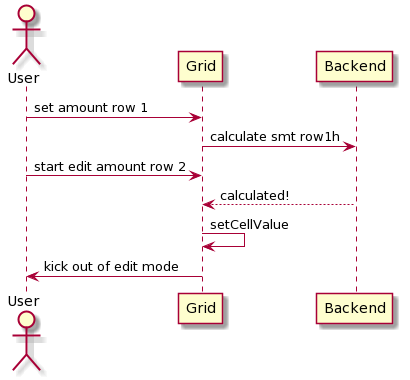
cellValue method kicks user from cell edit mode
Right now updating cell value via cellValue method kicks user from cell edit mode. Suppose user enters amount into editor and application is calculating some lengthy operation on the server and put value into nearby cell.
 springjazzy
on 8 Jul 2020
springjazzy
on 8 Jul 2020
Again, this is tightly coupled with the DataGrid and can not be done when using stand-alone DX form.
Thank you for your feedback. We will take it into account. Though we have not implemented this feature yet, you can implement the onFieldDataChanged event handler to collect changes to your own state.
I do have many rows and I want to be able to do remote sorting/paging/filtering etc while still being able to insert/remove rows without doing full reload.
You can use a Push API with a private index option for insertion in your case. Set it to 0 to show rows at the top of the grid: https://codepen.io/jtoming/pen/WNrMWGM
jtoming830
on 9 Jul 2020
Hello, @vkuzinet!
Why do not have an option like "savemode" that will define saving behavior and tell either call saving per each row or pass whole changes array to controller action.
At the moment, we are working on general editing API enhancements, which will allow our customers to customize different scenarios without private options and heavy solutions. "Send All Changes in a Single Request" is one of these scenarios. A new saveMode is a good idea and we will take it into account, but it will not be implemented in the 20.2 release.
jtoming830
on 9 Jul 2020
Hello, @springjazzy! Thank you for your feedback.
Problem is - I need to use undocumented API gridRef.current.instance().getController('editing')._editData and store it into storage to.
In 20.2 release we will add changes option. You will be able to use it instead of private _editData.
Add api for importing rows into batch mode
You will be able to use changes option for this purpose.
editing: {
    mode: 'batch',
    changes: . . .
}
cellValue method kicks user from cell edit mode
By default cellValue call causes a row rerender. You can set repaintChangesOnly to true to avoid this behavior: https://codepen.io/jtoming/pen/WNrJLNG
jtoming830
on 9 Jul 2020
You can use a Push API with a private
indexoption for insertion in your case. Set it to 0 to show rows at the top of the grid
Maybe this parameter could be made public and documented?
hakimio
on 13 Jul 2020
Maybe this parameter could be made public and documented?
We plan to publish the index parameter in v.20.2.
jtoming830
on 14 Jul 2020
Would it be possible to select new row in batch mode? I mean standard selection checkbox available via grid Selection option
springjazzy
on 18 Aug 2020
Hello, @springjazzy.
Would it be possible to select new row in batch mode?
Currently, we don't have any plans regarding this functionality. Could you describe your scenario in greater detail? This will help us understand your requirements better.
jtoming830
on 20 Aug 2020
Two grids with added values. When one value in grid 1 is selected, several corresponding rows must be selected in grid 2.
Currently it's not possible to use selection functionality of grid in batch mode for added rows. It is possible in cell mode if row is pushed into store.
Maybe this parameter could be made public and documented?
We plan to publish the
indexparameter in v.20.2.
In current batch mode it is possible to add new row and that row would be fixed on top of the grid which is great. Problem is - added row is not a subject to groups and summary calculations in case of remoteOperations: false. So if we make some grid where user can add several payments for example and then save all them in one request, it is impossible for user to see SUM of payments amount that he added and that use case is very important for user.
That is why we switched to cell mode and fake new row with store push (type:insert) but in that scenarion there is also a problem - it is impossible to push new row at the top of the grid in case reshapeOnPush = true, which we need since in case of reshapeOnPush=false newly added row doesn't count in grid summaries.
So that index parameter - would it work with reshapeOnPush = true?
springjazzy
on 21 Aug 2020
So that
indexparameter - would it work withreshapeOnPush = true?
It will just reload the data from the server when you push new row.
but in that scenario there is also a problem - it is impossible to push new row at the top of the grid in case reshapeOnPush = true
Doesn't it just display the data the way it gets from the server?
hakimio
on 21 Aug 2020
So that
indexparameter - would it work withreshapeOnPush = true?It will just reload the data from the server when you push new row.
but in that scenario there is also a problem - it is impossible to push new row at the top of the grid in case reshapeOnPush = true
Doesn't it just display the data the way it gets from the server?
We save all data - form and all grids on them by one request - separate button in form toolbar. All changed data is stored in Redux and then send to server by clicking "save" button. No actual save is made when item is pushed into store. We have to use cell mode only to make grid think that data is present on the server so that grid would allow us to select newly added rows and do summary calculations.
springjazzy
on 22 Aug 2020
You can use onRowInserting with e.cancel set to true and cancelEditData method for this task. In 20.2 release you will be able to use setState({ changes: [] }) instead of cancelEditData method.
I have made a sample for you: https://codesandbox.io/s/festive-leftpad-5yxvz
Please, try it and share your results with me.
jtoming830
on 26 Aug 2020
Can you please provide an example for WEBAPI f0r jquery
$('#gridContainer').dxDataGrid({
dataSource: data,
editing: {
mode: 'batch',
allowUpdating: true,
},
onSaving: function(e) {
e.cancel = true; // cancel automatic update of the data array
    **// await fetch(. . .);  // save data to your remote server if needed**

    // apply changes to your local data
    // you can use our applyChanges method or implement your own data modification logic
    DevExpress.data.applyChanges(data, e.changes);
    e.component.option('dataSource', data);
}
});
 rangaraogutta
on 6 Oct 2020
rangaraogutta
on 6 Oct 2020
A new DevExtreme package [email protected] is available now.
You can test this feature using examples that reside in the Live Sandboxes section of the discussion page.
 vconst
on 6 Oct 2020
vconst
on 6 Oct 2020
I noticed that in the new onSaved event, in the changes object, oldData and newData are the same. That is, oldData actually contains the data after the user's changes, not before. Is this a bug or intentional? It would be useful if oldData contained the unmodified data.
 RandScullard
on 26 Oct 2020
RandScullard
on 26 Oct 2020
Hi,
d.reject from sendBatchRequest on fail is rising error "dx.all.js:93 Uncaught TypeError: Cannot read property 'url' of undefined"
function sendBatchRequest(url, changes) {
var d = $.Deferred();
$.ajax(url, {
method: "POST",
data: JSON.stringify(changes),
cache: false,
contentType: "application/json",
xhrFields: { withCredentials: true }
}).done(d.resolve)
.fail(function (xhr) {
d.reject(xhr.responseJSON ? xhr.responseJSON.Message : xhr.statusText);
});
return d.promise();
};

jQuery version v3.5.1 and DevExtreme version 20.2.2
How can I fix this error?
Ranga
rangaraogutta
on 27 Oct 2020
Change above line to d.reject(xhr.responseJSON ? xhr.responseJSON : xhr.statusText); is fixed the dx.all.js issue.
rangaraogutta
on 28 Oct 2020
Hello, @RandScullard.
I noticed that in the new onSaved event, in the changes object, oldData and newData are the same.
In v20.2.3 the oldData parameter was removed from the changes object in the onSaving and onSaved events. Could you please describe your scenario in greater detail?
jtoming830
on 30 Oct 2020
Hello, @rangaraogutta.
d.reject from sendBatchRequest on fail is rising error "dx.all.js:93 Uncaught TypeError: Cannot read property 'url' of undefined"
I was unable to reproduce described behavior. Could you please provide the steps to reproduce this error?
jtoming830
on 30 Oct 2020
@jtoming830 I actually don't think I'm going to need to compare oldData and newData in my scenario. I was just thinking about a possible scenario where I would need to know which fields were changed.
RandScullard
on 30 Oct 2020
@RandScullard data parameter contains only changed fields. You can get them using the Object.keys method.
jtoming830
on 2 Nov 2020
Thank you to everyone who gave us early feedback. The Data Editing API Enhancements feature is now available in v20.2 release. We would appreciate it if you take a quick poll and leave your feedback in comments.
 jsdmitry
on 5 Nov 2020
jsdmitry
on 5 Nov 2020
Related issues
 pedrofurtado
·
3Comments
pedrofurtado
·
3Comments
 JuFrolov
·
9Comments
JuFrolov
·
9Comments
 bbakermmc
·
7Comments
bbakermmc
·
7Comments
 genachka
·
9Comments
genachka
·
9Comments
 Walgermo
·
4Comments
Walgermo
·
4Comments