Devextreme: TreeList - Record Paging
Such a poweful TreeList doesn't have a pager? Hmm so much for the consistency. :( It's still a grid that has a hierarchy. Why wouldn't you add this support?
 genachka
All 9 comments
There is an interesting demo (a different control set), but with the feature you are asking for. If you open the page 8, you will see a nice picture:
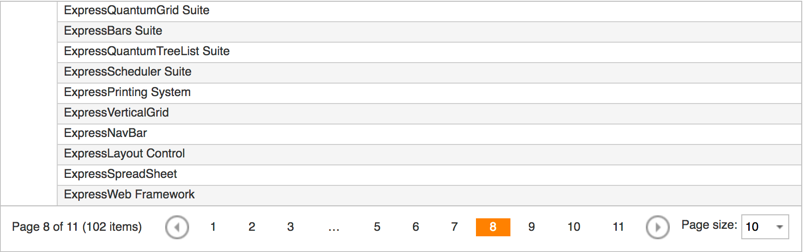
So, my question to you is -> how do you see a good-looking pager for tree-like structures? E.g. on the image above, nobody can identify the item's parents. Opposite, if you repeat the parents for every page, it might happen that a deep tree will have few children displayed only (because the top of the visible page will be filled with parent-items).
If you have a nice design of the pager implementation that you can share with us, I think this will help developers to understand your vision clearly.
At least, I'd better ask to support multiple columns with a horizontal scrolling like in Finder (Mac).
¯\_(ツ)_/¯
 Vest
on 13 Sep 2017
Vest
on 13 Sep 2017
@Vest the way it's done in that demo would be perfect. I wouldn't expect for the parent to be repeated on each page. Other treegrid controls I've looked at do that as well.
genachka
on 13 Sep 2017
Hi @genachka ,
We think that using the pager for hierarchical data is less convenient than scrolling. Other treelists use pager to resolve performance issues with large datasets. But our TreeList has virtual scrolling enabled by default, which resolves performance issues without the pager.
Can you describe in more detail why do you want to use a pager instead of virtual scrolling?
 vconst
on 19 Sep 2017
vconst
on 19 Sep 2017
Not everyone wants to / likes to scroll endlessly. Many of our apps have both a grid and a treelist. And the inconsistency between this is frustrating a lot of our users as they work with different parts of the app. To them, they don't understand all the controls behind the application and nor should they. Visually the treelist is a hierarchy grid to them. In many cases, having a pager is also very convenient, such as being able to directly go to a specific page or a close approximation (i.e. say they know that things that start with the letter j is on page 35) of what they are looking for and to jump back and forth like that. A pager also often quickly gives folks an idea of how many records they're dealing with.
For a third party control, it should be also about choice if you're going to have a pager in one grid but not another grid like control is like taking learned and expected functionality away and forcing one choice of developers.
genachka
on 21 Sep 2017
@Alyar666 very excited about 1069136eb796defe1dd847bbda8baed959ebe493! Looking forward to it, thank you!
genachka
on 19 Mar 2018
@genachka Hi, pre-release is available.
The Solution
You can use the pager and paging configuration options to enable a TreeList record paging capability. For instance, you can use the following TreeList configuration object:
    {
        ...
        scrolling: {
            mode: "standard"
        },
        paging: {
            enabled: true,
            pageSize: 10
        },
        pager: {
            showPageSizeSelector: true,
            allowedPageSizes: [5, 10, 20],
            showInfo: true
        }
    }
The TreeList component has the same API as the DataGrid.
Note: Due to the complexity of hierarchical data remote paging, this feature is only available on the client-side.
Live Sandbox
Installation
Follow the installation guide from the release page.
 dxbykov
on 20 Mar 2018
dxbykov
on 20 Mar 2018
@dxbykov thanks for the sample write up and sandbox. I've played a bit in the sandbox already and it's looking great! And _thank you_ for making the API same as DataGrid!!
genachka
on 21 Mar 2018
Thanks to everybody who participated in this discussion or gave us early feedback by other means. The feature is now available in the v18.1 release. I'm closing this thread. In the case of bugs or questions, feel free to create new GitHub issues or tickets in our Support Center.
dxbykov
on 21 May 2018
@dxbykov With the pager functionality as it is now the widget pages per all of the expanded rows. We would like to page only at the root level - so when you expand, the remaining root rows wouldn't be gone and the expanded rows would open in between. Is this possible?
 brgrz
on 29 Aug 2018
brgrz
on 29 Aug 2018
Related issues
 bbakermmc
·
7Comments
bbakermmc
·
7Comments
 JuFrolov
·
9Comments
JuFrolov
·
9Comments
 Yura13
·
8Comments
Yura13
·
8Comments
 ynslmz
·
7Comments
ynslmz
·
7Comments
 sebastianfdez
·
9Comments
sebastianfdez
·
9Comments
Most helpful comment
@genachka Hi, pre-release is available.
The Solution
You can use the
pagerandpagingconfiguration options to enable a TreeList record paging capability. For instance, you can use the following TreeList configuration object:The TreeList component has the same API as the DataGrid.
Note: Due to the complexity of hierarchical data remote paging, this feature is only available on the client-side.
Live Sandbox
jQuery
Angular
Installation
Follow the installation guide from the release page.