Devextreme-reactive: Cannot read property 'start' of undefined
Hello! I have tables in tabs. When switching tabs I get an error. ((((
breadcrumbs.js:64 TypeError: Cannot read property 'start' of undefined
at ee (dx-grid-core.es.js:1882)
at dx-react-grid.es.js:2707
at e.render (dx-react-core.es.js:535)
https://github.com/DevExpress/devextreme-reactive/blob/d83cdc32baef5517b3dcc5c00877cb1f7080f646/packages/dx-grid-core/src/plugins/table-fixed-columns/helpers.ts#L45
 SMaverick78
All 8 comments
Hi @SMaverick78 ,
I couldn't reproduce the described behavior. Please send us a runnable project or modify this codesandbox so that the issue is reproduced.
 ushkal
on 18 Dec 2019
ushkal
on 18 Dec 2019
Hi @ushkal, I have the same issue. Using VirtualTable, TableRowDetail, RowDetailState and rightColums.
Using Table instead of VirtualTable and leftColumns instead of rightColumns, I get the error.
Unable to reproduce it on codesandbox because of _A cross-origin error was thrown. React doesn't have access to the actual error object in development._
Here is the codesanbox.
Removing the TableRowDetail get it working (the cross-origin error but also the cannot read property 'start' of undefined). I think this is related to the TableRowDetail & TableFixedColumns compatibility.
 fabdts
on 19 Dec 2019
fabdts
on 19 Dec 2019
Error
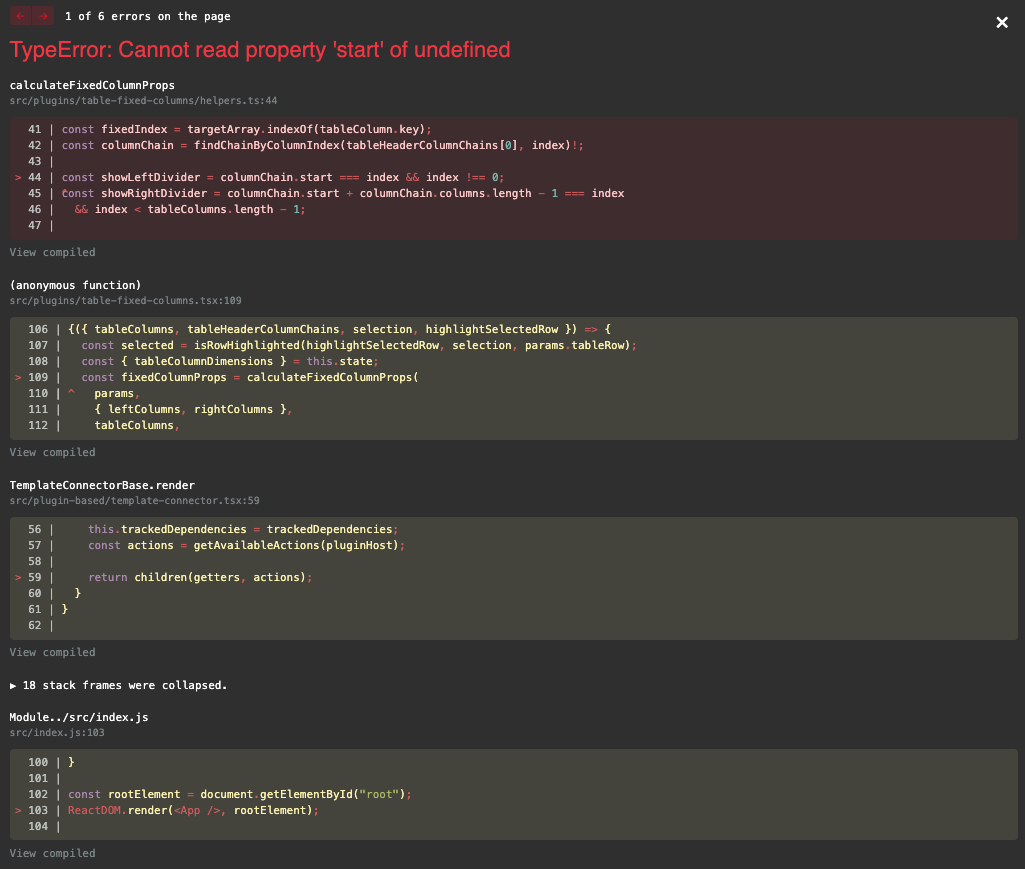
index.js
import React, { useState } from "react";
import ReactDOM from "react-dom";
import { Tabs, Tab, Typography } from "@material-ui/core";
import { RowDetailState } from "@devexpress/dx-react-grid";
import {
  Grid,
  TableHeaderRow,
  TableFixedColumns,
  TableRowDetail,
  VirtualTable,
} from "@devexpress/dx-react-grid-material-ui";

const TabPanel = props => {
  const { children, value, index, ...other } = props;

  return (
    <Typography
      {...other}
      component="div"
      role="tabpanel"
      hidden={value !== index}
      style={{ height: "100%" }}
      id={`simple-tabpanel-${index}`}
    >
      <div style={{ height: "100%" }}>{children}</div>
    </Typography>
  );
};

function App() {
  const [columns] = useState([
    { name: "name", title: "Name" },
    { name: "gender", title: "Gender" },
    { name: "city", title: "City" },
    { name: "car", title: "Car" }
  ]);
  const [rows] = useState([
    { gender: "Female", name: "Sandra", city: "Las Vegas", car: "Audi A4" },
    { gender: "Male", name: "Paul", city: "Paris", car: "Nissan Altima" },
    { gender: "Male", name: "Mark", city: "Paris", car: "Honda Accord" },
    { gender: "Male", name: "Paul", city: "Paris", car: "Nissan Altima" },
    { gender: "Female", name: "Linda", city: "Austin", car: "Toyota Corolla" },
    {
      gender: "Male",
      name: "Robert",
      city: "Las Vegas",
      car: "Chevrolet Cruze"
    },
    { gender: "Female", name: "Lisa", city: "London", car: "BMW 750" },
    { gender: "Male", name: "Mark", city: "Chicago", car: "Toyota Corolla" },
    {
      gender: "Male",
      name: "Thomas",
      city: "Rio de Janeiro",
      car: "Honda Accord"
    },
    { gender: "Male", name: "Robert", city: "Las Vegas", car: "Honda Civic" },
    { gender: "Female", name: "Betty", city: "Paris", car: "Honda Civic" },
    {
      gender: "Male",
      name: "Robert",
      city: "Los Angeles",
      car: "Honda Accord"
    },
    {
      gender: "Male",
      name: "William",
      city: "Los Angeles",
      car: "Honda Civic"
    },
    { gender: "Male", name: "Mark", city: "Austin", car: "Nissan Altima" }
  ]);
  const [rightColumns] = useState(["car"]);
  const [value, setValue] = useState(0);

  const handleChange = (event, newValue) => {
    setValue(newValue);
  };

  return (
    <div>
      <Tabs centered value={value} onChange={handleChange}>
        <Tab label="Tab 1" />
        <Tab label="Tab 2" />
      </Tabs>
      <TabPanel value={value} index={0}>
        <div>Go to tab 2</div>
      </TabPanel>
      <TabPanel value={value} index={1}>
        <Grid rows={rows} columns={columns}>
          <RowDetailState />
          <VirtualTable estimatedRowHeight={50} />
          <TableHeaderRow />
          <TableFixedColumns leftColumns={rightColumns} />
          <TableRowDetail contentComponent={({ row }) => row.car} />
        </Grid>
      </TabPanel>
    </div>
  );
}

const rootElement = document.getElementById("root");
ReactDOM.render(<App />, rootElement);
Hi @ARL64 ,
Thank you for the provided example. The TableFixedColumns plugin should be placed after all other Table* plugins to work properly. We'll add the TableRowDetail plugin to its dependencies to avoid confusion.
@SMaverick78 , please let me know if this solution solves this problem.
ushkal
on 20 Dec 2019
Hi @ushkal,
Thank you for the clarification. It's working.
fabdts
on 20 Dec 2019
Not help. (((((
SMaverick78
on 20 Dec 2019
@SMaverick78,
Please send us a runnable project or modify this codesandbox so that we could fix this error.
ushkal
on 20 Dec 2019
This issue has been automatically closed because there has been no response to our request for more information from the original author. With only the information that is currently in the issue, we don't have enough information to take action. Please reach out if you have or find the answers we need so that we can investigate further.
![no-response[bot] picture](https://avatars.githubusercontent.com/u/26350515?v=4&s=40) no-response[bot]
on 30 Dec 2019
no-response[bot]
on 30 Dec 2019
Related issues
 slava-lu
·
3Comments
slava-lu
·
3Comments
 jesusgp22
·
3Comments
jesusgp22
·
3Comments
 SferaDev
·
3Comments
SferaDev
·
3Comments
 zcuric
·
3Comments
zcuric
·
3Comments
 rajmakda
·
3Comments
rajmakda
·
3Comments
Most helpful comment
Error
index.js