Devextreme-reactive: Summary row as the first row of the table view
- [x] I have searched this repository's issues and believe that this is not a duplicate.
I'm using ...
- [x] React Grid
- [ ] React Chart
- [ ] React Scheduler
Description
I am trying to implement a "TOTALS" row much alike this but showing the totals row as the first row of the table view
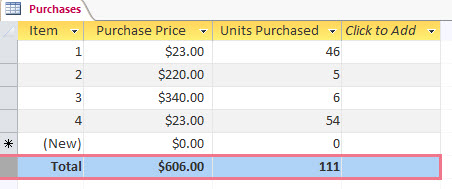
At first I tried to add a totals row manually to the data set but the sorting would constantly move this row in an unwanted position
I've tried using the summary row but it renders the row always on the footer of the table which is not the desired behavior
I've been fildding with the summary row implementation to get a glimpse of how to implement a plugin that would fit my needs but is unclear what code is responsible for positioning the summary row
Any help is apreciated
Environment
- devextreme-reactive: 1.10.0
- react: 16
- browser: chrome
- bootstrap: 4
- react-bootstrap: 4
- material-ui: none
 jesusgp22
All 3 comments
Hi @jesusgp22,
We already received the same question before and answered it in the following ticket. Please refer to it for a solution and try to implement your own UI plugin.
 MaximKudriavtsev
on 26 Apr 2019
MaximKudriavtsev
on 26 Apr 2019
Hi @MaximKudriavtsev
The solutiuon posted on that ticket didn't quite match my requirements.
After looking at several examples of pluggins that handle rows like IntegratedSorting, I was able to come up with this plugin:
import React from 'react'

import { Plugin, Getter } from '@devexpress/dx-react-core'

const computeRows = (rows, totalsRows, totalsKeyRow) => {
    const totals = {
        key: 'TOTALS',
        id: 'TOTALS',
        [totalsKeyRow]: 'TOTALS',
        classNames: 'totals-row',
    }
    for(const row of totalsRows){
        totals[row] = 0
    }
    for(const row of rows){
        for(const key of totalsRows){
            totals[key] += row[key]
        }
    }
    return [totals, ...rows]

}

export const IntegratedTotals = (props) => {
    const { totalsKeyRow, totalsRows } = props
    return (
        <Plugin name="IntegratedTotals">
            <Getter name="rows" computed={({ rows }) => computeRows(rows, totalsRows, totalsKeyRow)} />
        </Plugin>
    )
}

export default IntegratedTotals
This plugin achieves the goal of keeping the TOTALS row as the first row as long as you don't place it before IntegratedSorting plugin
I hope this is useful for someone else
jesusgp22
on 29 Apr 2019
This thread has been automatically locked since it is closed and there has not been any recent activity. Please open a new issue for related bugs or feature requests.
![lock[bot] picture](https://avatars.githubusercontent.com/in/6672?v=4&s=40) lock[bot]
on 16 Jun 2019
lock[bot]
on 16 Jun 2019
Related issues
 SferaDev
·
3Comments
SferaDev
·
3Comments
 sintuchintu
·
3Comments
sintuchintu
·
3Comments
 ProjectaJE
·
3Comments
ProjectaJE
·
3Comments
 Vaccano
·
3Comments
Vaccano
·
3Comments
 madebymt
·
3Comments
madebymt
·
3Comments
Most helpful comment
Hi @MaximKudriavtsev
The solutiuon posted on that ticket didn't quite match my requirements.
After looking at several examples of pluggins that handle rows like IntegratedSorting, I was able to come up with this plugin:
This plugin achieves the goal of keeping the TOTALS row as the first row as long as you don't place it before IntegratedSorting plugin
I hope this is useful for someone else