Devextreme-reactive: Scroll to row feature?
Hi,
When a user causes a row to be added to the grid through a dialogue etc, is there a way I can scroll the grid to show the new row?
Thanks,
Dan
 DanHarman
All 19 comments
Hi,
I am afraid that we don't currently have any workaround for the Virtual Table. We will consider your suggestion for future releases though.
 kvet
on 25 Oct 2017
kvet
on 25 Oct 2017
Is there a solution for the non virtual table?
DanHarman
on 25 Oct 2017
You can use React ref in the tableRowTemplate of the TableView plugin to get the DOM Node. After that, execute the scrollIntoView function on a row's DOM Node when needed.
Here is a link to a similar question on StackOverflow: https://stackoverflow.com/questions/41596411/how-to-scroll-component-to-the-bottom-in-react
kvet
on 30 Oct 2017
What's the status on this at this time? Still no workaround? This would be a really nice feature to have, and we need it.
 frankbolviken
on 1 Mar 2018
frankbolviken
on 1 Mar 2018
@kvet I think your suggestion has some limitations for virtual tables. It will only work for rows that are already rendered, but not for those that are out of view. I believe what most people want is the ability to scroll to a row by specifying an index, just like what react-virtualized does.
I'm currently long for this feature to be added to the virtual table as well.
Not sure if it is possible for you to just add a wrapper around react-virtualized to support virtual table, rather than writing your own, because the performance of react-virtualized is good and has lots of flexibilities and exposed APIs already, so that you don't have to invent your own wheels.
 franklixuefei
on 31 Jul 2018
franklixuefei
on 31 Jul 2018
is some one have work example that solving this problem by using react-virtualized
 gwmaster
on 28 Aug 2018
gwmaster
on 28 Aug 2018
Hi.
it's super important for my project.
is there some basic code that give me ability develop by myself this functionality.
without this functionality i can't use it.
if only i have some function to tell scroll up down from javaScript
i can then scroll and wait when my item is shown manually
what Getter name you use for scroll position
gwmaster
on 3 Sep 2018
Hi,
As we pointed above, currently React Grid doesn't provide the requested functionality. As a workaround, you can use the approach described below.
First of all, I'd point the main principles of the VirtualTable plugin implementation.
VirtualTable renders only visible rows. The rendered row count depends on a table height. Then, to keep a scrollbar thumb height consistent, VirtualTable renders two empty rows.
The first one is before visible rows, the second is after them. The empty row height depends on the scroll position. You can inspect the html markup and see it in action.
The idea is to manually change the height of these empty rows. It will put a scrollbar thumb to the required position and VirtualTable will render only expected rows.
I've created a sample that shows this approach in action. Please refer to my comments in the code.
 MaximKudriavtsev
on 4 Sep 2018
MaximKudriavtsev
on 4 Sep 2018
wow cool!! look on it, thank you very match..
gwmaster
on 4 Sep 2018
One approach would be to not render two large rows above and below the aperture, but instead render dummy rows that are just empty divs with no content. There would be some perf hit, but i don't think its that expensive to render empty divs.
 mattmarcello
on 7 Sep 2018
mattmarcello
on 7 Sep 2018
the big divs this what make the trick of scroller
without them will no be a scroller
the height of the big divs is simulate all invisible rows
gwmaster
on 13 Sep 2018
Multiple divs rendering empty content could take up the same height as a single div.
mattmarcello
on 13 Sep 2018
Rendering multiple stub rows instead of one will dramatically decrease performance
kvet
on 13 Sep 2018
i don't dispute that it would decrease perf. but rendering empty divs is still pretty cheap:
https://repl.it/repls/LightcyanGregariousLifecycles
definitely a perf tradeoff, but the point here is to discuss a possible scrollToIndex implementation. rendering empty divs would allow people to trivially scroll to nodes, whose content could be rendered when they are visible in the aperture.
mattmarcello
on 13 Sep 2018
ok so basically its work and all good if its only vScroll.
but after some work i stuck on performance problem when render 10,000 rows and on smile click you can change him and its take to match time.
so i use PagingPanel its solve the problem of performance but now i need some more help on scroller if you can .
i build basic example there 3 problems
this how its look on my PC
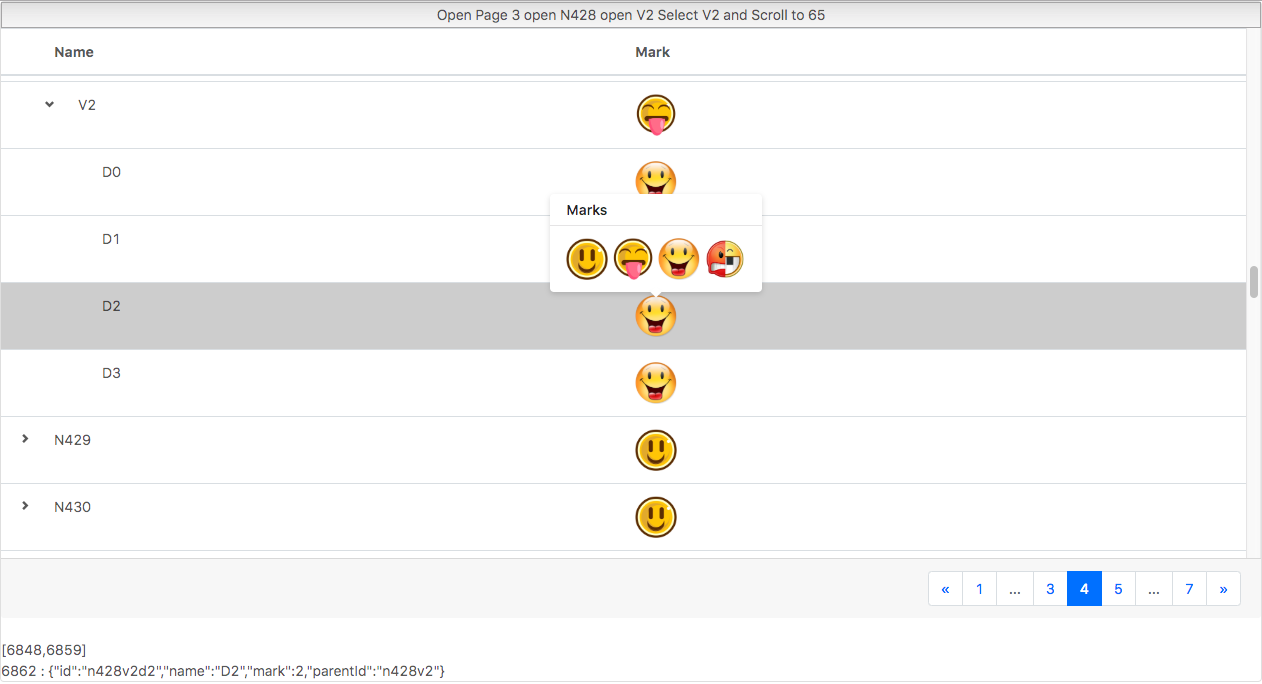
when click on button "Open Page 3 open N428 open V2 Select V2 Select D2 and Scroll to 65"
its do all this on my pc same code in online editor Tree don't work and don't select page 3
if you copy past this code to project and run all will work
the main problem is right now i find this magic
Page 3 and 65
what i have the id of row and from this i need find his location on page 3 and scroll to 65
row on example is {"id":"n428v2d2","name":"D2","mark":2,"parentId":"n428v2"}
gwmaster
on 19 Sep 2018
Hi all
We are working on implementing this feature. We are developing an API, which allows scrolling to a specified row (by the ID) using VirtualTable's scrollToRow method. Note that this feature doesn't work with remote data because we don't have information about unloaded rows.
Does this meet your requirements?
 LazyLahtak
on 21 Nov 2019
LazyLahtak
on 21 Nov 2019
The current API:
const App = () => {
//...

  const scrollToRow = (rowId) => {
    vtRef.current.scrollToRow(rowId);
  };

//....

  return (
    <Grid
      rows={rows}
      columns={columns}
      getRowId={getRowId}
    >
      <VirtualTable
        ref={vtRef}
      />
      <TableHeaderRow />
    </Grid>
  )
}
This thread has been automatically locked since it is closed and there has not been any recent activity. Please open a new issue for related bugs or feature requests.
![lock[bot] picture](https://avatars.githubusercontent.com/in/6672?v=4&s=40) lock[bot]
on 10 Jan 2020
lock[bot]
on 10 Jan 2020
Hi all,
We are happy to inform you that we released this feature. You may find more information about it in the following post.
LazyLahtak
on 17 Jan 2020
Related issues
 bloolizard
·
3Comments
bloolizard
·
3Comments
 ccamusso
·
3Comments
ccamusso
·
3Comments
 sintuchintu
·
3Comments
sintuchintu
·
3Comments
 jesusgp22
·
3Comments
jesusgp22
·
3Comments
 slava-lu
·
3Comments
slava-lu
·
3Comments
Most helpful comment
Hi,
I am afraid that we don't currently have any workaround for the Virtual Table. We will consider your suggestion for future releases though.