Detox: AppleSimUtils.deviceTypeAndNewestRuntimeFor gets wrong runtime
Description
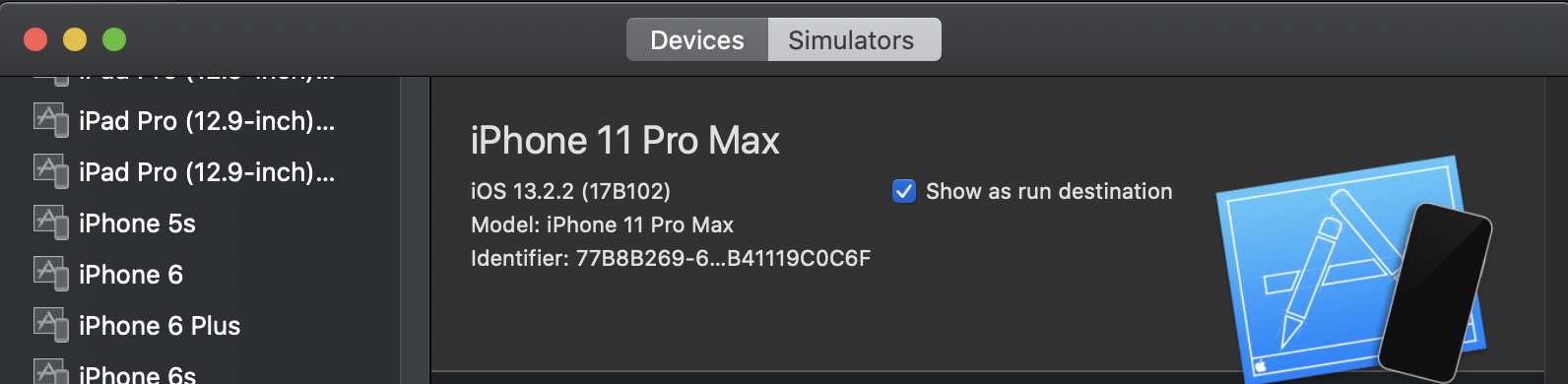
When trying to pick a simulator to run, I am using iPhone 11 Pro Max which is running iOS 13.2.2 as shown in XCode. This function does not return the correct runtime, resulting in the inability to find the simulator to run.
The problem is the line:
const newestRuntime = _.maxBy(output.runtimes, r => Number(r.version));
It tries to parse the version 13.2.2 as a number, which returns NaN, so it returns the next highest version I have available which happens to be 13.2 (tvOS).
Sample of my output.runtimes
[
  {
    "version": "12.2",
    "bundlePath": "/Library/Developer/CoreSimulator/Profiles/Runtimes/iOS 12.2.simruntime",
    "isAvailable": true,
    "name": "iOS 12.2",
    "identifier": "com.apple.CoreSimulator.SimRuntime.iOS-12-2",
    "buildversion": "16E226"
  },
  {
    "version": "13.2.2",
    "bundlePath": "/Applications/Xcode.app/Contents/Developer/Platforms/iPhoneOS.platform/Library/Developer/CoreSimulator/Profiles/Runtimes/iOS.simruntime",
    "isAvailable": true,
    "name": "iOS 13.2",
    "identifier": "com.apple.CoreSimulator.SimRuntime.iOS-13-2",
    "buildversion": "17B102"
  },
  {
    "version": "13.2",
    "bundlePath": "/Applications/Xcode.app/Contents/Developer/Platforms/AppleTVOS.platform/Library/Developer/CoreSimulator/Profiles/Runtimes/tvOS.simruntime",
    "isAvailable": true,
    "name": "tvOS 13.2",
    "identifier": "com.apple.CoreSimulator.SimRuntime.tvOS-13-2",
    "buildversion": "17K90"
  },
  {
    "version": "6.1",
    "bundlePath": "/Applications/Xcode.app/Contents/Developer/Platforms/WatchOS.platform/Library/Developer/CoreSimulator/Profiles/Runtimes/watchOS.simruntime",
    "isAvailable": true,
    "name": "watchOS 6.1",
    "identifier": "com.apple.CoreSimulator.SimRuntime.watchOS-6-1",
    "buildversion": "17S83"
  }
]
and the newestRuntime I'm getting:
newestRuntime: {
    version: '13.2',
    bundlePath: '/Applications/Xcode.app/Contents/Developer/Platforms/AppleTVOS.platform/Library/Developer/CoreSimulator/Profiles/Runtimes/tvOS.simruntime',
    isAvailable: true,
    name: 'tvOS 13.2',
    identifier: 'com.apple.CoreSimulator.SimRuntime.tvOS-13-2',
    buildversion: '17K90'
  }
- [x] I have tested this issue on the latest Detox release and it still reproduces
Reproduction
Provide the steps necessary to reproduce the issue. If you are seeing a regression, try to provide the last known version where the issue did not reproduce.
Using XCode 11, setup simulator
iPhone 11 Pro Maxin Xcode with iOS 13.2.2
Create a config in package.json to use the above simulator
- Run detox with the configuration
- Run into error
Error: Can't find a simulator to match with "iPhone 11 Pro Max", run 'xcrun simctl list' to list your supported devices.
Expected behavior
The expectation is for the correct runtime to be selected as the newestRuntime, and for the code to find the simulator.
Environment (please complete the following information):
- Detox: 16.7.1
- React Native: 0.60.6
- Node: 12.16.1
- Device: iPhone 11 Pro Max
- Xcode: 11.2.1
- iOS: 13.2.2
- macOS: 10.15.3
Logs
Error: Can't find a simulator to match with "iPhone 11 Pro Max", run 'xcrun simctl list' to list your supported devices.
It is advised to only state a device type, and not to state iOS version, e.g. "iPhone 7"
at AppleSimUtils.findDevicesUDID (/node_modules/detox/src/devices/ios/AppleSimUtils.js:47:13)
at processTicksAndRejections (internal/process/task_queues.js:97:5)
at async DeviceRegistry.getDeviceIdsByType (/node_modules/detox/src/devices/drivers/SimulatorDriver.js:16:41)
at async DeviceRegistry._getFreeDevice (/node_modules/detox/src/devices/DeviceRegistry.js:79:23)
 lmarques6
All 4 comments
Valid. I'll look into it
 noomorph
on 27 May 2020
noomorph
on 27 May 2020
Invalid. @lmarques6, you misled me - you just cannot have [email protected] as you had reported, because we removed this function findDevicesUDID in aa250258f58ef42b20183ab06d6c492bd39798f1 last year.
noomorph
on 28 May 2020
Try upgrading your Detox to the latest version indeed and check what happens.
noomorph
on 28 May 2020
hi @noomorph I apologize for the inconvenience, there was an issue with my node_modules folder when I upgraded to version 16.7.1. Cleaning out the folder and re-installing did get me the updated code, which did not have this issue. Thank you!
lmarques6
on 28 May 2020
Related issues
 JB-CHAUVIN
·
3Comments
JB-CHAUVIN
·
3Comments
 isnifer
·
4Comments
isnifer
·
4Comments
 jrobber
·
3Comments
jrobber
·
3Comments
 gtRfnkN
·
4Comments
gtRfnkN
·
4Comments
 LeoNatan
·
4Comments
LeoNatan
·
4Comments
Most helpful comment
Valid. I'll look into it