Detox: xcodebuild puts binaries in different locations than expected
Description
In trying to get the example project tests running on a fresh machine, I ran into build problems. I actually ran into this same type of problem when installing applesimutils (https://github.com/wix/AppleSimulatorUtils/pull/9), so I'll quote myself:
xcodebuild takes a -derivedDataPath option that seems like it should place all build artifacts in that folder. But it seems like it only puts some artifacts in there, and it is still putting the binary in a different location (by default, in ~/Library/Developer/Xcode/DerivedData).
When running the example tests in release (or debug) mode per the instructions, I first get:
detox-server info 13:37:43: server listening on localhost:49933...
detox info 1: Searching for device matching iPhone 6...
detox info Building Detox.framework (5.8.1) into /Users/gerard/Library/Detox/ios/69ec938fe7df49aef2463408303498305f87bb24...
  1) "before all" hook

  0 passing (1m)
  1 failing

  1)  "before all" hook:
     Error: Command failed: /Users/gerard/_work/detox/examples/demo-react-native/node_modules/detox/scripts/build_framework.ios.sh "/Users/gerard/_work/detox/examples/demo-react-native/node_modules/detox" "/Users/gerard/Library/Detox/ios/69ec938fe7df49aef2463408303498305f87bb24"
mv: rename /Users/gerard/Library/Detox/ios/69ec938fe7df49aef2463408303498305f87bb24/DetoxBuild/Build/Products/Release-universal/Detox.framework to /Users/gerard/Library/Detox/ios/69ec938fe7df49aef2463408303498305f87bb24/Detox.framework: No such file or directory
 `/Users/gerard/_work/detox/examples/demo-react-native/node_modules/detox/scripts/build_framework.ios.sh "/Users/gerard/_work/detox/examples/demo-react-native/node_modules/detox" "/Users/gerard/Library/Detox/ios/69ec938fe7df49aef2463408303498305f87bb24"` (exited with error code 1)
This is because Detox.framework got put in ~/Library/Developer/Xcode/DerivedData/Build/Products/Release-universal/Detox.framework instead of where the script expects it: ~/Library/Detox/ios/.../DetoxBuild/Build/Products/Release-universal/Detox.framework.
If I append BUILD_DIR="${detoxFrameworkDirPath}"/DetoxBuild/Build/Products to the end of the xcodebuild command in scripts/build_framework.ios.sh, it puts it in the expected location.
Then, when I re-run detox test, I get the same type of error because detox build did not get put where expected:
detox-server info 14:07:06: server listening on localhost:58302...
  1) "before all" hook

  0 passing (90ms)
  1 failing

  1)  "before all" hook:
     Error: app binary not found at '/Users/gerard/_work/detox/examples/demo-react-native/ios/build/Build/Products/Release-iphonesimulator/example.app', did you build it?
      at Device._getAbsolutePath (node_modules/detox/lib/devices/Device.js:202:15)
Same problem with xcodebuild in package.json.
I'm not sure why this works out-of-the-box for some but not others. There is nothing unique about my Xcode installation AFAIK. I have updated it from the App Store for years. Also, I'm not an Xcode developer, so I don't know the difference between -derivedDataPath and BUILD_DIR. The Apple docs aren't helpful.
Steps to Reproduce
Just following the instructions for release mode in examples/demo-react-native/README.
Node, Device, Xcode and macOS Versions
- Node: v8.6.0
- Device: iPhone 6, iOS 11, simulator
- Xcode: 9.0
- macOS: Sierra 10.12.6
 hellogerard
All 9 comments
Thanks for opening this issue.
This bugs me, and I want to investigate this further. One workaround is we append that BUILD_DIR but I want to understand why it helps.
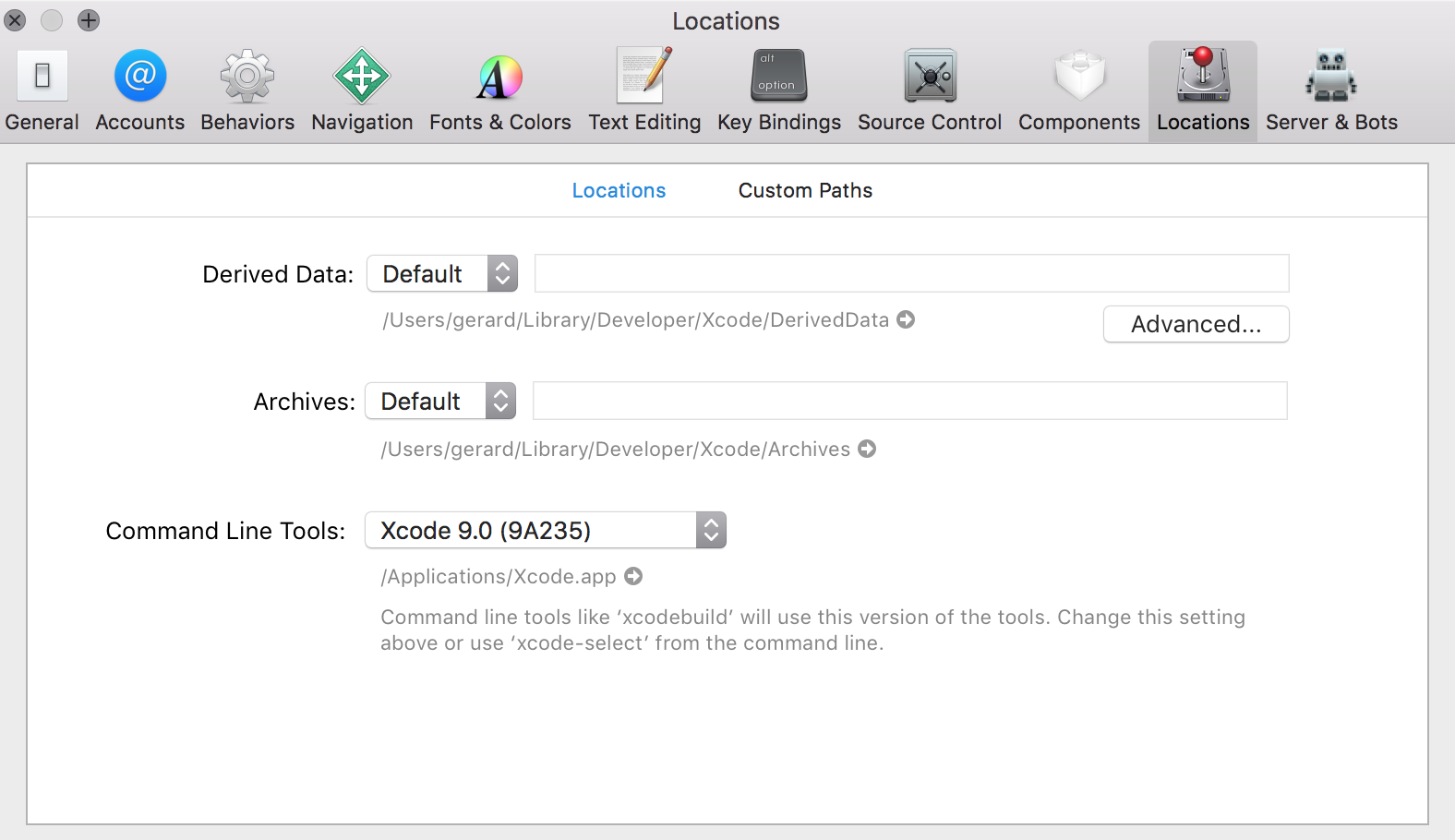
Could be related to location settings in Xcode preferences. Could you please paste a screenshot of those? Xcode (menu) -> Preferences -> Locations
 LeoNatan
on 10 Oct 2017
LeoNatan
on 10 Oct 2017
@LeoNatan
hellogerard
on 10 Oct 2017
💩
Thanks! I will investigate.
LeoNatan
on 10 Oct 2017
I had this issue a few months back with Xcode 8.3.3 after messing with the defaults. I took me a while to solve this.
Eventually I changed everything back to default, deleted and reinstalled Xcode. it now respects derivedDataPath again.
 rotemmiz
on 12 Oct 2017
rotemmiz
on 12 Oct 2017
@LeoNatan @rotemmiz can you screenshot your location settings in Xcode if it is not default? I can try with that setup.
 chirag04
on 18 Oct 2017
chirag04
on 18 Oct 2017
My settings are default in both the main screen and in Advanced.
LeoNatan
on 18 Oct 2017
Did you reinstall Xcode?
rotemmiz
on 18 Oct 2017
This issue has been automatically marked as stale because it has not had recent activity. It will be closed if no further activity occurs.
If you believe the issue is still relevant, please test on the latest Detox and report back.
Thank you for your contributions.
![stale[bot] picture](https://avatars3.githubusercontent.com/in/1724?v=4&s=40) stale[bot]
on 7 Mar 2018
stale[bot]
on 7 Mar 2018
@LeoNatan I just had this problem, in the end, this was fixed?
 tastafur
on 17 May 2018
tastafur
on 17 May 2018
Related issues
 jrobber
·
3Comments
jrobber
·
3Comments
 rikur
·
4Comments
rikur
·
4Comments
 brunobar79
·
4Comments
brunobar79
·
4Comments
 gtRfnkN
·
4Comments
gtRfnkN
·
4Comments
 alexmngn
·
3Comments
alexmngn
·
3Comments