Desktop: Error Upgrading from 3.4.10 to 3.5.1 (Missing Keys)
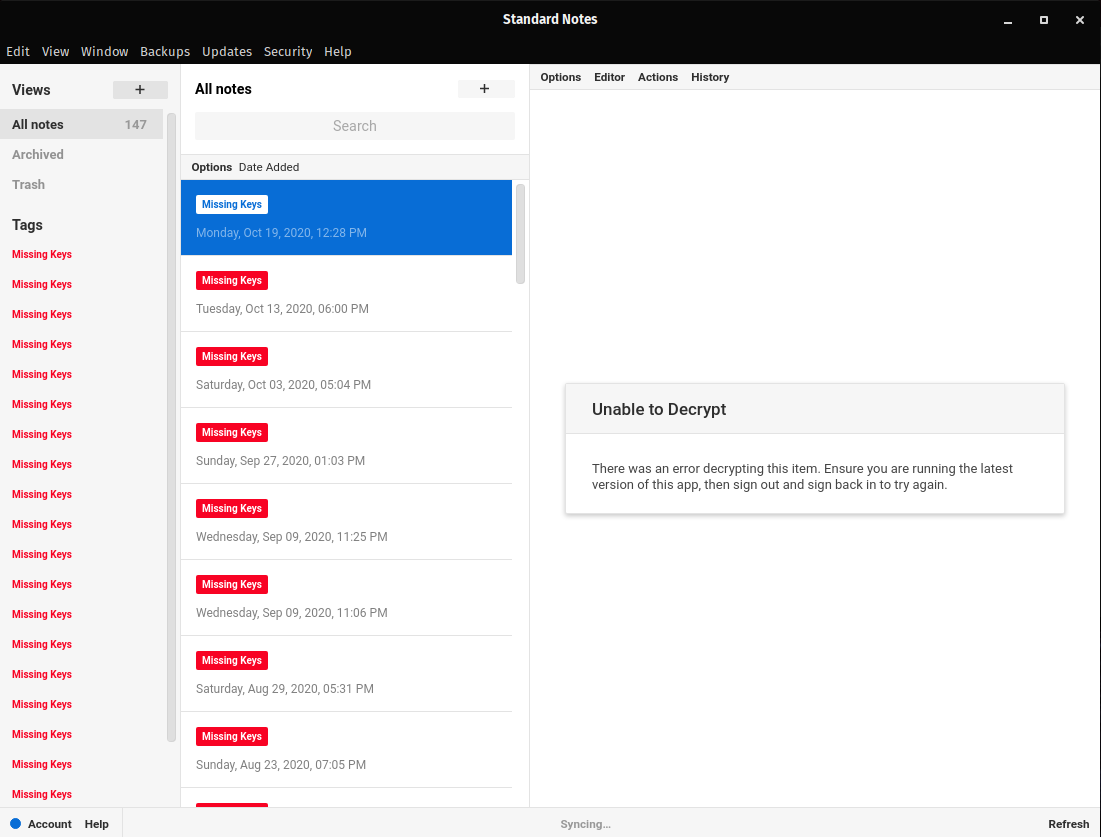
After updating to 3.5.1 today on the Linux App Image, I'm unable to view any notes. I'm seeing a "Missing keys" error on the note panels? Signing out and back in makes no difference.
 alecbcs
All 14 comments
Can you first click Help > Toggle Error Console, then ensure the Console tab is selected, then take a screenshot of what you see?
Then, if your data is properly synced to your account, please sign out then sign back in. This should resolve the issue, which appears to be a failed local migration.
 mobitar
on 2 Nov 2020
mobitar
on 2 Nov 2020
Here's a screenshot of the console log.

Logging out, as well as clearing the ~/.config/StandardNotes/ directory and signing in to a new install still results in the same issue. I still have access to all the files on another machine running 3.4.10 so it doesn't look like it's effecting the synced data.
alecbcs
on 2 Nov 2020
Thanks for the info. Can you please email me with your account email so I can investigate this further? Email in GH bio.
mobitar
on 3 Nov 2020
@mobitar just checking in, I sent you the info as requested but I haven't heard anything back yet. Any updates on this bug?
alecbcs
on 8 Nov 2020
@alecbcs sorry for the delay. Your account looks fine, so it must be something with the local software. Can you test any of our recent releases to see if they've fixed the issue? We've had many releases in the past few days. The latest desktop version is 3.5.6. Please try signing out and back in with this version.
mobitar
on 9 Nov 2020
@mobitar absolutely no worries! I'm still getting the same "missing keys" error on both Mac and Linux 3.5.6 after fulling logging out wiping local data and logging back in. I experimented logging in with the account I had previously been using with another email address and that one successfully logs in with no issues. So I wonder if this has anything to do with exporting and importing notes from another account?
alecbcs
on 9 Nov 2020
Hey @alecbcs, could you elaborate on the _exporting and importing notes from another account_ bit? Did you import data from your older account into this one?
If you could try signing in from https://app.standardnotes.org so we can confirm this is an account issue and not a local install issue that would be great.
 baptiste-grob
on 10 Nov 2020
baptiste-grob
on 10 Nov 2020
@baptiste-grob I can confirm that I'm experiencing the same broken state on the web app as with the desktop app.
could you elaborate on the exporting and importing notes from another account bit? Did you import data from your older account into this one?
Absolutely, as part of the process from moving from one primary email to another, I changed the email for my standard notes extended account and created a new standard notes sync account as described in this tutorial. I exported all of my previous notes from my previous standard notes sync account, logged out and cleared the local data, and then logged into my new sync account and imported my backup from the old account. After logging back into my extended account I enabled the extensions & themes I'd been using on my old account and then proceeded to log out of my old account on all of my devices and into the new one, which synced all of the notes, extensions, etc... successfully to my devices. After upgrading to 3.5.1 (or later) on each of these devices I'm running into the same error with "keys missing". As part of testing is bug I noticed that going back to my old sync account that account correctly launches under versions >= 3.5.1. So it must be some part of exporting/importing the data that is causing issues in the new version correct?
alecbcs
on 11 Nov 2020
Thank you so much for your detailed response. This must indeed be related to your import. Do you remember when approximately you transferred your data to your new account, so we can look into the exporting functionality of the most recently released app version at the time?
baptiste-grob
on 12 Nov 2020
Also, did you use an encrypted or a decrypted backup?
baptiste-grob
on 13 Nov 2020
Thank you so much for your detailed response. This must indeed be related to your import. Do you remember when approximately you transferred your data to your new account, so we can look into the exporting functionality of the most recently released app version at the time?
@baptiste-grob I've still got the exported backup, checking the metadata I went through this transferring process on Fri 30 Oct 2020. I believe it was an unencrypted backup although looking at the file it looks either encrypted or encoded, I was following the tutorial mentioned before to manually create the export in the account tab.
alecbcs
on 14 Nov 2020
Thank you again. We haven't been able to reproduce your issue yet so if you want to start using the v3.5 app you could export a backup from version 3.4.10, reset your account, and then re-import your data, like so:
- Ensure 3.5 apps can decrypt your latest data
- From your 3.4.10 app, export a decrypted backup.
- Create a third (temporary) account on a 3.5 app and import your backup there.
- Ensure all your notes and tags are there and wait for syncing to complete (You can check syncing status in the _Account_ menu).
- Sign out, then back in.
If you can successfully see all your notes and tags, you can start resetting your main account (the one you originally imported your data to):
- Go to https://standardnotes.org/reset
- Enter your main account's email address.
- After your account has been deleted, register in a 3.5 app.
- Import you backup file into the app.
- Ensure all your notes and tags are there and wait for syncing to complete.
- After a couple days of usage, if everything works as expected, use https://standardnotes.org/reset again to delete your third temporary account.
This is pretty involved, but if you follow these steps you are guaranteed not to lose any data. You can of course wait until we figure out what happened to your account but given that we've struggled to replicate your issue this is a worthwhile alternative.
baptiste-grob
on 16 Nov 2020
@baptiste-grob no worries, thank you for the in depth information. It's curious you all haven't been able to reproduce getting into this failed state. Leads me to believe that I probably did something wrong in the migration process or something happened with the timing of the update and my Linux App Syncing. Thank you all @mobitar & @baptiste-grob for your help tracking down this issue, I really appreciate all your help. I'll go ahead and close this issue.
alecbcs
on 17 Nov 2020
Hey @alecbcs, we've just published version 3.5.11 which includes a fix for a situation that could potentially be related to yours: https://github.com/standardnotes/desktop/releases/tag/v3.5.11
baptiste-grob
on 26 Nov 2020
Related issues
 mem101296
·
5Comments
mem101296
·
5Comments
 MisteryMonster
·
3Comments
MisteryMonster
·
3Comments
 kyletolle
·
4Comments
kyletolle
·
4Comments
 MorgothSauron
·
5Comments
MorgothSauron
·
5Comments
 quirkyheadband
·
3Comments
quirkyheadband
·
3Comments
Most helpful comment
@baptiste-grob no worries, thank you for the in depth information. It's curious you all haven't been able to reproduce getting into this failed state. Leads me to believe that I probably did something wrong in the migration process or something happened with the timing of the update and my Linux App Syncing. Thank you all @mobitar & @baptiste-grob for your help tracking down this issue, I really appreciate all your help. I'll go ahead and close this issue.