Desktop: v3.0.3 : Microsoft Defender shows warning after launching install
Expected behaviour
Installer should run without errors and warnings
Actual behaviour
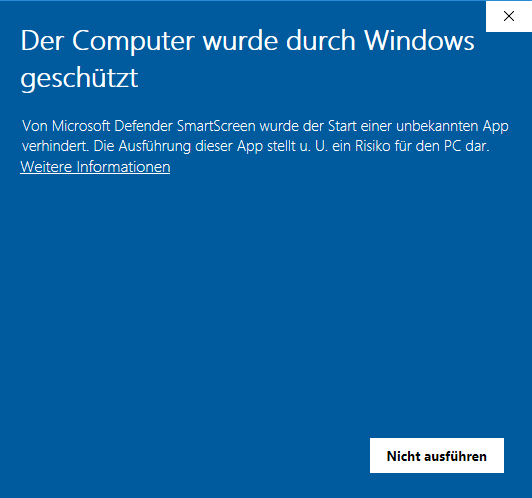
Started installer and immediately got this warning:
Steps to reproduce
- Download installer from https://nextcloud.com/install/#install-clients (https://github.com/nextcloud/desktop/releases/download/v3.0.3/Nextcloud-3.0.3-setup.exe)
- Launch installer
3.
Client configuration
Client version: 3.0.3
Operating system: Windows 10 Enterprise
OS language: german
Installation path of client: C:\Program Files\Nextcloud
 rakekniven
All 10 comments
After click at "more information" I got this:
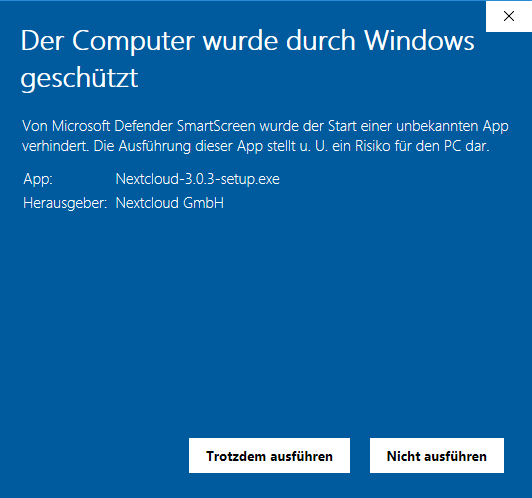
Pressed "Continue anyway" (Trotzdem ausführen) and installer started.
But it hanged.
So I uninstalled old v3.0.2 version and started installation again and it worked.
rakekniven
on 30 Oct 2020
I m seeing the same behaviour as rakekniven.
Defender is flagging the installer for version 3.0.3 as potentially harmful.
AVG is also flagging the file as harmful, triggering a CyberCapture scan.
(Sending the file to their servers for deeper analysis)
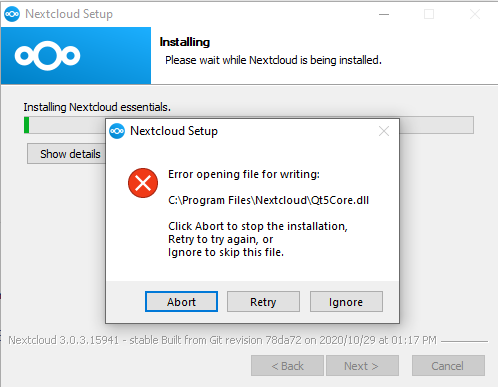
After clicking through all the AV dialogs and proceeding with the installation, It hangs almost immediately with the error shown on the attached image.
I downloaded the x64.msi from github, the file prompted the same harmful file dialogs, but installation proceeded successfully.
 tonyskilton
on 30 Oct 2020
tonyskilton
on 30 Oct 2020
same for me (also error on Qt5Core.dll). Any more information we can add, that would be helpful?
 rainerzufall
on 31 Oct 2020
rainerzufall
on 31 Oct 2020
So that's really two issues here: the upgrade itself failing on that file it can't write in and defender flagging the installer. We got another separate ticket for the failing upgrade so I'll ignore this here and deal only with defender.
So we had to change the key we were using to sign the binaries (simply the old keys were getting expired really soon now). But the new keys are not in the defender whitelist yet. We've been told this should happen when we reach some critical mass of installs (of course we're not in control of that threshold).
That's why I'm just closing it, we can't do much about it and it's supposed to clear itself after enough installs are done.
 er-vin
on 2 Nov 2020
er-vin
on 2 Nov 2020
We've been told this should happen when we reach some critical mass of installs
Wow, very transparent logic from MS.
rakekniven
on 2 Nov 2020
We got another separate ticket for the failing upgrade
@er-vin Is this #2606 ?
If so I will place a link in the forums to point users to the correct issue.
rakekniven
on 2 Nov 2020
Yes, that'd be the one.
er-vin
on 2 Nov 2020
I have similar issues with upgrading.
When i choose to uninstall previous version, i get the error with install script already running which has been mentioned before.
If i choose "add components", the installer starts the process until approx. 25%. Then showing the error could not overwrite ../shellext/NCContextMenu.dll. No way to finish the installation properly.
I repeated the same process after shutting down NC-Client with the same result.
Info:
Explorer.exe has not been opened in the PC-Sesssion to this point.
Manually deleting the file shows the same effect, win10 says it's still in use by the explorer.
 sunchezz89
on 15 Nov 2020
sunchezz89
on 15 Nov 2020
What then??? no resolving?
 xames81
on 27 Nov 2020
xames81
on 27 Nov 2020
What then??? no resolving?
Hi, I got this issue this morning too.
Killing nextcloud.exe before upgrading just makes you go a bit further then stops for NCContextMenu.dll file.
Solution as mentionned in @rakekniven 's previous message : uninstall first (or uninstall now if half installed). Install then. You won't loose any config nor sync'ed files.
Regards,
 michauk
on 30 Nov 2020
michauk
on 30 Nov 2020
Related issues
 RobertZenz
·
3Comments
RobertZenz
·
3Comments
 Linuxfabrik
·
3Comments
Linuxfabrik
·
3Comments
 despens
·
3Comments
despens
·
3Comments
 Ackis
·
4Comments
Ackis
·
4Comments
 steven-omaha
·
3Comments
steven-omaha
·
3Comments
Most helpful comment
I m seeing the same behaviour as rakekniven.
Defender is flagging the installer for version 3.0.3 as potentially harmful.
AVG is also flagging the file as harmful, triggering a CyberCapture scan.
(Sending the file to their servers for deeper analysis)
After clicking through all the AV dialogs and proceeding with the installation, It hangs almost immediately with the error shown on the attached image.
I downloaded the x64.msi from github, the file prompted the same harmful file dialogs, but installation proceeded successfully.