Desktop: [Feature] Activity feed missing in frontend
Activity Feed
It seems that the activity feed was removed in favour to the tiny popup window which you can get when you click on the notification icon. This is really inconvenient. If I got lots of conflicting files I can not get a proper view over all of them. Also when I click on one of the files the popup windows closes, and a new file manager window opens every time which is also annoying.
What I need is what the owncloud client offers:
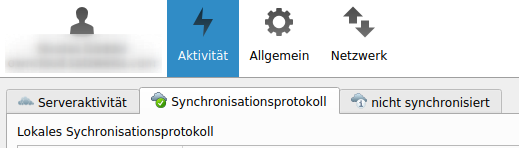
But the nextcloud client only shows this:
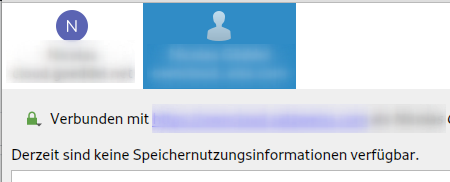
Client configuration
Client version: 3.0.2
Operating system: Ubuntu 20.04
OS language: German
Qt version used by client package (Linux only, see also Settings dialog): There is no version in the settings dialog.
Client package (From Nextcloud or distro) (Linux only):
3.0.2-20200924.150911.068ad89d8-1.0~focal1
http://ppa.launchpad.net/nextcloud-devs/client/ubuntu focal/main amd64 Packages
Installation path of client:
/usr/bin/nextcloud
 NicolasGoeddel
All 7 comments
@jancborchardt opinion? I don't think we want to go back in time like this but let's see.
 er-vin
on 29 Sep 2020
er-vin
on 29 Sep 2020
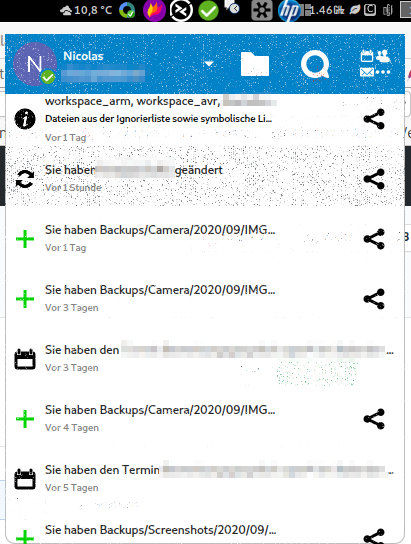
I also like the fresh design in the popup menu although my nvidia drivers decide to destroy the graphics cache after each suspend (which I can not show here because the window closes every time I want to make a screenshot). But I guess this has nothing to do with the client. It's just nvidia gibberish.
Nevertheless I liked the main window with all its possibilities it had before. I liked the big window with the list of all recently synchronized files, all conflicts, and all ignored files. If you have file paths with more than 200 characters it helps a lot to have a big window.
Also unfortunately the tray icon is missing on a LXDE desktop which I connect to over XRDP. But I guess this should be a separate ticket then.
Edit: Here is the popup with its graphic errors:
NicolasGoeddel
on 29 Sep 2020
I personally dislike the "new" Client very much and rolled back to 2.6.5 on all my devices. The "new" Client is not usable such as:
- shows conflicts but you cannot even jump to the issue / file
- the diaglog box from the systray icon is black/unreadable half the time
- I am not able to add more accounts anymore from the main window (why was this killed?)
 cmasterdelphi
on 17 Oct 2020
cmasterdelphi
on 17 Oct 2020
I really miss that "activity" tab too.
Is this a bug or has it been removed on purpose?
I used it a lot to check that a transfer is going on as expected, or to monitor what is happening (which is very important when using scripts that may automatically move files, software that may automatically sort pictures or songs...or just to check Nextcloud is working correctly in case of a new user having installed it for the first time).
Thanks
 daladim
on 19 Oct 2020
daladim
on 19 Oct 2020
Is this a bug or has it been removed on purpose?
On purpose.
* shows conflicts but you cannot even jump to the issue / file
We are working on improving things in the new UI. See #2527.
 camilasan
on 20 Oct 2020
camilasan
on 20 Oct 2020
I am for improving things, but not at the expense of user experience. I find the new UI harder to read, and not being able to have it up while I'm doing other things on the machine (because clicking anywhere else makes it go away) make it less useful than the old UI.
 K0HAX
on 28 Oct 2020
K0HAX
on 28 Oct 2020
Same here, the new UI is a big step backward.
I share all of the above.
And, I am adding this:
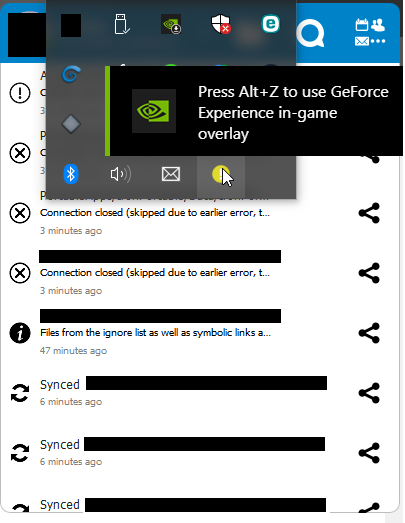
Windows OS, I have my tray bar at the top of the screen.
- When I click on the nextcloud tray icon I have a nvidia popup which tells me I can access the ALT+Z hotkey just like in video games. But it goes right on top of the menu
- The tray menu doesn't disapear when I click on the nextcloud tray icon and it stays on top of the nextcloud floating UI
The previous UI was poor, but the new one is even poorer.
 RedKage
on 1 Nov 2020
RedKage
on 1 Nov 2020
Related issues
 Engineer-of-Stuff
·
3Comments
Engineer-of-Stuff
·
3Comments
 AndreyNazarchuk
·
4Comments
AndreyNazarchuk
·
4Comments
 Ackis
·
4Comments
Ackis
·
4Comments
 steven-omaha
·
3Comments
steven-omaha
·
3Comments
 TP75
·
3Comments
TP75
·
3Comments
Most helpful comment
I personally dislike the "new" Client very much and rolled back to 2.6.5 on all my devices. The "new" Client is not usable such as: