Desktop: 3.0.1 UI does not help in conflict situation
How to use GitHub
- Please use the 👍 reaction to show that you are affected by the same issue.
- Please don't comment if you have no relevant information to add. It's just extra noise for everyone subscribed to this issue.
- Subscribe to receive notifications on status change and new comments.
Expected behaviour
There are several behaviors relevant to the issue:
Informational messages in the main window should show full path to the item caused conflict, - by either excluding middle part of path, or hovering mouse, or resizing the main window.
Clicking on a conflict informational message in the main window opens Nextcloud web interface in a folder where conflict file is.
(The more preferred option can be having special conflict resolving UI such as some git GUI conflict resolvers).Clicking on the yellow warning message "There are unresolved conflicts. Click for details." in _Settings_ - opens a window with details.
Nextcloud client continues synchronizing files not involved in the conflicts.
Actual behaviour
Informational messages in the main window do not show full path of the item in message.
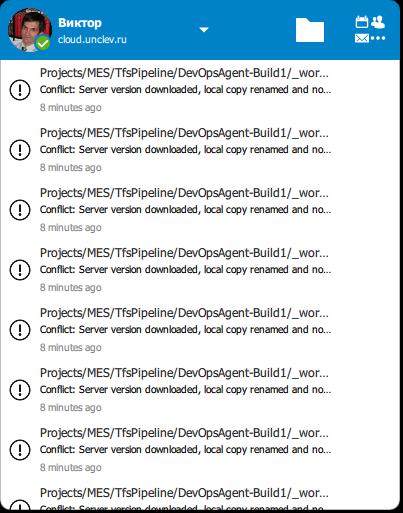
Clicking on a conflict informational message in the main window opens Nextcloud web interface at the page "All files".
Clicking on the yellow warning message "There are unresolved conflicts. Click for details." in _Settings_ - does nothing.
This Nextcloud client stops synchronizing files at all.
Steps to reproduce
I didn't try to reproduce for a second time. I'm also not sure what exactly caused the file conflict. So the following steps show what I did several days before conflict, and on the day when conflict happen
Moved large amount of content from one remote folder to another (new) by "Move or copy" some folders via web interface
- from
/Project/MES/TfsPipeline/... - into
/Archive/topics/Work/CompanyNameCensored/Projects/MES/TfsPipeline/...
- from
Synchronized on a remote Windows client (let name it _Client-0_) successfully (got "There are folders that were not synchronized because they are too big or external storages" for one folder within the path being synchronized _Projects/MES_, but this is likely irrelevant).
Synchronizing from Nextcloud root on a Windows PC (let name it _Client-1_) reported conflicts.
Note: Linux client _3.0.1 (ubuntu)_ /KDE Plasma/ (let name it _Client-2_) seems to be working without issues in this situation, - doesn't show conflicts.
Client configuration
Client version: 3.0.1
Operating system: Windows 10 Pro Version 20H2 build 19042.508 Windows Feature Experience Pack 120.2212.31.0.
OS language: English (United States) // also installed Russian, regional format Russian.
Qt version used by client package (Linux only, see also Settings dialog): -
Client package (From Nextcloud or distro) (Linux only): -
Installation path of client: "C:\Program Files (x86)\Nextcloud\nextcloud.exe"
Server configuration
Nextcloud version: Nextcloud 17.0.3 (on an ubuntu host in a docker container image: nextcloud:17-fpm)
Storage backend (external storage): - it was not an external storage where conflicts occurred.
Logs
Please use Gist (https://gist.github.com/) or a similar code paster for longer
logs.
Client logfile
nextcloud --logdebug --logfile %USERPROFILE\%nextcloud-client.log.txt:- https://cloud.unclev.ru/index.php/s/nextcloud-client-log-txt-7z (3.3M 7zip archive 76M unpacked).
(In the log actual company name folder occurrences were replaced with _CompanyNameCensored_).
- https://cloud.unclev.ru/index.php/s/nextcloud-client-log-txt-7z (3.3M 7zip archive 76M unpacked).
Web server error log:
- it seems to be nothing relevant. The nginx logs are redirected to the docker container logs, and have only 200 response codes for the testing period.
Server logfile: nextcloud log (data/nextcloud.log):
- it seems nothing for the same period. Noticed some background jobs, and Mail exception later.
 unclev
All 8 comments
In addition, there is a yellow exclamation mark, with the "There exists conflicst. For details click here..."
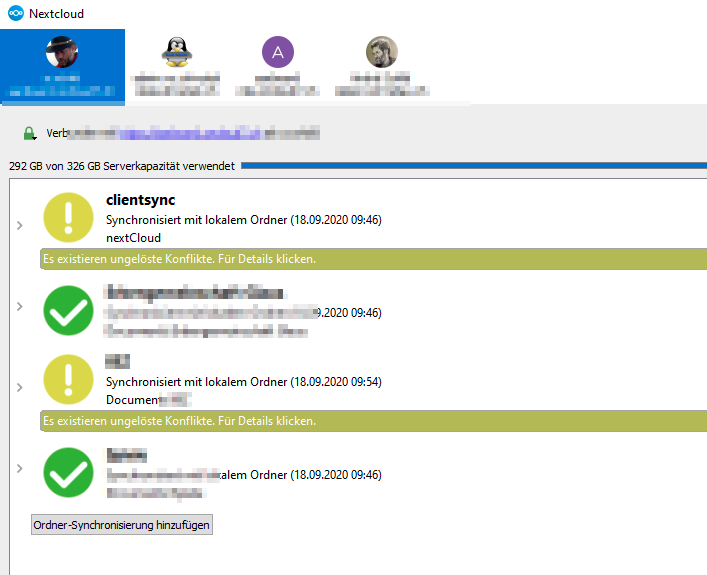
But if you click on it, nothing happens
 a-schild
on 18 Sep 2020
a-schild
on 18 Sep 2020
The issue poster above is on Windows 10, so I'm just noting here that I'm on macOS Catalina 10.15.6 and experiencing the same issue.
 MageJohn
on 18 Sep 2020
MageJohn
on 18 Sep 2020
And I'll confirm that I'm having the same issue on the Linux side.
 reteo
on 19 Sep 2020
reteo
on 19 Sep 2020
I have the same issue but disagree on the expected behavior :
- Clicking on a conflict informational message in the main window opens Nextcloud web interface in a folder where conflict file is.
The server does not have the conflict file, thus the conflict can only be solved client size, so clicking on the conflict should open locally the folder where the conflict file is.
I agree that adding an option to launch winmerge or an alternative could be nice (but another topic)
 dbeniamine
on 23 Sep 2020
dbeniamine
on 23 Sep 2020
Looks like this issue is a duplication of this.
 stevleibelt
on 23 Sep 2020
stevleibelt
on 23 Sep 2020
Got the same issue on Windows.
 Sveeeeeen
on 24 Sep 2020
Sveeeeeen
on 24 Sep 2020
@reteo wrote
Looks like this issue is a duplication of this.
Not exactly. The previous issue is about client v2.5.1.
This issue is about 3,0,x with new main window interface.
Even though it would be good changing the old UI too (that obviously renamed to "Settings" in 3.x) that is not the whole issue.
There are fixes in 3.0.2 against this particular issue:
- When hovering the the main window list item with mouse it now shows a tooltip with (hopefully) the whole message. (Not sure about the very long messages).
- By clicking on the list item it opens file explorer (Windows) at the folder there the conflict happened. (It seems to be the downloaded file, - please correct me if I'm mistaking, - I've already removed the conflicted files from that window).
It would be better if it points to the renamed file (it definitely does not). Without that and if file sort is not by name user have to guess how the software renamed old file. Personally I agree with the current solution.
(Remaining) 3. Clicking on the yellow warning message "There are unresolved conflicts. Click for details." in Settings - still does nothing.
(After resolving conflicts) 4. The client synchronizes. (At the moment I cannot say if it works in conflicted situation as I've already resolved my conflicts).
I would say this issue is resolved in v3.0.2 or very close to the resolution. Thanks.
unclev
on 28 Sep 2020
Yes, most of that should be gone with 3.0.2 apart from your (3) for which we have a separate report already. I think @stevleibelt was correct in the one he was pointing out, it has indeed been introduced before 3.0 so that explains the version difference (it's unfortunately still there, didn't find the bandwidth to address it yet).
As for (4), I find that surprising this should keep syncing the rest in most cases (except in a few bad cases where trying to continue would be worse).
Thus I'll close this one, if (4) shows up again for you, I would advise that you collect as much information about it as you can and look if you can add that to an existing ticket if someone else reported it too (can't remember a ticket at the top of my head but didn't search right now) and otherwise file a new ticket.
Thanks in advance.
 er-vin
on 29 Sep 2020
er-vin
on 29 Sep 2020
Related issues
 js-d-coder
·
3Comments
js-d-coder
·
3Comments
 andresantacruz
·
3Comments
andresantacruz
·
3Comments
 Linuxfabrik
·
3Comments
Linuxfabrik
·
3Comments
 steven-omaha
·
3Comments
steven-omaha
·
3Comments
 kaysond
·
3Comments
kaysond
·
3Comments
Most helpful comment
And I'll confirm that I'm having the same issue on the Linux side.