Desktop: Installer cannot display Russian characters correctly
Expected behaviour
Installer displays Russian characters correctly.
Actual behaviour
Installer cannot display Russian characters correctly

Client itself works perfect, the problem with Installer only.
Steps to reproduce
1.Just simply start to Install fresh version of NextCloud desktop client.
2.Installer chooses language automatically, picking up Russian Windows OS language.
Client configuration
Client version: 3.0.1 (but problem exist for quite a long time. I guess, last 10 updates, maybe more.
Operating system: Windows 10.
OS language: Russian.
Installation path of client: C:\Program Files\Nextcloud
 teterkin
All 11 comments
This is unicode based, which codepage are you using on your system? I guess this is russian without unicode that you have?
 er-vin
on 9 Sep 2020
er-vin
on 9 Sep 2020
Thank you for helping.
I have latest Windows 10 and default Russian with Unicode support as primary system language.
All other applications display correctly.
How can we debug the installer? Perhaps it tries to use another codepage?
teterkin
on 14 Sep 2020
@misch7 any idea which code page it's picking? At least on @teterkin that seems to be the right language pack...
er-vin
on 14 Sep 2020
@er-vin Tried the same with a Russian language pack on a Win10 VM and it looks like this:
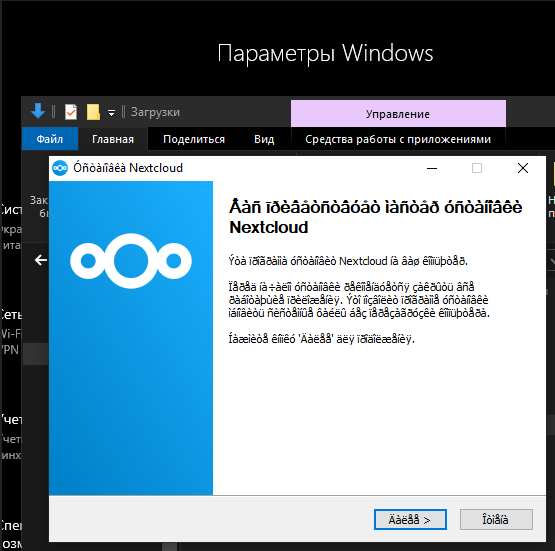
Windows Language Settings:

Don't know if I selected the same language pack. Our repo's language file admin\win\nsi\l10n\Russian.nsh seems to be properly encoded in UTF-8. What do you see when you open it in an editor @teterkin ? The characters there look good to me (without understanding them of course^^).
However, looking at our NSIS script nextcloud.nsi (client-building repo), also UTF-8 encoded, there are some language names hard-coded, but for example not including Russian. Not sure if the problem originates there. I'll try to play with adding the language and build a new package. Let's see if this will do the trick:
https://github.com/nextcloud/client-building/blob/58426b4ef6073e8b334b6c351df4efcca49b2f12/nextcloud.nsi#L194-L274
 misch7
on 14 Sep 2020
misch7
on 14 Sep 2020
Update:
Tried to build a package with some modifications to nextcloud.nsi but that didn't change anything, same display as in my last comment.
Likely needs some further investigation, digging into the NSIS docs.

misch7
on 14 Sep 2020
Don't know if I selected the same language pack. Our repo's language file
admin\win\nsi\l10n\Russian.nshseems to be properly encoded in UTF-8. What do you see when you open it in an editor @teterkin ?
That would be a good idea to check this indeed.
The characters there look good to me (without understanding them of course^^).
Not that I can read Russian, but it still looks wrong to me, it's pretty much gibberish. If you double check opening Russian.nsh in an editor you should see very different strings than what we saw in your screenshot.
I'd say that for some reason (unlike @teterkin) your system font somehow managed to display the characters but that still doesn't look like properly processed UTF-8.
er-vin
on 15 Sep 2020
The characters there look good to me (without understanding them of course^^).
Not that I can read Russian, but it still looks wrong to me, it's pretty much gibberish. If you double check opening Russian.nsh in an editor you should see very different strings than what we saw in your screenshot.
I'd say that for some reason (unlike @teterkin) your system font somehow managed to display the characters but that still doesn't look like properly processed UTF-8.
Haha, yes. I can't either but I can distinguish Cyrillic characters from something that looks like broken Indonesian ;-)
Just wasn't sure whether I selected the correct subset in the Windows Settings, as multiple Russian language variants were offered.
However, further investigation and tests confirmed that the cause of the issue is the processing of UTF-8, as we already guessed. The language files have to be saved as UTF-8 BOM (not plain UTF-8 as of now):

Some useful hints:
https://sourceforge.net/p/nsis/bugs/1167/
Now I'll just have to figure out how to adapt them to be saved correctly in the future.
misch7
on 15 Sep 2020
Fixed it with #2432 and nextcloud/client-building#38 :-)
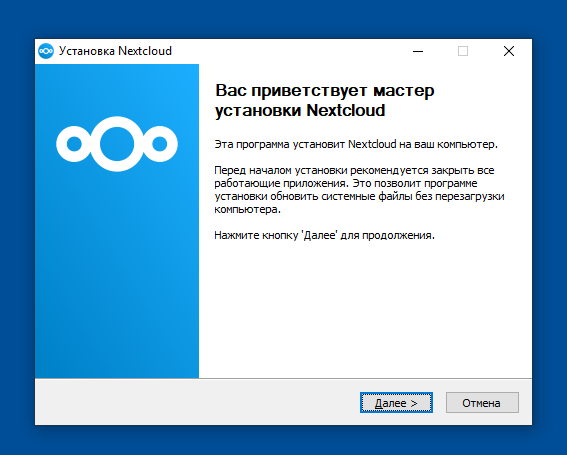
First I tried these command line options for makensis:
  /INPUTCHARSET UTF8
  /OUTPUTCHARSET UTF8
But they caused it to demand UTF-8 BOM encoded files, thus requiring to add the binary encoding at the beginning of each UTF-8 translation file.
The trick was to "simply" tell NSIS to use Unicode in nextcloud.nsi and to just once convert all Windows Code Page-specific translation files to real UTF-8.
Unicode true
Furthermore some language files weren't referenced at all, including Russian.nsh
misch7
on 16 Sep 2020
For testing:
This daily build already includes the modifications:
https://download.nextcloud.com/desktop/daily/Windows/nextcloud-3.1.0.15828-daily-20200916-Release.exe
misch7
on 16 Sep 2020
Alright nextcloud/client-building#38 and #2432 merged. We can close this.
er-vin
on 16 Sep 2020
For testing:
This daily build already includes the modifications:
https://download.nextcloud.com/desktop/daily/Windows/nextcloud-3.1.0.15828-daily-20200916-Release.exe
I have just tested. Great job! Thank you!
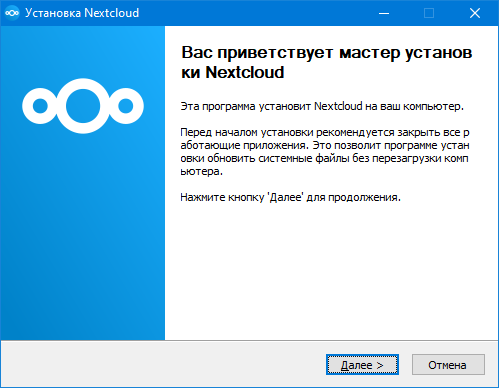
teterkin
on 16 Sep 2020
Related issues
 linucksrox
·
3Comments
linucksrox
·
3Comments
 MichaIng
·
3Comments
MichaIng
·
3Comments
 rguenther-dz
·
3Comments
rguenther-dz
·
3Comments
 nilsbecker
·
3Comments
nilsbecker
·
3Comments
 Linuxfabrik
·
3Comments
Linuxfabrik
·
3Comments