Desktop: Cannot react to notification in windows client app
Hi,
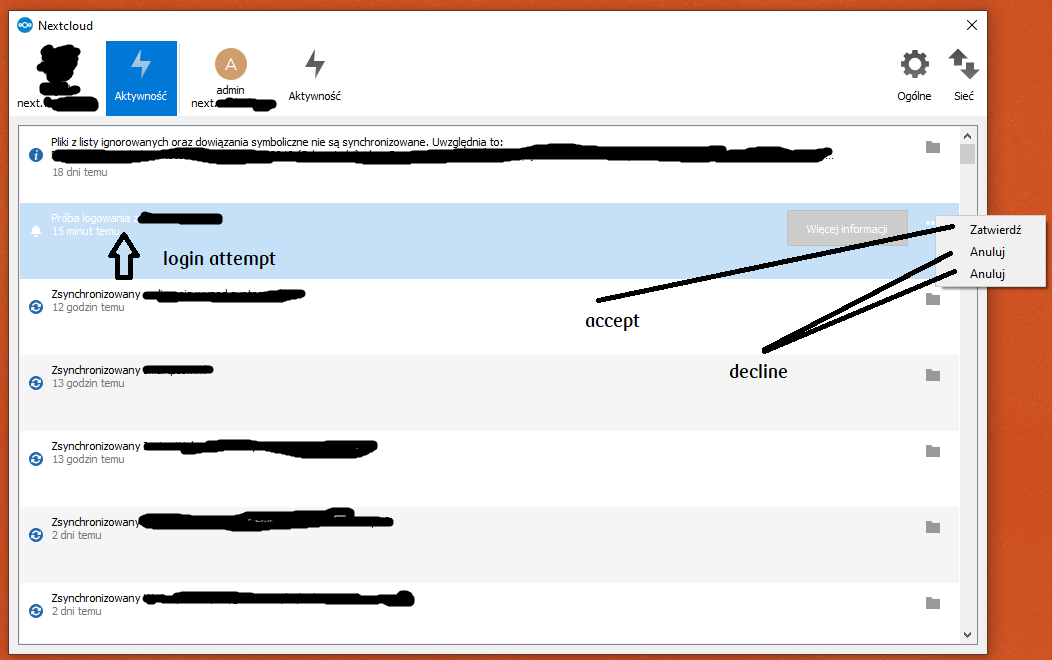
in my Nextcloud configuration I’m using notification in order to confirm login attempt, so that login can be authenticated only from single device. Everything is working perfectly, but I’m moving from one device to another and have installed the newest version of Nextcloud Win client (3.0). In this app (on my admin device) while logging in (on other device), I see notification about login attempt, but I cannot respond to that. In the previous version (2.6.5) it was possible, but in the newest I can’t see this button to accept or decline login attempt.
Windows 10, Nextcloud client 2.6.5
Windows 10, Nextcloud client 3.0
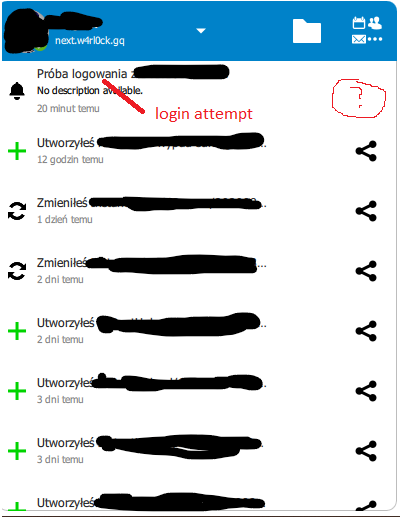
Is it normal? :thinking:
Best regards
 wojcik13
All 7 comments
Same thing here. I can't find a way to react with the Nextcloud notification.
Nextcloud client v3.0 on Ubuntu 20.04
 codesmaker
on 30 Aug 2020
codesmaker
on 30 Aug 2020
@DominiqueFuchs @jancborchardt opinions on that?
 er-vin
on 31 Aug 2020
er-vin
on 31 Aug 2020
Any news on this issue?
codesmaker
on 12 Sep 2020
Not, that I'm aware of. Maybe @er-vin @DominiqueFuchs @jancborchardt have some developments on that?
wojcik13
on 12 Sep 2020
@DominiqueFuchs @jancborchardt opinions on that?
@er-vin Not sure what opinion is needed from me here.. To make this work, someone would have to implement it - adding a corresponding action to this type of activity, just like for the different type of activities already differentiated by now.
 DominiqueFuchs
on 13 Sep 2020
DominiqueFuchs
on 13 Sep 2020
@DominiqueFuchs @jancborchardt opinions on that?
@er-vin Not sure what opinion is needed from me here.. To make this work, someone would have to implement it - adding a corresponding action to this type of activity, just like for the different type of activities already differentiated by now.
Well, you moved over that code into QML land, so I assumed you had insights on how it was done before and what's missing now. But also how it should be presented.
Will need to be investigate further I guess.
er-vin
on 14 Sep 2020
how it should be presented.
Basically just like it is in the settings dialog, except accounting for the limited space in the main dialog. The actions on the right would be:
- icon-info for "More information" (make sure to set alt text there) to link to the server for more information on that.
- 3-dot menu with "Accept login" and "Decline login".
 jancborchardt
on 15 Sep 2020
jancborchardt
on 15 Sep 2020
Related issues
 DBLouis
·
3Comments
DBLouis
·
3Comments
 jospoortvliet
·
4Comments
jospoortvliet
·
4Comments
 dkebler
·
3Comments
dkebler
·
3Comments
 Ackis
·
4Comments
Ackis
·
4Comments
 Engineer-of-Stuff
·
3Comments
Engineer-of-Stuff
·
3Comments
Most helpful comment
Basically just like it is in the settings dialog, except accounting for the limited space in the main dialog. The actions on the right would be: